


Integra Research RDC-7.1 Review
Integra Research RDC-7.1
- Product Name: RDC-7.1
- Manufacturer: Integra Research
- Performance Rating:

- Value Rating:

- Review Date: June 30, 2004 19:00
- MSRP: $ 4000 ($5250 as configured)
Processing
Exclusive Apogee Master Clock
THX Surround EX 7.1 Processing
Dolby Digital EX and Pro Logic IIx
DTS, DTS-ES, DTS Neo:6 and DTS 96/24
Dolby Headphone and Dolby Virtual Speaker
Dual -32Bit DSP Chips for Main and Zone 2
VLSC-Vector Linear Shaping Circuitry
Non-Scaling Configuration
PC Set-up Application Available via Ethernet and RS-232
Wolfson 192 kHz/24-Bit D/A Converters for all Channels
Composite and S-Video Upconversion to Component Video
Miscellaneous
THX Ultra2 Certification
New High Current Power Supply
Individual Crossover Adjustment (40-150 Hz, 10 Hz Step)
Detachable Power Cord
Rigid Aluminum Panel (Front/Side/Top) and Stabilizer Bar
Elegant Aluminum Faced Remote Control with Scroll Wheel and LCD Display
Firmware
Version
Master: 1.03
Link 1.01
Net-Tune 1.00
HDMI 1.00
Connections (including optional cards)
8 Balanced XLR Outputs for Stable, Noise-Free
Signal Transfer
2 Assignable Sets of 7.1 Multi-Channel Preouts
(A/B)
Total of Three Subwoofer Outputs (3 Assignable)
High Definition Multimedia Interface (HDMI
v 1.0) - 2 in/1 Out for HD Video
ILink (IEEE1394) Digital Input for DVD-Audio
and Super Audio CD
Ethernet for Net-Tune Streaming Audio
Three Zone Multiroom Capability (Main, Zone
1, Zone 2)
Bi-Directional RS-232 Port
Five Assignable 12V Trigger Outputs
Independent IR Outputs for all 3 Zones with
12 VDC for IR Receiver
12 Digital Inputs
(6 Optical/6 Coaxial/12 Assignable)
4 Digital Outputs
(2 Optical/2 Coaxial/4 Assignable)
4 Component Inputs
(4 Assignable) / 2 Outputs
9 Audio Inputs / 5 Outputs
AES/EBU Input for High End CD/DVD Transports
Hardware and Software Upgradeable Chassis
Pros
- Phenomenal Performance & Fidelity
- Excellent Trigger Options
- HDMI & I.Link
- Attractive Fit & Finish
- Upgradeable Architecture
Cons
- Notch Filter Erroneous operations
- No Auto Setup or Room Correction
- HDMI limited to Version 1.0
- No Analog Video Up-conversion to HDMI
- Noisy SACD performance via I.Link
- DTS erroneous operations
- Pricey
Integra Research RDC-7.1 Introduction
 Everyone is familiar with the old
saying "too much of a good thing is NOT a good thing". But how many of us
actually live by that saying? I am one person that usually doesn't,
always demanding more - especially when it comes to performance cars and A/V equipment.
With that said, I am always looking for the "ultimate" A/V processor,
or at least one that can compete with today's excellent high performance
super-receivers. In the $2-3,000 price range this is a tough find and can
even be difficult at $4000 when factoring in all of the latest surround
formats, A/V switching, bass management flexibility, etc. About a year
and a half ago we reviewed Integra Research's flagship A/V Processor, the RDC 7. At the time this was
one of the best A/C controllers on the market and it scored very high marks on
our A/V Processor Checklist. Much has happened since then, thus we
revamped our Checklist to reflect recent advances in technology and
consequently made it more difficult for manufacturers to reach high
marks. We don't do this to be cruel (or at least we don't think so) but
to pay tribute to progress. We feel the constant pressure forces manufacturers
to strive to reach the pinnacle of perfection and value demanded by the serious
Audioholics want more for their money. This is especially important in an ever
increasingly competitive marketplace that in our opinion seems to be changing
more rapidly than even the computer industry these days. Integra Research
did a fine job with the RDC-7, but it was time to move onto a new platform that
would deliver an easier path for hardware and firmware upgradeability as well
as incorporate the latest chipsets, processors and technologies.
Everyone is familiar with the old
saying "too much of a good thing is NOT a good thing". But how many of us
actually live by that saying? I am one person that usually doesn't,
always demanding more - especially when it comes to performance cars and A/V equipment.
With that said, I am always looking for the "ultimate" A/V processor,
or at least one that can compete with today's excellent high performance
super-receivers. In the $2-3,000 price range this is a tough find and can
even be difficult at $4000 when factoring in all of the latest surround
formats, A/V switching, bass management flexibility, etc. About a year
and a half ago we reviewed Integra Research's flagship A/V Processor, the RDC 7. At the time this was
one of the best A/C controllers on the market and it scored very high marks on
our A/V Processor Checklist. Much has happened since then, thus we
revamped our Checklist to reflect recent advances in technology and
consequently made it more difficult for manufacturers to reach high
marks. We don't do this to be cruel (or at least we don't think so) but
to pay tribute to progress. We feel the constant pressure forces manufacturers
to strive to reach the pinnacle of perfection and value demanded by the serious
Audioholics want more for their money. This is especially important in an ever
increasingly competitive marketplace that in our opinion seems to be changing
more rapidly than even the computer industry these days. Integra Research
did a fine job with the RDC-7, but it was time to move onto a new platform that
would deliver an easier path for hardware and firmware upgradeability as well
as incorporate the latest chipsets, processors and technologies.
Integra Research RDC-7.1 Comparison to the RDC 7
The major difference of the new RDC-7.1 is its modular card design that allows you to customize its configuration options to suit your needs. I ordered our review sample with the following optional modules, hoping a future addition would incorporate the very impressive Audyssey Room Correction System we previously reviewed. Integra Research said they are investigating many such systems and are considering integrating this feature in future upgrades.
|
Included Modules |
Optional Modules |
|
Digital Audio Module |
Net-Tune Ethernet Module |
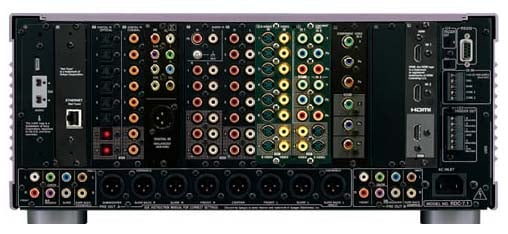
Integra Research RDC-7.1 Back Panel
Integra RDC-7.1 Remote, Build Quality, and Setup
From left to right we see the i.LINK, Ethernet, Toslink and coax digital connections, followed by multi-channel inputs, analog RCA's, S-video/composite and component video, HDMI, RS232 and the trigger system. Integra Research accommodates component video or BNC, or both. I selected the extra component video card to support my current system configuration. Owners of certain high-end front projection systems may wish to opt for the BNC card instead. Pretty much all the bases are covered here and in the likely event of newer interface adoptions, the RDC-7.1 is ready with a quick card change from your local dealer.
Remote Control
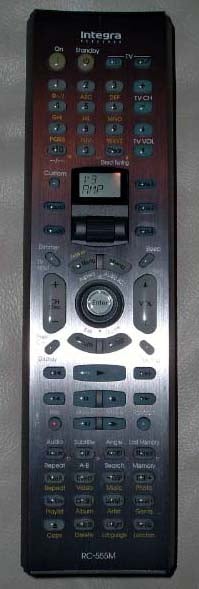 At first glance the RC-555M remote control could be quite intimidating. It's basically a long thin remote stuffed with a lot of buttons. Though the buttons are well labeled, they could sometimes be difficult to read in a room with high ambient light due to reflections off of the anodized silver faceplate or in a darkened room since the backlighting
was rather dim. One of the redeeming qualities of this remote was the
spin flywheel which functioned twofold; to toggle operation mode and source. When you spun the flywheel the "mode" and "input" buttons illuminated green allowing you to select which you would like to control or both. Initially I accidentally toggled the wheel with both options illuminated and it took me a few moments to figure out how to get the remote to operate the processor since it was stuck in DVD operation mode. Selecting "mode" and spinning the flywheel won't take you back to controlling the processor which they designate as "amp". You must instead press the flywheel for it to revert back to processor control. Remember this or you will be in a world of hurt if you accidentally toggle the remote to control other devices. I found the buttons I used most during normal operation, aside from the obvious volume and power, were the flywheel and "surround" and "DSP" keys which allowed the user to toggle surround modes on the fly. On many processors and receivers it takes at least two or three keystrokes and/or submenus to address this feature. I much prefer the simpler approach of the Integra Research.
With this configuration, the user can simply toggle between PLIIx Music
Mode or Movie Mode by the toggling a single button (a handy featuring
when switching between different source types).
At first glance the RC-555M remote control could be quite intimidating. It's basically a long thin remote stuffed with a lot of buttons. Though the buttons are well labeled, they could sometimes be difficult to read in a room with high ambient light due to reflections off of the anodized silver faceplate or in a darkened room since the backlighting
was rather dim. One of the redeeming qualities of this remote was the
spin flywheel which functioned twofold; to toggle operation mode and source. When you spun the flywheel the "mode" and "input" buttons illuminated green allowing you to select which you would like to control or both. Initially I accidentally toggled the wheel with both options illuminated and it took me a few moments to figure out how to get the remote to operate the processor since it was stuck in DVD operation mode. Selecting "mode" and spinning the flywheel won't take you back to controlling the processor which they designate as "amp". You must instead press the flywheel for it to revert back to processor control. Remember this or you will be in a world of hurt if you accidentally toggle the remote to control other devices. I found the buttons I used most during normal operation, aside from the obvious volume and power, were the flywheel and "surround" and "DSP" keys which allowed the user to toggle surround modes on the fly. On many processors and receivers it takes at least two or three keystrokes and/or submenus to address this feature. I much prefer the simpler approach of the Integra Research.
With this configuration, the user can simply toggle between PLIIx Music
Mode or Movie Mode by the toggling a single button (a handy featuring
when switching between different source types).
Programming the RC-555M was a snap, again thanks to the handy flywheel. All you have to do is look up the manufacturers ID code and toggle the flywheel to component name you wish it to operate. You can even customize specific keys and set up macro commands.
Unfortunately the program modes of the RC-555M are only reserved for (DVD, TV, VCR, CBL, and SAT) inputs. The other inputs are hard configured for Onkyo/Integra hardware. I successfully operated my Dish PVR box using the Integra Research supplied ID codes, but was unable to operate my Denon DVD-5900 with any of the supplied ID codes. I had to manually program the remote to get it to operate my DVD player.
Overall, the RC-555M is a very competent remote with good tactile feel and build quality, though somewhat limited in programming function. I just wish the backlighting was a bit brighter but as of yet we don't buy flagship high performance electronics for their remotes, and for as little as $300, a dedicated universal remote control can be purchased without such limitations.
Inside the RDC-7.1
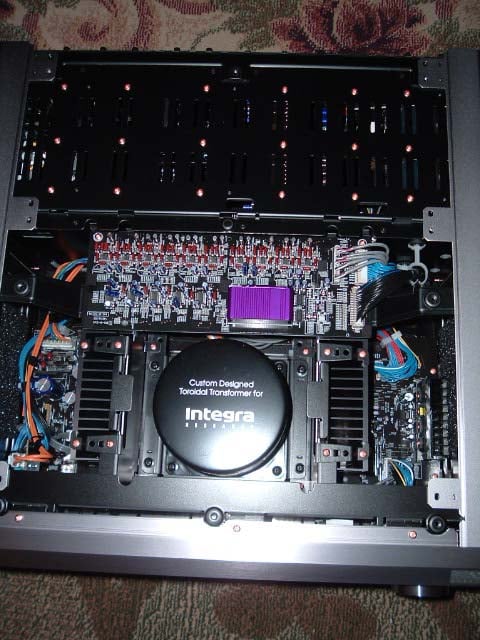 Anyone who is into cars always likes to get a good look under the hood before they take the plunge into proud ownership. Test driving a new A/V processor is no different, at least not for me. My curiosity got the best of me so I grabbed my trusty Torx screwdriver and removed the top cover. With the sheer size and weight of the RDC-7.1 it's hard to believe this is a processor and not a flagship receiver. Peering into it with the top cover off, I was pleased to see a well laid out design, oversized toroid power supply, and ample heat-sinked regulation.
Chips Anyone?
As with the RDC-7.1's predecessor, Integra Research has provisioned some of the best and most current processors and DACs on the market including dual 32-bit processors from Aureus™ Texas Instruments, 192kHz/24 bit DACs from Wolfsen, and a proprietary low jitter clocking system from Apogee which is said to audibly clean up jitter by taking in erratic or jittery timing signals and putting out cleaner, lower jitter signals. This allows optimum A/D and D/A conversion for improved sonic performance.
The Set-Up
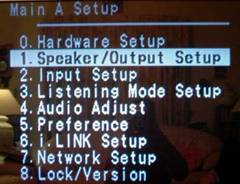 In
my opinion the true test of a well-designed, user-friendly interface is
how infrequently one has to reference the owner's manual to setup and
operate the equipment. I am one of the last people to ever use those
dreaded things (I am also one of the last people to stop and ask for
directions when I get lost driving in an unfamiliar place, so I am sure
there is a pattern here.) In fact, I usually stubbornly drive around
getting more lost until I find my way, and similarly leave the owners
manuals in the box and attempt to figure out the equipment setup and
configuration myself. With many A/V controllers and receivers, I get
reasonably far along before I eventually have to crack it open.
Considering the complexity of the RDC-7.1, I figured I wouldn't get too
far and would soon be referencing a novel length owner's manual.
Shockingly, my assumptions were incorrect. I actually configured about
95% of this processor on the fly, with no referenced instructions
whatsoever! The menu options were straightforward, and quite easy to
navigate. I did find an area or two that I felt were not appropriately
labeled or complete, such as the first option "0. Hardware Set-Up" that serves no purpose other than assigning a remote
control ID.
In
my opinion the true test of a well-designed, user-friendly interface is
how infrequently one has to reference the owner's manual to setup and
operate the equipment. I am one of the last people to ever use those
dreaded things (I am also one of the last people to stop and ask for
directions when I get lost driving in an unfamiliar place, so I am sure
there is a pattern here.) In fact, I usually stubbornly drive around
getting more lost until I find my way, and similarly leave the owners
manuals in the box and attempt to figure out the equipment setup and
configuration myself. With many A/V controllers and receivers, I get
reasonably far along before I eventually have to crack it open.
Considering the complexity of the RDC-7.1, I figured I wouldn't get too
far and would soon be referencing a novel length owner's manual.
Shockingly, my assumptions were incorrect. I actually configured about
95% of this processor on the fly, with no referenced instructions
whatsoever! The menu options were straightforward, and quite easy to
navigate. I did find an area or two that I felt were not appropriately
labeled or complete, such as the first option "0. Hardware Set-Up" that serves no purpose other than assigning a remote
control ID.
Bass Management
On the surface, the RDC-7.1 bass management system appears to be among the most flexible systems we have seen in a processor, allowing the user to adjust speaker group crossover frequencies independently of each other in 10Hz step sizes from 40Hz to 150Hz. I proceeded with caution based on my past experience with systems that attempted, but failed, to successfully offer this type of multiple crossover system. The problem with most multiple crossover systems is when you configure one speaker group's crossover to a much higher setting than the main channels, the bass from those speaker groups don't get recombined to the sub and is lost entirely. This is because most systems only incorporate one fixed LPF setting for the subwoofer channel which is usually derived from the main channel's setting. Knowing the kind of company Integra Research is, I didn't suspect the RDC-7.1 truncated the bass like this, especially since it has a separate LFE crossover setting.
Integra RDC-7.1 Bass Management
To test my assumption, I used the Audio Precision SYS 2722 Audio Analyzer to run some measurements via the analog two-channel inputs of the RDC-7.1 configured in two-channel and multi-channel surround modes. What the SYS 2722 told me was that the LFE crossover setting only affects LFE info as stated in the menu. This is a good start, implying if you set all other channels to a lower frequency, critical LFE info will NOT get truncated. Many processors unfortunately do truncate LFE bass under this circumstance, the RDC-7.1 is not one of them.
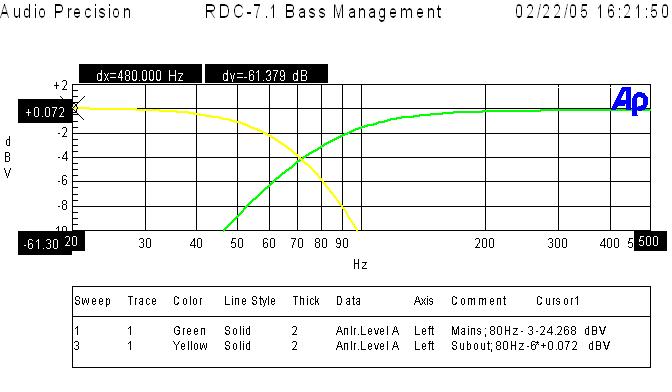
This is a plot of the subwoofer LPF and Main Channels HPF when set to the THX recommended 80Hz crossover setting. Notice the HPF is down -3dB at 80Hz with a 12dB/Octave slope while the subwoofer is -6dB down at 80Hz with a slope of 24dB/Octave as per THX.
Editorial Note
The reason for asymmetric filter responses between the HPF and LPF is to account for the natural roll off of the satellite speakers which is typically 12dB/octave. This allows the best blend between the subwoofer and satellite system.
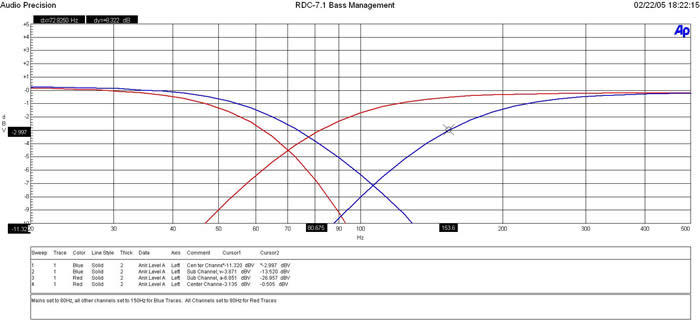
In the Blue Traces, we set all channels but the mains to 150Hz (extreme case), while the mains were set to 80Hz. Notice how the subwoofer crossover -6dB cutoff has extended from 80Hz to 100Hz. This is good news.
Granted, ideally it should have extended to the frequency of the satellite speaker with the highest crossover setting (in this case 150Hz), but I suspect Integra Research limited the cutoff of the LPF of the sub to 100Hz or so to avoid excessive bass energy from a single source which is localizable at frequencies above 80Hz and to avoid having too much overlap of the speakers with HPF's set to a lower value. The Red Traces represent all channels set to 80Hz. Notice the better summation at the crossover points.
Let's take a closer look at the subwoofer output while varying the multiple crossover settings between the main speakers having high and low crossover settings, while the other speakers have low and high crossover settings, respectively. The RDC-7.1 is configured in PLIIx Music Mode.
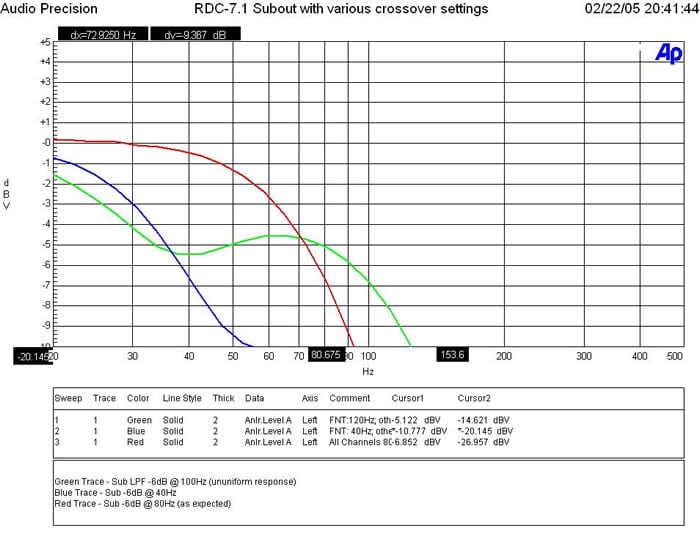
The Red trace represents all channels set to 80Hz. The sub out, as expected, exhibits -6db at 80Hz.
The Green Trace represents the subwoofer output while the main channels are set to 120Hz while all others are set to 40Hz. Notice the uneven response of the subwoofer output that appears to be rolling off at 40Hz, then rises until it rolls off again at 120Hz.
The Blue Trace represents the Main channels set to 40Hz while all other channels are set to 120Hz. Notice how the subwoofer output -6dB point is around 40Hz. Essentially any speaker groups set above this point will not properly recombine bass back into the subwoofer. In other words, that information will be lost or extremely attenuated. Initially I was disappointed until I thought about the logistics. The RDC-7.1 was receiving a two-channel source. Thus it was defaulting the LPF of the subwoofer to whatever setting the main channels were configured too.
The true test was to verify if the RDC-7.1 was smart enough to incorporate independent LPF's for each channel group when playing a discrete source such as DD or DTS. Since my SYS 2722 doesn't have a built in Dolby Digital decoder, I couldn't input a digital 5.1 source to the RDC-7.1. Thus I had to rely on my trusty Avia test disc and Sencore FFT analyzer. Using the bass sweeps in Avia I verified that each speaker group's crossover setting was independent of the main channels so the RDC7.1 does in fact have independent LPFs for each speaker group! As an example, if the center and surround channels are set to 100Hz and the main channels are set to 40Hz, the bass from the center and surround channels will get correctly recombined into the sub for all discrete sources.
Overall this multi-crossover system appears to be one of the most flexible offerings to date, and can be very effective if used within confined limits. We would suggest to always select satellite speaker systems with a -3dB point of 80Hz or lower, especially when using a product of this caliber in a full-blown high performance home theater system. We also suggest maintaining a difference of no greater than 20Hz between crossover settings of all speaker groups and using caution when setting the main channels' crossover setting too low (especially when listening to two-channel sources in surround sound) to avoid loss of bass information from the other channels. Always start at the 80Hz reference point and only deviate when absolutely necessary for your particular situation. In my system, I set all channels, including the LFE, to 80Hz (THX setting) except for the main channels which I set to 100Hz because I achieved better acoustical bass integration with my subwoofers and main satellite speakers.
The RDC-7.1 provides three (3) subwoofer outputs and two (2) sets of 7.1 speaker outputs. Unfortunately, these outputs are not independently configurable and rely on the settings you pick for the primary speaker system. This is a disappointment since it would have been very useful to have independent level control, and distance compensation, especially if configuring a separate surround sound zone, or running a complex multi-subwoofer system.
One final but important note in closing our discussion of the RDC-7.1's bass management system:
The RDC-7.1 has a feature in the subwoofer mode to toggle between "LFE Only" and "D.Bass". In most cases use the latter since "LFE Only" will NOT allow any bass information from the satellite speakers to be recombined to the subwoofer channel. "D.Bass" will output front channel info (even in two channel mode) as well as all speakers that have bass management applied to them. Use this setting!
Integra RDC-7.1 Notch Filter
Just when I thought things couldn't get better, they did with the welcomed Notch filter Integra Research incorporated into this processor.
The Notch filter is adjustable from 20Hz to 300Hz in 1Hz increments, from 0 to -15dB in 1 dB increments.
The Q of the filter is adjustable from .05 to .25. I would have liked to have seen a Qmax of at least .5 to deal with broad bumps such as what my room suffers from at my primary listening position. I have a bass bump centered around 36Hz from 25 to 40Hz in width that could stand to use a bit of attenuation. In order to effectively do this, a system Q of at least .42 is needed. I did my best using the somewhat limited Notch filter of the RDC 7.1 and effectively removed most of the excessive energy from 31.5Hz to 40.5Hz.
It's important to note, if your speaker system is wideband and linear, you probably don't desire flat in-room frequency response, but more of a shelved response at the listening position with a gradual increase in bass as frequency decreases below 80Hz and a decrease in high frequency energy above 6kHz in order to sound pleasing to the human ear.
Editorial Note on Notch Filters
A notch filter (aka. band-reject filters) is a special type of filter that attenuates a specific frequency band only while allowing all other frequencies to pass through. This is particularly useful for removing excessive bass energy in a room do to modal peaking.
In room,
on axis measurement at the listening position
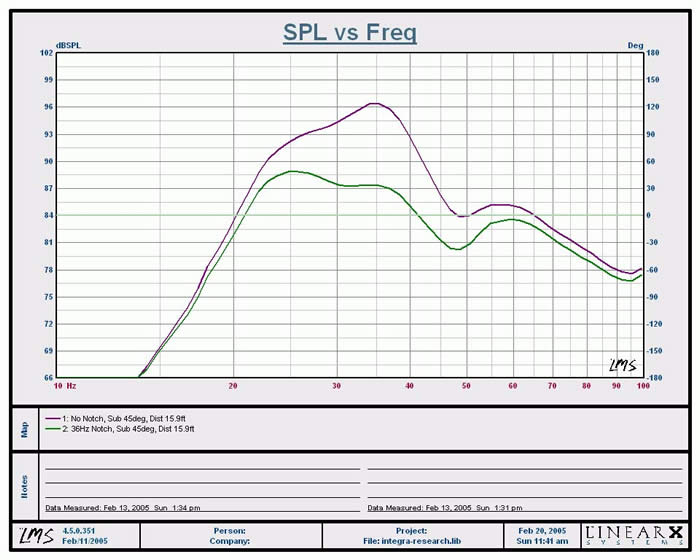 Using LMS I found the primary room mode that
added a huge bump in the lower bass region. I adjusted the notch filter
to minimize this-10dB from 25Hz to 40Hz.
Using LMS I found the primary room mode that
added a huge bump in the lower bass region. I adjusted the notch filter
to minimize this-10dB from 25Hz to 40Hz.
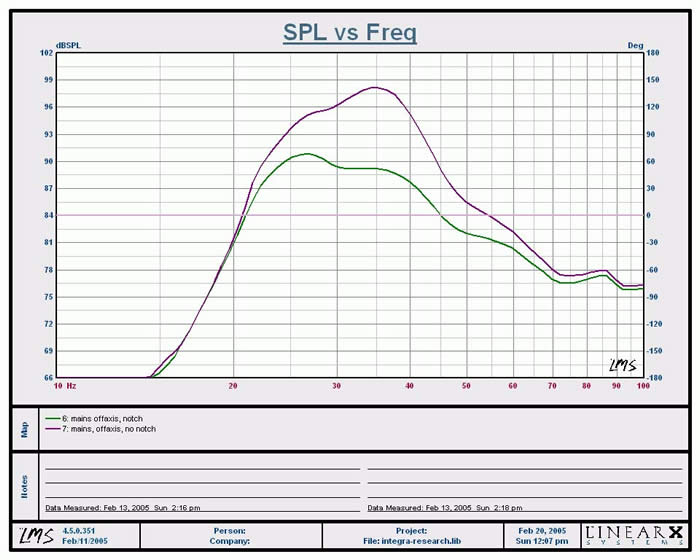
I did a quick check in a remote seating location to verify the notch I added didn't do more harm than good for other listeners.
As you can see, the notch filter smoothed out the bass response even at other listening positions making the overall bass response +-10dB from 20Hz to 1kHz as opposed to +-20db without the notch filter.
 Unfortunately there are no free
lunches. When I ran my FFT analyzer into the RDC-7.1 with the notch
filter engaged, I heard a very low level driver resonance present in all of the
channels which became more predominant the lower in frequency the notch filter
was set to. When I popped in a DVD I could hear the same resonance mode
(though extremely faint) created by the notch filter in my rear channels if I
put my head up to the midrange driver. In most cases this is inaudible,
but it lead me to further investigate this issue with my trusty Audio Precision
SYS 2722 Audio Analyzer.
Unfortunately there are no free
lunches. When I ran my FFT analyzer into the RDC-7.1 with the notch
filter engaged, I heard a very low level driver resonance present in all of the
channels which became more predominant the lower in frequency the notch filter
was set to. When I popped in a DVD I could hear the same resonance mode
(though extremely faint) created by the notch filter in my rear channels if I
put my head up to the midrange driver. In most cases this is inaudible,
but it lead me to further investigate this issue with my trusty Audio Precision
SYS 2722 Audio Analyzer.
What I found was the Notch filter was being applied globally to all speakers and NOT just the subwoofer channel. In my opinion, this is a major oversight as the only place the Notch filter sound be applied is to the speaker system capable of exciting room modes to benefit from it. In this case that is the subwoofer channel, not the channels we just applied bass management too!
Regarding the Notch Filter and reasons to NOT apply it globally:
-
Applying a notch filter to the main speaker channels has the capability to mess up transient response and upper order harmonics, particularly in the center channel when listening to male vocals. This is especially true if you are not using FIR filters which the RDC-7.1 is not.
-
The notch filter is only relevant at the sub to listening position that it was calibrated for. Each speaker has its own unique position in the room and subsequently plays into the room differently - creating its own nulls and peaks. Thus the global notch can actually be degrading the overall sound quality of the room.
Regarding Notch noise issue: The noise gets worse as you lower the frequency. I found it most prominent when I set the Notch Filter between 20-24Hz. It is independent of Q or amplitude adjustments. When I set it to 20Hz, I can clearly hear resonance in all channels. To test this, I simply inputted bandwidth limited pink noise (20Hz to 250Hz) to an analog input and engage Stereo or All Channels mode. I suspect what I was hearing was a resonance/ringing issue of the filter response or noise induced somewhere in the associated circuitry.
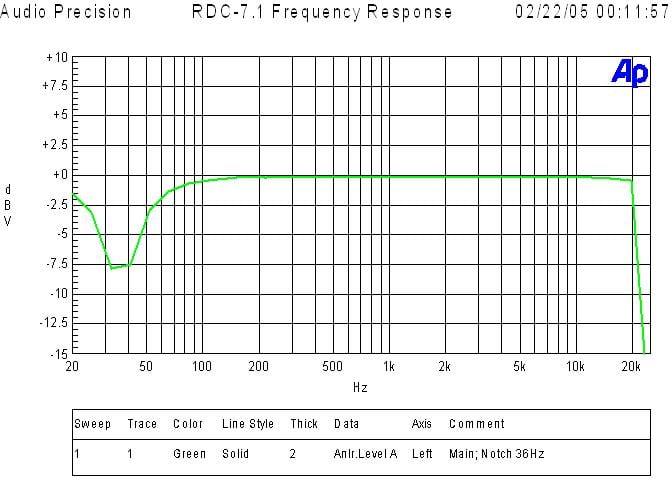 Pictured here is an electrical
frequency response plot of the Center Channel (with no bass management applied)
and the notch filter set for 36Hz -10dB from 31.5Hz to 40.5Hz. Note, I
shut off the bass management of the center channel to illustrate the shape of
the notch filter. With bass management applied, the notch filter is still
present with the added roll off at whatever the center channel crossover is set
to.
Pictured here is an electrical
frequency response plot of the Center Channel (with no bass management applied)
and the notch filter set for 36Hz -10dB from 31.5Hz to 40.5Hz. Note, I
shut off the bass management of the center channel to illustrate the shape of
the notch filter. With bass management applied, the notch filter is still
present with the added roll off at whatever the center channel crossover is set
to.
I informed Integra Research about this and they are investigating a firmware upgrade to allow user selectability over which channels (if any) other than the subwoofer channel utilize the notch filter. In the meantime, I stress caution when using this filter as it currently operates. Applying a notch for the sub channel is only relevant for the bass modal issue it is correcting relative to the sub(s) and listening area. The other speakers in the system, located at different positions create their own modal and nodal responses which usually don't coincide with the corrected response of the subwoofer.
Integra RDC-7.1 Setup and Configuration
Configuring the audio and video sections was fairly straightforward. All of the audio and video I/O's are user assignable. Each input has priority settings for audio and video signaling along with auto detect. The most outstanding feature I found was the ability to assign surround modes for each input and source type independently!
For example, on the DVD input, I assigned PLIIx Movie mode for Dolby Digital Sources and PLIIx Music mode for DTS. If this doesn't work well for your particular disc you are using, don't sweat it. The remote control has a hot key for toggling through surround modes. You can store surround modes for two-channel sources of each input but not the particular type of mode like PLIIx Music or Movie. Thus if you find yourself switching between CD's and VHS movies, you will have to toggle the PLIIx mode you desire. I would have really liked the option of storing PLIIx modes for each input for two-channel sources, but I am unaware of any other processors that offer this kind of flexibility.
I was equally thrilled to have the ability of assigning different surround modes via the i.LINK interface for DVD-A and SACD. What a configuration dream come true for those wanting to tweak out their setting for all audio formats and inputs used! I only wish they provisioned independent PLIIx modes for 2CH sources like they did with multi-channel sources. This would have prevented me one extra keystroke (yes I know I am lazy) to toggle between PLIIx Music for CD's and PLIIx Movie mode for old VHS tapes.
IntelliVolume and More
Integra Research once again included their IntelliVolume feature that allows independent trim settings for each input. This feature is important when two different sources of significantly different signal levels are utilized in the same system. This ensures you won't get blasted out of your couch when switching between a music CD and your CableTV, for example. Another useful feature (especially if you have kids or estranged visitors frequenting your home theater room) is the ability to enable a max volume level setting as well as a stored power up volume setting. I can't tell you how many times a family member tried to operate my system while I wasn't present, couldn't get any sound, and figured the only cure was to keep pumping the volume up only later to happen on pressing the right input and getting scared out of their pants while almost blowing out a speaker, or in my case tripping a circuit breaker. Integra Research recognized this and made a fail safe option to prevent your system from self destruction caused by the neophytes attempting to operate something they shouldn't. This is the best solution short of electric shock treatment.
Each input has independent A/V Sync in 1ms step sizes, also relative delay for center, surround and surround backs ensuring you can resolve any lip-sync issues that may arise when using scaling and video processing capabilities of front projection systems.
Got Triggers?
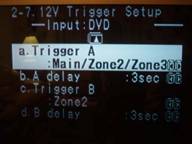 One of the biggest
contentions I have with many of the receivers and processors on the market is
their anemic trigger system. Sure most of them have the standard 12V
trigger, but read the fine print. In most cases, they supply 12V to 20mA
or less. This is not enough current drive to operate most power centers and
motorized screens. Refreshingly, Integra Research supplies five (count
them 5) high current triggers with Zone A, 200mA, and Zones B-E of 100mA each.
Best of all, the triggers have configurable delay settings to help minimize
inrush current issues that can arise while simultaneously powering up many
power hungry devices such as power amplifiers, plasmas, etc. Integra
Research really did their homework here and I am sure many custom installers
are as delighted as myself about this.
One of the biggest
contentions I have with many of the receivers and processors on the market is
their anemic trigger system. Sure most of them have the standard 12V
trigger, but read the fine print. In most cases, they supply 12V to 20mA
or less. This is not enough current drive to operate most power centers and
motorized screens. Refreshingly, Integra Research supplies five (count
them 5) high current triggers with Zone A, 200mA, and Zones B-E of 100mA each.
Best of all, the triggers have configurable delay settings to help minimize
inrush current issues that can arise while simultaneously powering up many
power hungry devices such as power amplifiers, plasmas, etc. Integra
Research really did their homework here and I am sure many custom installers
are as delighted as myself about this.
Video Setup
Perhaps one of the coolest new features of the RDC-7.1 is its inclusion of HDMI video switching. The RDC-7.1 is one of a scarce few dedicated processors that offer this feature. Unfortunately the RDC-7.1's HDMI interface is only compliant to HDMI 1.0. HDMI 1.0 doesn't support multi-channel audio formats. Currently Denon has the only commercially available product line of HDMI 1.1 compliant receivers and DVD players via the latest Silicon Image chipsets, however others will eventually catch up. Considering the fact that HDMI 1.1 has yet to receive approval for digital transmission of SACD, i.LINK is still the only all inclusive digital interface for all digital media. Thus the best solution in this case is HDMI for video, i.LINK for audio.
Some important notes about HDMI (especially for computer folks):
You cannot connect display devices (such as presentation displays) that are NOT HDCP compliant. The result if you attempt this will be no picture. Don't even try it!
The RDC-7.1 does not support analog video upconversion to HDMI (a feature currently supported only by Denon's new AVR-4806 and soon upgrade to their AVR-5805). However, the RDC-7.1 does support Component Video Up Conversion so it's a good idea to use this feature when handling composite, s-video and component video connections.
I was mildly disappointed that the RDC-7.1 offered no I/P conversion, scaling or video processing. It also doesn't include Time Base Correction (TBC) circuitry which is very useful for the newer econo box VHS machines that no longer offer this as a standard feature. TBC will help video sync the signal for such instances. Flagship receivers from Denon and Yamaha offer these features and I am hopeful Integra Research will eventually come around with an upgrade module for this.
I found the HDMI video switching to work flawlessly. My only contention was not with the RDC-7.1, but with my Denon DVD-5900 that didn't incorporate a squeeze mode setting to properly play back 4:3 DVD material on 16:9 displays. It was a bit of a pain each time I viewed a 4:3 source on my 16:9 display to go into the user control menus to select the correct aspect ratio. I am hopeful that all new HDMI-enabled DVD players will offer an auto scaling feature to eliminate this inconvenience.
Integra RDC-7.1 Listening Tests
Editorial Note on HDMI (High Definition Multimedia Interface)
HDMI (High Definition Multimedia Interface) is a trademark of HDMI Licensing LLC. Developed by Sony, Hitachi , Thomson (RCA), Philips, Matsushita (Panasonic), Toshiba and Silicon Image, HDMI was created as a digital interface standard for the consumer electronics market.The HDMI protocol combines high-definition video, multi-channel audio, and inter-component control in a single digital interface. This lone interconnect has the ability to transmit uncompressed digital video and up to eight channels of audio from source to display. Even more, the HDMI connection enables audio/video components to share data and commands, thus unifying an oft-disjointed collection of "boxes" into a real, working system. Based on Silicon Image's TMDS ® technology, HDMI is also fully compatible with PCs and display devices incorporating the Digital Visual Interface (DVI) standard.
For more information on HDMI Connections check out our Audio & Video Connections - Definitive Guide
Surround Processing
The RDC-7.1 is fully armed with all the latest surround modes including PLIIx, DTS Neo, DTS 96/24, THX Ultra2 as well as their own proprietary surround modes which I found to be a cut above what is typically thrown in the mix by other manufacturers. What's really cool is you can overlay PLIIx over virtually any audio signals and formats (ie. Dolby Digital, DTS, DVD-A and SACD transported through i.link!)
All of the THX options are also present, including Ultra2 Music, Cinema, EX, and the newest THX Games mode. Read our article on the Different Levels of THX Certification
Not since my review of the Yamaha RX-Z9 have I found a processor with DSP mode enhancements worthy of consideration. In most cases, I prefer PLIIx Music over any surround mode for music and PLIIx Movie when watching old VHS tapes. However, there are occasions when the right acoustical environment cannot be conveyed in these modes and a little extra processing can help. Integra Research offers a variety of DSP modes including Theater Dimensional, Enhance 7, Orchestra, Unplugged, Studio-Mix, All Channel Stereo, Musical and Action. Each of them produce their own ambiance and can be somewhat tailored to suit the listening environment. My personal favorite includes All Channel Stereo (with the rear surrounds), and Unplugged. When listening to two-channel CD's, the All Channel Stereo mode is an excellent processing mode for filling the room with sound, especially when hosting parties. This mode assures that no matter where you stand in the room, you will be able to indulge in a complete sound field. The Unplugged mode is the perfect setting for CD's with acoustic guitar as it provides a warm, MTV Unplugged type ambience. All other DSP modes offer their own sound field that some may like and others may not. It's completely dependant on your personal preference and source material as to which mode(s) (if any) will work for you.
The Sound
What good is a feature packed receiver or any A/V gear for that matter if it cannot deliver the goods in sonic performance? Our viewpoint is sound first, features second. With that, here is my subjective impression of the RDC-7.1 for the gamut of playback modes I put it through.
Two-Channel Audio
I always begin my initial listening tests in two-channel since I am a two-channel audioholic at heart. I always tweak my system to get the front soundstage optimized prior to getting into any multi-channel listening sessions. I began my review with some familiar tunes from a CD I picked up in Canada visiting Axiom Audio called "Mediterranean Nights" by Vehkavaara & Piltch. I took note of the smooth and melodic melodies of this CD with an extremely low noise floor. The bass extension was very pronounced and controlled with the notch filter in place. Toggling it on and off I could hear just how colored and overpowering the bass was in the off position. This was clear indication to me that my measurement efforts paid off. The notch filter did a bang up job at removing my room's primary modal peek and subsequently increasing system bass linearity.
The RDA-7.1 amplifier proved to pack what seemed to be much more punch and weight than its published specifications. I was able to really crank this CD for long periods of time both in two-channel and PLIIx music without the amp even giving indications of being stressed. It remained cool to the touch, even with the RDC-7.1 stacked on top of it. So far this combo unit was proving itself worthy of the Integra Research heritage and brand.
Listening to SACD via i.LINK was a luxury missed since my review of the Yamaha RX-Z9. For those worrying about the RDC-7.1 passing subwoofer information in two-channel mode - fear not as it does handle bass management via its i.LINK interface much like it does when decoding DD/DTS. While some would argue converting DSD to PCM to enable this may result in sonic degradation, I would counter with "But can you really hear a difference?" If implemented properly, there shouldn't be any ill effects, and in my opinion, the benefits of having bass management and digital delay compensation in this case far outweigh such concerns.
SACD: Patricia Barber Cafe Blue
This, as well as the other three Patricia Barber recordings
by Premonition Records, remains one of my benchmark SACD's for good reason -
lumpy jazz in a smooth jazz environment free from compressive artifacts. You
won't find repetitive and annoying saxophone scales, single stroke drumming,
and simplistic guitar rifts. Instead you're showered with snappy jazz and
provocative lyrics, slamming drums and memorable instrumental solos. The
SACD layer of Track #2, "Morning
Grace" sounded
about as good as I've ever heard which in one word would best be summed up as
"phenomenal". Oddly, listening to the RDC-7.1 via i.Link
appeared a bit noisier than I remembered when using Yamaha or Denon i.Link
enabled receivers. A quick listening comparison between the RDC-7.1
i.LINK and the Denon DVD-5900 analog outputs demonstrated my suspicions were
correct. I detected about a 6-10dB increase in noise floor via the
RDC-7.1 i.LINK connection. I suspect there is a firmware
configuration issue with the RDC-7.1 and until it is resolved I recommend using
the i.LINK interface for DD/DTS and DVD-Audio only and analog connections for
SACD.
Some Notes About i.LINK / IEEE-1394 Firewire
1) FireWire is a balanced interface. The modern "low voltage differential serial" interfaces are *all* based on the original work done to develop Firewire back in the early '90's. The low level interface is a pair of LVDS signals (2 pair) in addition to very aggressive grounding for those systems that are not galvanically isolated (the "b" form of 1394 supports both copper and optical connections, and the copper connections can be transformer coupled if necessary).
2) The amount of jitter for audio applications is arbitrarily small. The IEC 61883-6 transport method used for 1394 allows each audio source to provide its own sample clock, and the sync can follow that clock with arbitrary accuracy and stability. It's totally up to the system cost budget how stable the PLL must be. For more information on this, suggestive reading material on this topic can be found at: http://www.1394ta.org/Press/2003Press/january/White_paper.pdf3) The AES (audio engineering society) has been working with 1394 specs for some time, and the experts there have no problem with the quality of 1394-based transports. There are a few AES specs based on 1394 networks.
Note: IEEE-1394 / Firewire / i.LINK / Lynx are all names describing various manufacturers depiction for cables belonging to the IEEE-1394 standard. IEEE-1394 is the new, extremely fast external serial bus standard that supports data transfer rates of up to 400 Mbps (400 million bits per second). It is used primarily for multimedia devices such as camcorders, computers, video cassette recorders (VCR's), digital audio recording workstations and, in this case, a digital transport for high resolution audio.
Multi-channel Audio
DTS CD: Steely Dan Goucho
I always start off with
my base DTS CDs for quick sanity check. The reason being is I intimately
know how these discs should sound, and they usually provide me clear indication
when I have configuration issues. Steely Dan Gaucho is one, the Alan
Parsons Project On Air is the other.
When I hit play, I immediately heard the classic DTS fizzle sound that has been pretty much absent in most products for the past several years. I was surprised that the RDC-7.1 didn't include a muting function during DTS lock on and search. In addition, when I allowed this disc to play through the end on my CD changer, the RDC-7.1 remained locked in DTS mode and would only resolve through power cycle. This only occurred on two of my DTS discs in my 50+ collection. I made Integra Research aware of these issues and they are looking into a firmware fix. Aside from these issues, DTS sounded great, especially with PLIIx Music Mode overlaid to yield 7.1 surround sound!
DTS CD: Pat Metheny Speaking of Now LIVE
Overlaying PLIIx and Integra Research's very
impressive DSP processing modes (Orchestra, Unplugged) over the DTS soundtrack brought about new dimensions to the stellar performance of
the Pat Metheny Group: Speaking
of Now Live DVD. The soundstage of "Last Train Home" was
really opened up in 'Orchestra' DSP mode, without sacrificing the focus of
Pat's acoustic guitar, though I ultimately preferred Unplugged or regular PLIIx
Music mode for more program material.
"Roots of Coincidence" rocked my house, cranking the volume up on
this song, using the Integra Research combo and my RBH Sound T-2 system
transported me back to the live event at Ruth Eckerd Hall in Clearwater Florida I so fondly remembered
being a part of only a few years ago. This experience has primed me for
the next Pat Metheny concert which is coming to my hometown in
only a few short weeks!
When playing back concert DVDs or other recordings for that matter, my advice is to experiment with variety of DSP modes and configuration settings Integra Research offers. I personally enjoy using the Orchestra and Unplugged modes to bring back life in ordinarily dull or compressed sounding DVD concerts and VHS tapes. I ultimately prefer using PLIIx music for CD music in most cases, but this is entirely subjective and you must decide what works best for your listening preferences.
Home Theater
 Eager to hear the
RDC-7.1 in action for movies, I popped in the Extended Disc set of Lord of
the Rings - Fellowship of the Ring and configured it for DTS ES. The RDC-7.1 had no
problems identifying ES mode and I was quickly on my way listening to discrete
6.1 surround sound.
Eager to hear the
RDC-7.1 in action for movies, I popped in the Extended Disc set of Lord of
the Rings - Fellowship of the Ring and configured it for DTS ES. The RDC-7.1 had no
problems identifying ES mode and I was quickly on my way listening to discrete
6.1 surround sound.
The RDC-7.1 performed flawlessly and the opening battle scenes sounded about as good as I have ever heard them in my set-up. The panning between channels was fluid, the noise floor so commendably low that, until the sound kicked in, I kept pumping up the volume until I was blasted with the dynamics of the first action scene and literally grasped the handles of my chair in agony while swords sliced through those nasty goblins.
Playing an assortment of DVD movies ranging from Star Trek, to Double Jeopardy, I was equally enthralled by the RDC-7.1's home theater performance capabilities. I always found it to be transparent and extremely clean sounding. I also loved the fact that I could transform standard 5.1 DD DVD's to 7.1 via PLIIx processing and felt it really added a sense of realism and envelopment to the movie watching experience. If you are contemplating on whether you wish to integrate the extra two back surround channels, just do it! Find a way to make it work as it will be worth your while.
Integra RDC-7.1 Recommendations and Conclusion
Playing an assortment of DVD movies ranging from Star Trek, to Double Jeopardy, I was equally enthralled by the RDC-7.1's home theater performance capabilities. I always found it to be transparent and extremely clean sounding. I also loved the fact that I could transform standard 5.1 DD DVD's to 7.1 via PLIIx processing and felt it really added a sense of realism and envelopment to the movie watching experience. If you are contemplating on whether you wish to integrate the extra two back surround channels, just do it! Find a way to make it work as it will be worth your while.
Recommendations
Let's face it, nothing is perfect, but there is no crime in striving for perfection. With that I have comprised a short list of areas I would like to see updates and/or improvements:
- Analog Video Upconversion to HDMI
- HDMI 1.1 (or higher) for Multi-channel audio provisioning (though without SACD support this isn't a big priority)
- Multiple subwoofer outputs with independent channel assignability, channel trim, delay adjustment, phase, and notch filters
- Ability to store independent speaker, trim and delay settings for Zone A and B, as well as different listening modes (ie. Stereo, DD/DTS, EXT Analog Inputs)
- Provide DTS mute during search and acquire
- Resolve SACD i.LINK noise issue
- Video pass through on analog video sources when processor is powered down
- Video I/P scaling for analog 480i signals
- Audyssey or equivalent room correction system option
A few minor issues that puzzled me where:
- Lock Setup is supposed to lock all user settings once
engaged, but allow non retainable user adjustability where the default
settings are all restored after power cycling. This feature did not
function as advertised and allowed me to vary settings which were retained
after power cycling.
- Pure Direct Mode has a user setting to allegedly allow for subwoofer output. This did not function for two-channel audio, thus I could only conclude this feature is for provisioning multi-channel audio mode only.
Conclusion
The RDC-7.1 is truly a high end processor in both form and function. Its physical appearance and build quality have no rival. Its modular based design provides an easy path for upgradeability ensuring longevity of your investment. All of the major surround formats and video switching options are covered for the most part, and the ability of provisioning extra component video switching or BNC connections will serve installers of high caliber home theater systems quite well. While I would have liked to have seen inclusion of some sort of auto setup feature (at least for channel level and distance calibration), Integra Research informed me at the time of development of this product they weren't too thrilled with the available options on the market. Much has changed in this area over the past two years (see our Audyssey MultEQ review), and Integra Research realizes this. Don't be surprised if an upgrade module surfaces in the near future. I feel there is so much more potential to unleash in this platform. If Integra Research supports hardware and firmware updates, it could make for an unprecedented value for a high caliber home theater system based on its performance, open architecture design, configuration flexibility, and ease of operation.
Take your time right off the bat to properly configure the audio and video settings of each input to ensure maximum enjoyment and ease of operation, both for yourself and your significant other. Fuel this processor with high quality components, loudspeakers, and room acoustics - a great sports car demands nothing less!
Integra RDC-7.1 Measurements and Analysis
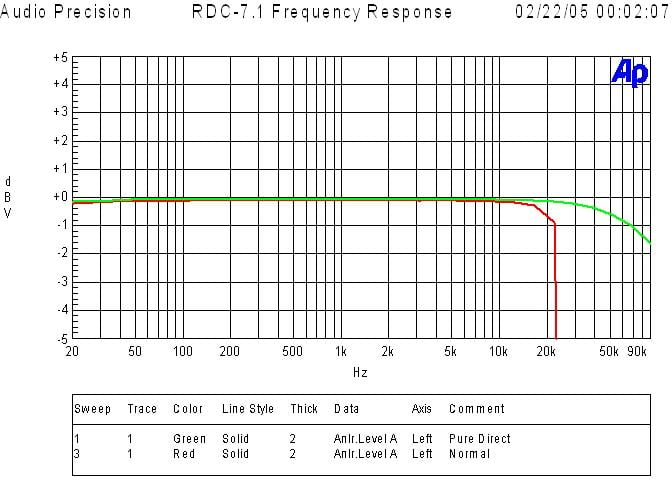
The red trace shows the frequency response via the analog inputs after they go through ADC and DAC conversion stages. As you can see, there is about 0.5dB roll off at 20KHz followed by a sharp brickwall filter response rolloff at ½ nyquist frequency of 22kHz (44kHz sampling rate). The green trace represents "Pure Direct" mode, where the 3dB point was well above 100kHz.
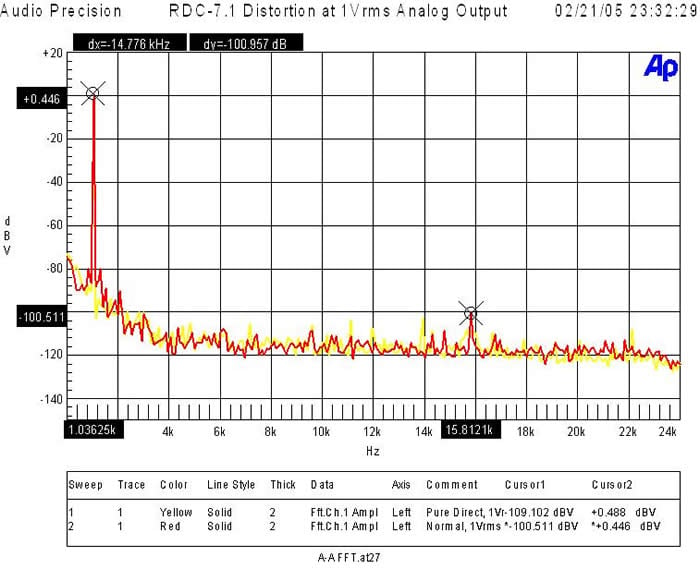
When the analog preamp was driven at 1Vrms (typically ½ signal strength to achieve ½ of max power of most power amps with voltage gain of 29dB) distortion levels were (+.0446 + 100.511)dBv = 100.957dBv or 100*alog(-100.957/20) = .000896%! The yellow trace represents "Pure Direct" mode, while the red trace represents DSP analog input. As you can see it is only slightly higher in distortion, certainly not dramatic enough to be audible. This is good testament to the ADC design and implementation in this product!
Integra Research distortion spec at 1Vrms was .05%, about 5 times higher than I measured, or 35dB worse. Talk about conservative!
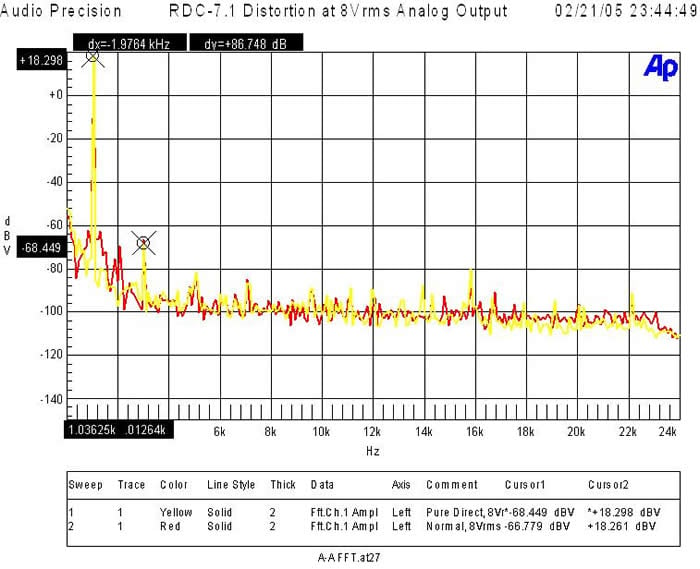
When I drove the analog preamp to its limits it was able to output 7Vrms unbalanced and 15Vrms balanced (about 10dB more gain than you should ever need) and distortion levels were (+18.298 + 68.449)dBv = 86.747dBv or 100*alog(-86.747/20) = .00459%!
Note: In "Pure Direct" mode the analog inputs were able to handle about 7Vrms before clipping input circuits and 2Vrms when engaged in analog DSP. Most consumer equipment (ie. CD players, VCR, etc) drive 1-2Vrms max via their analog outputs so there shouldn't be any compatibility problems here. If for some reason you find the input levels too high, causing clipping, the RDC-7.1 provisioning for independent level trims for each input will come in quite handy here. This is great foresight on their part!
Editorial Note on Balanced vs Unbalanced
I measured the voltage gain of the RDC-7.1 via balanced and unbalanced inputs and found the following:
Unbalanced: Av = 17dB
Balanced: AV = 23dB (6 dB higher than unbalanced)
This is a standard practice in most consumer and pro audio. The power amp therefore usually has 6dB less gain via the balanced outputs to compensate. I verified the RDA-7. achieved full rated power with less than 1.3Vrms driving it unbalanced, and about 2.5Vrms via balanced.
Check out our Balanced vs. Unbalanced Connections Article for more information.
Integra RDC-7.1 THX Overview and Scorecard
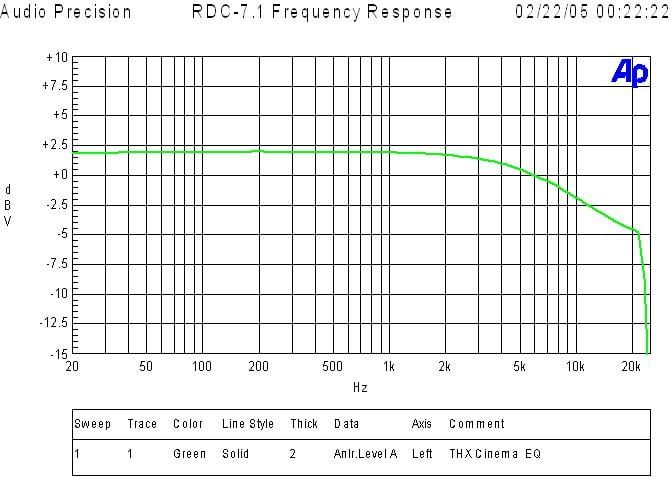
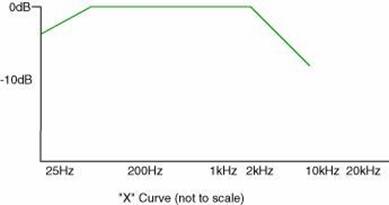
For those wondering what the typical response of THX ReEQ™ looks like, here is a frequency response plot with it engaged. While it's not the preferred two biquad solution, it just passes, since the total droop in energy in the 2K to 10K pass band closely mimics the original X curve correction. This response curve follows the digital, single biquad, low pass filter response. Sonic differences between these two types of filter responses are likely not audible in most applications given the much large variance of speaker responses and room interaction.
Editorial Note About THX ReEQ™ by John Dahl of THX
ReEQ was developed by THX's Tomlinson Holman in response to a request from the movie sound editors and mixers at Lucasfilm's Skywalker sound. The mixers found that when they listened to master tapes of their work on their home systems they sounded consistently too bright and edgy compared with what they heard in the movie dubbing stage where the masters were created. Movie dubbing stages are set up and calibrated to sound exactly like good movie theaters and vice versa. It's important to movie sound artists that they create the sound track while listening to the same system as the theater audience. In the movie biz this is known as accurate venue to venue translation.
In a movie theater the audience sits a long way away from the speakers, a theater is acoustically absorbent and the theater speakers have the high frequencies turned down slightly. In a home you sit close to the speakers, the room is acoustically live and the speakers do not have the high frequencies turned down. So you can see that a soundtrack recorded in a theater would sound bright when played back at home. The THX ReEQ filter compensates precisely for the response difference between a perfect movie theater and a perfect home theater.
The dubbing stage to theater translation is usually quite good but home theaters are another matter entirely. For example, a film played on a small TV without ReEQ may actually benefit by the high frequency boost while a decent home theater will almost always sound hard or edgy and therefore benefit from ReEQ.
Then there's the matter of the very small percentage of DVDs that have been "remixed for the home". That sounds like a good idea but who's system is it remixed for? How close will you sit to the speakers? How reverberant is your room? Etc, etc. Even when a disc is marked as remixed (which it may not be), these questions are impossible to answer in a technically and consistently useful way. This makes the THX ReEQ a known quantity based on idealized systems which can then be used or not as preferred by the individual listener.
Bottom line is… THX ReEQ, based on an ideal set of circumstances turns out to be quite useful even though home theater systems have wildly variable in-room responses making perfect corrections impossible 100% of the time.
Many thanks to John Dahl at THX for his background perspective on ReEQ.
The Score Card
The scoring below is based on each piece of equipment doing the duty it is designed for. The numbers are weighed heavily with respect to the individual cost of each unit, thus giving a rating roughly equal to:
Performance × Price Factor/Value = Rating
Audioholics.com note: The ratings indicated below are based on subjective listening and objective testing of the product in question. The rating scale is based on performance/value ratio. If you notice better performing products in future reviews that have lower numbers in certain areas, be aware that the value factor is most likely the culprit. Other Audioholics reviewers may rate products solely based on performance, and each reviewer has his/her own system for ratings.
Audioholics Rating Scale
 — Excellent
- — Very Good
- — Good
- — Fair
- — Poor
| Metric | Rating |
|---|---|
| Multi-channel Audio Performance | |
| Two-channel Audio Performance | |
| Build Quality | |
| Ergonomics & Usability | |
| Ease of Setup | |
| Features | |
| Remote Control | |
| Performance | |
| Value |  |
Gene manages this organization, establishes relations with manufacturers and keeps Audioholics a well oiled machine. His goal is to educate about home theater and develop more standards in the industry to eliminate consumer confusion clouded by industry snake oil.
View full profile Subscribe to our newsletter