


Integra DTC-9.4 Processor and DTA-9.4 Amplifier Review
Integra DTC-9.4 Processor and DTA-9.4 Amplifier
- Product Name: DTC-9.4 DTA-9.4 Processor and Amplifier
- Manufacturer: Integra
- Performance Rating:

- Value Rating:

- Review Date: January 30, 2004 18:00
- MSRP: $ 5000
|
DTC-9.4 Preamp/Processor - MSRP $2000 DSP:
THX Surround EX, Dolby Digital EX, DTS-ES Discreet 6.1, Dolby Pro Logic II, DTS
Neo:6, DTS 96/24, Dolby Headphone, Theater-Dimensional,
New Dual 32-bit DSPs |
DTA-9.4 Class-D Amplifier - MSRP $3000 Continuous
Power: 120W/240W into 8-ohms/4-ohms x 7 (2 channels
driven) |
Pros
- Aesthetics
- A/V input routing
- IntelliVolume input level matching
- Flexible bass management options
- HDTV-compatible component video upconversion
- Net-Tune PC-audio streaming connectivity
Cons
- Difficult custom remote control programming
- No sub out in two channel "pure audio" or "direct" mode
Integra DTC-9.4 and DTA-9.4 Introduction
Previously, Audioholics reviewed the Onkyo TX-SR601 and found that to be a good value for a mid-fi receiver. We also reviewed the high-end Integra RDC-7 pre-processor. Naturally, it made sense for us to review the unit that would fall somewhere in between the two and thus we requested the DTC-9.4 pre-processor. Integra was kind enough to send us the DTA-9.4 so we could mate the unit with its 7-channel Class-D "partner". Here's a quick summary of the specifications of the DTC-9.4 and DTA-9.4:
We had no prior experience with the Integra line of processor and Class-D amplifier products. The Integra Research RDC-7 processor made its way into our Reference System 2 and the Onkyo TX-SR601 proved to be able to hold its own and even take a slight edge over many other $500 receivers. Our review of the DTC-9.4 and accompanying DTA-9.4 proved that entry-level separates are still competing for attention in the audiophile community and that some of the new competing flagship receivers will most likely have a continuous fight to stay ahead of the curve.
Integra DTC-9.4 Overview
Company History
Integra , the higher-end manufacturing line over Onkyo, has been producing precision audio components for over 50 years. The company's philosophy is to deliver products that are superbly designed and built to a consistently outstanding standard of excellence. Today, Integra is at the forefront of the home theater and digital revolutions. We feel this is largely due to the inevitable "trickle down effect" achieved by putting an incredible amount of R & D into their Integra Research line - these technologies quite often make it into the Integra line and provide "best of class" performance in that line. For more information about this and other Integra products, visit www.integrahometheater.com or call 800-229-1687.
Moving on Up
For those of you familiar with the Onkyo TX-SR601 , the Integra DTC-9.4/DTA-9.4 combo is quite a step up, offering the following advanced features which differ from the Onkyo receiver:
-
120W/240W x 7 into 8/4 ohms respectively (via the DTA-9.4)
-
THX Ultra2 Certification
- 6 s-video inputs, 3 outputs
- Component video upconversion (rated at 60MHz with OSD disable possible)
- 7 assignable digital inputs (4 optical, 3 coaxial + front panel optical), 2 digital outputs
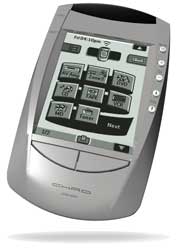
- CHAD touch screen remote control
- 8 (7.1) balanced XLR/unbalanced RCA preamp outputs
- Gold-plated input/output RCA terminals
Integra has built a versatile unit with excellent specifications and features. There is a distinct difference in performance between the mid-fi TX-SR601 and the Integra separates which we'll go into futher during this article. So, without further a-do, let's explore the Integra separates!
Integra DTC-9.4 First Impressions and Setup
DTC-9.4
This preprocessor looks beautiful and has a finish that I believe rivals many other processors and receivers in its price range. This is highly subjective, of course, but the brushed aluminum power button and volume control gives some gravitas to the anodized case design. It's quite often the little things that make a component stand out in its class - after all, about 95% of all processors and receivers are black anodized aluminum so it's the tiniest details that help them to stand apart. The front door hiding controls for Zone 2, DSP modes, dimmer and tuner functions provides a smooth, nicely controlled operation when opened, reminding me of a reverse implementation of the early 90's Pontiac TransAm GTA hatch backs.
DTA-9.4
I haven't utilized a lot of Class-D amplifiers (aside from those found in subwoofers) and they have a reputation for being noisier than Class AB amplifiers. The analog output filters at the power stages are notorious to causing ill effects on signal integrity when driving highly reactive loads such as a loudspeakers. I was pleased to not have to break my back when installing the unit, but couldn't help but wonder if the sound quality would suffer. After all, don't people generally base amplifier quality by the pound? In this case my first impression was a positive one. The amp did not produce the dearth control I had heard was the inherent characteristic of this type of amplifier class. I'll go into more detail later, but out of the box I was pleased with the unit's ability to reproduce dynamics.
First Impressions: CHAD Remote Control
I honestly never understood the attraction to LCD remote controls as they eliminate one of the most ergonomic ways to navigate any device - tactile response. An LCD remote control by nature demands your full attention during operation as you have no buttons to feel around for or texture to familiarize yourself with. Any functions other than volume and channel changing require at minimum a quick glance at the screen and often the engaging of the backlight. Regardless of this fact I know the difference between my opinion and the overall usefulness of the remote control - so I settled in to accustom myself to the new remote and weigh its usefulness against others typically found in this price range. ( full discussion on the CHAD remote )
The Set-Up
Making all of the connections was
straightforward as expected with the DTC-9.4. The back panel was efficiently organized and I
especially liked the smart location of the preamp inputs and outputs. I was able to connect a
Universal DVD player after I had already integrated the system into my audio rack due to the
separated location of the preamp inputs form the much-occupied A/V section.
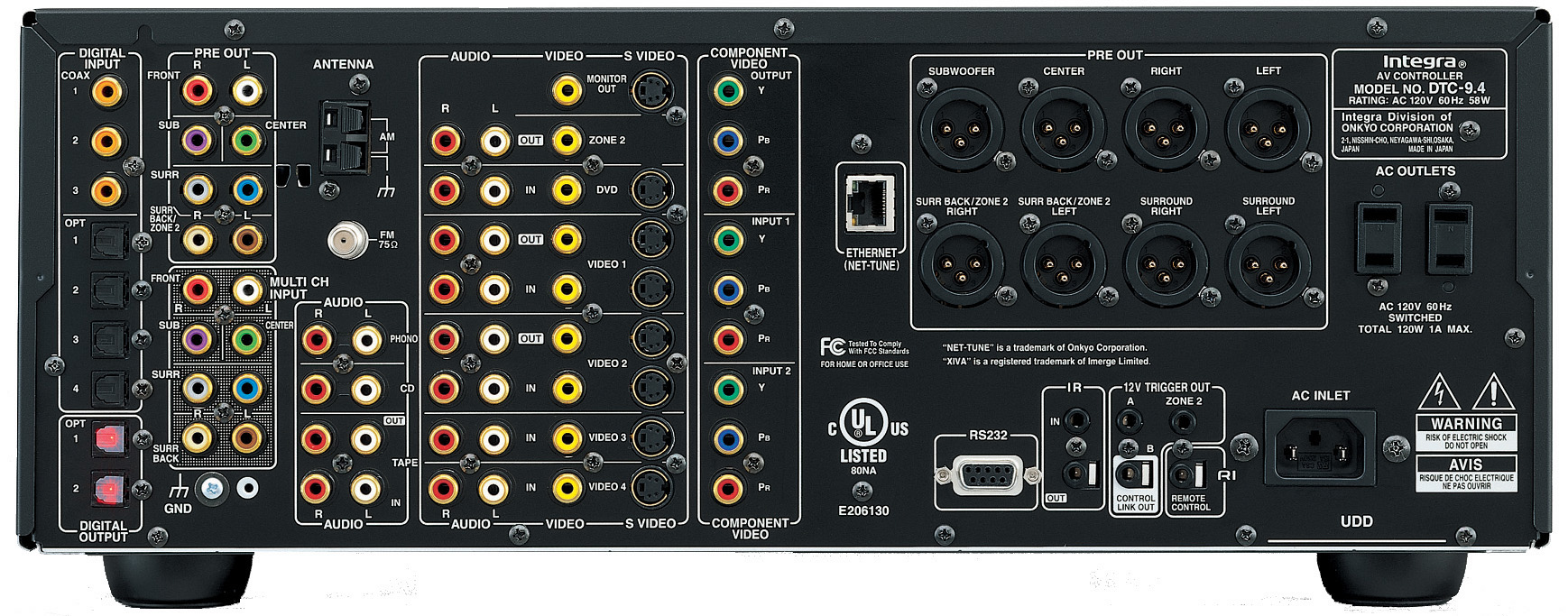
Back Panel of the Integra DTC-9.4 Preamp Processor
During this review I exclusively utilized the DTA-9.4 for amplification except for some dedicated listening tests to examine the effects of Integra's Class-D amplification against a comparably-priced Class AB/G amplifer. With my 4-ohm main speakers and 6-ohm center and surrounds, this provided between 180 - 240W (max) per channel to all speakers (rated with two-channels driven).
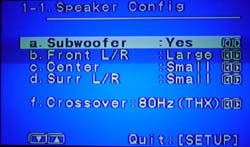 Having used the Onkyo TX-SR601 receiver for a number of weeks prior to
this review I was fairly familiar with the Integra's similar setup menus and configuration
methodology. I think that Onkyo/Integra has one of the most straightforward OSD systems for all
major settings, though you can certainly drill down into the menus quite a bit for some of the more
obscure adjustments you may wish to make. Going through the On-Screen Display (OSD) I was able to
easily set up the receiver and customize the DTC-9.4 to fit the required metrics of my listening
room. I configured the bass management to cross over at THX' recommended 80Hz and set the speaker
configuration as shown here.
Having used the Onkyo TX-SR601 receiver for a number of weeks prior to
this review I was fairly familiar with the Integra's similar setup menus and configuration
methodology. I think that Onkyo/Integra has one of the most straightforward OSD systems for all
major settings, though you can certainly drill down into the menus quite a bit for some of the more
obscure adjustments you may wish to make. Going through the On-Screen Display (OSD) I was able to
easily set up the receiver and customize the DTC-9.4 to fit the required metrics of my listening
room. I configured the bass management to cross over at THX' recommended 80Hz and set the speaker
configuration as shown here.
In addition to being able to set your crossover in 20Hz increments from 40Hz - 120Hz, you can enable subwoofer out in 2-channel analogue/PCM mode via the Audio Adjust/Sound Effects/Subwoofer menu. While there is no subwoofer output in the analogue Pure Direct mode (which bypasses all DSP and disables all video processing), you are able to engage it in Direct and Stereo modes. The flexibility of the Integra processor is only limited by the lack of multiple settings for different listening modes. For example, while I can alter the subwoofer levels for both DTS and Dolby Digital modes, I cannot permanently adjust individual speaker levels for different modes. This is especially handy when switching between listening to multichannel audio such as SACD/DVD-A and movies. THX is actually building a much more complex DSP mode due to the extreme differences in typical levels associated with gaming and movie/song reproduction. For this very reason it is extremely helpful to be able to store alternate levels for different listening modes. One nice thing is that the DTC-9.4 makes it very easy to adjust channel levels temporarily on the fly by simply hitting CH Sel (channel select) and raising the level of the desired speaker. This works in both multichannel and digital input modes.
 Quick Picks
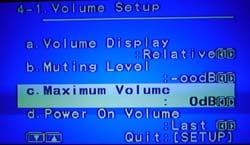
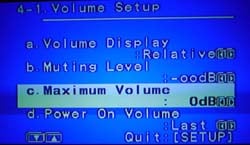
There are some thiings that are worth pointing out right away with regards to the Integra DTC-9.4. The Maximum Volume setting located in the Preferences Setup menu enables you to set a maximum volume for your system. This is incredibly useful if you have small children or audio novices living in your home and could potentially save you thousands of dollars in blown drivers. Another excellent feature is Net-Tune (I'm going to gloss over it here because it will get its own article at a later date). Net-Tune enabled Onkyo and Integra products allow you to use your processor as a remote playback device for music stored on a networked PC in your home. The result is that you can finally play that MP3 library you've collected on your PC - in your living room! Very cool, very simple, and very practical in today's portable electronics driven world. Character Input is a neat way to create custom labels for your inputs. I've always been a fan of this and feel that more receivers and processors should incorporate this feature. Combined with a fully routable audio/video matrix, this basically allows you to have total freedom in routing devices through the various inputs of the Integra processor. Dolby Headphone mode is the last thing I'll mention here. If you haven't tried this, do yourself a favor and grab a set of over-the-ear headphones and plug them in. You can set the amount of room size you'd like to hear in the Dolby Headphone mode, but regardless of what you choose, you'll be amazed at the surround effect created by this DSP.
Integra DTC-9.4 CHAD Remote
This remote control is excellent if you like LCD remotes. It is quite similar in features to the Philips Pronto TS series of remote controls (it has less tactile buttons than newer Pronto models so nearly everything must be controlled using the LCD touch screen). With the optional RF kit and docking station you can control all of your devices from adjoining rooms and without line of site. I'm getting a reputation as a remote control critic, but I have found several that I really like. The downside to LCD remotes is that you spend more time looking at the remote than you do with a remote having tactile buttons that can be "felt". Nevertheless, some people swear by LCD remotes and love the complete customization that they can deliver - and for those people, the CHAD will provide an excellent experience.
As expected, the remote comes configured with everything you need to run the DTC-9.4. All other functionality will need to be programmed from the internal database or learned from existing remotes. Because none of the CHAD's 12 Mitsubishi TV codes could operate my Diamond 55" HDTV, I got to learn both methods very well (a third method is via free CHAD Edit software downloadable from their website.) The internal database was sufficient to start me off with my Yamaha DVD player and Scientific Atlanta cable box. I was able to quickly learn a few missing commands via the "Learn" function of the CHAD. If you want to actually move icons around or design custom button screens, you'll want to download and install the CHAD Edit software. It's fairly intuitive, but like any complex application it will take some time to get used to. The CHAD comes with an RS-232 (serial) cable that you will need to connect the remote to your PC (Windows only).
 Pros:
Pros:
- 500 device internal database
-
Clear backlit display easy to view in total darkness
- Similar to Philips Pronto remote
Cons:
- Very few tactile buttons
- Cumbersome PC software for reprogramming custom buttons or functions
- Several key buttons in difficult to activate corners
Options:
-
BCC-5 Docking Cradle
- RFR-5 RF Receiver and Distribution Block
Integra DTC-9.4 Music and Movie Theater Modes
The decision to have these processors spec'ed for THX Ultra2 was a good one. Engaging the THX mode almost always improved the quality of the feature films in my listening room, though I prefer to not utilize DSP for most music tracks except for certain CDs that benefit from Dolby Pro Logic II. According to John Dahl of THX, the reason THX was created was to level the playing field and give everyone an opportunity to hear the soundtrack in the way it was intended. Judging by how good some of the DVDs I watched sounded, I feel this processor does a good job of delivering on that ideal. Available THX DSP modes include THX Ultra2 Cinema, MusicMode, Cinema (PL II), Cinema (Neo:6), Surround EX, and DTS-ES THX Cinema.
The Integra, of course, also comes with Dolby Digital EX, DTS Discrete 6.1 (and Matrix 6.1), DTS 96/24, DTS Neo:6 and Pro Logic II modes. If you are a purist, your bases are covered. Some modes are available in both 2-channel and multi-channel modes, but I will place them where I believe you'll find them more useful. I'll explain some of the non-standard modes below:
Movie Modes
- Theater Dimensional (T-D): This interesting mode is created for those who have only two speakers and still desire a surround sound experience. It essentially creates a pseudo surround experience around a fixed listening position (the characteristics of this position can also be adjusted through the receiver setup menus.)
- MonoMovie: Excellent for old black and white mono movies. Keeps the original soundtrack in the center channel where it belongs and adds some abience into the Front L/R speakers.
- CinemaFILTER (on/off): This EQs some high frequency out of the signal, taking the edge off of speakers or movie soundtracks that are "too bright". I thought this mode eliminated a lot of detail and do not recommend it use in most applications. If your speakers sound too bright perhaps you can adjust some of the acoustical properties of your room to compensate (add a throw rug, for example) or experiment with positioning.
Television Modes
- Enhance: Selecting the enhance mode will engage your surround channels in a soft ambient manner, also placing dialogue and main action into your center channel. I found this mode to be more of a hindrance on 2-channel music, but effective when watching sports programming.
- TV Logic: This mode claims to be geared towards a studio-based television program, enhancing surround sound and adding clarity to the center channel. I found that it basically accomplished this through sending some of the Front L/R information to the surrounds and over-accenting the center channel signal just a bit.
Music Modes
- ALL ST (all stereo): Located on the remote, this mode produces an all-encompassing background music presence. The front, surround, and surround back (if present) channels create a large, wide, stereo image.
- DIRECT: Input signal is sent to the right and left channels only, bypassing all DSP and therefore also not routed to the subwoofer.
- PURE AUDIO: Same as DIRECT mode, however the display is turned off, as is the power supply to the video circuitry. This serves to minimize noise and provide an uninterrupted audio path with no DSP or interference.
- STEREO: 2-channel source audio is output with bass management information sent to the subwoofer according to the crossover settings and Speaker Setup menu.
- Orchestra: In this mode the center channel is muted and the surround channels enhanced to create an artificially more expansive surround environment. This is an effective mode for opera or when attempting to simulate a large hall or theatre. Warning: Don't try this mode on regular music as your head may explode.
- Unplugged: This mode enhances the Front L/R channels giving you the impression that you are closer to the stage performance of an artist. Try this mode on just about any CD and you'll instantly get a more intimate positioning of the sound field. Warning: You may not want to get this close to certain artists!
- Studio-Mix: Having recorded and mixed numerous tracks in the studio I found this mode to be reminiscent of a rushed 4am studio monitor mix - complete with crushed vocals and a relatively flat mix. If you like recessed vocals and a more subdued mix it might be fun to play with this mode.
Integra DTC-9.4 Listening Tests and Conclusion
DTA-9.4 Sound - Putting Class-D to the Test
The DTA-9.4 is a digitally-controlled Class-D amplifier having a digitally generated control that switches a 400kHz power stage. In a Class-D amplifier, no error control is typically present or the error control is topologically equivalent to an analog-controlled class D with a DAC in front. The upswing is that the amplifer is about 90% efficient with a low amount of heat production and thus fan-less. It also saves quite a bit in the size and weight department coming in at only 39 lbs and a hair under 18" deep. The bad rap that Class-D has been getting lately has to do with the THD levels (in the case of the DTA it has a THD of 1% at rated power.) The DTA-9.4 also lacks THX certification.
So how do you tell if the DTA-9.4 Class-D solution is a decent performer? Simple - put it up against a quality Class AB/G amplifier like the Sherbourn 7/2100 . I lined up the Sherbourn and manually switched identical interconnects and speaker cables between the two units.
Editor's Note
I utilized banana connectors to easily connect and disconnect the speaker cables to the amps but wanted to point out the excellent quality speaker posts located on the back of the DTA-9.4 amplifier. They will easily handle large spade connectors as well as banana jacks or whatever else you want to throw at them. When connecting spade connectors, the plastic housing of the post keeps each cable positioned correctly to avoid slipping and shorting of the ends - a definite bonus.
As shown in my equipment list, the Yamaha DVD-S2300 MK2 was the transport and the DTC-9.4 was retained and utilized as the preprocessor. I pulled both units out into the room, making my life a bit easier and cable-switching a bit more expedient. An SPL meter allowed me to learn output volumes suitable to bring both amplifiers to the same perceived level for undergoing the listening comparison.
Listening Tests - Multichannel Audio
SACD: Norah Jones Come Away With
Me
I conducted all listening tests after recalibrating my system using the AVIA setup DVD, setting all
speakers to 75dB reference level (C-weighted). The first disc I put in was Norah Jones' Come Away With
Me, which is simply an excellent SACD to use if you want to hear vocal clarity and detail as well as
excellent room ambience and reverb. It won't excercise your subwoofer, but it will give you a great
reference point with which to compare amplifiers - which is exactly what I was doing. The DTA-9.4 held
its own and performed admirably. The differences heard between the amps were fairly subtle and I had to
go back and forth quite a few times to hear a distinction. In particular, the finger noises on the
guitar on Track 2 was a bit more pronounced and clear with the Sherbourn, but it took a lot of critical
listening to hear the difference - let alone decide if the difference was better or worse. Track 3
allowed some comparison of the bass control of each amp and both performed with too much similarity to
make a distinction. The jury is still out on this particular test for normal listening. When cranking
up the volume to near-overbearing levels, I did notice the differences became more pronounced, with the
Sherbourn allowing smoother reproduction of vocals while the DTA-9.4 tended to possess more
edge.
 DVD: The Matrix Reloaded
In watching and listening to
The Matrix Reloaded
I was blown away by
Chapter 24, the Ducati motorcycle scene which ends with the head on collision and explosion of two
colliding semi trucks. There was little to no discerable difference between the 7/2100 and the DTA-9.4
in much of the movie chapters that I listened to. Both produced deep, well-controlled low end through
the M80ti speakers (again, subwoofer was disengaged during these tests). The clear observation was that
the DTA-9.4 does an excellent job of controlling detail and bass material for feature films, even at
high SPLs.
After performing several hours of comparison, I found that two things affecting the perceived performance of the Integra Class-D amplifier: high SPLs and detailed musical passages. If you are utilizing the amplifier at reasonable playback levels (under 95dB) the difference is minimal, especially on feature film soundtracks. This conclusion was reached after playing several movie sequences from DVDs including Lara Croft Tomb Raider: The Cradle of Life, The Lord of the Rings: The Two Towers and the Matrix Reloaded. On 2-channel music, the Integra amplifier exhibited less articulate bass response than the Class AB/G amp when played at higher volumes.
Overall I was impressed at the ability of the Integra digital amplifier to hold its own. There is definitely a difference in Class-D amplification, but it is a subtle difference and it is no wonder why so many companies are experimenting with this technology. Integra seems to have been more successful than most, which is why we wanted to hear it for ourselves. Integra attributes much of this success to its implementation an ingenious circuit that reduces noise caused by the transient capacitance inherent in switched MOSFET devices. The DTA-9.4's "Zero Switching Power Supply" only switches when this value is zero, resulting in a highly accurate power supply output.
Conclusions and Overall Perceptions
The Integra products have always benefited from all of the R&D that goes into the Integra Research line, but none so much (recently, anyway) as the DTC-9.4 preprocessor. This unit shares many of the features of the Integra Research RDC-7 and even benefits from its later release by having some additional features (adding component video upconversion, for example). The result is a preprocessor that is ergonomic, well-rounded and great-sounding. I noticed no major flaws with the unit and many of our suggested improvements have already been confirmed by Integra as being integrated into the next round of receivers and pre-pros coming in the future.
As shown by the Integra DTC-9.4 Processor Checklist, this unit is a good value and holds its own against pre-pros and receivers costing much more. It performs well and many valuable features that are truly useful, from IntelliVolume and the Master Volume limiter to the CHAD remote control. We have been consistently impressed by Onkyo/Integra as well as with Integra Research who seems to be constantly breaking new ground with innovative products whose technology eventually makes its way into the more affordable product lines.
Integra receivers purchased through authorized retailers or directly from Integra carry a three year warranty on parts and labor, pretty standard for this level of product. We don't expect you'll need it as Integra is one of the more reliable receiver brands available based on our member feedback.
MSRP $3000
Integra
18 Park Way
Upper Saddle River, NJ 07458
800-225-1946
www.integrahometheater.com
The Score Card
The scoring below is based on each piece of equipment doing the duty it is designed for. The numbers are weighed heavily with respect to the individual cost of each unit, thus giving a rating roughly equal to:
Performance × Price Factor/Value = Rating
Audioholics.com note: The ratings indicated below are based on subjective listening and objective testing of the product in question. The rating scale is based on performance/value ratio. If you notice better performing products in future reviews that have lower numbers in certain areas, be aware that the value factor is most likely the culprit. Other Audioholics reviewers may rate products solely based on performance, and each reviewer has his/her own system for ratings.
Audioholics Rating Scale
 — Excellent
- — Very Good
- — Good
- — Fair
- — Poor
| Metric | Rating |
|---|---|
| Multi-channel Audio Performance | |
| Two-channel Audio Performance | |
| Video Processing | |
| Bass Management | |
| Build Quality | |
| Fit and Finish | |
| Ergonomics & Usability | |
| Ease of Setup | |
| Features | |
| Remote Control | |
| Performance | |
| Value |  |
Clint Deboer was terminated from Audioholics for misconduct on April 4th, 2014. He no longer represents Audioholics in any fashion.
View full profile Subscribe to our newsletter