


APC AV H15 1.5kVA H Type Power Conditioner Review
APC H15 Power Conditioner
- Product Name: H15
- Manufacturer: APC
- Performance Rating:


- Value Rating:
- Review Date: February 10, 2008 19:05
- MSRP: $ 449.99
INPUT
Input Voltage
Range for Operation
(on utility): 92V - 144V
Nominal
Voltage: 120 Vac
Allowable
Input Frequency for Operation (on utility): 47 - 63 Hz
Rated Input
Current: 12 Amps
Input Circuit
Breaker Rating: 15 Amps
OUTPUT
Number of
Outlets: 12 (all outlets are surge protected, conditioned, and regulated)
Output
Regulation: +/- 5%, 10%, 15% for AVR (Range = Narrow/Normal/Wide)
Outlet type:
NEMA 5-15R
Rated VA
Capacity: 1440VA
Rated Watt
Capacity (continuous): 1440 Watts
Rated Output
Current: 12 Amps
SURGE
PROTECTION
Let-Through
Voltage Rating: <40 Volts
Peak Surge
Current (NM + CM): 250KA
Data Line
Protection Jacks (splitter): Single-line 2-wire phoneline protection for phone,
modem, or fax.
Coax: 5MHz-1GHz
Two pairs (one with splitter)
MISCELLANEOUS
EMI/RFI
Attenuation: 40-100dB at 100KHz-30MHz
Total Surge
Joules: 5200 Joules
DC Trigger:
Two 3.5mm mini-jack plugs (5-30V)
Physical
Dimensions (H x W x D): 3.75 x 17 x 9.5”
Unpackaged
Weight: 16.7 lbs
Shipping
Weight: 22.4 lbs
Safety Agency
Approvals: UL1449, cUL, FCC Part 68 Class B, FCC Part 15 Class B, NOMClick on a thumbnail below
to view full image.
Pros
- Beautiful
- Performs perfectly
- Lots of feedback to the user so they know exactly what it is doing
Cons
- Sometimes doesn't play well with subwoofer amps
APC AV H15: Introduction and First Impressions
 "Pursuing the
truth in audio and video" has often translated into "pointing out the
snake oil that permeates our field." Of course cables have long been a
culprit but also on our short list is power conditioning. I can't tell you how
many of these products we've come across that were practically empty boxes with
reinforced sidewalls for added heft. We've found some that have actually
created accentuated spikes rather than suppress them. Snake oil doesn't even
begin to describe it. And the price tags that are associated with such products
would turn your stomach. At least it did me. But that doesn't stop other home
theater publications from gushing over them.
"Pursuing the
truth in audio and video" has often translated into "pointing out the
snake oil that permeates our field." Of course cables have long been a
culprit but also on our short list is power conditioning. I can't tell you how
many of these products we've come across that were practically empty boxes with
reinforced sidewalls for added heft. We've found some that have actually
created accentuated spikes rather than suppress them. Snake oil doesn't even
begin to describe it. And the price tags that are associated with such products
would turn your stomach. At least it did me. But that doesn't stop other home
theater publications from gushing over them.
APC has long been associated with UPS and power solutions that are probably used by your school, business, and plenty of governmental entities. Well respected doesn't begin to describe them. I often wonder how a company like APC decides to get in to the home theater market. Now, I can't honestly say that I know how this all went down but this is what I envision…
Fade up on the office of a powerful corporate executive bent over his desk looking over blueprints and contracts. The glass on the door reads "Chief Research Officer APC".
Enter flustered employee, bursting through the door. He's forgotten to knock but doesn't seem to remember that in his excitement. The CRO looks up, annoyed at first but he holds his tongue as he sees the expression on the employee's face. The employee holds a magazine open and slams it down on the CRO's desk.
Employee: You've GOT to see this…
CRO: What's the meaning of…
His voice trails off as he looks down at the open magazine. The employee has placed it upside down but it is clear that it is a photograph of the internals of some sort of AV equipment. The CRO's eyes squint in concentration as he slowly turns the magazine and begins to decipher the device laid bare.
CRO: What's this supposed to be?
Employee: They call it a power conditioner!
The CRO's eyebrows arch violently. Surprise is evident on his face.
CRO:
But that'll never work!
Employee: I know but look at what they are charging for it!
He points to a 4 figure price tag.
CRO: That's outrageous!
Soon after it was decided that APC should provide a product that not only performed the advertised function but didn't rake the consumer over the coals for doing so.
First Impressions and Build Quality
 My little fiction aside, APC has really put together a nice piece of
equipment in the H15. The H15 is a stand alone unit that provides surge
protection, isolated noise filtering, and voltage regulation. Do you need this?
I can't say. But you most certainly need the surge protection. Isolated noise
filtering might be needed if your neighbor uses power tools or if your wife
likes to blow-dry her hair during the climatic scenes of Lord of the Rings.
Voltage regulation would be considered necessary if you live in an area near a
high current draw (like a hospital) which might lower or raise your voltage
unexpectedly or if your home theater shares a circuit with your AC. My only caveat
here is for those of you with projectors (anything with a bulb). Ensuring a
stable voltage source will increase your bulb life significantly. Depending on
the cost of your replacement bulbs, this could amount to a serious cost
savings.
My little fiction aside, APC has really put together a nice piece of
equipment in the H15. The H15 is a stand alone unit that provides surge
protection, isolated noise filtering, and voltage regulation. Do you need this?
I can't say. But you most certainly need the surge protection. Isolated noise
filtering might be needed if your neighbor uses power tools or if your wife
likes to blow-dry her hair during the climatic scenes of Lord of the Rings.
Voltage regulation would be considered necessary if you live in an area near a
high current draw (like a hospital) which might lower or raise your voltage
unexpectedly or if your home theater shares a circuit with your AC. My only caveat
here is for those of you with projectors (anything with a bulb). Ensuring a
stable voltage source will increase your bulb life significantly. Depending on
the cost of your replacement bulbs, this could amount to a serious cost
savings.
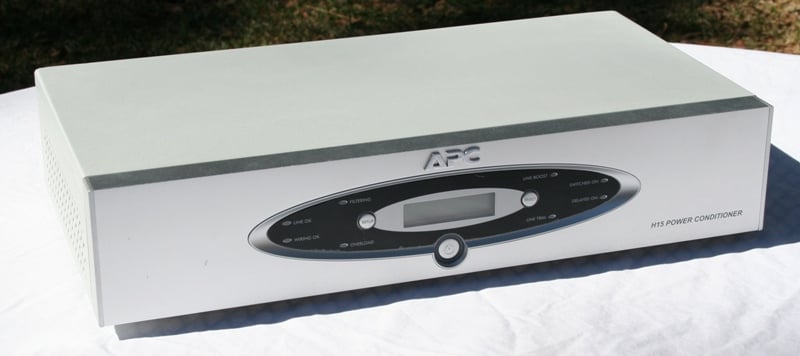
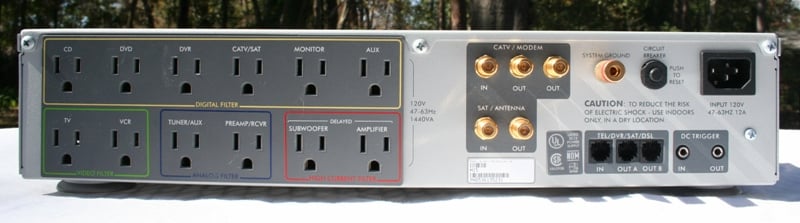
The H15 is built like a rectangular, silver tank. At over 16 pounds, it certainly feels like a hefty piece of electronics equipment. The front of the unit has a small two-line LCD display, three buttons, and a number of lights. The central button is an On/Off button (they recommend On at all times). Once the H15 is integrated into your system, I can see no reason why you'd want to turn it off. The left button is for accessing the Setup menus and the right button is a Select button for use when choosing the different settings.
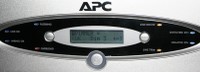
There are a number of lights on the front panel which indicate the state of the unit. Working from the bottom left and going clockwise we have:
-
 Overload
Status Indicator - Will light up (red) if you've plugged too much
stuff into the H15. Unplug stuff until the light goes away.
Overload
Status Indicator - Will light up (red) if you've plugged too much
stuff into the H15. Unplug stuff until the light goes away. -
Wiring OK Status Indicator - If it is blue, your house is wired properly. If it is not lit then either there is a missing ground, overloaded neutral or reversed polarity. Call an electrician.
-
Line OK Status Indicator - If it is blue, you're OK. If it is not lit the input voltage is too low (or high) and the unit will go into boost or trim mode to compensate. You may hear a clicking sound.
-
Filtering Status Indicator - When blue, EMI/RFI noise reduction circuit is active.
-
Line Boost Status Indicator - When lit (orange) the H15 is boosting the voltage.
-
Switched On Status Indicator - All outlets (except those with a programmed delay) are receiving power.
-
Delayed On Status Indicator - All delayed outlets are receiving power.
-
Line Trim Status Indicator - When lit (orange) the H15 is trimming the voltage.
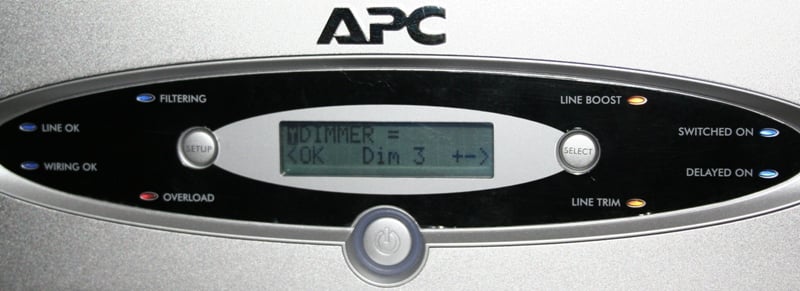
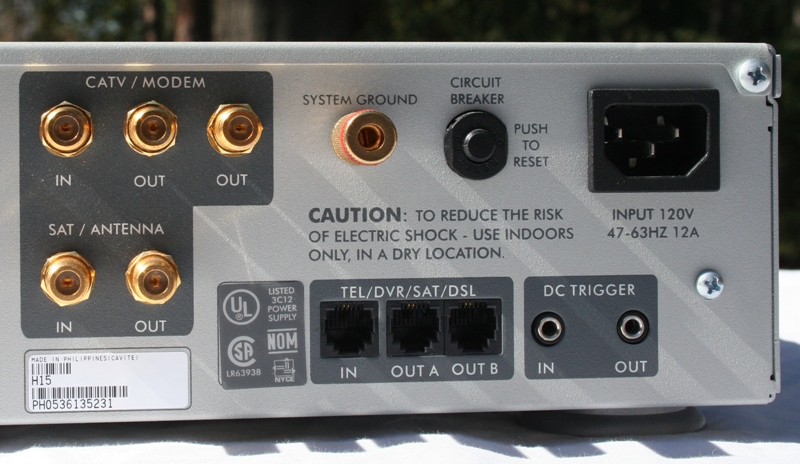 Taking a look at the back of
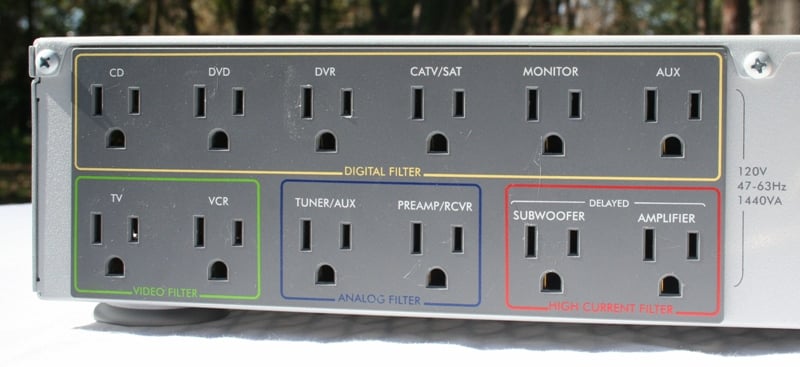
the unit, we see the 12 outlets which are all labeled in some way (all the labels on the back of the unit are suggestions only - your DVD player won't blow up if you plug it in to the CD outlet). Under the Digital Filter label, there are 6
outlets labeled CD, DVD, DVR, CATV/SAT, Monitor, Aux. The Video Filter has TV and VCR, Analog
has Tuner/Aux and Preamp/RCVR, and Delayed
has Subwoofer and Amplifier. The strike against these outlets is that the
outlets are a little too close for your larger wall warts. There is a single in
and two outs for CATV/ Modem RF cable and one in and one out for a SAT/Antenna
RF. If you have a telephone line that you'd like protected there is a single in
and two outs. There is a removable power cord along with a manual circuit
breaker button (in case of a major surge) and DC trigger in and out ports.
Lastly, there is a System Ground Terminal for you to tie all your grounding
wires to eliminate ground loops and their accompanied hum.
Taking a look at the back of
the unit, we see the 12 outlets which are all labeled in some way (all the labels on the back of the unit are suggestions only - your DVD player won't blow up if you plug it in to the CD outlet). Under the Digital Filter label, there are 6
outlets labeled CD, DVD, DVR, CATV/SAT, Monitor, Aux. The Video Filter has TV and VCR, Analog
has Tuner/Aux and Preamp/RCVR, and Delayed
has Subwoofer and Amplifier. The strike against these outlets is that the
outlets are a little too close for your larger wall warts. There is a single in
and two outs for CATV/ Modem RF cable and one in and one out for a SAT/Antenna
RF. If you have a telephone line that you'd like protected there is a single in
and two outs. There is a removable power cord along with a manual circuit
breaker button (in case of a major surge) and DC trigger in and out ports.
Lastly, there is a System Ground Terminal for you to tie all your grounding
wires to eliminate ground loops and their accompanied hum.
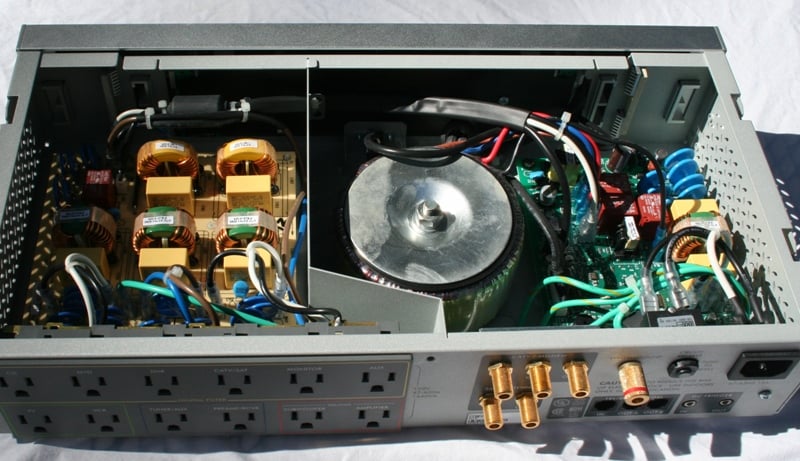 From an aesthetic
standpoint, the H15 just can't be beat. The review unit is silver but there is
a black version as well. Personally, I prefer the silver. Cracking open the
case we see a
large isolation transformer separated from the analog input filters, high
quality MOV’s for surge suppression, and heavy gauge wiring to ensure maximum
power delivery. This is no empty box! There is no doubt that this design
utilizes some high quality parts and sturdy construction all backed by UL
Certification which is a rarity in the business of home theater power
conditioners. UL Certification is something that one should be very concerned
about when looking into surge protection and power conditioning. Why? Well, I
can't say that non-UL certified products are necessarily unsafe, but I can say
that UL certified products ARE safe. If you want to take your chances with
non-UL certified products, have at it. It's your equipment to fry.
From an aesthetic
standpoint, the H15 just can't be beat. The review unit is silver but there is
a black version as well. Personally, I prefer the silver. Cracking open the
case we see a
large isolation transformer separated from the analog input filters, high
quality MOV’s for surge suppression, and heavy gauge wiring to ensure maximum
power delivery. This is no empty box! There is no doubt that this design
utilizes some high quality parts and sturdy construction all backed by UL
Certification which is a rarity in the business of home theater power
conditioners. UL Certification is something that one should be very concerned
about when looking into surge protection and power conditioning. Why? Well, I
can't say that non-UL certified products are necessarily unsafe, but I can say
that UL certified products ARE safe. If you want to take your chances with
non-UL certified products, have at it. It's your equipment to fry.
APC AV H15: Menus, Use, and Conclusion
If you hit the Select button on the front of the H15, it will cycle between four different displays. The Power display shows you how much power your equipment is drawing and what percentage that is of the total power available. The Vout/Iout screen will let you know the voltage and amps going out to your equipment. The Vin/Freq screen tells you the incoming voltage and frequency. Lastly, the Serial Number and Firmware Version Display is pretty self-explanatory.
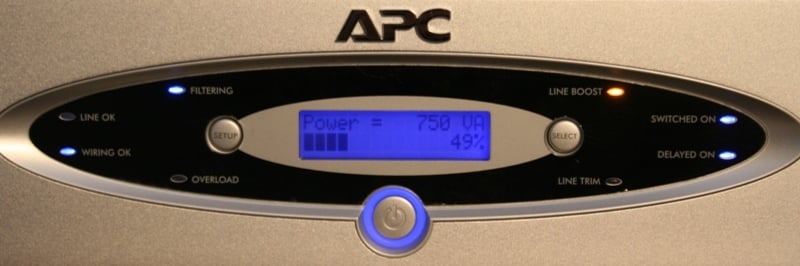 By far my favorite
display was Power. I had my display, receiver, and SMS-1 plugged into the H15.
With everything on and at a normal listening volume (able to carry on a
conversation at the same time) the power draw was about 20% (of the 1440
voltage-amps (VA) available). Being a bit of a sadist, I decided to see just
how much power I could pull with the Denon
AVR-2307CI using the DVD-A of Porcupine
Tree: Deadwing. Deadwing is a
multichannel music disc with tons of information. I felt that I could be sure
that I was taxing my receiver (and the APC) as much as possible. Jacking the
volume up to +6.5 (which is LOUD), I found I tended to pull around 50% (or
about 750VA) with spikes up to about 65%. What does this mean? At pretty much
max volume I had plenty of headroom for just about every non-amp component in
my home (which is a lot). It also makes you realize how little continuous power
you draw. It's all in dynamics which the APC display is too slow to track.
Plus, it was fun to try and overload the H15.
By far my favorite
display was Power. I had my display, receiver, and SMS-1 plugged into the H15.
With everything on and at a normal listening volume (able to carry on a
conversation at the same time) the power draw was about 20% (of the 1440
voltage-amps (VA) available). Being a bit of a sadist, I decided to see just
how much power I could pull with the Denon
AVR-2307CI using the DVD-A of Porcupine
Tree: Deadwing. Deadwing is a
multichannel music disc with tons of information. I felt that I could be sure
that I was taxing my receiver (and the APC) as much as possible. Jacking the
volume up to +6.5 (which is LOUD), I found I tended to pull around 50% (or
about 750VA) with spikes up to about 65%. What does this mean? At pretty much
max volume I had plenty of headroom for just about every non-amp component in
my home (which is a lot). It also makes you realize how little continuous power
you draw. It's all in dynamics which the APC display is too slow to track.
Plus, it was fun to try and overload the H15.
There are a few menus on the H15 that are accessed by hitting the Setup button. Once you get to the menu you want, you must hit the Select button until you get to the correct setting. Each menu has a number of options so I'll run through them individually:
Dimmer: There are a total of eight options (Off, Dim3, Dim2, Dim1, Normal, Bright1, Bright2, Bright3) with Dim3 being the lowest (other than 'Off' of course) and Bright3 the brightest. You're going to want to adjust this based on your love of pretty blue lights and the placement in your room. In my room I preferred the lowest setting which gave me just enough light to see the indicator lights but not so much that the display was distracting me.
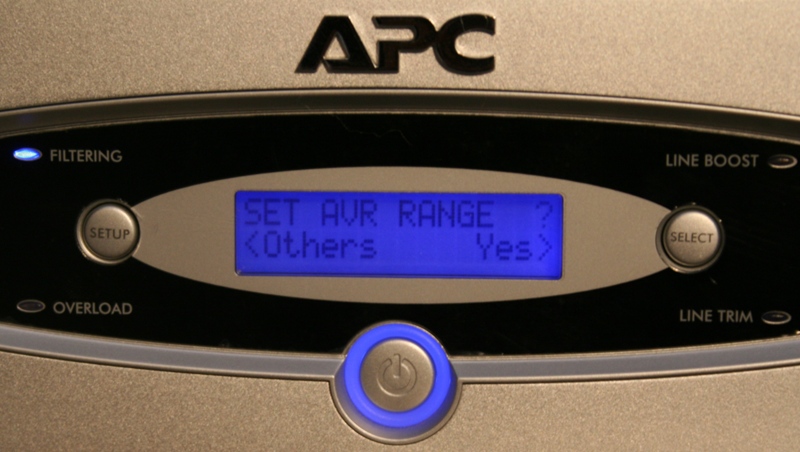 AVR Range: There are only three setting here -
Wide, Normal and Narrow. Narrow regulates to 120 volts plus/minus 5% (or
102-132 Volts). Normal
is 120 +/- 10% (97-139 Volts) and Wide is 120 +/- 15% (92-145 Volts). We
suggest you start with Narrow. If you find that the H15 is running into
boost/trim issues too often, bump it up. I had mine set to Narrow and almost
never had it adjust.
AVR Range: There are only three setting here -
Wide, Normal and Narrow. Narrow regulates to 120 volts plus/minus 5% (or
102-132 Volts). Normal
is 120 +/- 10% (97-139 Volts) and Wide is 120 +/- 15% (92-145 Volts). We
suggest you start with Narrow. If you find that the H15 is running into
boost/trim issues too often, bump it up. I had mine set to Narrow and almost
never had it adjust.
Delay Time: Here you can select the delay time for the two delayed outlets. You have the option of 0-12 seconds in 1 second intervals
Beeper: Turn the beeper on and off. The beeper only sounds when you are controlling the unit so this isn't much of an issue.
Language: If you don't speak/read English (so I'm guessing this review isn't helping you much) you can choose French or Spanish.
Set-Up & General Use
 You almost don't need
the manual or anything else to setup this unit. Plug everything into the
appropriate outlets, plug the unit into the wall, and turn it on. That's pretty
much it. During my evaluation period, I almost never heard a sound out of the
thing. Once I dimmed the front display I pretty much forgot it was there. It
looked pretty, it did its job, and it didn't bug me.
You almost don't need
the manual or anything else to setup this unit. Plug everything into the
appropriate outlets, plug the unit into the wall, and turn it on. That's pretty
much it. During my evaluation period, I almost never heard a sound out of the
thing. Once I dimmed the front display I pretty much forgot it was there. It
looked pretty, it did its job, and it didn't bug me.
That's not to say that it was a glorified surge protector. It was far more than that. I was surprised to note how often I'd see the Line Boost light lit. Occasionally on power up and would hear it click indicating that there was a dip in the available power as all those components were powering on but that would subside after a moment or two. The Line Boost however was indicative of a systemic (albeit minor) problem with my power. It didn't so much as hiccup at this issue but it was nice to know that it was doing something.
What I found particularly reassuring was that the APC AV H15 was designed to inform me of any wiring problems in the house. As most of us haven't built our houses from the ground up, there is always this nagging doubt that there might be a problem somewhere - not any more. Add to that the fact that the H15 is UL approved and will perform well above the stated specs gives me piece of mind that my gear will be safe even in the worst of Florida's weather (save floods of course).
The only issue I had with the H15 was its interaction with a subwoofer. Some amps are designed such that they will fool the H15 into thinking that it is in a low voltage situation. The H15 will naturally boost the voltage to accommodate. This can blow the fuses on the sub amps which have very tight operational tolerances (provided they have them). I had this happen twice before I discerned it was the H15/sub interaction. From the standpoint of blame - it's hard to find a culprit. The amp is doing what it is supposed to be doing and the H15 is doing its job. My suggestion is to connect the H15 to a subwoofer with caution. Under normal circumstances this shouldn’t be an issue, but if you find a similar experience when you plug your subwoofer into this unit, disconnect it and plug it into a standard surge protector (APC makes plenty of these as well). I would like to note that I had a number of receivers plugged into the H15 without a problem so my issue may be isolated specifically to the subwoofer I was using in this review.
Note from APC
The problem Tom experienced is probably the sub-woofer drawing a large in-rush of current, causing the line to sag. Some types of AV equipment (Class-A amplifiers, sub-woofers, etc.) have extremely large capacitor banks. If the voltage increases suddenly on these capacitors (when the H15 makes a correction) they demand a large current pulse. Poorly designed equipment has a current limiter that acts only when the equipment is first turned on, or not at all. This is likely the case for this sub-woofer (which is why they designed it with replaceable fuses - any dramatic voltage change after initial turn-on will likely damage the fuse).
Viewing/Listening Evaluation
I'd love to wax poetic about how much cleaner the sound was or how better realized the picture was on my display but I just can't. Not that you won't notice a difference. Depending on the state of your power in your home, you very well may. But for someone like me with very few power issues, the H15 mostly provided top of the line protection and regulation along with the piece of mind that can't be beat at this price point.
Conclusion
 The
APC AV H15 performs its every job superbly - of that there is no doubt. I can find
no real flaw that I can attribute to it. Depending on your need, the H15 may be
a purchase of necessity or just the cherry on the top of your dream system.
Personally, the H15 embodies the perfect marriage of form and function. It
looks as good as it performs. If you really want to make sure that your system
is fully protected or if you have power issues, take a close look at the H15. It's
hard to give a value rating to such a product. Should I compare it to surge
protectors that cost much less but don't give you the conditioning or feedback
that the H15 does? Should I compare it to the high dollar esoteric conditioners
that may or may not be of any help in your system? Either way, the performance
of the H15 can't be beat... maybe matched but not beat. By that measure, this
product is a great value as those that might match it cost vastly more and, in
my experience, are inferior on other metrics.
The
APC AV H15 performs its every job superbly - of that there is no doubt. I can find
no real flaw that I can attribute to it. Depending on your need, the H15 may be
a purchase of necessity or just the cherry on the top of your dream system.
Personally, the H15 embodies the perfect marriage of form and function. It
looks as good as it performs. If you really want to make sure that your system
is fully protected or if you have power issues, take a close look at the H15. It's
hard to give a value rating to such a product. Should I compare it to surge
protectors that cost much less but don't give you the conditioning or feedback
that the H15 does? Should I compare it to the high dollar esoteric conditioners
that may or may not be of any help in your system? Either way, the performance
of the H15 can't be beat... maybe matched but not beat. By that measure, this
product is a great value as those that might match it cost vastly more and, in
my experience, are inferior on other metrics.
APC AV H15 Power Conditioner
$449.99
APC
132 Fairgrounds Road
W. Kingston , RI
02892
877-272-2722
About APC-MGE
In February 2007, APC and MGE UPS Systems combined to form a $3 billion (€2.4
billion) Critical Power & Cooling Services business unit of Schneider
Electric. Together, APC and MGE offer the industry’s most comprehensive product
and solution range for critical IT and process applications in industrial,
enterprise, small and medium business and home environments. APC and MGE
solutions include uninterruptible power supplies (UPS), precision cooling units,
racks, and design and management software, including APC's InfraStruXure®
architecture the industry’s most comprehensive integrated power, cooling, and
management solution. Backed by the industry’s broadest service organization and
an industry leading R&D investment, the combined company’s 12,000 employees
help customers confront today’s unprecedented power, cooling and management
challenges. Schneider Electric, with 112,000 employees and operations in 190
countries, had 2006 annual sales of $18 billion (€13.7 billion). For more
information on APC and MGE, please visit www.apc-mge.com.
All trademarks are the property of their owners.
The Score Card
The scoring below is based on each piece of equipment doing the duty it is designed for. The numbers are weighed heavily with respect to the individual cost of each unit, thus giving a rating roughly equal to:
Performance × Price Factor/Value = Rating
Audioholics.com note: The ratings indicated below are based on subjective listening and objective testing of the product in question. The rating scale is based on performance/value ratio. If you notice better performing products in future reviews that have lower numbers in certain areas, be aware that the value factor is most likely the culprit. Other Audioholics reviewers may rate products solely based on performance, and each reviewer has his/her own system for ratings.
Audioholics Rating Scale
 — Excellent
- — Very Good
- — Good
- — Fair
- — Poor
| Metric | Rating |
|---|---|
| Ease of Setup | |
| Build Quality | |
| Ergonomics & Usability | |
| Features | |
| Fit and Finish | |
| Performance |  |
| Value | |
As Associate Editor at Audioholics, Tom promises to the best of his ability to give each review the same amount of attention, consideration, and thoughtfulness as possible and keep his writings free from undue bias and preconceptions. Any indication, either internally or from another, that bias has entered into his review will be immediately investigated. Substantiation of mistakes or bias will be immediately corrected regardless of personal stake, feelings, or ego.
View full profile Subscribe to our newsletter