


APC AV C10 Home Theater Power Filter Review
- Product Name: APC AV C10 Home Theater Power Filter
- Manufacturer: APC AV
- Performance Rating:

- Value Rating:
- Review Date: March 18, 2008 20:25
- MSRP: $ 199
INPUT
Input Voltage
Range for Operation
(on utility): 92V - 140V
Nominal
Voltage: 120 Vac
Allowable
Input Frequency for Operation (on utility): 50-60 Hz
Rated Input
Current: 15 Amps
Input Circuit
Breaker Rating: 15 Amps
OUTPUT
Number of
Outlets: 12 (all outlets are surge protected and filtered)
Outlet type:
NEMA 5-15R
Rated Output
Current: 15 Amps
SURGE
PROTECTION & Filtering
Let-Through
Voltage Rating: < 40 Volts
Data Line
Protection Jacks (splitter): Single-line 2-wire phone line protection for
phone, modem, or fax.
Coax:
5MHz-1GHz Three pairs
EMI/RFI Noise rejection (100
kHz to 10 mHz) 55 dB
MISCELLANEOUS
Total Surge
Joules: 3400 Joules
DC Trigger: One
3.5mm mini-jack plug (5-30V)
Physical
Dimensions (H x W x D): 22.7” x 6.5” x 2.2”
Unpackaged
Weight: 6.71 lbs
Safety Agency
Approvals: UL1449, UL 1363, UL + CSA FCC Part 68 & 15 Class B, CE
Pros
- Excellent Filter and Surge Suppression
- Major Agency Approvals (UL, CSA, Part 15 & 68)
- Monitors Line Voltage, Wiring and Filter Conditioning Status
Cons
- Not rack mountable
- Useless wall bracket
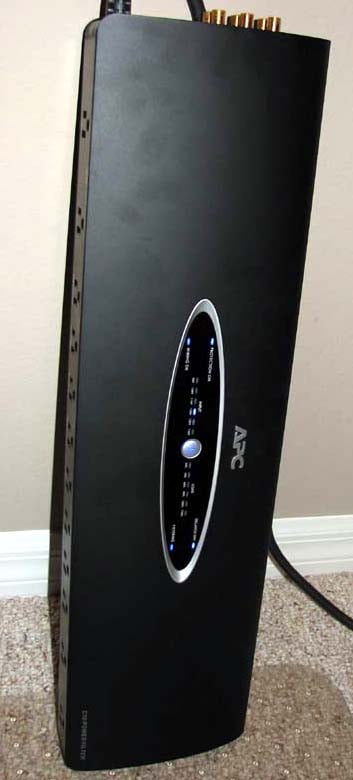
APC AV C10 Design Overview
 Spend
any appreciable amount of time on the Audioholics website and you will gather
that I am a fan of APC AV power products.
I'm not so impressed with the name brand as much as the reputation
they’ve built over the last couple of decades in the IT world and their
talented engineering staff behind the products. I had the opportunity to meet
many of the staff during my APC AV On Location visit I paid them two summers
ago at their R&D facility in Billerica,
MA. Their test facilities are quite
impressive which affords them the resources to properly engineer and test their
products.
Spend
any appreciable amount of time on the Audioholics website and you will gather
that I am a fan of APC AV power products.
I'm not so impressed with the name brand as much as the reputation
they’ve built over the last couple of decades in the IT world and their
talented engineering staff behind the products. I had the opportunity to meet
many of the staff during my APC AV On Location visit I paid them two summers
ago at their R&D facility in Billerica,
MA. Their test facilities are quite
impressive which affords them the resources to properly engineer and test their
products.
The APC AV C10 Power Filter is based along the design principles of their H15 Power Conditioner but it lacks voltage regulation. Instead it’s a straight up power filter but not a typical one you find from their competitors. This baby’s got some meat on its bones which will surely make the end user happy knowing they are actually buying a device that will do no harm to their equipment while at the same time actually protecting it from dangerous surges and power spikes.
Design Overview
The APC AV C10 is not your typical power filter. In fact, if it was any other company, they would have stamped the words “Power Conditioner” on the product, not gone through the extensive and costly UL certification process, and simply called it a day. APC AV chose the high road here. As competent as the C10 is for surge suppression and noise filtering, they don’t consider it to be a power conditioner. Their definition of power condition is on the same page as mine in that it must meet the three following criteria:
- Surge suppression
- EMI/Noise filtration
- Line (voltage) regulation
The C10 meets 2 of 3 of these requirements. If you want line regulation, you have to step up to an H10 or higher model.
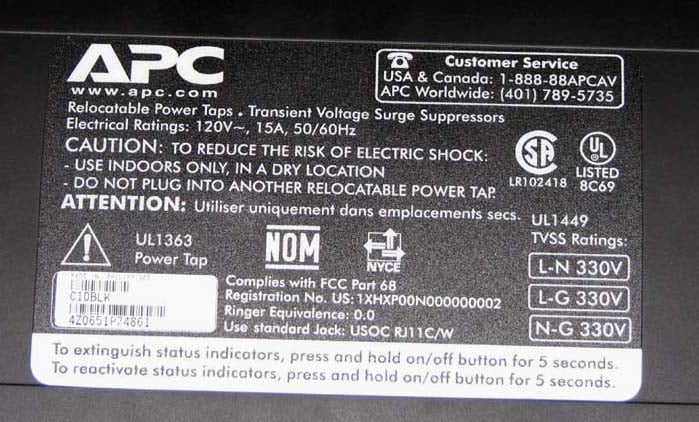 That being said, the C10 is still a valuable commodity for protecting
your expensive A/V gear from line transients caused by lightening strikes and
power spikes from your local power company.
APC AV is so sure of their product that they have a $350,000 life time
connected equipment protection guarantee.
Anyone can stamp a box with a guarantee but few can back up the safety
and reliability of their products with the proper industry regulatory
certifications. You will notice quite a
few regulatory body approvals stamped on the back panel of the C10 and I will
provide a brief explanation to their meaning.
That being said, the C10 is still a valuable commodity for protecting
your expensive A/V gear from line transients caused by lightening strikes and
power spikes from your local power company.
APC AV is so sure of their product that they have a $350,000 life time
connected equipment protection guarantee.
Anyone can stamp a box with a guarantee but few can back up the safety
and reliability of their products with the proper industry regulatory
certifications. You will notice quite a
few regulatory body approvals stamped on the back panel of the C10 and I will
provide a brief explanation to their meaning.
Safety agency approvals: UL1449, UL1363, UL + CSA FCC Part 15 and Part 68 Class B
- UL1449 - Standard for Transient Voltage Surge Suppressors
- UL1363 – Standard for Relocatable Power Taps. A relocatable power tap (RPT) is intended only for indoor use as a temporary extension of a grounding alternating-current branch circuit for general use.
- Part 68 - uniform standard for the protection of the telephone network from harms caused by connections of terminal equipment. What this means is this device can NOT cause harmful interference and it must accept any interference received even if it can cause undesirable operation. The telephone on-hook impedance must be preserved and the line must remain properly balanced so that no hum or added crosstalk can ingress at the customer premise or central office and there is no interference with the telephone ringer.
- Part 15 B - has to do with radiated emissions for commercial usage. Generally, this means the device leaks a signal at some level. Because it costs money to filter out noise, there is always a balance struck between regulatory compliance and perfect filtering in these devices. Microwave ovens or devices with microprocessors may leak within allowable limits but may generate an undesired signal that interferes with something in the way of a licensed communications device such as a radio or phone.
The APC C10 RJ11 phone splitter even includes an REN# (Ringer Equivalence #) which pertains to the electrical load the telephone line sees when the device is connected. 1 REN is equivalent to a 693 ohm resistor in series with an 8uF capacitor. The lower the REN# the better so that it doesn’t interfere with call waiting or caller ID. Most modern phones have a REN# of around 0.2. The APC C10’s REN# is a whopping 0.0 so basically when it’s connected to your phone line, it’s transparent.
Let-Through Voltage
During normal operation surge suppressors are essentially transparent on the line. Once the voltage across their leads reaches their clamping voltage they conduct electricity to create a short circuit in hopes to arrest the surge. They basically give the surge a low resistance direct path to bypass the connected equipment. The clamping voltage of the components in the surge suppressor reveals the most important metric of judging its effectiveness. This is called the let-through voltage. APC conducts this test using a ring wave as opposed to the UL 330V rating which is virtually a useless measure of determining real world protection. Very few companies have this testing capability and most simply create a Joule rating by adding up the specified values of the MOVs in the product. The Let-Through Voltage measurement indicates the maximum amount of above nominal peak voltage the device will allow to reach your equipment after surge suppression. In the case of the C10 which happens to be rated for 40V, this means your equipment would momentarily see about 210V (based on a peak nominal voltage (120V x sqrt(2) + 40V), which is excellent.
Quality Assurance
Every unit ships with Quality Assurance Test Data report marking model#, serial#, time/date tested and the actual tester. In this test they verify full functionality, cosmetics, etc and give status on each tested item a total of 16 tests. Aside from all of the certification and testing APC has done to ensure many years of hassle free and trusted protection, they built this power filter to last. The casing is constructed of sturdy stamped aluminum, all of the COAX connectors are gold plated, the power cord is heavy duty (I’d venture to say 14AWG or lower) with a NEMA 5-15P style right angled plug and the unit has a resettable circuit breaker.
APC AV C10 Setup, Installation, and Conclusion
The APC C10 is about as easy to setup as any standard power strip. You simply connect your cable and Ethernet devices to the appropriate side mounted I/O’s and plug in your components to the appropriately labeled outlets. I recommend plugging your subwoofer, and receiver into the “delayed” high current outlets which is a good idea to reduce inrush currents when powering up the entire system. With 12 surge protected outlets (2 for video, 6 for digital sources, 2 delayed high current and 2 analog),3 RF I/O’s, 1 RJ11 phone/fax input / 2 outputs and 1 RJ45 ethernet I/O, there are plenty of connection options to ensure your entire system is protected.
Display
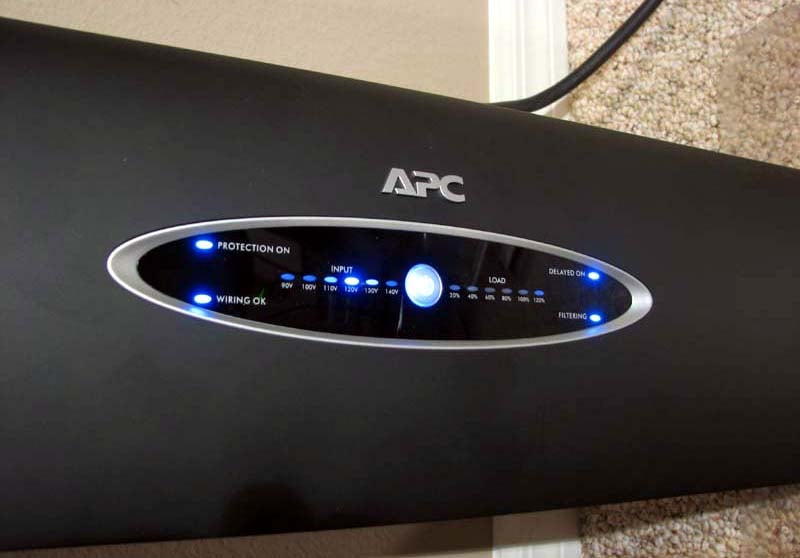
There are a number of lights on the front panel which indicate the state of the unit. You have some control over them with respect to turning all of them off but the main power and protection ones by pressing and holding the on/off button.
- Protection On - on/off LED status illuminates blue when the unit is working properly
- Wiring OK - LED status illuminates blue if your outlet wiring is correct
- Filtering - LED status illuminates blue when the unit is working properly
- Input - monitors line voltage via blue LED indication from 90V to 140V in 10V increments
- Load – monitors the load condition on the line via LED indication from 20% to 120% in 20% increments
- Delayed On – LED illuminates blue when the delayed outlets are active (6 sec delay during initial power up)
I felt the LED display for line voltage and load was a bit cheesy and would have preferred a digital read out like Monster offers on their similarly priced HTS-1000MKIII. But considering the APC C10 has 4 additional filtered outlets over the Monster product, I think I’d take more filtered outlets over a digital readout I’d likely spend very little time monitoring. The APC in comparison is not nearly as flashy or busy looking as the Monster but instead is a much cleaner more ergonomically friendly solution.
Placement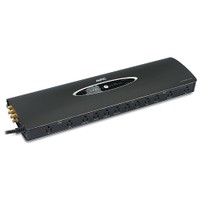
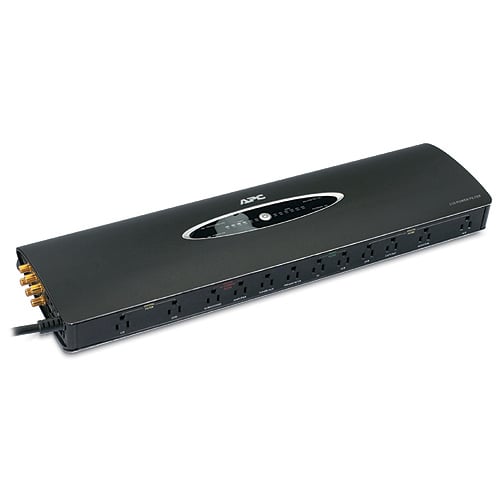
I brought this unit over to my brother’s house and wired it to his home theater system which consisted of an older Yamaha A/V receiver, Sharp Aquos LCD display, Toshiba DVD player, Sony CD changer, Brighthouse cable box, and a JVC VCR. I neatly horizontally placed the unit under his A/V rack on the ground which was out of sight but still accessible. The C10 has pads on the bottom which increases static friction so it can be placed horizontally on the ground without fears of it moving around either from cable tension or excessive bass output from a local subwoofer. The unit also comes with a metal bracket which is said to be used for wall mounting but comes with no hardware to attach and I didn’t quite understand how to secure it to the unit. Regardless I feel the C10 is much less obtrusive when placed on the floor under an entertainment center then being mounted on a wall.
Conclusion
Once I flipped the power switch on my brother’s A/V system, it came alive and he breathed a sign of relief now that his system was fully protected. He remarked that the picture quality seemed to improve on his cable signal but I wasn’t certain I saw any appreciable benefit. This very well could have been a placebo affect. I was confident that the C10 didn’t cause any signal degradation, while at the same time ensured his system was protected against the numerous lighting storms and power surges we typically get in Florida. The APC AV C10 marks another well executed and no BS A/V power product from a company that is, in my experience, unparalleled in their collective knowledge of power protection and backup. I highly recommend this unit for anyone looking for a cost effective surge and power conditioning solution with ample outlets and unparalleled reliability.
APC AV C10 Power Filter
$199
APC
AV
132 Fairgrounds Road
W. Kingston , RI
02892
877-272-2722
www.apcav.com
About APC
In February 2007, APC and MGE UPS
Systems combined to form a $3.5 billion (€2.4 billion) Critical Power and
Cooling Services business unit of Schneider Electric. The Critical Power and Cooling Services
division offers the industry’s most comprehensive product and solution range
for critical IT and process applications in industrial, enterprise, small and
medium business and home environments.
The company’s solutions include APC’s InfraStruXure®
data center architecture, the industry’s most comprehensive integrated power,
cooling, and management solution. The
company’s products also include APC and MGE-brand uninterruptible power supplies (UPS),
along with APC-brand precision
cooling units, racks, and design and management software. Backed by the industry’s broadest service
organization and an industry leading R&D investment, the company’s 12,000
employees help customers confront today’s unprecedented power, cooling and
management challenges. Schneider
Electric, with 112,000 employees and operations in 190 countries, had 2007
annual sales of $25 billion (€17.3 billion). For more information on APC,
please visit www.apc.com. All trademarks are the property of their
owners.
The Score Card
The scoring below is based on each piece of equipment doing the duty it is designed for. The numbers are weighed heavily with respect to the individual cost of each unit, thus giving a rating roughly equal to:
Performance × Price Factor/Value = Rating
Audioholics.com note: The ratings indicated below are based on subjective listening and objective testing of the product in question. The rating scale is based on performance/value ratio. If you notice better performing products in future reviews that have lower numbers in certain areas, be aware that the value factor is most likely the culprit. Other Audioholics reviewers may rate products solely based on performance, and each reviewer has his/her own system for ratings.
Audioholics Rating Scale
 — Excellent
- — Very Good
- — Good
- — Fair
- — Poor
| Metric | Rating |
|---|---|
| Build Quality | |
| Ergonomics & Usability | |
| Ease of Setup/Programming/Integration | |
| Features | |
| Fit and Finish | |
| Performance | |
| Value | |
Gene manages this organization, establishes relations with manufacturers and keeps Audioholics a well oiled machine. His goal is to educate about home theater and develop more standards in the industry to eliminate consumer confusion clouded by industry snake oil.
View full profile Subscribe to our newsletter