


Westinghouse DPF-1021 Digital Photo Frame Review
Westinghouse's Digital Photo Frame Needs Some Work
- Product Name: DPF-1021 10-inch Digital Photo Frame
- Manufacturer: Westinghouse Digital
- Performance Rating:

- Value Rating:
- Review Date: August 25, 2008 07:39
- MSRP: $ 249.99
Memory
Card Support: CF I,II/MD/MS/MS Pro/MS Duo/MS Pro Duo/SD/MMC/XD
File
Format Support: JPEG, AVI Motion-JPEG, MPEG 1, MPEG 4
Features
MosaicView
Slideshow
Individual
Slideshow or Picture View
Variety
of transitions for slide show
Variable
speed for slideshow
AVI
Motion JPEG, MPEG 1 and 4 player
Random
Picture Shuffle
Set
Favorite Picture
Save
and Delete Function
Color
Adjustment Function
Extendable
stand for angle adjustment
Wall-mountable
- 75 x 75 mm hole pattern
Auto-play
after memory card insertion
Internal
Memory: 128 MB Flash
Physical
Specifications
Dimensions:
12.6" x 9.1" x 1.9"
Weight:
2.8 lbs
Connectors:
Mini USB (for file transfer), USB port (for USB flash drives)
Frame
Colors: Ebony
Warranty: 6 months
Pros
- Bright picture
- MosaicView feature
- High resolution display
Cons
- Difficult controls/interface
- USB PC interface didn't work
- One of the more expensive models
- Doesn't fit standard 8x10 frame size
- No frame color/material options
- No remote control
DPF-1021 - How It Works
I'm a huge fan of digital photo frames. In fact I can't understand why this technology hasn't dropped further in price to-date so that more people can enjoy this technology. Digital photo frames allow more than just the single photo available in traditional picture frames. In fact, the Westinghouse DPF-1021 lets you view up to 4 at once with its MosaicView Slideshow feature. This model is a 10-inch unit that works with most of the available flash memory storage devices available on the market. While it boasts PC connectivity, we were never able to get it to connect - even using a variety of current and older machines. Forced to use one of the USB or Flash media options to transfer files we began our review of this product.
Build Quality
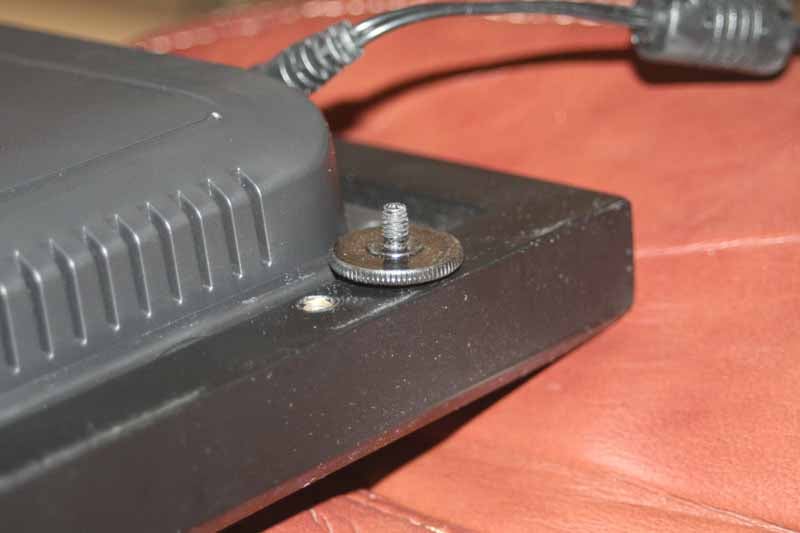 The DPF-1021 seems to be well-built.
It is only 1-7/8" thick (not including desk stand) which means it won't
look ridiculous should you decide to hang it on the wall. The downside of
course is that you'd need to wire it for 12VDC power (1.5A) since Westinghouse
currently makes no models that utilize rechargeable lithium polymer batteries. The
frame can be easily detached from the display unit by removing four thumb
screws that can be easily turned with a quarter. Once separated, the core of
the DPF-1021 measures 8" x 11.5", making it a custom size that will
not fit standard 8x10 frames. This is unfortunate, but Westinghouse chose a
wider stance in order to more easily implement its MosaicView slideshow system.
Were it narrower, two side-by-side portrait photos would not easily fit without
being unnecessarily cropped.
The DPF-1021 seems to be well-built.
It is only 1-7/8" thick (not including desk stand) which means it won't
look ridiculous should you decide to hang it on the wall. The downside of
course is that you'd need to wire it for 12VDC power (1.5A) since Westinghouse
currently makes no models that utilize rechargeable lithium polymer batteries. The
frame can be easily detached from the display unit by removing four thumb
screws that can be easily turned with a quarter. Once separated, the core of
the DPF-1021 measures 8" x 11.5", making it a custom size that will
not fit standard 8x10 frames. This is unfortunate, but Westinghouse chose a
wider stance in order to more easily implement its MosaicView slideshow system.
Were it narrower, two side-by-side portrait photos would not easily fit without
being unnecessarily cropped.
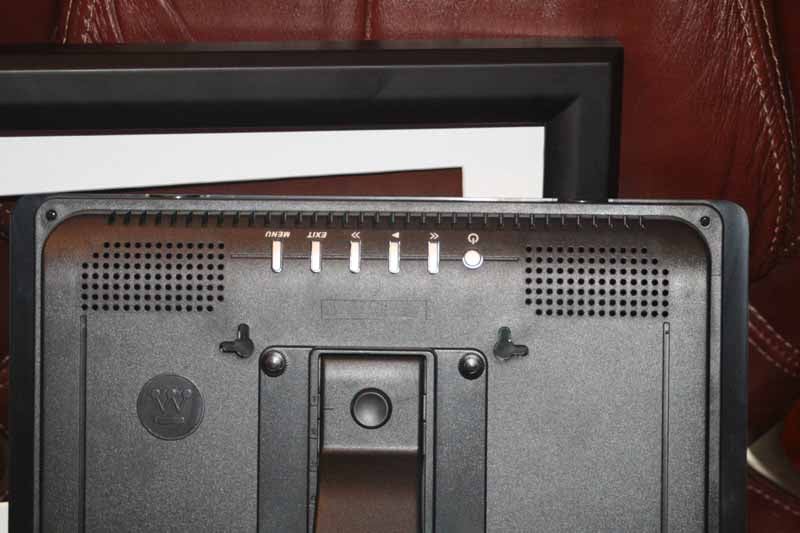
The controls for the unit are located on the back and are oriented so that when you look down on the frame from the top the controls are readable. This means they are upside down when you turn the unit around. This makes sense since you need to be looking at the screen in order to control it. What is a bit difficult is simply the non-uniqueness of the controls (with the exception of a round power button.) I kept flipping the Exit and Menu buttons when using the product. To be fair, the only other option would be to use a 4-way arrow pad for navigation of the menu system and that would have its own share of difficulties. A remote control would be the best addition to this product. If Westinghouse doesn't want to clutter the frame or remove the customizability of their product then a "flip-up" IR receiver could be used in place of the more commonly found fixed IR receiver.
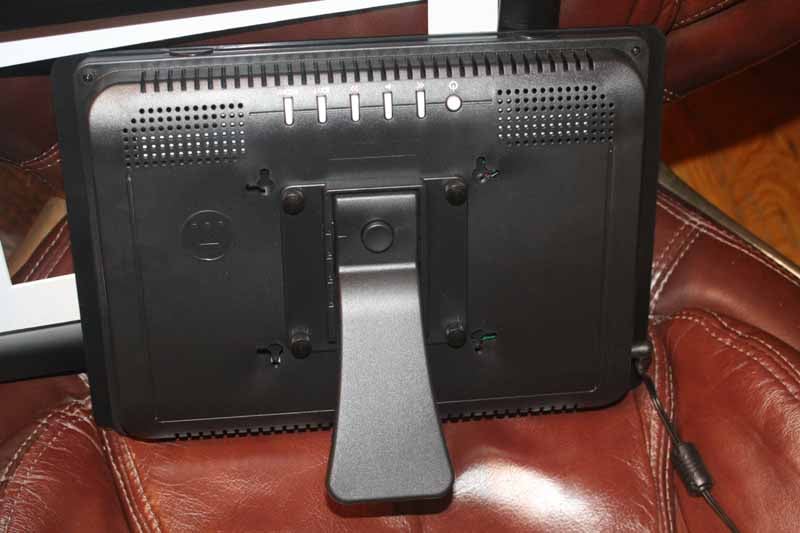 The DPF-1021 can be wall-mounted or
placed on a desktop and there is a removable stand that comes with the digital
photo frame. It has four mounting locations that would allow it to be set at
varying heights - something which would be helpful only if the unit could be
rotated to portrait view (it cannot). Setting #4 is the optimal setting. It
seems solid enough and I never worried about the frame breaking or falling
over. The twin groupings of holes found on the back of the unit are vents and
not holes for speakers. While the unit apparently supports video, that's only
true if you like to watch silent films. Why Westinghouse missed this small but
important detail eludes us.
The DPF-1021 can be wall-mounted or
placed on a desktop and there is a removable stand that comes with the digital
photo frame. It has four mounting locations that would allow it to be set at
varying heights - something which would be helpful only if the unit could be
rotated to portrait view (it cannot). Setting #4 is the optimal setting. It
seems solid enough and I never worried about the frame breaking or falling
over. The twin groupings of holes found on the back of the unit are vents and
not holes for speakers. While the unit apparently supports video, that's only
true if you like to watch silent films. Why Westinghouse missed this small but
important detail eludes us.
How It Works
Digital photo frames all work in basically the same way, with a few exceptions. The idea is to get your photos stored in the unit and have the unit display those photos for all to see. Sounds simple. It should be. In practical use, however, we quickly discovered that even a simple device like this can cause loads and loads of frustration if the user interface isn't intuitive and the product doesn't work as advertised.
Loading Pictures
The most basic function of the DPF-1021 is to load up your pics and let it fly... What we quickly found was that it took 76 clicks of the manual controls to accomplish loading up 10 photos. 76 clicks! It took 3 clicks of the 'Exit' button to get back to the 'Select a Card' screen:

2 more clicks selected my USB thumb drive. From there another 2 clicks got me into the Photo view page where I could see the individual contents of the USB thumb drive:
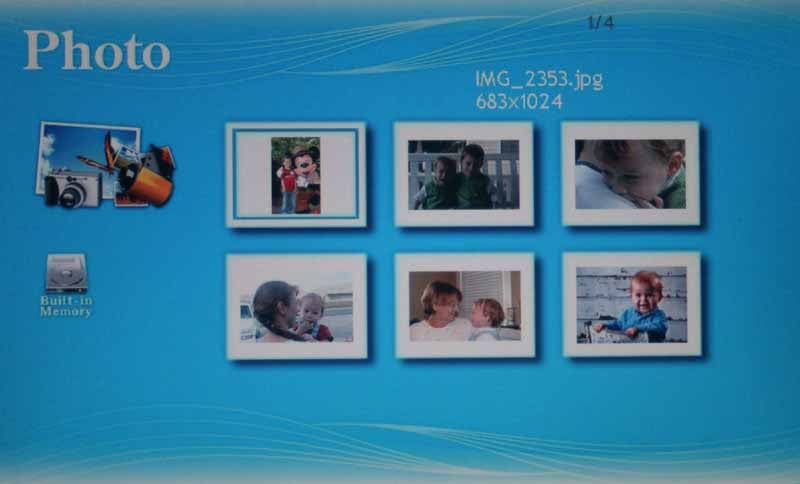
At this point I figured there would be a simply select all, or copy all function. There isn't. Unbelievably, the DPF-1021 - after failing to allow me to drag and drop photos to its 128MB internal storage - now forced me to load up pictures 1 at a time. Picking up where I left off it took another 9 clicks of the controls to copy my first photo. Each additional photo to be copied took 6 more clicks as we had to exit the menu system, navigate to the next photo and bring up the menu system again to initiate the next Copy:
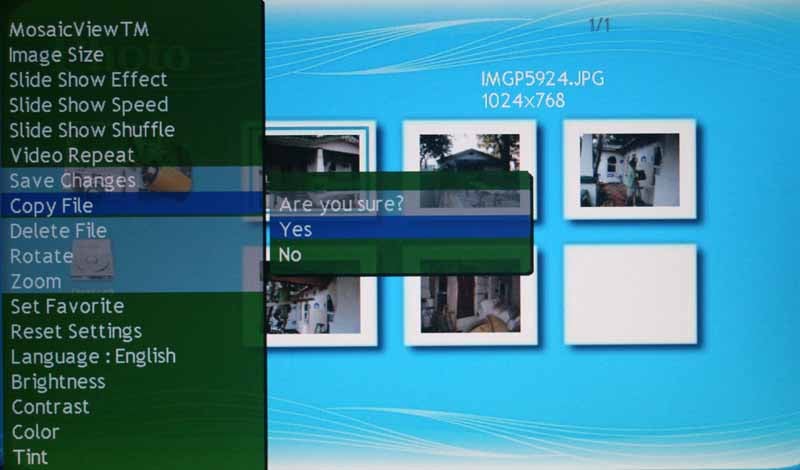
Each time you initiate a Copy there is a confirmation screen, so you must confirm it before the system will pull the photo into its internal memory.
Seventy six (76) clicks to get 10 photos loaded into the Westinghouse is absolutely ridiculous. It's made even more ridiculous by a couple of factors: 1) there is no remote control to aid in faster menu access and control, and 2) the system makes it equally difficult to delete files from its internal storage.
That's correct, photos must be deleted one at a time and there is no function to simply format or delete the entire contents of the internal memory. I suppose some people might indicate at this point that it's not a big deal since once the photos are loaded they will remain for some time. While that may be true, the advantage of a digital photo frame is supposed to be convenience and flexibility. With the DFP-1021 neither is present. If I want to update my photos every month or two to the internal memory, I am in for a lengthy, endurance marathon of clicking around using the cumbersome controls on the back of the unit. There is one saving grace for this product, however. By ignoring the 128MB of internal memory and using a Flash memory card, you can easily update your photos from any PC. The DPF-1021 is fast enough to play directly from the card reader and you can forget about the hassle of Copying and Deleting files using the onboard controls and menu. Now if only users could get a discount for not using the storage...

Pick a flash card... any card.
The digital photo frame's feature set states that the unit has "Auto-play after memory card insertion". We found this to not be true. After inserting a memory card (we used Compact Flash II and an SD card) the system eventually got us to the source selection page. Three (3) clicks later and we were running our slideshow. I think that somewhere at Westinghouse there is a developer who gets $0.01 every time someone clicks on a DPF-1021 button.
Set Favorite - Don't Use This Feature
One of the features of the DPF-1021 is 'Set Favorite' where you can "select images to appear more often." Not so. What this feature actually does is select images which will be displayed exclusively. No unchecked images will appear once you've set any images to Favorite. We tried this multiple times, including selecting just a single image as a favorite. After its selection it was the only image to be displayed on the screen - even with MosaicView turned on. We recommend you use this feature only to deselect images you don't want viewed without deleting them from the picture frame.

Sure I like this pic, but enough's enough!
There are three modes for viewing files: Photo, Slide Show, and Video. Photo gives you the thumbnail view of all the images on your storage device, 6 at a time. In this view you can activate the menu to Delete images, Copy images from your storage device to the 128MB of internal memory, or even Rotate images as needed.

How It Looks
Photos looked great on the DPF-1021 and for that the little photo frame seems to do a fine job. Images were bright (blacks were mostly a medium to dark gray) and only lost a little contrast once you got off axis to the frame. Overall it was a nice image that really appealed to guests coming to our home and seeing the numerous photos that traveled through the MosaicView interface. Our youngest son also delighted in seeing himself come up over and over again on the screen - reminding us of who we were watching as if we'd forgotten seeing it 90 seconds previous.

Colors are vibrant and images are crisp
One thing I noted was how fast the digital photo frame transitioned from one photo to the next. There are 10 different transitions, not including the straight cut, and even with files "weighing in" at over 3MB, the wipes, fades and dissolves were instantaneous. I have seen other photo frames that need to have the pics reduced in file size before they can quickly load them up and play them back without lag. This is NOT the case with the Westinghouse DPF-1021 - it's as fast as anything I've seen to date.
When using MosaicView for the first time, be aware that the system must first "load" the pictures into place. This means there will be some black on the screen until the first 2, 3, or even 4 pictures are pulled into the display for viewing. Once this is complete the images cycle continuously without any blanks.

MosaicView loading up one pic at a time
Videos
The Video selection brings up a list of available videos. The system supports AVI Motion-JPEG, MPEG 1, and MPEG 4 videos. We tried a small MPEG-4 movie file and it played it, but at about a 30 percent speed increase over its native frame rate. It also came up at the bottom of the screen and didn’t stretch at all to fill the available pixels, either width- or lengthwise. Scaling videos to fill the screen or at least fill from top to bottom seems to be a good idea in our view, however perhaps Westinghouse was figuring on only larger size videos (ours was natively 160x120 in size). In either case, videos without sound have limited appeal, though I wouldn’t write off this functionality - just question why a system that doesn't have a battery (so it has no concern with increased power drain) decided to forgo even a small speaker.
Conclusions
The Westinghouse DPF-1021 is a mixed bag, but mostly a disappointment. Many of its features either don't work or don't work as expected, leaving the unit difficult to enjoy using. 76 clicks to load up 10 images is inexcusable and the lack of a remote means that the system's failure to work with PCs is catastrophic. Even if it did work, since the unit doesn't have a battery you'd have to move it and the power supply and tote it to your nearest PC for image loading. Right now the workaround is to use a compatible Flash memory card (which you can load at your PC) and ignore the 128MB of onboard memory. Consumers can find better deals in digital photo frames from some other manufacturers. Westinghouse is a solid brand and we like their LCD TVs, but this particular product has some maturing to do before we can recommend it to consumers.
Westinghouse Digital DPF-1021 10-inch Digital Photo Frame
MSRP $249.99
Westinghouse Digital Electronics
Santa Fe Springs, CA
(866) 287-5555
About Westinghouse Digital Electronics
Westinghouse Digital Electronics
is one of the top five LCD TV manufacturers in the U.S. (2007). The company offers a
complete suite of innovative LCD displays for the professional and consumer
markets as well as LCD-based consumer electronic products that deliver the
latest digital content for the ultimate entertainment or commercial display
experience. Westinghouse Digital’s award-winning consumer HDTV line up includes
a complete family of 720p and 1080p LCD HDTVs and HD 1080p monitors in a wide
range of sizes and formats, HD Grade computer standard and widescreen monitors,
and a full line of digital photo frames. Westinghouse Digital’s Commercial
Business Unit offers a full suite of high-end LCD HDTVs and video monitors
targeted to meet the demanding needs of the Pro A/V business sector, including
digital signage applications.
The Score Card
The scoring below is based on each piece of equipment doing the duty it is designed for. The numbers are weighed heavily with respect to the individual cost of each unit, thus giving a rating roughly equal to:
Performance × Price Factor/Value = Rating
Audioholics.com note: The ratings indicated below are based on subjective listening and objective testing of the product in question. The rating scale is based on performance/value ratio. If you notice better performing products in future reviews that have lower numbers in certain areas, be aware that the value factor is most likely the culprit. Other Audioholics reviewers may rate products solely based on performance, and each reviewer has his/her own system for ratings.
Audioholics Rating Scale
 — Excellent
- — Very Good
- — Good
- — Fair
- — Poor
| Metric | Rating |
|---|---|
| Detail and Resolution | |
| Contrast and Black Levels | |
| Color Reproduction | |
| Build Quality | |
| Ergonomics & Usability | |
| Ease of Setup | |
| Features | |
| Fit and Finish | |
| Performance | |
| Value | |
Clint Deboer was terminated from Audioholics for misconduct on April 4th, 2014. He no longer represents Audioholics in any fashion.
View full profile Subscribe to our newsletter