


Samsung YP-T9 MP3 and Video Player Review
Samsung YP-T9 MP3 Player
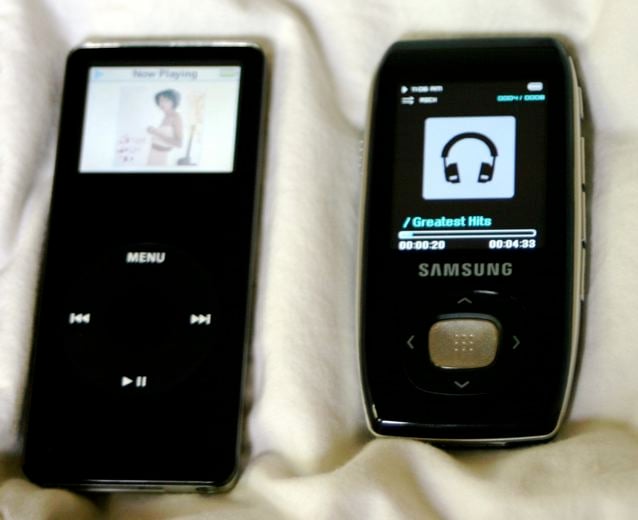
Walk into any big box store these days and you will find a flood of portable media players on display. There are many shapes, sizes and prices vying for your attention. While Apple continues to lead the pack, there are plenty of options worth consideration. I have recently had a chance to review several of these devices, and the Samsung YP-T9 has proven to be one of my favorites. Similar in form factor to Apple's Nano, this glossy black multimedia player sports a larger screen, as well as a ton of features.
Design & Operation
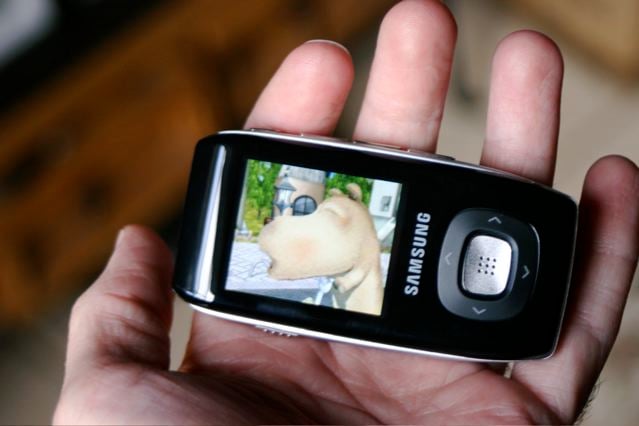
 While the design of the T9 won't win any
awards for innovation, it is familiar and has a huge (relative to the size of
the player) 1.8" TFT LCD color screen that dominates the front of the
unit. The screen is bright, crisp, and
easy to view in all but the brightest (direct sunlight) environments. Text, photos, video and song title/track
information was all very easy to view and read.
While the design of the T9 won't win any
awards for innovation, it is familiar and has a huge (relative to the size of
the player) 1.8" TFT LCD color screen that dominates the front of the
unit. The screen is bright, crisp, and
easy to view in all but the brightest (direct sunlight) environments. Text, photos, video and song title/track
information was all very easy to view and read.
Underneath the screen is a thumb control with up/down (for move/volume) and left/right (for move/file browser), and a center "OK" button. The left side has a "HOLD" slider switch, and the right side has buttons for, from top to bottom, Section Repeat/Recording, Back, Menu, and Power/Play/Pause. The top of the player has the headphone jack, a loop for a lanyard strap, and a microphone. The bottom of the player has the connector jack for the included USB cable.
 Let me go ahead and get my only real
complaint out of the way. To me, this is
primarily an MP3 player that just happens to be loaded with other cool features
such as video. But primarily, most
people will use it for music. When you
are listening to a track, the only way to go "back" to the menu is to
use the "BACK" button on the side of the player. To do this requires a move that for me was
clumsy, at best. The slick, glossy
plastic finish of the player made it even more difficult, slipping out of my hand. I resorted to using both hands (oh, the
horror!) to navigate back. I know this
sounds nit-picky, but the size of this player makes it perfect for workouts,
jogging, etc., and you should be able to navigate on this unit with one
hand. The same thing occurred while in
other modes. I guess my suggestion would
be to have a menu button available on the front, easily accessible with your
thumb.
Let me go ahead and get my only real
complaint out of the way. To me, this is
primarily an MP3 player that just happens to be loaded with other cool features
such as video. But primarily, most
people will use it for music. When you
are listening to a track, the only way to go "back" to the menu is to
use the "BACK" button on the side of the player. To do this requires a move that for me was
clumsy, at best. The slick, glossy
plastic finish of the player made it even more difficult, slipping out of my hand. I resorted to using both hands (oh, the
horror!) to navigate back. I know this
sounds nit-picky, but the size of this player makes it perfect for workouts,
jogging, etc., and you should be able to navigate on this unit with one
hand. The same thing occurred while in
other modes. I guess my suggestion would
be to have a menu button available on the front, easily accessible with your
thumb.
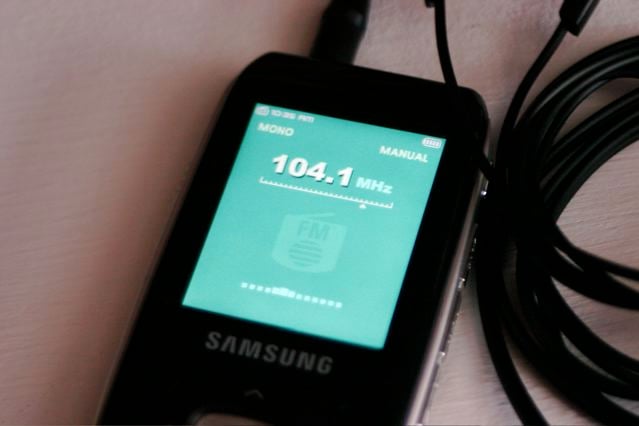
Getting past that one complaint, I found the rest of my experience with the Samsung to be very good. The thumb control buttons have a very sturdy feel with a solid "click" when you press them, and the menu system is very easy to navigate. From the top, you scroll through the following choices: MUSIC, FILE BROWSER, FM, TEXT, PHOTOS, VIDEO, GAMES, RECORD, and SETTINGS. There is tons of choice in your settings. The music section has eleven preset audio modes and a 9-band user customizable EQ. You can also create playlists including an on-the-go "Favorites" list.
For video, the T9 supports MPEG4 files that the included Samsung Multimedia Software (for your PC) will transcode to play at the optimal frame size/rate. The video resolution is 208x176, and the frame rate is 15fps. Videos are presented in horizontal aspect, which was cool.
 You want more from your portable? The T9 has it. How about voice memo recording? You not only can record memos using the
built-in mic, but they are saved as MP3's, and you can select the bit rate from
32, 64, 96 or 129 Kbps. How about
games? The unit I tested had a pretty wacky
little baseball game on it, as well as "Pizza Delivery," which had a
decidedly Japanese anime feel to it.
The T9 games are flash based games, and you can add more if you like. You can add your own JPEG photos for
wallpaper, as well as text files that can be viewed in either horizontal or
vertical aspect.
You want more from your portable? The T9 has it. How about voice memo recording? You not only can record memos using the
built-in mic, but they are saved as MP3's, and you can select the bit rate from
32, 64, 96 or 129 Kbps. How about
games? The unit I tested had a pretty wacky
little baseball game on it, as well as "Pizza Delivery," which had a
decidedly Japanese anime feel to it.
The T9 games are flash based games, and you can add more if you like. You can add your own JPEG photos for
wallpaper, as well as text files that can be viewed in either horizontal or
vertical aspect.
Your PC must be a Pentium 300 or higher, running Windows XP Service Pack 2 or higher with 100 MB of free space. You also need to have Windows Media Player 10.0 or higher and DirectX 9.0 or higher, as well as a USB 2.0 port and a CD Rom drive. The Samsung Media Studio software makes it pretty easy to transfer files to the player. When you plug the player into your computer, the software automatically launches. Select the files you want to transfer to the player and click on the transfer icon, and you are good to go.
Battery life is rated for up to 30 hours of music, and 6 hours of video playback. Recharging is accomplished through the USB cable when connected to a computer. The firmware is upgradeable for any future additions Samsung might make available. In the box you will find the T9 player, earbuds, a USB cable, and the installation and Media Studio software.
Conclusion
With a MSRP of $129.99, this player packs a lot of value into a pretty cool form factor. The only room I see for improvement is the addition of a "back" button on the face, or at least in an easier to get to location that would make one handed operation smoother. Otherwise, this is a solid little unit, capable of providing you plenty of enjoyment with music, and personal video or games.
PRICE:
$129.99
a bargain!
Media:
multimedia
Form Factor:
medium
Styling:
same 'ole, same 'ole
what's so great about it? tons of features
what's not-so-great? placement of back button
SPECS:
- 1 GB
- PC only software
- USB 2.0
- 1.73 oz.
- 1.68"(W) x 3.27"(H) x .44"(D)
FOR MORE INFORMATION:
Samsung Electronics
400 Valley
Road, Suite 201
Mt.
Arlington, NJ 07856
1-800-SAMSUNG
www.samsung.com
About Audioholics Gear Corner
Welcome to the Gear
Corner, where we give you a quick but comprehensive look at consumer
electronics from several different categories.
All products in the Gear Corner have been individually evaluated through
hands-on testing by our reviewers in order to give you a quick but detailed
overview that we hope will help you in your purchasing decisions.
Over the years J. has constantly found himself to be an "early-adopter," spending way too much money on "new" technologies such as Compact Disc, LaserDisc, and DVD. He is one of the few people who actually purchased (and still owns) a CORE programmable remote control (bonus points if you remember this product).
View full profile Subscribe to our newsletter