


Apple iPhone Review
Apple iPhone
About five years ago the company I worked for began offering me a Treo or Crackberry. (For the record, these devices were selling for around $500 w/contract at the time). I had played with them, and I chose to pass. They seemed a bit clumsy and the web browsing stunk. And I have continued to stick with my relatively low-tech Nokia candy-bar style phone ever since, although at times I was tempted to try one of the so-called "smart" phones. But I held out, feeling certain that Apple would one day make a phone for the rest of us.
Yes, I am a fan of Apple products, and I have been ever since I bought a Mac Plus back in 1986 or '87. I don't like troubleshooting computer problems, and over the years I have been much more productive on my Macs than I have been on PCs. I was always convinced that if Apple entered the phone market, it would be an event worth waiting for. Well, the wait is over, and on Saturday I purchased my 8 gig iPhone. The following review covers my first 24 hours with the iPhone.
Design & Features
My Audioholics secret underground lair is in a small coastal town in SC, and as a result, there are no Apple stores or AT&T stores here. According to the Apple/AT&T websites, Charleston, SC, would be the nearest outlet. We have friends there, so on Friday (launch day) afternoon we drove over to meet them for dinner and to try and snag an iPhone. We arrived at the small AT&T store in the strip mall around 6:45pm (they went on sale nationwide at 6pm) and the store was already sold out.
The next day, my daughter and I drove to an AT&T store in Florence, SC, where I was told they had plenty, and I purchased the 8 gig model ($599). Since I am currently in a business plan, grouped in with a dozen or more other phones, I was curious about my eligibility. I had called AT&T (formerly Cingular) a month or so ago, and was told I would be able to upgrade to the iPhone without any problem. At the AT&T store I was told that I could indeed update, but I would have to pull my phone and number out of the group plan and pick a package and pay individually.
If you haven't been reading anything lately, there are a few things about the iPhone's development you should know. Steve Jobs apparently found in AT&T a willingness to cooperate that was lacking in the other major carriers. It was widely reported that Verizon passed on the partnership with Apple for the iPhone. (One of my favorite things that happened last Friday (iPhone launch day) was Verizon issuing a press release that some of their stores would stay open 24 hours. I'm not sure if that was for the weekend or what, but what a futile and desperate attempt to get some headlines that day...) AT&T was willing to give Apple something that the wireless providers have never wanted to give up in the past - CONTROL. Apple wanted to not only have some new technology implemented in the carrier's system itself, but they wanted control over the way the product would be priced and sold, as well as the available monthly service packages. Perhaps most interesting is the fact that AT&T signed the deal before ever laying eyes on the iPhone. Say what you want about Steve Jobs, but the man is a salesman!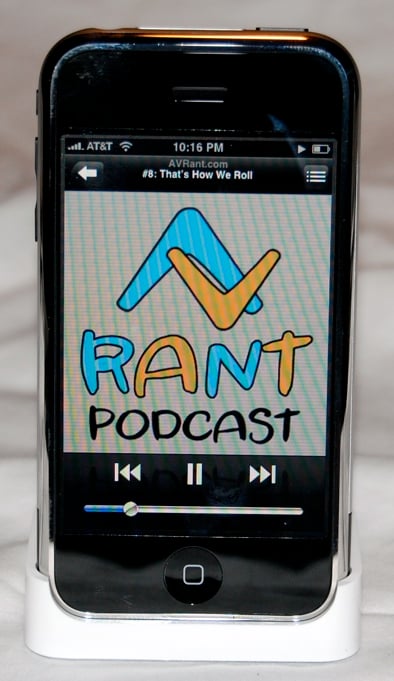
One thing that Apple customers will tell you is that the experience of purchasing and setting up their products is a good one. In my opinion, the main reason for the success of the iPod is the user experience. It is simple and intuitive, as is the case with most Apple products. You take it out of the box, plug it up to your computer, and it works. And you don't need a manual. So it was with great interest that I began the process of unboxing the iPhone to activate it. Yes, you read that right. The iPhone is a wireless phone that you purchase at the store, and take HOME to activate. Purchasing the phone was as simple as walking into the store and asking for one, picking out a leather case, and handing them my plastic. I was out the door in 5 minutes.
I knew I had a potential problem with the corporate account situation, so I was prepared for the worst. Unboxing was fun, as is typically the case with Apple. A surprisingly small black box, with the iPhone, dock, USB cable, earbuds (with built-in mic), and a very compact USB power adapter. I popped the iPhone into the dock, and it automatically launched iTunes. The activation process uses iTunes, which makes it very simple and familiar. You are presented with an activation screen, and options for current AT&T (or Cingular) customers, or new customers. As I expected, when I chose current AT&T customer and entered my wireless number, it told me I would need to call in for activation. It was Saturday night around 10:30PM EST, so I braced for the worst. After about 20 minutes on hold, I was connected to pleasant lady who walked me through moving my number out of the corporate plan I was under, and then took my credit card and personal billing info. It took about 10-15 minutes, and she told me everything was good, my old number was going to work fine, and that I now had to wait for the activation.
So that was the other shoe dropping. I had a friend in Nashville who had been waiting all day for his activation, and he was not happy. He had stood in line on Friday night, scored his phone, and then had returned home only to be told his phone would be activated within 24 hours. I guess Apple had controlled everything except AT&T's servers and their ability to handle the tens of thousands of activations happening all at once over the weekend. I read this morning a report from AT&T claiming only 2% of customers experienced delayed activation, but I have to doubt that. I read too many reports on online forums of this happening to people. I went to bed Saturday night happy to have an iPhone sitting in a cradle capable of doing absolutely nothing. There were no features that were accessible before completing the activation process, which kind of stinks when you have just dropped $600 clams on a piece of gear.
I spent Sunday afternoon on the beach, and when I got home there was an email that had been sent about 4:55pm saying my phone had been activated. Interestingly enough, my old phone had continued to work up until the moment the iPhone activation was completed. I did read in some Apple forums of people who were without service during the activation delay, but this was not the case with me.
Apple iPhone Multi-touch Technology and Flick Scrolling
I put the iPhone in the cradle, and it immediately fired up and said
something like "activated" on the screen, and began syncing with my
MacBook Pro. About five or ten minutes later, it had completed the
sync which included photos from my iPhoto library, songs, TV shows and
movies from my iTunes library. It also synced all of my contacts, my
calendar and my bookmarks from Safari (Apple's web browser).
Probably the coolest thing to me, though, was that it automatically
configured my 3 email addresses their corresponding mail servers. Let
me repeat that - I did not have to configure my email. I have 2
earthlink addresses and one .mac address. I went into settings and it
was all there, including passwords, incoming and outgoing mail
servers. The email application on the phone is a full-blown email
client, as is the web browser. 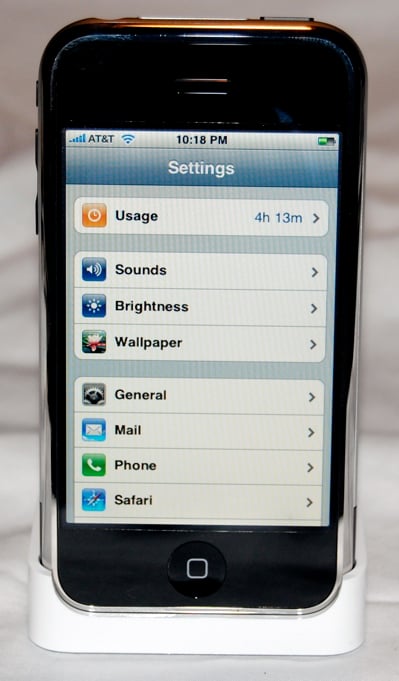
The iPhone is based on "multi-touch technology," which allows for the many interesting touch screen interface operations. While many manufacturers are working on this technology, Apple is the first to bring it to market. Operations such as the slider and "flick" scrolling are examples. What is "flick" scrolling, you ask? If you are in the phone mode, looking at a list of your contacts, just take your finger and "flick" up or down on the screen, and the contacts list scrolls up or down, at a speed determined by the thrust of your flick. Imagine watching a video slot machine in Vegas - it's that kinda thing. Another interesting use of the multi-touch is when you are viewing a web page or a photo. If you want to enlarge what you are looking at, take your thumb and forefinger and place them on the screen as if you are squeezing, and expand them. The image enlarges. Bring them back together (think "pinch"), and the image reduces. It is really cool, and a totally effective way to surf or navigate photos or Google maps, for example.
As for size, the iPhone is slimmer and
smaller than I expected. It is .46" thick, and is 2.4" wide by 4.5"
tall. In comparison, it is less than half the thickness of my trusty
Nokia 6620, and if the Nokia were not rounded it would be about the
same size (width and height). It weighs a mere 4.8 oz. The rear of
the phone is constructed of what feels like anodized aluminum with a
small black plastic section on the bottom (which would presumably be
the location of the antenna). The front of the machine is black with a
chrome trim around the perimeter, and the screen is a gorgeous 3.5 inch
diagonal widescreen with 480 x 320 pixel resolution at 160 dpi. There
is only one button on the front face - a round "home" button centered
at the bottom and flush with the surface. On the left side is a volume
rocker and a mute switch to silence the ringer. On top of the unit you
will find the headphone jack (more on that below), the SIM card slot,
and the on/off button. When a call comes in, pressing the on/off
button once silences the ring, pressing it a second time sends the call
directly to voicemail. When you flip the ringer switch on the side of
the unit, the screen shows an icon of a muted bell and a short
vibration lets you know you have entered silent mode. 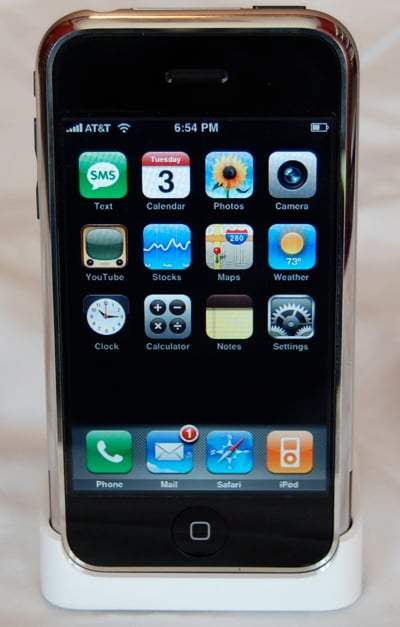
The 2.0
megapixel camera lens is located in the top corner on the rear of the
phone, and the camera seems to take decent photos, although I have not
yet tried anything critical. The phone is Quad-band GSM, operating at
850, 900, 1800 & 1900 MHz. For wireless data, the phone operates
using Wi-Fi (802.11b/g), EDGE, and Bluetooth 2.0 + EDR.
Much
has been discussed about Apple's decision to go with the slower EDGE
technology. Last week some users reported exponential speed jumps in
AT&T's EDGE network, leading some to believe that AT&T and
Apple had been working on a speed bump, but that has not been
confirmed. Apple has responded to the criticism by suggesting that
many people find themselves in a Wi-Fi area more often than not when
using their devices, so they opted for the robust Wi-Fi system for the
iPhone. Apple tends to think forward rather than current, so this
makes sense when you start to think how many people have Wi-Fi at home
and at their office, and with everyone from Starbucks to airports to
entire cities beginning to offer wireless net access, they assume that
this is where things are headed.
Also included as features of
the iPhone from the home screen are SMS Text Messaging, Calendar,
Photos, YouTube, Stocks, Maps, Weather, Clock, Calculator and notes.
And of course, a full-featured, touch screen video iPod.
Apple iPod Operation: Phone and Email
As stated above, syncing my contacts was a breeze. On Monday
morning I had some meetings around the state, so I was going to be on
the road most of the day. I decided to leave my laptop behind to see
if indeed the iPhone would be a worthy replacement for a day on the
road.
Let me now concentrate on the four major features of the iPhone: the phone, the email, the internet browsing, and the iPod.
The Phone
When
you turn on the iPhone, the display wakes up and you are greeted with
the time and date at the top of the screen along with whatever photo
you have chosen as your wallpaper (this can be chosen from included
stock images, a photo you have taken with the camera, or an imported
photo). At the bottom of the screen is a slider which says "slide to
unlock." You simply drag your finger across the slider and and you
hear a mechanical "click" and the home screen appears. It consists of
three rows of colorful icons for all the extra features of the phone.
Along the bottom of the screen are the 4 main functions, Phone, Mail,
Safari & iPod. If you have any mail, the Mail icon will have a
red dot (with the number of waiting emails in it) in the top right
corner. The Phone icon will also show the number of missed calls
and/or voicemails. 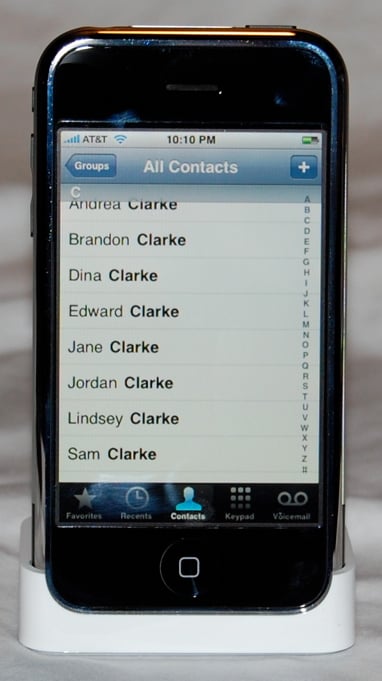
Voicemail is one of the really cool and innovative features of the iPhone. When you have received several voicemails, you touch the voicemail icon (while in phone mode) and you are presented with a list of your voicemails. It has the names or numbers of the calls you have missed, and you can choose whichever message in the list you want to listen to rather than having to listen through several messages to get to the one you want. This feature is called Visual Voicemail, and it is one of the features that AT&T had to rework their wireless technology to accommodate. To me, this is easily one of the best features of the phone.
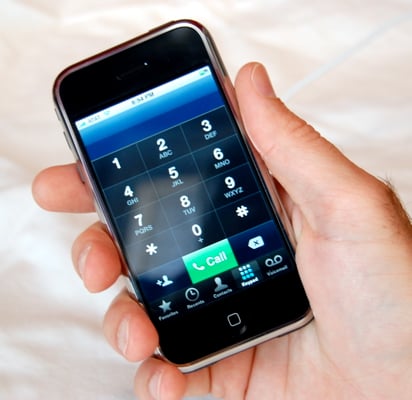
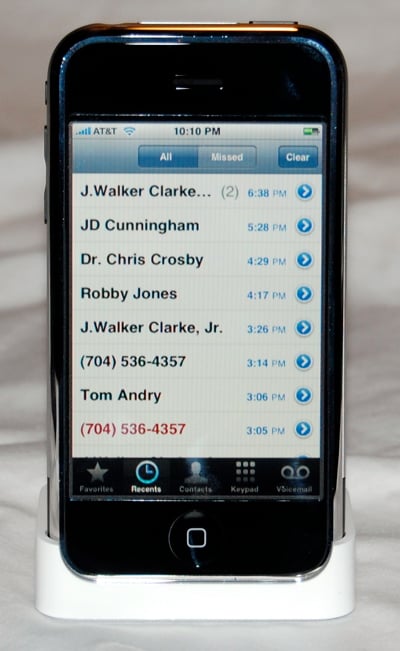
Call quality was excellent - loud and clear, and people I talked to said it sounded great as well. The speakerphone was also clear and loud enough to use effectively in my car or office. Calls can be made from your contact list or if you prefer, a virtual number pad. Along the bottom of the screen in Phone mode are the following buttons: Favorites (save a list of frequently called contacts here), Recents (if a call was missed, it appears in Red in this list of recent calls), Contacts, Keypad, and Voicemail (an icon with number of unheard messages will appear here if there are any).
 When you place a call, the screen shows the
following six large buttons: Mute, Keypad, Speaker, Add Call, Hold,
and Contacts. Everything you need without having to remember how to do
something. For example, your friend you are talking too asks if you
have someone's address or phone number - just press the contact button
and navigate through the contacts screen. Or how about adding two more
friends for a conference call? Just press the Add Call button, then
dial from the keypad or contacts list. When that person answers, the
Add Call button has changed to "Merge Call," which you press to
activate the conference. Even on an office phone, creating a
conference call has always been confusing, but the iPhone makes it
simple.
When you place a call, the screen shows the
following six large buttons: Mute, Keypad, Speaker, Add Call, Hold,
and Contacts. Everything you need without having to remember how to do
something. For example, your friend you are talking too asks if you
have someone's address or phone number - just press the contact button
and navigate through the contacts screen. Or how about adding two more
friends for a conference call? Just press the Add Call button, then
dial from the keypad or contacts list. When that person answers, the
Add Call button has changed to "Merge Call," which you press to
activate the conference. Even on an office phone, creating a
conference call has always been confusing, but the iPhone makes it
simple.
The Email
When you touch the Mail icon at the
bottom of the phone, you are presented with a list of your accounts
(assuming you have multiple email accounts). You touch the account you
want to see, and you are taken to a screen showing your Inbox, Drafts,
Sent and Trash. Touching any of these takes you to that folder.
Navigating to the Inbox, you are presented with your current and new
emails. Touching the message you want to view brings you to a full
view of the message. At the bottom of the screen are icons for
checking for new mail, filing the current message, deleting current
message, replying to the current message, or composing a new message.
Word, Excel or PDF images attached to a message can be opened and
viewed, although not edited or saved.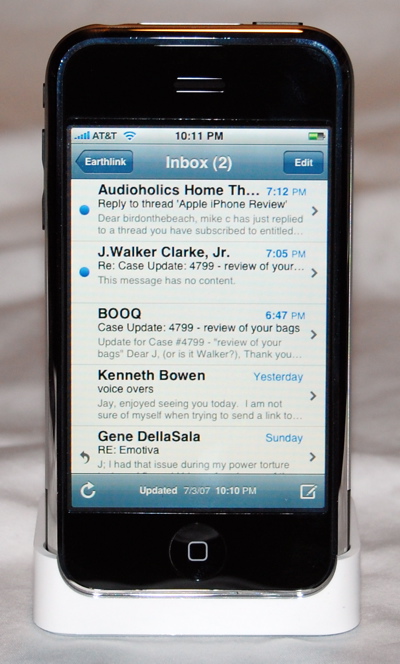
To compose a new message,
you touch the compose icon and you are presented with a blank new
message with the cursor blinking in the "To:" field. The virtual
keyboard is presented in the bottom half of the screen. This is
probably the main learning curve issue with the iPhone - the virtual
keyboard. Using your thumbs, you press the virtual key you want and as
you touch it it enlarges, which allows you to see what key you actually
hit. The first time I tried it I was only 50% at best (hitting the key
I wanted). But as I began to type words, I noticed that under the word
I was typing was a drop down window showing the word the iPhone thinks
I was trying to type. If I had misspelled the word but continued to
type it, once I hit the space key to begin the next word, it
auto-corrected my typos and inserted the correct word. This was
remarkably accurate, and I realized that the more I just kept typing,
trusting the intelligence of the software, the more it worked. But it
is something that takes getting used to. One advantage I have is that
I have not been using tactile keys, such as on a Treo or Blackberry. I
would assume that if you are used to one of those devices, it will take
a bit longer to get used to. I saw Walt Mossberg on the Charlie Rose
show and he said that the first day using it he was frustrated, the
second day of using it he was getting angry, and by the third day he
wanted to throw it out of the window. But by the fifth day, it had
clicked and he loved it. (He has used a Treo for several years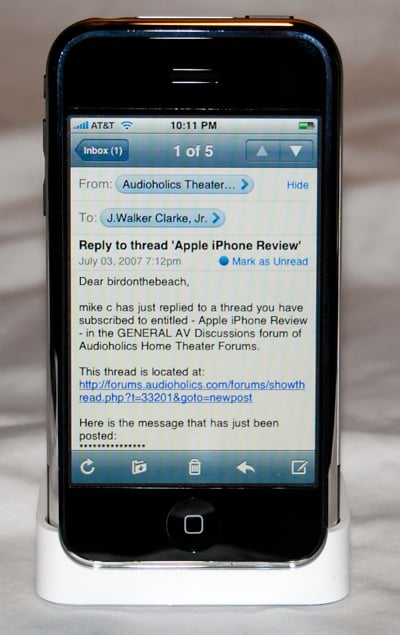 now).
There is a number and symbol button at the bottom of the page that
changes the QUERTY layout of the virtual keyboard to a numbers and
symbols layout when you need it.
now).
There is a number and symbol button at the bottom of the page that
changes the QUERTY layout of the virtual keyboard to a numbers and
symbols layout when you need it.
Once you have finished your
message, you hit the 'Send' key and you soon hear the "woosh" sound
(familiar to Mac Mail users) that lets you know the message has been
sent. One complaint I have is that there are multiple inboxes (one for
each email account you have configured) rather than one master inbox.
This means you have to hit the back button quite a bit to navigate
between your different incoming mail. (There might be a way to change
this, but I have not found it yet. Remember, my disclaimer is that I
am only in my first 24 hours with the device!)
Apple iPod Operation: Web Browser and iPod
The Web Browser
To
surf the web, you touch the Safari icon at the bottom of the page. Up
comes a web browser. And it is important to point out, this is a full
strength web browser, not a WAP page viewer. You have forward and
backward navigation buttons at the bottom of the screen, as well as a
bookmarks button (that accesses your synced bookmarks from your
desktop), and finally a button that allows you to open multiple pages
on the screen that you can "flick" through. Want to zoom in on
something on the page? Just double tap the area you want enlarged, or
use the squeeze/expand motion with your thumb and forefinger. These
motions will zoom in and out of the page. Otherwise, it works as you
would expect from a normal web page on your laptop or desktop. You can
scroll up or down or side to side using your finger and the flicking
motions.
One of the cooler features of the display is the
ability to turn the phone from vertical to horizontal orientation while
viewing web pages or photos. The iPhone automatically senses the shift
in orientation and adjusts the screen accordingly to a widescreen
format. (This is nice for reading reviews on Audioholics.com,
especially when you want to zoom in on that rear panel photo of a new
receiver!)
The browser is currently not compatible with Adobe
Flash technology - yet. This is one of the many issues that I would
hope Apple will improve with future software updates.
The iPod
The
iPod section of the phone is what Apple calls the best iPod ever. It
certainly is not the largest capacity iPod, as it is available in
either 4GB ($499) or 8GB ($599) models. But the interface is certainly
new and cool, employing touch screen control of your music and video.
The iPod button brings up the iPod main screen with the following
buttons at the bottom: Playlists, Artists, Songs, Videos, and More.
From the More button, you get a screen with Albums, Audiobooks,
Compilations, Composers, Genres and Podcasts (where you should find
your catalog of AVRant.com episodes. What? You have not subscribed to
the hottest new podcast out there? Go to www.avrant.com and get
plugged in!!!)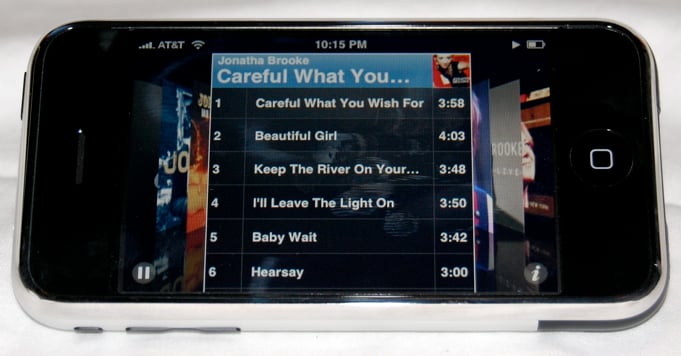
The interface is new, as there is no scroll
wheel. Instead, you use taps and flicks to navigate the playlists,
songs, artists, etc. Once you have flicked your way through your
playlist or song list and tapped on the song you want to hear, the
album cover appears on the display with a reverse/pause/forward and
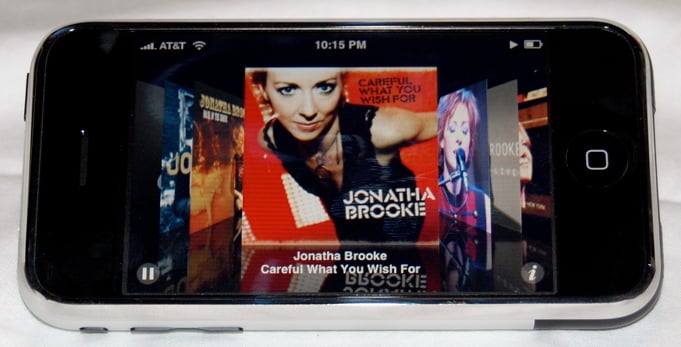
volume display on the bottom of the screen. If you turn the iPhone to
a horizontal orientation, the display shifts accordingly to the
familiar iTunes cover flow. Scroll (flick) through the album cover art
to the record you want to hear, tap on it, and it flips over revealing
the song list. Tap the song you want to hear and you are good to go.
It is really impressive. One other cool feature is that when you are
listening to the iPod on the built-in speaker (which is not bad,
considering) and a phone call comes in, instead of instantly pausing
the song, it fades the song out before sounding your selected ring tone
(at which time it pauses the song). When you hang up, the song ramps
back up.
Conclusion
The iPhone is chock full of fun and surprises, and I am sure that I
will find many more things I like, as well as shortcomings, over the
next few weeks. It is great, but not without some flaws and room for
improvement. It will be interesting to see how many things Apple can
or will fix through software updates.
In first full day of
use on the road, I left the house around 9AM with a full charge.
Throughout the day I received and made several calls, listened to one
or two songs using the built-in speaker, browsed the web in both Wi-Fi
and EDGE environments, checked, read, composed and sent several
emails. Around 8PM back at the house, I got a message that I had 20%
of my battery left. So in fairness, I had a pretty average day of use
with the phone and did not run out of battery. But I will invest in a
car charger, as I can see a really busy day draining the battery.
I
have made note of several complaints over the first full day of use.
AT&T's activation delays stunk. How could they have not been
prepared for the glut of activations over the launch weekend? There is
no good excuse for this, and it makes both Apple and AT&T look
bad.
As for the design, it is a beautiful little device, but
I would like to see rubberized edges so if you dropped it there would
be a chance of not damaging it. I purchased a hard, form-fitting
leather case (that allowed full use of the screen and buttons) to keep
it in as a precaution. I just feel that it could get damaged or
scratched in my pocket or backpack without one. If you have a friend
like my buddy JD, who seems to have sudden urges to throw his phone to
ground while say, walking across a busy intersection, I would worry
about their $500 investment.
The headphone jack is recessed
and will require an adaptor for many, if not most headphones or car
adaptors. This really stinks. I saw that Griffin has already
announced one as I am sure many third-party vendors will, but really
Apple, what were you thinking here?
I would also like to see the
multiple Inbox situation in the Mail application addressed. It
requires too many touches to navigate through your new messages from
multiple accounts.
There is no instant messaging available.
The SMS Text feature is designed to look like iChat, but it is really
just traditional texting. And since most packages allow only a certain
number of text messages, a "chat" using text messaging can get
expensive with lots of "okay," "yes," or "no" messages going back and
forth.
Finally, while battery life seemed okay, and certainly
better than your laptop would fare doing the same tasks, I am not sure
what a heavy day of use will do to your mileage. And as is the case
with iPods, you cannot change a dead battery yourself. You will need
to send it in to Uncle Steve and pay a heavy price, I am sure - at
least until third party vendors provide cheaper, albeit
warranty-voiding solutions.
Overall, the iPhone is a great
product. It is really more of a handheld computer than a phone. Apple
has once again innovated in a way that all other manufacturers will
most certainly begin to immediately follow (and copy). My guess is
that software updates will continue to improve the iPhone. After five
years, was it worth the wait? For me, yes indeed.
you'll need a towel
With This Gadget, You Will Be The Envy Of:
anyone who sees it
Is It Easy To Use?
if you have a pulse
Price:
pricey!
Specs
Size and weight
• Height: 4.5 inches (115 mm)
• Width: 2.4 inches (61 mm)
• Depth: 0.46 inch (11.6 mm)
• Weight: 4.8 ounces (135 grams)
In the box
• iPhone
• Stereo Headset
• Dock
• Dock Connector to USB Cable
• USB Power Adapter
• Documentation
• Cleaning/polishing cloth
Capacity
• 4GB or 8GB flash drive1
Display
• 3.5-inch (diagonal) widescreen multi-touch display
• 480-by-320-pixel resolution at 160 dpi
• Support for display of multiple languages and characters simultaneously
Operating system
• OS X
GSM
• Quad-band (850, 900, 1800, 1900 MHz)
Wireless data
• Wi-Fi (802.11b/g)
• EDGE
• Bluetooth 2.0+EDR
Camera
• 2.0 megapixels
Audio
• Frequency response: 20Hz to 20,000Hz
• Audio formats supported: AAC, Protected AAC, MP3, MP3 VBR, Audible
(formats 1, 2, and 3), Apple Lossless, AIFF, and WAV Video
•
Video formats supported: H.264 video, up to 1.5 Mbps, 640 by 480
pixels, 30 frames per second, Low-Complexity version of the H.264
Baseline Profile with AAC-LC audio up to 160 Kbps, 48kHz, stereo audio
in .m4v, .mp4, and .mov file formats; H.264 video, up to 768 Kbps, 320
by 240 pixels, 30 frames per second, Baseline Profile up to Level 1.3
with AAC-LC audio up to 160 Kbps, 48kHz, stereo audio in .m4v, .mp4,
and .mov file formats; MPEG-4 video, up to 2.5 Mbps, 640 by 480 pixels,
30 frames per second, Simple Profile with AAC-LC audio up to 160 Kbps,
48kHz, stereo audio in .m4v, .mp4, and .mov file formats
Headphones
• Stereo earphones with built-in microphone
• Frequency response: 20Hz to 20,000Hz
• Impedance: 32 ohms
Mac system requirements
• Mac computer with USB 2.0 port
• Mac OS X v10.4.10 or later
• iTunes 7.3 or later
Windows system requirements
• PC with USB 2.0 port
• Windows Vista Home Premium, Business, Enterprise, or Ultimate
Edition; or Windows XP Home or Professional with Service Pack 2 or later
• iTunes 7.3 or later
• Input and output
• iPhone
• 30-pin dock connector
• 3.5-mm stereo headphone minijack
• iPhone Dock
• Dock connector
• Power and battery
• Built-in rechargeable lithium ion battery
• Talk time: Up to 8 hours
• Standby time: Up to 250 hours
• Internet use: Up to 6 hours
• Video playback: Up to 7 hours
• Audio playback: Up to 24 hours
Apple
1 Infinite Loop
Cupertino, CA 95014-2084
408/996-1010
www.apple.com
About Gear Corner
Welcome to the Gear Corner, where we give you a quick but comprehensive look at consumer electronics from several different categories. All products in the Gear Corner have been individually evaluated through hands-on testing by our reviewers in order to give you a quick but detailed overview that we hope will help you in your purchasing decisions.
Over the years J. has constantly found himself to be an "early-adopter," spending way too much money on "new" technologies such as Compact Disc, LaserDisc, and DVD. He is one of the few people who actually purchased (and still owns) a CORE programmable remote control (bonus points if you remember this product).
View full profile Subscribe to our newsletter