


Denon S-101 Home Entertainment System Review
Denon S-101 Home Entertainment System
- Product Name: S-101 Home Entertainment System
- Manufacturer: Denon
- Performance Rating:

- Value Rating:
- Review Date: November 20, 2005 19:00
- MSRP: $ 999
|
|
Pros
- Easy setup
- Good value
- Commendable sound
- Space efficient
Cons
- Can sound compressed with highly dynamic sources
- Average surround envelopment
- Ho hum disc tracking ability
Denon S-101 Overview and Setup
Let's face it. We all love surround sound, but can't always find the space for a full-fledged system. I can personally relate while I am staying at my beach condo for the next two months awaiting completion of my new home. While my condo is pretty accommodating for the three of us, it has little space to accommodate a 5.1 surround system, well, perhaps a dinky cubed system, but I'd prefer my clock radio as an alternative. Don't laugh, it has decent fidelity and certainly jump starts my mornings each time the alarm goes off to the local hard rock station. That being said, I was on a quest to continue doing reviews of home theater gear despite my living constraints. I quickly had flashbacks of the Denon Summer Conference where we walked away very impressed with their new DVD Home Theater Systems, particularly their S-301 (MSRP: $1599) and the S-101 (MSRP: $999). Thinking about this, I requested an S-301 for review and within one week the S-101 showed up at my office. Oh well, so it's not flagship, but it is surround sound that will integrate perfectly in my condo and hopefully satiate my desire for home theater while I await completion of my new home.
Editor's Note
For a tabulated comparison of the major feature/performance differences between the S-301 and S-101 Denon DVD Home Theater Systems, search for our article titled Denon S-101 Vs. S-301 DVD Home Theater Systems
Set-Up
The S-101 showed up in a moderately sized box. This was a sigh of relief for me to finally take a break from monster speaker systems and amplifiers and be reviewing manageable sized gear which is easy to setup and place in the room. To test the alleged ease of setup of this system, I had my wife connect it up. Normally she would clear the room when I bring in a new AVR receiver or DVD player, but not this time. Following the single paged connection guide which is the first thing that greets you when you open the box, she located all of the components and cables required for the setup. The subwoofer module did have a bit of heft so I helped out and placed it in the most ideal location in the room which happened to be midway off the front wall concealed behind a chair.
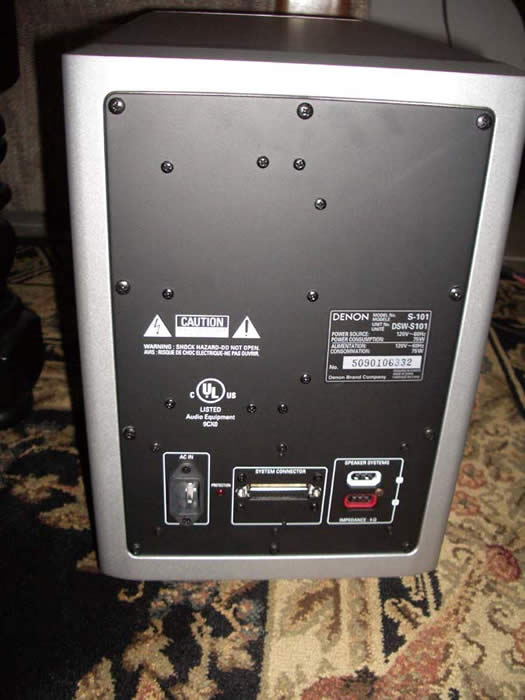

 Connections were a snap thanks to the color coded and keyed cables. They insured you couldn't
reverse the polarity of the speaker leads or misconnect the DB25 system cable. This large connection
supplies the DVD module power and audio connectivity to the subwoofer's internal amplifiers
which power the satellite speaker system. You can even change out the speaker cables for something
more exotic, or to simply lengthen them if the speakers are located further away from the
subwoofer.
Connections were a snap thanks to the color coded and keyed cables. They insured you couldn't
reverse the polarity of the speaker leads or misconnect the DB25 system cable. This large connection
supplies the DVD module power and audio connectivity to the subwoofer's internal amplifiers
which power the satellite speaker system. You can even change out the speaker cables for something
more exotic, or to simply lengthen them if the speakers are located further away from the
subwoofer.
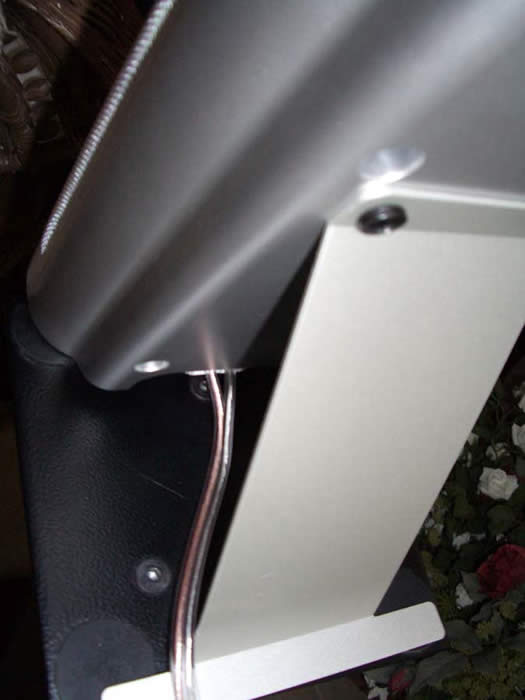
About the only criticism I had on ergonomics of set up is if you use the
supplied speaker stands to sit your speakers on a table top or auxiliary stands, they get in the way
of the wires.
I would have liked to have seen a perforated slot on the middle of the stand to
snake the wire through. Other than that, setup couldn't be any easier or more straightforward,
as evident by the fact it passed the wife acceptance test with flying colors.
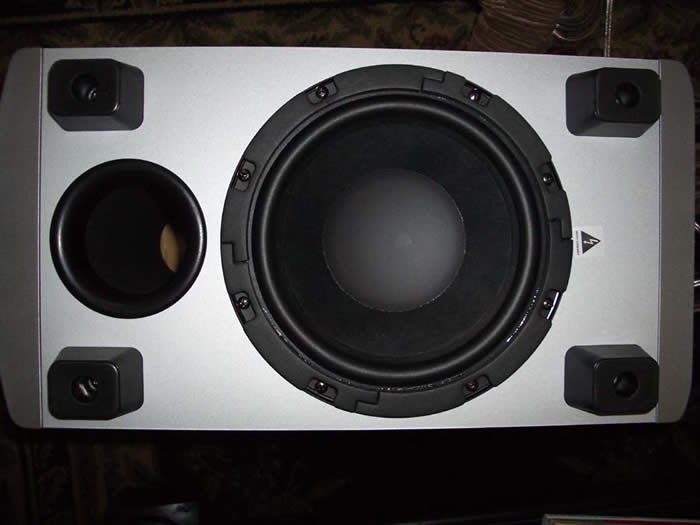 The heart of the S-101 system resides in its rather potent, yet compact,
8"
high-excursion powered subwoofer that also serves as the demarcation connection point for
the satellite speakers and DVD unit.
Thanks to the unit's down firing woofer and port
topology, it opens up more flexible placement options since you don't have to worry about
installing it in situations that may be blocking the woofer or port.
The heart of the S-101 system resides in its rather potent, yet compact,
8"
high-excursion powered subwoofer that also serves as the demarcation connection point for
the satellite speakers and DVD unit.
Thanks to the unit's down firing woofer and port
topology, it opens up more flexible placement options since you don't have to worry about
installing it in situations that may be blocking the woofer or port.
The rubber feet were a nice touch and not only added a good aesthetics factor, but also added a functional one by allowing the sub to make firmer contact to the floor which helps tighten up the bass response.
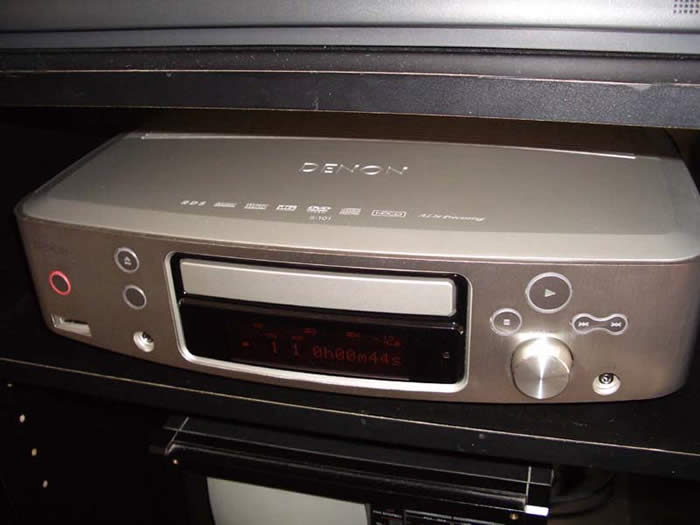
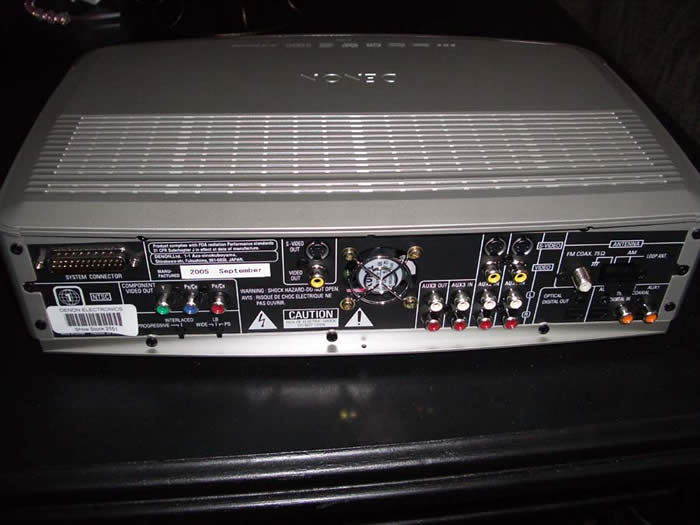
Front/Back Panel Views of the Denon S-101 CD/DVD Controller
Unit
This is one jacked HTIB unit as evident by multiple analog and digital audio I/Os, and provision for component video. It even has a front panel connection for iPod. I was a bit disappointed to see a back panel switch to select between progressive scan and interlaced video as I would have preferred the ability to select this via the OSD in the menu setup like most DVD players do today.
Denon S-101 Remote, Configuration and Listening Tests
RC-1007 Remote Control
The supplied remote (RC-1007) is a relatively slim, easy to handle remote control. The lack of back lighting and poor tactile feel of the back panel functions make it a useful primarily in reasonably well-lit rooms lest you risk hitting the wrong function key and interrupting your movie watching experience (as I did on more than one occasion.) The front face of the remote controls system volume and power up, DVD navigation, input selection, and sports a Help function key to rescue neophytes from themselves in the event they misconfigure the system and/or can't get it to operate properly. While the back panel keypad contains numeric keys and more geek tweakability of surround parameters, tone controls, DVD angle, etc. Oddly I found one of the most useful features on the back panel. I personally felt the Zoom Mode should have been on the front of the remote control since it's a feature that will likely be used by many connecting this system to a standard 4:3 display and wanting to minimize black bars while watching widescreen movies.
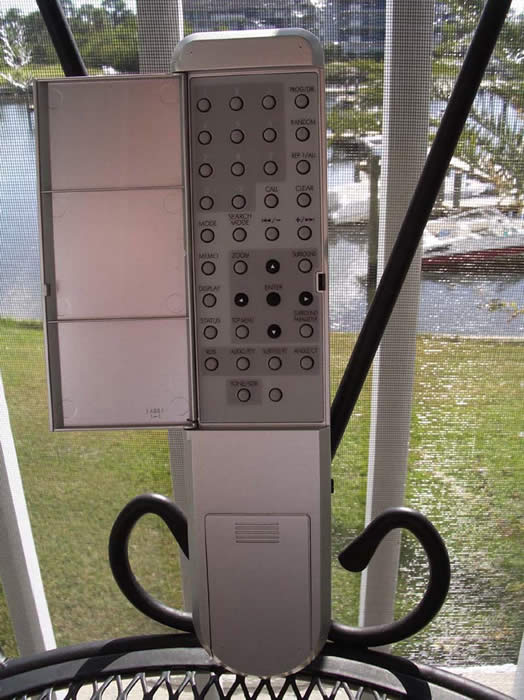
With the stored remote codes, I was able to power up and change inputs on my
el cheapo Sansui 27"
CRT TV, though control functions were very limited. Since this remote
isn't programmable there was little I could do other than use a dedicated universal remote
control.
It got the job done, was fairly intuitive, and, provided you had adequate room
lighting, served its purpose as expected.
Configuration
 Configuring the S-101 proved rather straightforward for the
most part.
Though it irked me a bit that on-the-fly level changes simply weren't possible.
In order to change channel trims you had to enter the OSD DVD player
setup via four levels of menus while interrupting the music the whole
time.
So, if a song you are listening too has too much bass and you want to
turn down the sub, you would have to do so via the OSD menu system.
This is contrary to the way most Denon receivers work, allowing
on-the-fly level changes by simply hitting the enter key on the remote
with no interruption of music.
Configuring the S-101 proved rather straightforward for the
most part.
Though it irked me a bit that on-the-fly level changes simply weren't possible.
In order to change channel trims you had to enter the OSD DVD player
setup via four levels of menus while interrupting the music the whole
time.
So, if a song you are listening too has too much bass and you want to
turn down the sub, you would have to do so via the OSD menu system.
This is contrary to the way most Denon receivers work, allowing
on-the-fly level changes by simply hitting the enter key on the remote
with no interruption of music.
The S-101 allows the user to adjust speaker levels in 1dB
increments, and digital delay in 1ft increments.
This isn't as precise as most modern AVR receivers, but pretty typical of many
DVD players and certainly accurate enough for the scope of this
product.
The S-101 allows the user to select between freestanding, on-shelf and
on-wall speaker installations which essentially compensates for
boundary conditions when the speakers are placed on the wall or when a
wall is directly behind the speakers.
The S-101 even allows the user to select room damping properties as
low, mid and high which basically serves as an active shelf
equalization to tame brightness in rooms with low dampening and boost
high frequencies in over damped rooms.
Denon should be commended for including such useful and practical
features in this type of product.
Listening Tests: Music
CD: Daddy Yankee
Barrio Fino
Cranking up the tunes I started with Daddy
Yankee
Barrio Fino
CD.
Track #5
"Gasolina"
is a party favorite whenever I attend my wife's Colombian family parties.
This song is a trip for sure.
You can't help but sing along and, before you know it, your hips are moving to
its rhythm.
The S-101 belted out tight and controlled bass, and lots of sizzle on
the top end.
Track #8
"Lo Que Paso, Paso"
is another song that gets you moving and playing it on the S-101
certainly exemplified this, especially when engaging Dolby Virtual
Speaker which expanded the stereo soundstage considerably while
maintaining vocal clarity and focus.
CD (DTS): Diana Krall
Love Scenes
Next up was the
Diana Krall
Love
Scenes
DTS CD
(a particular multi-channel favorite of mine).
I am very fond of this CD for three reasons; content, recording
quality, and surround implementation.
Of course her rather attractive appearance doesn't factor into this at all, but I thought it would be important to point
out ;-)
On an exceptional playback system, track#1
"All or Nothing at All"
envelopes you with Diana's powerful and eloquent voice.
You could clearly hear the echo decay of her voice and airiness
indicating a lack of compression and care taken in the mastering and
mixing.
The surrounds aren't used as cheap trick attempts to dazzle the listener but instead to
increase the soundstage and enveloping experience of the recording.
On the S-101, I could hear many of the elements I have grown to adore
on my reference system, though it wasn't quite nearly as immersive or convincing.
Of course it's not a fair comparison since my reference is a discrete multi-channel
speaker system. The S-101 certainly did make a gallant effort of
simulating the experience through a pair of speakers.
The bass extension was again controlled and tight, though not quite as
extended to accurately produce all of the elements of this recording
without compression as I am used to hearing on my reference system.
Track #3
"I Don't Know Enough about You"
sounded silky smooth while track #7
"I Don't Stand a Ghost of a Chance with You"
literally had enough bass to pressurize the living room of my condo,
shaking the floor and walls nicely while also causing one of the
satellite speakers to resonate making me realize I didn't screw down the stand as tightly as I should have.
I tried out some more aggressive multi-channel audio discs such as Graham Nash Songs for Survivors DTS DVD which had a very full sound, but simply didn't envelop the listener like it does on a truly discrete 5.1 playback system. Toeing out the speakers helped remedy some of this, but regardless I couldn't place the surround image behind me, especially when cymbal crashes that were mixed for the rear channels were reproduced.
What I have discovered in my multi-channel music listening sessions was that Dolby Virtual works very well with ambient surround cues but not as effectively with more aggressively mixed multi-channel recordings. Your mileage may vary, but in all circumstances the 2.1 channel configuration of the S-101 worked better than simply connecting a pair of speakers and a subwoofer to a multi-channel receiver and switching over the receiver to stereo mode allowing it to downmix the 5.1 track to two channel.
Read our FAQ for more information on Dolby Virtual Speaker Technology.
Denon S-101 Viewing Tests and Conclusion
DVD:
Batman Begins
I
was eager to see
Batman Begins
in the comforts of my home, so the moment this DVD was
released, I was in line at my local retailer buying it.
What a fantastic movie, especially if you
are a diehard Batman fan like I am.
It was about as true to the story line as you could get
without having to read the comic books.
In Virtual DD, the S-101 did produce a reasonably
enveloping soundfield but it was limited mostly to the sweet spot.
Again toeing out the speakers
helped widen this a bit, but don't mistake this setup for a replacement to a full fledged 5.1
discrete audio system or even
Yamaha's venerable YSP-1
.
Both of these alternative solutions are more costly and space consuming
so the trade off may be well worth it depending on your needs and WAF.
The S-101 was able to deliver action scenes with good clarity and
dynamics when listened to at reasonable levels.
When pushed too hard however, you could hear some compression and
strain during dynamic peaks in the movie which sounded more like
digital artifacting rather than amplifier dynamic range limitations.
Though at these levels, you are likely to get run out of your apartment
or condo which is what this system is truly meant for.
All in all it should provide enough oomph for bedroom type environments
or small living rooms.
DVD: Star Wars Episode III: Revenge of the Sith
Star
Wars Episode III: Revenge of the Sith
was yet another movie I was eager to watch on DVD.
On
the S-101, I heard good bass extension, especially when Lord Sidious was mind chucking the hover
platforms at Yoda.
The S-101 managed to keep me involved in the action despite the surround
effects remained mostly in the front soundstage.
Vocal clarity was good, though best when sitting
dead center.
At times I did find myself missing the center channel speaker and wished Denon would
have provisioned it as an optional accessory for those able to accommodate one.
The strong point
of enjoyment of the S-101 was its subwoofer's ability to bolt out the SPLs during space combat
and crash scenes.
Most budget HTIB systems at this price point would have simply whimpered away
in these instances, but the S-101 eagerly played them without hesitation.
From a video standpoint, the Denon S-101 served up excellent interlaced and progressive images. Judging by the picture quality I saw I would say it was right up there with Denon's entry level DVD players. I particularly found the 1.5x Zoom feature a necessity when watching widescreen DVDs on a 4:3 display. In my experience, most zoom modes on DVD players tend to cause too much pixilation or compromise in resolution. This was simply not the case when using the 1.5x Zoom on my 27" display sitting about 8 feet away. I used this feature so frequently that I truly wished it had a hot key on the front of the remote.
Conclusions
Like all products, the Denon S-101 is not without flaws. I found the DVD transport to be finicky when compared to all but the worst DVD players we have reviewed in the past few years. It consistently skipped briefly on track #1 of my Diana Krall DTS CD despite there being no blemishes or scratches on the disc, as well as a couple of areas on one of the test DVDs I used to evaluate its performance.
This product has its limits, but they usually aren't called upon if not used beyond its intended purpose - to deliver quality sound in small to reasonable sized bedrooms or living rooms. $999 could certainly buy a two-channel system that could comfortably outperform the S-101 musically, but they won't likely be able to playback multi-channel recordings at nearly the same sense of envelopment and realism as this system.
To put this into perspective, I spent some time at my local Best Buy A/B-ing the similarly priced Bose 321 system which incidentally offers less features and performance. The Bose system features full range paper wizzer cone satellite speakers and a so-called bass module that sounded like its usable bass extension didn't extend much below 60Hz. The bass it did produce was rather boomy and sloppy in comparison. The Bose system sounded more like a boom and sizzle show while the Denon S-101 took on a more fluid sound just like a good subwoofer/satellite system should.
The Denon S-101 makes a gallant effort of delivering all of the major surround formats into a 2 speaker + subwoofer, easy to use, and cosmetically appealing platform. While it can by no means replace what a good discrete 5.1 speaker system could achieve in terms of surround envelopment and dynamics, its value, ease of setup, and space savings make it an attractive package for people dabbling in home theater without making a big commitment in space, money, and the learning curve of setting up more elaborate alternative systems.
www.simple.denon.com
About Denon Electronics
Denon is a world leader in the manufacture of the highest quality
home theater, audio and software products. Denon is recognized
internationally for innovative and groundbreaking products and has a
long history of technical innovations, including the development and
first commercialization of PCM digital audio. Denon Electronics is
owned by D
&
M Holdings Inc.
The Score Card
The scoring below is based on each piece of equipment doing the duty it is designed for. The numbers are weighed heavily with respect to the individual cost of each unit, thus giving a rating roughly equal to:
Performance × Price Factor/Value = Rating
Audioholics.com note: The ratings indicated below are based on subjective listening and objective testing of the product in question. The rating scale is based on performance/value ratio. If you notice better performing products in future reviews that have lower numbers in certain areas, be aware that the value factor is most likely the culprit. Other Audioholics reviewers may rate products solely based on performance, and each reviewer has his/her own system for ratings.
Audioholics Rating Scale
 — Excellent
- — Very Good
- — Good
- — Fair
- — Poor
| Metric | Rating |
|---|---|
| Performance | |
| Value | |
Gene manages this organization, establishes relations with manufacturers and keeps Audioholics a well oiled machine. His goal is to educate about home theater and develop more standards in the industry to eliminate consumer confusion clouded by industry snake oil.
View full profile Subscribe to our newsletter