


Atdec Visidec VF-AT-NBC Dual Laptop Monitor Mount Review
Atdec Visidec VF-AT-NBC Dual Laptop Monitor Mount
- Product Name: Visidec VF-AT-NBC Dual Laptop Monitor Mount
- Manufacturer: Atdec
- Performance Rating:

- Value Rating:
- Review Date: January 25, 2011 17:05
- MSRP: $ 229
Max Weight, monitor arm (lbs): 17.5
Max Weight, notebook tray (lbs): 17.5 (notebooks up to 17" in size)
Mounting Hole Pattern, monitor arm (mm): 75x75; 100x100 (optional AC-AP-2010 adaptor plate allows for 200x100)
Notebook tray tilt/pan: 35° up of forward tilt; pan: 180°
Rotation around pole, both arms: 360°
Monitor arm tilt/pan: 70° up and 70° down; pan: 180°; portrait to landscape rotation
Pole height (inches): 17.3
Cable management: Internal / Integrated
Mounting options: Desk clamp & bolt through included
Maximum reach, monitor arm (inches): 16.25
Pole diameter: 1.5
Color: Silver pole with polished arm, black notebook tray
Pros
- Easy installation
- Great articulation
- Great aesthetics
- Integrated wire management
- Versatile - holds up to 17.5lbs per arm
- VESA 75/100 compatible
Cons
- Cable management a tad wimpy
- Expensive
VF-AT-NBC Setup and Build Quality
Atdec has invented a way to create yet more desk space with its new VF-AT-NBC Notebook/Monitor Arm Combo mount that is as elegant as it is practical. This mount works with nearly any desk and handles your laptop as well as a flat panel monitor up to 24-inches, getting both off of the desk and into the air and making them extremely maneuverable in the process. We took the system through its paces and really liked what we found. In fact, it was one of the more down-to-earth and innovative mounting solutions we've seen in some time.
Our first exposure to the Visidec VF-AT-NBC mount came with a press release announcing the new product. The ability to mount both a notebook and an LCD monitor to a desk, both with swing arms that offered a full range of motion was more than a little enticing. I've been working full-time on a computer, professionally, for over 16 years. In that time I've gone from a small CRT monitor to a large one. From that to a pair of small flat screen monitors. And finally, I rested on a single 24-inch LCD display - which really had the same screen real estate as a pair of moderately-sized monitors. With that said, this Visidec VF-AT-NBC mount made me realize that the folded MacBook Pro (which I kept "docked" in a convenient Twelve South stand) could once again be used to extend my desktop to another display. In fact, it could be used in this way and not take up valuable desk space. Sold.
The Atdec VF-AT-NBC is really two products in one. It takes the Visidec VF-AT ergonomic monitor arm and the Visidec VF-AT-NK notebook mounting accessory and combines them into a single mounting solution for what amounts to what I think should be a new trend in office computing. Since more and more people are using laptops today, it's no small thing to have a product like this that is elegant and also able to ergonomically position and even maneuver your laptop and display for clients. Both of the system's arms are independently controlled. You can set their height to perfectly match the screens with each other, and you can also adjust the displays so that you can bring them in and out, or rotate them around the central mounting post as desired - up to a full 360 degrees! While all of this is occurring, you are also removing both your laptop and your flat panel monitor from your desk, reclaiming valuable workspace and making for a more elegant look.

Setup, Build Quality and Positioning
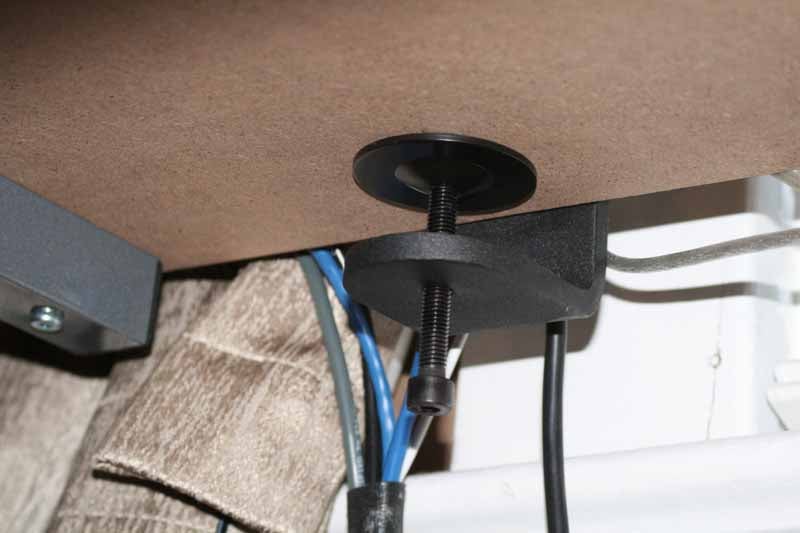
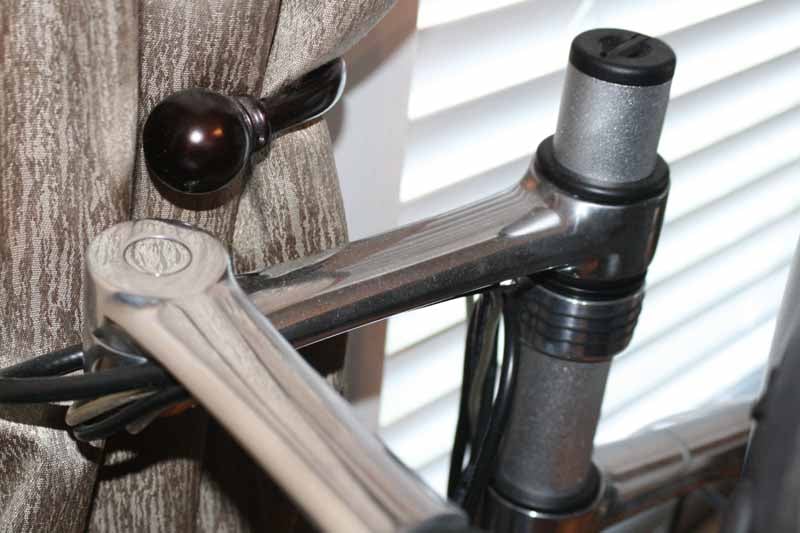 The VF-AT-NBC comes in two boxes and, while we typically use the instructions to make sure we do everything correctly, we really didn't need them. The notebook tray installs via either the desk clamp mount, which can attach to the outside edge of a desk without any additional tools (the allen wrench is included). Alternatively, you can use the bolt-through system which entails drilling a hole anywhere on your desk to allow for a limitless placement of the mounting system directly through the desk's surface - allowing you to put the pole in a place that may not be at the edge (perfect for corner-oriented desks, for example). Once you've chosen one of these methods, you can then slide the VF-AT-NK notebook mounting system onto the post. There is a locking grip, which is a piece of plastic that, once it is cranked down by the locking ring, keeps the notebook arm from moving up or down. The tilt tension of the notebook tray is adjustable, and even the support tabs (which keep the notebook from sliding off the tray) can be adjusted left and right for a wider, or narrower, laptop (or to move them away from any important connectors.) The allen key even stores in the top of the pole - very convenient.

The notebook platform itself was very well made. It has a grippy surface, so you never feel as if your laptop is going to slide off on its own. The adjustable tabs provide the real support against downward movement, of course, and we liked that they were silver, like our MacBook Pro. The fact that the tray is ventilated also didn't go unnoticed - a feature that speaks volumes about how intelligent this system is and how much work went into thinking it through. There is also a cable clamp in the underside that can grab and hold loose cables to keep them out of sight and reduce cable strain. Beyond that, however, there are cable channels built right into the arm, with plastic clips and "locking balls" which tuck cables into the channel behind the primary silver mounting pole.
As far as flexibility and placement, this mount is nearly infinite. The accessory arms can be tilted by 70° in either direction and panned through 180 degrees. This allows applications in either landscape or portrait, independent of the desired position of the other screen. With the capability of holding monitors of up to 17.5lbs, the arm also accommodates two different VESA mounting hole patterns: 75mm x 75mm (3” x 3”) or 100mm x 100mm (4” x 4”). The vented notebook tray supports laptops all the way up to 17.5 pounds (and ~17 inches in width) and can still safely tilt up to 25 degrees up or down.
VF-AT-NBC Features, Use & Conclusion
Key features
- Supports notebooks up to 17" and 17.5 lbs (8kg)
- Non-slip notebook tray surface
- Notebook tray tilt: 25 degrees up down
- Notebook pan: 180 degrees
- Notebook tray support area: 12" W x 10.1" D (300mm x 272mm)
- Monitor arm tilt: 70 degrees up and down
- Monitor arm pan: 180 degrees
- Monitor arm rotation: 90 degrees (portrait to landscape)
- Monitor arm supports displays up to 8kg (17.5lbs)
- VESA mounting: 75mm x 75mm, 100mm x 100mm
- Pole height: 17.3"
- Internal cable management
- Desk clamp and bolt through mounting options
Use
The notebook tray accessory (VF-AT-NK) is what we mounted first before moving onto the Visidec ergonomic monitor arm (VT-AT). Adding that later allowed us to more properly adjust the monitor height to match the top of our notebook display. Continuing our configuration in the OS X Displays control panel, we were able to get a seamless transition between the 24-inch monitor and our notebook screen. While we wouldn't exactly pull on the mount with all our might, there was no time at which we didn't feel that everything was amply supported and we could rotate both screen and notebook as we saw fit.

It was a great feeling being able to completely free up space below both my monitor and my notebook. Never before did I have access to so much desk-space - not in over a decade-and-a-half of work experience, in fact. Running cables was fairly easy, though with my particular setup it was easy to overload the cable management with an external hard drive, DisplayPort connection, Ethernet, USB and power cable. The cable management is nice, but it's not meant to contain quite that many different runs. As a compromise, what we did was route as much as we could through the system, and then hide the rest behind the arms as we needed. I would say that the mobility-factor of the mount is diminished when using the cable tracks - you're simply not going to be able to swing the monitor around 180 degrees and not have something pop out of place. Still, it's an excellent attempt, and one of the more serious ones I've seen. The small locking balls cracked me up in their simplicity and effectiveness - what a great idea.
Conclusion
If you work at a desk and use a laptop, this mount is for you. It's a no-brainer and a product that makes it extremely practical to have a laptop as your primary computer - which is exactly the situation I am in. I gave up my desktop PC long ago in favor of a single MacBook Pro and VM Fusion to run Windows 7 when needed. Now, with Atdec's Visidec VF-AT-NBC I can reclaim valuable desktop real estate and add an additional monitor for an extended desktop experience that was simply not possible before. This is a product that you should buy - and one that you'll thank us (and Atdec) for later.
Atdec Visidec VF-AT-NBC Dual Laptop Monitor Mount
$229.00
Atdec
Level 1, 26 Castlereagh St
Liverpool NSW 2170
Australia
www.atdec.com.au
About Atdec
Atdec is an Australian company that designs and manufactures flat screen (LCD and plasma) mounting systems providing a better visual experience in the home, office and public space. Established in 1998, Atdec is Australia’s largest flat screen mounting company and a world leader in mounting innovation and design. Exporting to over 15 countries in North America, Asia, Middle East and Europe, Atdec product can be seen worldwide. Our mounting systems boast superior design, unique features and product flexibility make our products ideal for a broad range of applications in various markets including commercial space and POS, home entertainment, education, digital signage, healthcare, and the audio visual marketplace.
The Score Card
The scoring below is based on each piece of equipment doing the duty it is designed for. The numbers are weighed heavily with respect to the individual cost of each unit, thus giving a rating roughly equal to:
Performance × Price Factor/Value = Rating
Audioholics.com note: The ratings indicated below are based on subjective listening and objective testing of the product in question. The rating scale is based on performance/value ratio. If you notice better performing products in future reviews that have lower numbers in certain areas, be aware that the value factor is most likely the culprit. Other Audioholics reviewers may rate products solely based on performance, and each reviewer has his/her own system for ratings.
Audioholics Rating Scale
 — Excellent
- — Very Good
- — Good
- — Fair
- — Poor
| Metric | Rating |
|---|---|
| Build Quality | |
| Ergonomics & Usability | |
| Ease of Setup/Programming/Integration | |
| Features | |
| Fit and Finish | |
| Performance | |
| Value | |
Clint Deboer was terminated from Audioholics for misconduct on April 4th, 2014. He no longer represents Audioholics in any fashion.
View full profile Subscribe to our newsletter