


Sanus LT25 Tilting Flat Panel Wall Mount Review
Sanus LT25 Tilting Flat Panel Wall Mount
- Product Name: LT25 Tilting Flat Panel Wall Mount
- Manufacturer: Sanus Systems
- Performance Rating:

- Value Rating:

- Review Date: August 23, 2010 22:20
- MSRP: $ 199.99
TV Diagonal Min/Max: 30" - 60"
Product Width: 30" (76.2 cm)
Product Height: 18.25" (46.36 cm)
Product Depth: 3" (7.62 cm)
Product Weight: 12 lbs (5.45 kg)
Product Depth Max: 3" (7.62 cm)
Product Depth Min: 3" (7.62 cm)
TV Size Range: 30" - 60"
Maximum TV Weight: 175 lb (79.55 kg)
Mounting Pattern: Universal
Tilt: +8 degrees -10 degrees
Roll: +/- 2 degrees
Pros
- Well-built
- One-handed tilt adjustment
- ProSet level (roll) adjustment
- ClickStand stand-off mode
Cons
- None
LT25 Build Quality and Function
Flat panel mounts are common, but there are a lot of challenges associated with putting your plasma or LCD TV up on a wall. For one, those "super-thin" mounts are great, but most people don't realize that you need recessed power and low voltage connection plates in order to utilize them. Then there are those who need a mount that tilts, so that the TV is at the proper trajectory in situations where the set may be elevated - perhaps above a fireplace or simply to clear a piece of AV furniture. Another common problem is that, with most flat panel TV mounts, you have to get the mount absolutely level or your television will look crooked... permanently. Sanus addresses several of these issues with the LT25 Tilting Flat Panel Wall Mount.
This mount provides a myriad of features and is well-built and simple to install. Of all the flat panel mounts we've tried, this is probably one of the more ergonomic, efficient, and inexpensive tilting mounts we've used. Considering there are dozens of models to choose from - that's high praise.
Build Quality & Function
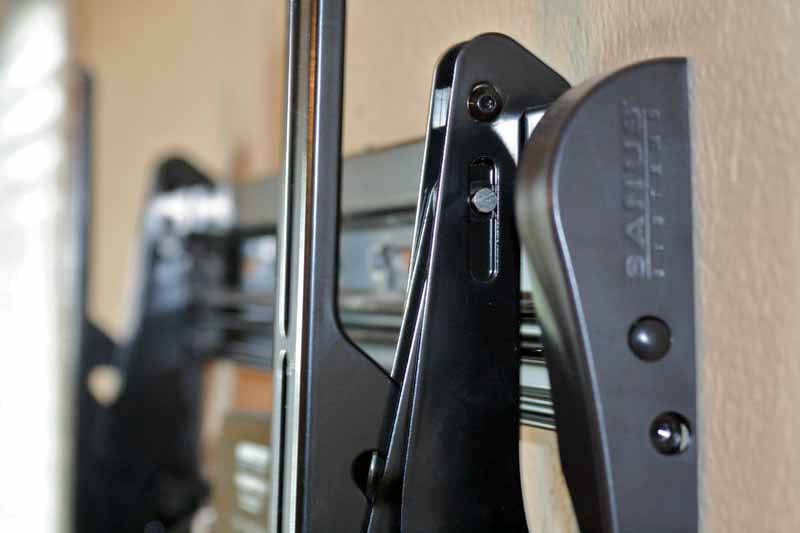 The Sanus LT25 Flat Panel Wall Mount is an open-back design, which I prefer over those mounts which provide a solid plate across the back. Open-back mounts give you some interior room to use for centering wireless HDMI receivers, recessed power plates or other modules or devices such as Sanus' ClickFit surge protector. They also tend to be easier to maneuver and weigh less. The mount is made from heavy gauge extruded aluminum, which makes it strong and light. The end caps, which bear an embosses Sanus Systems logo, are made of plastic to further reduce weight and give the mount a nice finished look. This is a beautifully machined piece of equipment.
The mount works by installing the back plate to the wall and then hanging the two Virtual Axis tilting arms which are designed to be pre-fastened to your television or display. Tilt adjustment tension can be set using the knobs located on the side of the tilt arms, and adjustments are easy, either by hand or via an allen wrench. The two arms slide along the mount rails, both top and bottom, so you can actually center the TV in your space, even if the mount needs to move to the right or left during the installation process.

A ClickStand mechanism means that you can release the bottom of the mounting brackets and swing out the TV for easy installation of power, AV and network cables. This is one of the most convenient features we've seen, save for the next one I am about to mention. A ProSet post-installation height adjustment screw is located on each tilt bracket. This means that you can basically slap the mount up on the wall any which way (more or less) and you will have 2 degrees of roll in either direction in order to assure your television is level. I cannot stress enough how important this is. A natural and accepted part of mounting flat panel TVs involves a torpedo or 2-foot level, which you place on the mount as you mark it out on the wall. This assures a level positioning of the mount bracket. The trouble is, screws drift and, particularly in older homes, floors and ceilings aren't always straight. When you finally mount your TV on the wall, it is not uncommon to note that it is slightly out of sorts and not at all level. The built-in adjustment provided by Sanus removes all worry and you can finally just install the mount as needed and handle the fine-tuning afterwards (we still recommend you use a level, but if you're even remotely close you are good to go).


The ClickStand disengaged the bracket from the lower rail and then swings around to stand off the TV from the wall, allowing you to make cable connections easily and quickly.
LT25 Installation and Conclusion
 Installation was a breeze. This mount was one of the easiest products I've ever installed. In fact, with the ProSet system, we slapped up a torpedo level, marked our holes and went to town. After locating the studs and pre-drilling the holes for our lag bolts, we put the mount up on the wall and secured everything in place. Because the mount is so wide, it's very easy to catch studs at all four primary mounting points. The entire aluminum mounting plate has openings at top and bottom across the entire length in order to facilitate an easy installation, regardless of your location. Sanus also included mounting hardware for both wood and masonry, complete with washers, bolts and stand-offs.
About the only thing to even watch out for during installation is the location of the mounting holes on your television. If they are less than ~16" then the tilt mechanisms should be located on the outside of the mounting brackets. If greater than ~16" they should be on the inside. All this means is that you may have to reverse the tilt adjustment knobs by removing them completely and inserting them on the other side, so you can switch the tilt arm brackets around. The tension knobs should always, for obvious reasons, be located on the outside so that you can get to them for easy adjustment.

Once everything was in place, we made good use of the ProSet height-adjustment screws and dialed in the mount to be perfectly level. This was done while holding our torpedo level on the top of the display and adjusting the ProSet screw with the included allen wrench. In less than 2 minutes our television was perfectly level and installation was completed. Now all that was left was installing the myriad of devices and wall plates we had in store to wrap up our installation. One note - while positioning any peripherals, be sure to check your clearance and ensure that your tilt brackets aren't going to interfere with cables or anything you plan to place behind the screen.

The ProSet screw is on top of the tilting bracket and adjusts easily for 2 degrees of positive or negative roll.
Conclusion
The Sanus Systems LT25 is very possibly the best tilting flat panel mount you can buy. It's easy to install, looks great, will support nearly anything you throw at it, and removes the most common hassles associated with flat panel display mounting. Given the price of just $199, I'm confident you can dig around and find something for less money, but it won't have this level of quality or features. And when you figure in your time and energy, and the importance of a product that has takes a difficult job and makes it easy, then the Sanus LT25 is a downright bargain. Highly recommended.
Sanus Systems LT25 Tilting Flat Panel Wall Mount
$199.99
Sanus Systems
Milestone AV Technologies
2221 Highway 36 West
St. Paul, MN 55113
(800) 359-5520
www.sanus.com
About Sanus Systems
Sanus Systems, a division of Milestone AV Technologies, designs and builds a broad variety of audio video mounts, furnishings and accessories that will satisfy even the most demanding audio/video enthusiast or interior designer. Every Sanus product is engineered to enhance AV systems and the surrounding decor. Today Sanus offers more than 300 products, including on-wall furniture, home theater furniture, TV stands, audio racks, wall mounts and speaker supports. Sanus products are available at thousands of retail locations nationwide; a store locator is available at www.sanus.com.
The Score Card
The scoring below is based on each piece of equipment doing the duty it is designed for. The numbers are weighed heavily with respect to the individual cost of each unit, thus giving a rating roughly equal to:
Performance × Price Factor/Value = Rating
Audioholics.com note: The ratings indicated below are based on subjective listening and objective testing of the product in question. The rating scale is based on performance/value ratio. If you notice better performing products in future reviews that have lower numbers in certain areas, be aware that the value factor is most likely the culprit. Other Audioholics reviewers may rate products solely based on performance, and each reviewer has his/her own system for ratings.
Audioholics Rating Scale
 — Excellent
- — Very Good
- — Good
- — Fair
- — Poor
| Metric | Rating |
|---|---|
| Build Quality | |
| Ease of Setup/Programming/Integration | |
| Features | |
| Fit and Finish | |
| Performance | |
| Value |  |
Clint Deboer was terminated from Audioholics for misconduct on April 4th, 2014. He no longer represents Audioholics in any fashion.
View full profile Subscribe to our newsletter