


Slim Devices Transporter Digital Music Player Review
Slim Devices Transporter
- Product Name: Transporter
- Manufacturer: Logitech Slim Devices
- Performance Rating:

- Value Rating:

- Review Date: March 06, 2007 09:10
- MSRP: $ 1,999
|
DAC: AKM AK4396 Multi-bit Sigma-Delta D/A, 120dB Dynamic Range, 120dB SNR (A-weighted), -106dB THD+N Digital Outputs: 15 picoseconds intrinsic jitter (std. deviation), coax, optical, BNC S/PDIF, & balanced AES/EBU Digital Inputs: Coax, optical and BNC S/PDIF, and balanced AES/EBU inputs can be used to drive the DAC, network streaming or pass-through Word Clock Input: Allows synchronization to an external clock source Display: Dual 320x32 grayscale vacuum florescent displays with multiple text, spectrum analyzer and VU views CPU: 325MIPS 8-way multithreaded, 8MB audio buffer & SlimDSP Network: True 802.11g wireless, 10/100mbs Ethernet |
Decoders: WAV, AIFF, MP3, WMA, FLAC with 24 bit resolution, 44.1, 48 and 96k sample rates Communications: TCP/IP control, infrared input, infrared output, RS-232 Rack-mount Brackets: Optional Finish: aircraft grade aluminum cases available with choice of black or clear anodized finishes Weight: 6kg (13lbs) Power: Autoranging linear power supply 100-240v, 50-60Hz, 10W Remote Control: Custom, backlit, 32-key infrared remote Dimensions: 17”W x 3”H x 12.25”D (433mm x 72mm x 311mm) Warranty: One year parts and labor; 30-day Satisfaction Guarantee |
Pros
- Well-designed chassis that blends well with esoteric high end gear
- Cool "force-feedback" TransNav control knob
- Excellent 802.11g wireless range
- Digital coax and optical S/PDIF inputs/outputs
- Wireless bridge option
- Rhapsody Music Service Support
- SqueezeNetwork allows use without PC
- Almost universally compatible with most operating systems
Cons
- Expensive for casual consumers (who alternatively can get a Squeezebox)
- No direct "digital" input control on remote
Slim Devices Transporter Introduction
I hate CD players. They're bulky and they typically play only 1-5 discs at a time - unless you get a CD changer and that's like getting the family pack at Krystal - it isn't about quality. We're no strangers to Slim Devices Digital Network Music Players. In fact, we've reviewed both the second and third iterations of the Squeezebox Digital Music Players. One upgrade we asked for back when we were reviewing the Squeezebox was a more "normal" form factor that could be rack-mounted into a system and therefore allow the player to blend more naturally into a system instead of standing out like an iPod on a docking cradle… Well, Slim Devices (who was acquired this past year by Logitech) listened to me… OK, maybe it wasn't just me, but the end result is more than I would have expected - or even hoped for - a completely tricked-out Squeezebox with dual displays, upgraded DAC, and enough functionality to serve as the true powerhouse in any "analogue-is-my-friend" system. But can this new "Cadillac" model really replace your CD player?
Slim Devices Transporter Features and Packaging
It's hard to compare the Transporter to the Squeezebox - it's really a completely different product and is more like a replacement for a traditional media player if you have a PC or NAS (network attached storage) device with stored lossless music files. In this sense, the Transporter now becomes a high-end DAC for your music. Check out these features:
- TransNav Contoller - This is a "force-feedback" style controller that is hard to explain except to say that it's really cool and EVERYONE should use this technology. The central knob on the Transporter that bisects the player rotates freely - until it comes to the beginning or end of a list. Then it stops… Yeah, I don't know how it works either, but it just "knows" when to stop turning. It's so cool you'll initially come up with reasons to browse your music library just so you can make it start and stop turning. You can't fool it, it just works.
- Connections - In or out you have access to everything you would want in this type of digital network player. People begged for the ability to use the DACs with other products, like a run-of-the-mill CD player… Well, they got it. The Transporter will allow users to connect via AES/EBU, S/PDIF coax (RCA and BNC) and even TOSLINK (EIAJ optical) and use the onboard high-quality DAC to convert digital audio to the analogue outputs. There's even a Word Clock connection for perfect sync to an external clock. Not enough? How about balanced and unbalanced analogue audio outputs, RS-232 for control via whole house systems and IR in/out ports.
- New Premium Quality DAC - Slim Devices calls their AK4396 the 'Miracle DAC' (perpetuated from audiophile forum threads that have dubbed it as such). Here's what one thread had to say about it: "All I can say to describe the sound is STUNNIGLY REAL! Extreme and refined high frequency detail is combined with magical midrange, full bodied sound and astounding bass performance." Magical midrange? That's a new one and while I'd love to take their word on it I suppose we'll still do some listening tests of our own.
What’s in the Package
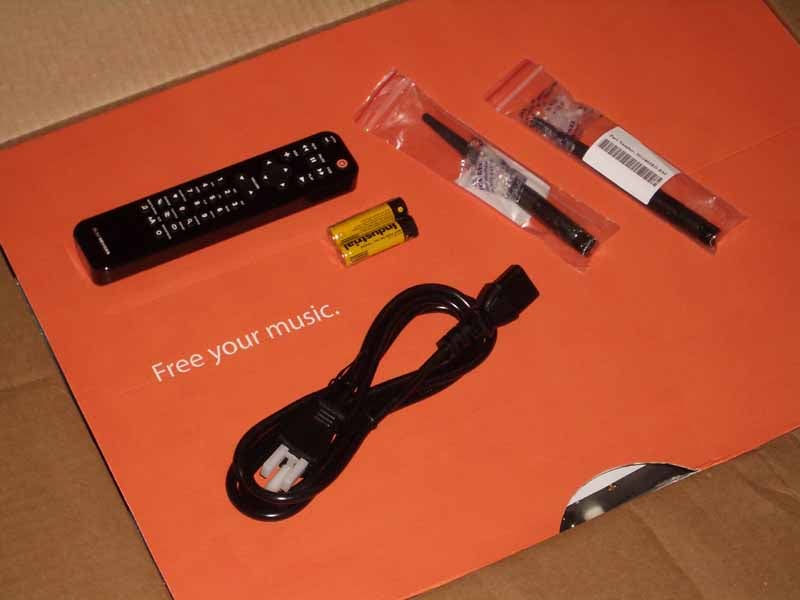 Opening up the Transporter was like opening up a large iPod package. There were boxes within boxes and everything was colorful and well-labeled. Inside were the transporter, power cable, remote, two antenna's user manual and even a pair of AAA batteries. A large orange box sported the words "free your music" - appropriate considering this device paired with a PC can result in hundreds of CDs being replaced by a single hard drive. Once you've crossed over to this method of playback then you truly have "freed" your music.
Slim Devices Transporter Hardware and Internal Pics
The Transporter features some hefty hardware in comparison to the Squeezebox (or any other Network Streaming Music players we've seen). Here's an overview of what you'll find inside of the chassis:
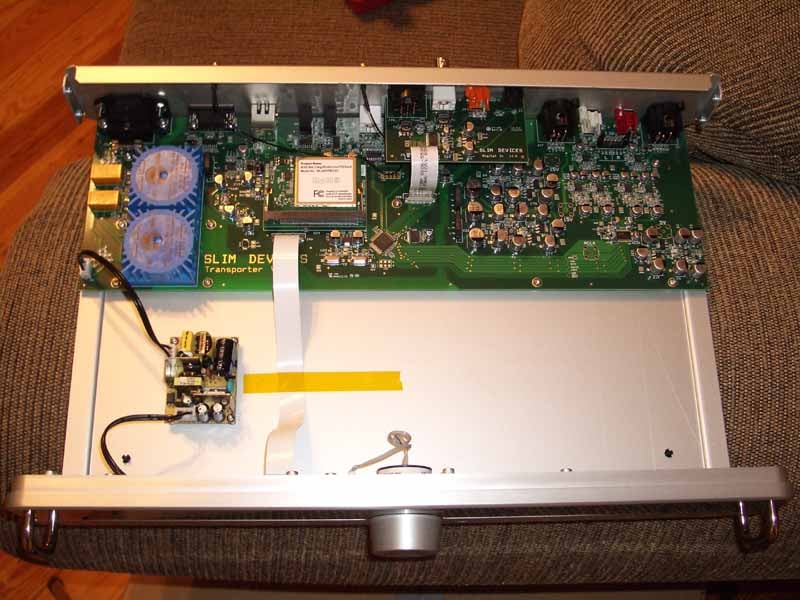
At first glance there doesn't seem to be all that much under the hood, however I'm not really an advocate of jamming in additional electronics just to make the inside look cool. The audio electronics and majority of the hefty components are kept to the back, away from the electroluminescent display components located in the front of the Transporter. Notice the physically isolated 5V power supply for the displays and CPU.
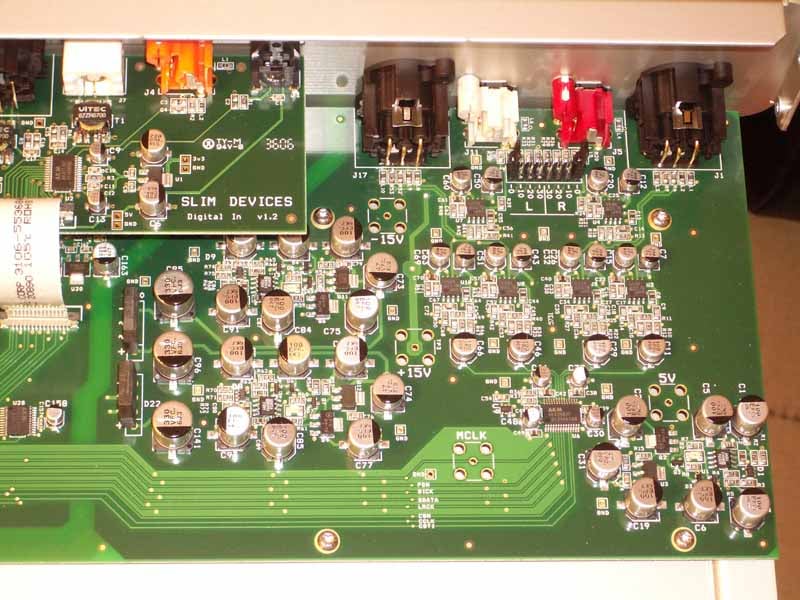
A small S/PDIF board sits atop the analogue output stage - a fully balanced system. This is where you'll see the AKM AK4396 multi-bit delta-sigma DAC (it's actually a dinky little chip for all the hoopla) and a gaggle of NE5534 op-amps. The board seems well laid out and organized.
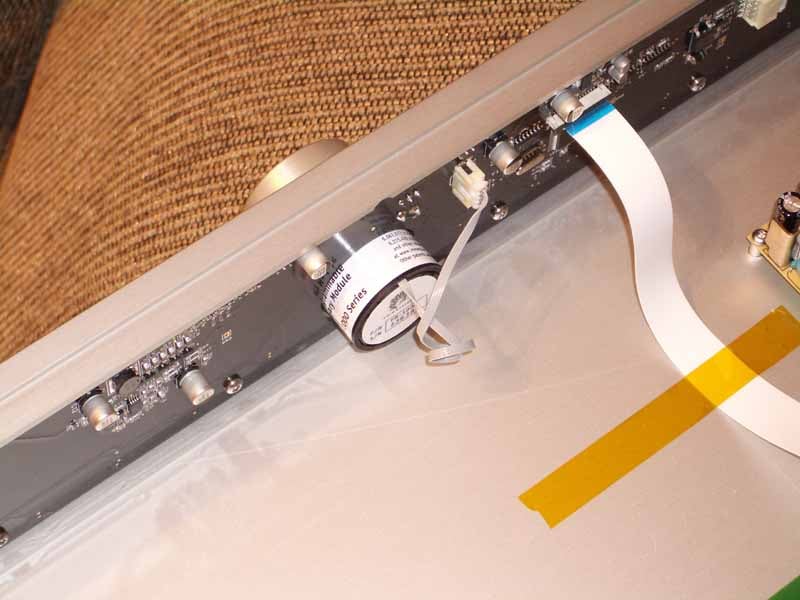
This is where the "magic" happens. The CPU and new TransNav tactile knob are located up front along with the dual fluorescent displays. Check the orange tape - no vibrations allowed… The TransNav is the first of its kind that I have ever experienced. It is an electronically-controlled knob that can give tactile response to scolling through lists and also stop when the top or bottom of a list is reached. It also supports a pushbutton functionality to allow you to drill down further into menus. The bottom line is that you should run out to a dealer just to experience this thing - it's truly amazing and I hope it's not patented by Logitech so that we see it showing up on more products across the industry.
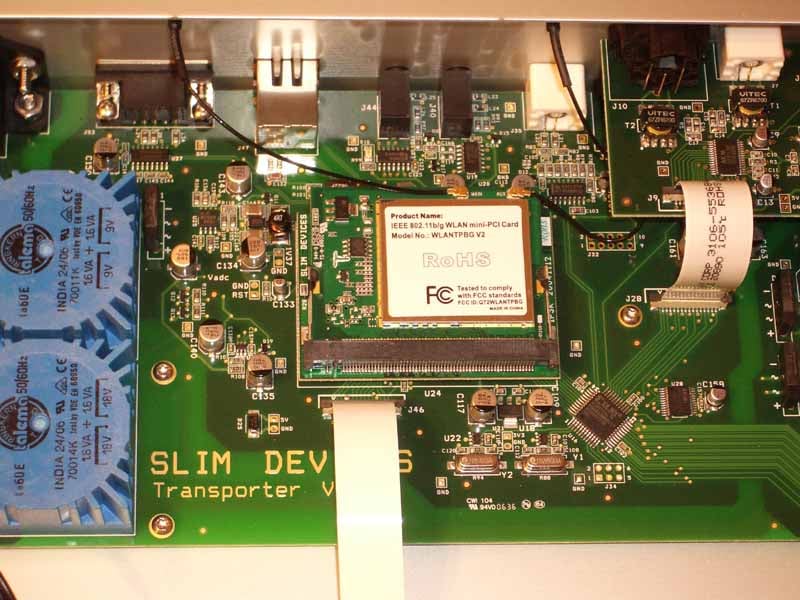
Here you can see the 802.11 b/g mini-PCI card with dual Wi-Fi antenna connections. Partially hidden are the dual 3.2VA NUVOTEM toroidal transformers (yes those are actually mini toroidals) in 9V and 18V configurations. These are used to step the voltage down to the appropriate level for the power supply.
Slim Devices Transporter SqueezeNetwork and Remote
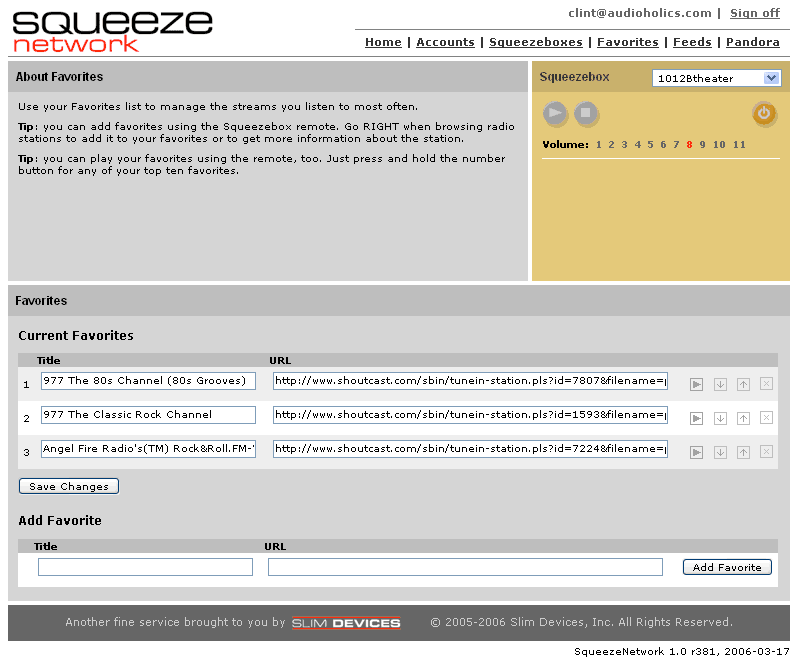 SqueezeNetwork was cool the last time we tried it. This time they added the popular Rhapsody Music Service - meaning you can pull music from your Rhapsody account without having to have a PC (or push it to your Transporter or Squeezebox using the Squeeze Network web interface). Now that's pretty cool and takes the Transporter (and Squeezebox) product to a whole other level. I was, unfortunately unable to get Rhapsody to work in my system which could well have been part of an internal networking problem. I also encountered a bit of a firmware "round robin" whereby in order to utilize Rhapsody I had to update my firmware… then when I exited to the Slim Server I had to update it again… and then again when I went back to Squeeze Network… you get the idea. The workaround fix is to update the Slim Server software to 6.5.2 (nightly build) or do a manual edit to the Firmware/squeezebox2.version file. My guess is that by the time most people read this they'll laugh in fond remembrance of Slim Server 6.5.1.
We haven't yet seen Slim Devices enhance the SqueezeNetwork to include shared playlists, etc, but we suppose DRM might have something to do with this. It is still nice to have the ability to stream content without a PC and we like the capability it gives us to "push" discrete content to players throughout our home.
Backlit Remote Control
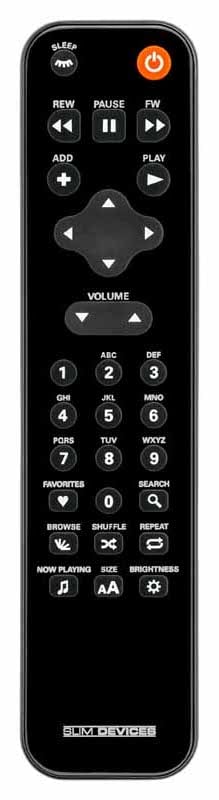 Hey, a new remote - and it doesn't suck! This completely redesigned remote which comes with the Transporter is unlike anything I've seen in my AV travels. It is reserved in appearance yet the backlighting makes it very elegant and high-end in appearance. It's a subtle fluorescent backlight effect - and it activates when any button is pressed. If I had my way, all of my remotes would look like this and function in near the same way.
The button layout is very ergonomic with the most commonly-used navigation falling right under the thumb. Just below is volume - and I find that I use that less frequently, but it's nice to be able to activate these controls without having to switch remotes to the Marantz PM-11S1 integrated amplifier I'm using with this system. Located beneath this is the number pad and then 8 buttons which serve very specific purposes. Most of this has been described in my prior reviews of the Squeezebox systems, so suffice to say that Favorites, Search, Browse, Shuffle, Repeat, Now Playing, Font Size and Brightness (also triggers the firmware update function) are present.
At the top there is a Sleep button in addition to Power, standard Play Controls and an Add button. This is a nice remote and it only lacks one thing in my opinion - a direct digital input button to switch the unit into DAC mode for use with a CD player (or other) digital outputs. With the Transporter, one of the big features you're paying for is the ability to use a nice DAC - so you can conceivably "upgrade" a CD player or other digital source component with the Transporter.
Slim Devices Transporter Listening Tests and Conclusion
So Is It a CD Player Killer?
I'll point out a couple of things before we delve into this part of the review. First, I'd love to tell you I was using a $50,000 Pleitzkreig Zuftwaffer 6000 Esoteric Tube CD player, but I wasn't. The $1500 Denon DVD-3090CI was my reference and the goal of this experiment was to see if (in my case) Windows Media lossless music could sound as good as the 16-bit source in my 2-channel listening room. Both devices were connected using their analogue outputs (Denon was using unbalanced), level matched, and tracks were started at the same time. A-B switching was done visibly and with my full knowledge of which source was selected at all times. :-) My goal was to see if there were significant or even noticeable differences that were easily discernable via speakers (and later earphones) not try to conduct a double blind listening test in an effort to prove whether I could pick them apart 9 times out of 10 (I sincerely doubt I could have).
SACD: Norah Jones - Come Away With Me (CD layer)
Track 2 "Seven Years" had a nice overall range of bandwidth including a nice opening of acoustic guitar with a well-rounded bottom end. It was very "live" sounding (as is the entire album) will all-encompassing low notes and distinct finger noises. Jones' vocals were typically breathy (in the good way) and I especially liked how the guitar solo had absolutely no compression or loss of top end - even when cranked in my listening room.
I kept the ripped disc running into the next track "Cold, Cold Heart" where the intro bass line and naturally reverberant vocals showed me that when picking up the Transporter, people won't be leaving any money on the table". It appeared, so far, to be completely transparently executing the duties of a "high-end" transport.
CD: Riotous Brothers
I first heard this band two weeks ago, live, at a good friend of mine's 60th birthday party (incidentally, Bruce Hensal also happened to be the guy who mastered the album). For $10 this is the best deal I've gotten on a good CD in a long time. Bruce doesn't subscribe to the "mash it until there's nothing left" theory of mastering, so the disc still has some dynamics left in it. This UK band has Blues, Rock, Funk, and a lot of British band influences (don't know how they feel about all those labels I just threw at them of course) - all of which combine to make for one impressive band. I focused on the imaging, drums, lead guitar and impressive, up-front vocals.
Track 2 "Real Mother for Ya" is a funky tune (almost Blues Brothers meets Tower of Power but without the brass) with a nice bass groove to it. As indicated previously, I really paid attention to imaging and soundstage which remained defiantly locked in pace when I A-B'ed the two players. Imaging and soundstage remained wide without sounding artificial or over-mixed/over-panned. I could not, despite my numerous attempts, hear a difference between the Denon and the Transporter during A-B switching.
Thanks to precise snare positioning in the mix, Track 3 "Strange Face of Love" further helped to confirm that imaging and soundstage were identical on both players.
But what if the differences are so subtle that the RBH Sound speakers and my room aren't enough to allow me to hear them? Simple, we grabbed our reference Etymotic ER4 earphones and sat back for another round of listening tests (I know, it's a tough job, but somebody's got to do it). Folks, this reviewer couldn't hear a lick of difference between the two players. I focused in on reverb, scrutinized the male vocals, and dissected the top and bottom ends for artificial compression, tonal shifts or alterations in the soundstage. I'd have to say that I'd ditch my CD player in a heartbeat - I mean, how 80's!
CD: Euphoria - Precious Time
So are we done? Nah, I had one more CD - and even though I was pretty certain I'd still hear the same on both sources, we pooped in Euphoria's Precious Time CD and settled in for a listen. Track 2 "Blue" featured vocals by Tina Dico - who had a nice "angry white female" style voice with good texture and timbre. I loved the vocal effects in this song and the Transporter never missed a note. This album does tend towards a "busier" mix than I typically like but there's enough varied content to make it a very interesting work. Tracy Bonham makes it onto track 7 "Precious Time" and I again compared the luscious vocals on both players. The Transporter carried through reverb decays perfectly with no hint of the DAC taking a dump or missing anything in the translation from Windows Media lossless to its pristine balanced outputs. Simply stunning - at least for 16-bit tracks. My work here was done.
Conclusions and Overall Perceptions
Slim Devices took the world by storm with its Squeezebox series of players. Now the Transporter moves it even further ahead by ramping up the quality and adding more functionality and "pizzazz". But is the CD player dead? Can we replace a digital transport with a supercharged DAC to decode our lossless CD content into our listening rooms? After a thorough review and dissection of the product, its functionality, and its ability to fit in perfectly with audiophile grade equipment, I have to say the answer is a resounding "Yes" - provided you don't mind having a networked computer on in your system. This product isn't for everyone - but before you choke on the price, realize its target market and go price yourself some high-end CD players for comparison. And they don't have this cool TransNav knob… When put into perspective, the Transporter is almost a bargain - almost!
Slim Devices - a Logitech Company
455 National Avenue
Mountain View, CA 94043
(650) 210-9400
sales@slimdevices.com
The Score Card
The scoring below is based on each piece of equipment doing the duty it is designed for. The numbers are weighed heavily with respect to the individual cost of each unit, thus giving a rating roughly equal to:
Performance × Price Factor/Value = Rating
Audioholics.com note: The ratings indicated below are based on subjective listening and objective testing of the product in question. The rating scale is based on performance/value ratio. If you notice better performing products in future reviews that have lower numbers in certain areas, be aware that the value factor is most likely the culprit. Other Audioholics reviewers may rate products solely based on performance, and each reviewer has his/her own system for ratings.
Audioholics Rating Scale
 — Excellent
- — Very Good
- — Good
- — Fair
- — Poor
| Metric | Rating |
|---|---|
| Audio Performance | |
| Build Quality | |
| Ergonomics & Usability | |
| Features | |
| Remote Control | |
| Fit and Finish | |
| Performance | |
| Value |  |
Clint Deboer was terminated from Audioholics for misconduct on April 4th, 2014. He no longer represents Audioholics in any fashion.
View full profile Subscribe to our newsletter