


Slim Devices Squeezebox v3 Digital Music Player Review
Squeezebox v3 Digital Music Player
- Product Name: Squeezebox v3
- Manufacturer: Slim Devices
- Performance Rating:

- Value Rating:
- Review Date: April 13, 2006 19:00
- MSRP: $ 299
|
System Requirements
Audio formats
Wireless Interface (wireless model only): 802.11g wireless networking with dual int/ext antennas; Bridging capability allows Ethernet devices to connect to the network through Squeezebox3; Automatic detection of available networks; Support for both WPA Personal and 64/128-bit WEP encryption
Ethernet: True 100Mbps throughput; Shielded CAT5 RJ-45 connector; Automatic receive polarity correction
Display: 320x32 VFD grayscale pixels with brightness control
Firmware: Flash-upgradeable; Network settings stored on non-volatile memory; Auto-configuration for most networks
Architecture: 250 MHz 8-way multithreaded RISC processor; Field-upgradeable Xilinx CPLD; 64Mb high-speed RAM; 16Mb program flash
Warranty: One year parts and labor; 30-day Satisfaction Guarantee
Finish: choice of high gloss white or black |
Internet Radio
Analog RCA outputs
Digital S/PDIF outputs
Headphone output: Multifunction 1/8" jack (also functions as an IR blaster); 16-ohms minimum impedance; less than 0.03% THD; Left/right crosstalk attenuation is 92dB.
Dimensions: 7.6"W x 3.7"H x 3.1"D (192mm x 93mm x 80mm) |
Pros
- AAC Support
- Excellent 802.11g wireless range
- Setup is a cake walk
- Digital coax and optical S/PDIF outputs
- Sexy new chassis
- Wireless bridge option
- Added Internet Radio selection to SlimServer
- Improved Help topics in SlimServer
- Runs on Windows, Mac OSX, and Linux!
Cons
- No RS-232 control (just TCP/IP)
- Um... it’s not free?
Slim Devices Squeezebox v3 Introduction
We already did a review of the Squeezebox2 music player which we found to be incredibly versatile and scored high marks for ease of use and quality of music playback. The goal of the Squeezebox is to eliminate the need for a huge physical CD collection. With Squeezebox, users can rip their CDs to a hard disc in one of the lossless formats and play it back through the high fidelity Burr-Brown 24-bit DAC. The Squeezebox v3 is functionally and internally identical to the Squeezebox2, but features a brand new enclosure that has completely redesigned the unit for a more “stunning” look. Instead of a geeky looking black box that does wonders, the unit now has the look of a polished product that can go head to head with the big boys.
Slim Devices Squeezebox v3 Overview and Internet Radio
A couple of welcome changes and additions were also made to the updated version of SlimServer (v 6.2.1 as of this review) since our last encounter with the Slim Devices product:
- Replay Gain: automatically adjust volume based on RG info
- WMA support in Firmware: streams WMA radio stations and local files
- Unicode support on the VF display
- Random Mix: allows mix based on songs, artists or albums with filters for unwanted genres
- Various Artists: automatically identifies various artists / compilation albums
- Wake-on-LAN
- Lyrics support added to WebUI (iTunes 5 supports the USLT tag)
- Multiple comment keys of the same type are allowed for Vorbis users
- SqueezeNetwork & DirectStreaming (added just after my Squeezebox2 review was published
- Added “Radio” subsection allowing the user to select stations from SHOUTcast, radioed.com, Live365 Internet Radio, or even custom stations
- Improved Help topics in SlimServer
- Bug fixes and enhancements which are too many to name. See the Changelog for more details.
 What’s in the
Package
What’s in the
Package

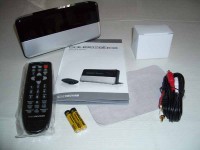
The Squeezebox v3 comes with just about the same materials as the Squeezebox2, but with improved packaging. I especially liked the opening statement inside the box: A 5x7 “MP3 is Not A Crime” sticker. I found it subtle but effective (not). Contents included the main unit, power supply, remote, manual, and a stereo RCA cable. Frills include batteries and a nice cleaning cloth to keep the shiny face of the Squeezebox clean and clear of dust or fingerprints (and you’ll use it because some people just can’t keep their hands off of a vacuum florescent display – trust me).
Internet Radio via SlimServer Software
In our last review we complained (ok, we whined and threw hissy fits) over how the comprehensive SlimServer software had overlooked direct access and manipulation of Internet Radio streams. While this was accessible on the unit itself via remote, the SlimServer software (which is extremely convenient in allowing you to essentially turn any laptop or PC into a sophisticated remote media player) lacked any controls or ability to select stations. This is no longer the case with the version 6.2.1 software I ran for this review, and apparently hasn’t been since Michael Herger, Dave Cohen, and chrisp810 added various interface modifications and plug-ins in v6.1b1 for what is an impressive interface. Full Internet radio support is offered and custom URLs can be input into the Slim Server and stored. These can be direct stream URLs or playlist (.pls) files which point to the stream. Oh yeah, Podcasts can be accessed via a custom plug-in... nice.
Slim Devices Squeezebox v3 SqueezeNetwork and Conclusion
 SqueezeNetwork is an
innovative add-on that Slim Devices came up with since our last review.
SqueezeNetwork allows users to register their Squeezebox players so that they
can connect and share favorites without the need for a PC. In this way you can
have multiple Squeezeboxes which share favorites and can access them without the
need for a PC or the SlimServer software. This is a cool option as in the past
the Squeezebox was pretty much useless if your PC crashed or the SlimServer
application was not running properly. Now, users can access the thousands of
Internet radio stations at any time. More is planned for SqueezeNetwork, but to
whet your appetite here are the basics:
SqueezeNetwork is an
innovative add-on that Slim Devices came up with since our last review.
SqueezeNetwork allows users to register their Squeezebox players so that they
can connect and share favorites without the need for a PC. In this way you can
have multiple Squeezeboxes which share favorites and can access them without the
need for a PC or the SlimServer software. This is a cool option as in the past
the Squeezebox was pretty much useless if your PC crashed or the SlimServer
application was not running properly. Now, users can access the thousands of
Internet radio stations at any time. More is planned for SqueezeNetwork, but to
whet your appetite here are the basics:
- Always-on Internet Radio: You can listen to stored Internet radio streams from Live365, SHOUTcast, radio, or even custom streams you store in the system.
- Always-on News Ticker: You can configure custom RSS news feeds from news providers and web sites directly on the Squeezebox display.
- Pandora: This “music discovery service” is designed to help users find and enjoy music to match their custom tastes. It's powered by the Music Genome Project, which claims to be the most comprehensive analysis of music ever undertaken. You simply enter one of your favorite songs or artists and the system launches a streaming station to explore that part of the music universe. A 90-day trial is included with SqueezeNetwork after which you will need to pay $36/year to continue.
The idea is that Slim Devices will expand SqueezeNetwork to include shared playlists as well as community ratings of music and Internet radio stations. They will also add plug-in downloads through the network for almost limitless expandability of options. SqueezeNetwork has yet to meet its full potential but it may end up being a significant factor in what sets apart the Squeezebox from its competition.
Community
Slim Devices has developed quite a following, including a users forum where you can talk directly to not only other Squeezebox users, but also the owners and the software developers to give feedback, report bugs, or request features. The Squeezebox community is a sight to behold, with nearly 5000 members, 20,000 threads and almost 100,000 posts. Not bad for a small company. The amount of attention a typical user can get from the Slim Devices staff and user base is mind boggling. Weight Watchers and AA have nothing on this support group!
 Updated Remote Control (ok, so it’s
just one button)
Updated Remote Control (ok, so it’s
just one button)

Not much has changed with the remote control since the last time I used it. In fact, you can easily use a Squeezebox2 remote on a Squeezebox v3. The one addition I did note was a new “Favorites” button. This is a welcome addition as it allows you to immediately call up your favorites list – an act that formerly took several arrow clicks. Someone must have made a comment about the blue buttons because they have now been changed to various shades of gray – the red power button being the conspicuous exception.
One change I would formally request (and I make this request of any AV product that doesn’t have it) is for discrete power controls. A separate on and off IR control allows for much easier integration into a universal remote control or system macro. As of right now the workaround to ensuring the on/off state of the Squeezebox is to use the “Play” button control to turn the unit on, and the use the “Power” button to turn it off.
In the event that you truly don’t like the remote control, realize that the Squeezebox can also be controlled by a Sony PSP, Pocket PC, cell phone or Palm PDA. Yeah, I thought that was pretty cool, too.
Conclusions and Overall Perceptions
Slim Devices has taken a great thing and made it even… well, greater. This is one box that should have a prominent place in anyone’s home theater. I am enamored by its upgraded body work and the consistent attention to firmware updates and software upgrades cannot go unnoticed. Slim Devices is a company that is paying attention to its user base and it shows. About the only suggestion I can make for the product is that a single rack space version with discrete power controls and RS-232C control might attract more of the custom install crowd and could be worth a look. Go get yourself a Squeezebox.
Review Addendum
Note that the SlimServer software has a very rich CLI (command line interface), fully controllable via TCP/IP. As such, RS-232 would simply be a more expensive, slower control option. Why use RS-232 when you have TCP/IP, which is faster and built into most control systems today?
In the review we commented about the lack of RS-232 support, however it has been brought to our attention that the Squeezebox3 can be very effectively controlled via TCP/IP. According to Jeff (via the SlimServer General Discussion forum):
I use an AMX NetLinx control system (very commonly used with the custom install crowd). I did an open source module to control the Squeezebox. It's free for the taking. Here's [are] sample screenshot[s]: http://sourceforge.net/project/screenshots.php?group_id=62827
The Score Card
The scoring below is based on each piece of equipment doing the duty it is designed for. The numbers are weighed heavily with respect to the individual cost of each unit, thus giving a rating roughly equal to:
Performance × Price Factor/Value = Rating
Audioholics.com note: The ratings indicated below are based on subjective listening and objective testing of the product in question. The rating scale is based on performance/value ratio. If you notice better performing products in future reviews that have lower numbers in certain areas, be aware that the value factor is most likely the culprit. Other Audioholics reviewers may rate products solely based on performance, and each reviewer has his/her own system for ratings.
Audioholics Rating Scale
 — Excellent
- — Very Good
- — Good
- — Fair
- — Poor
| Metric | Rating |
|---|---|
| Analogue Audio Performance | |
| Build Quality | |
| Ergonomics & Usability | |
| Ease of Setup | |
| Features | |
| Remote Control | |
| Performance | |
| Value | |
Clint Deboer was terminated from Audioholics for misconduct on April 4th, 2014. He no longer represents Audioholics in any fashion.
View full profile Subscribe to our newsletter