


Logitech Squeezebox Duet Music Server Review
Logitech Squeezebox Duet
- Product Name: Squeezebox Duet
- Manufacturer: Logitech
- Performance Rating:

- Value Rating:

- Review Date: May 14, 2008 20:00
- MSRP: $ 399
|
Specifications Digital and analog outputs High fidelity Wolfson 24-bit DAC Two dedicated linear power regulators for DAC and line-out stages 4.8Vpp line-level outputs Signal-to-noise ratio: over 90dB Total harmonic distortion: less than -88dB (0.002%) Optical and coax digital connections Squeezebox Receiver Dimensions: 6.2" x 4.4" x 1.2" (156mm x 112.5mm x 29.25mm) Finish: high gloss black Squeezebox Controller Dimensions: 5.75" x 2" x 0.75" (156.2mm x 50.8mm x 18.8mm) Finish: high gloss black 2.4-inch color LCD TFT display
|
Audio Formats Lossless Formats (Apple Lossless, FLAC, WMA Lossless)
Uncompressed formats (AIFF, WAV, PCM)
Compressed formats (MP3, AAC, Ogg Vorbis, MP2, MusePack, WMA)
Other |
Pros
- Easy access to Internet Radio
- Tons of connection options
- Great fidelity and lack of audio dropouts
- SqueezeCenter makes personalization a breeze
Cons
- If receiver has a problem connecting, there is very little feedback to tell you what's wrong
- Software still beta
- Menu layout could be better organized
Logitech Squeezebox Duet Introduction
If you haven’t heard of Squeezebox - you've been living under a rock. On the other hand, you may recognize the name but not know what it does. Well, we'll fix that in a moment. The Squeezebox products have always gotten good reviews here but that was before Logitech bought them. At first, they tried to compete with their Wireless DJ system but eventually they ended up just purchasing their competition. One thing we really liked about the Wireless DJ system was its remote. When we finished the review, the first thing we said to Logitech was that we thought it'd be a great idea if they integrated the Wireless DJ remote with the Squeezebox functionality. They didn't exactly answer except to give us a wink and a smile. Since then, we've been waiting with bated breath.
Logitech Squeezebox Duet Build Quality and Setup
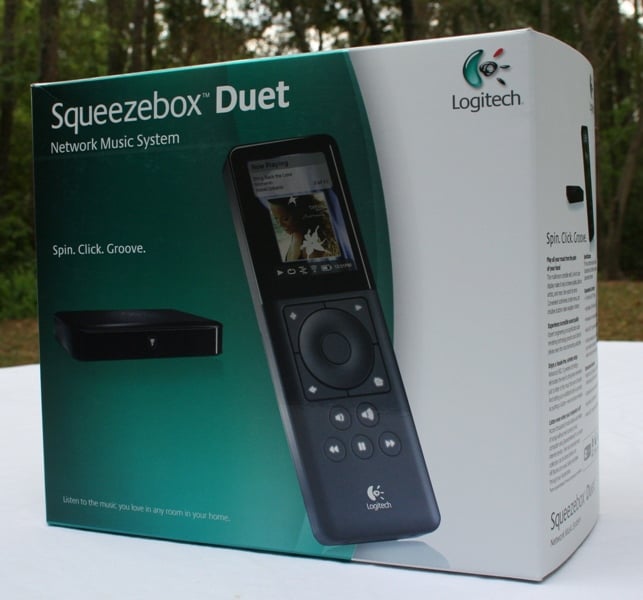 When I received the Squeezebox Duet, it was so new that
there was hardly any information on the web - which was a problem considering
that the Duet didn't come with a manual. Later on, when they got their
information up on the net, I found out that this wasn't a mistake as I had suspected,
but instead the way the unit ships. It only comes with a Quick Start Guide.
While I was able to get the unit up and running with only the Quick Start
Guide, I definitely felt like I could have used a little more direction that a
full fledged manual would provide. I'd suggest that you download the manual
from Logitech's website as soon as you purchase the unit.
When I received the Squeezebox Duet, it was so new that
there was hardly any information on the web - which was a problem considering
that the Duet didn't come with a manual. Later on, when they got their
information up on the net, I found out that this wasn't a mistake as I had suspected,
but instead the way the unit ships. It only comes with a Quick Start Guide.
While I was able to get the unit up and running with only the Quick Start
Guide, I definitely felt like I could have used a little more direction that a
full fledged manual would provide. I'd suggest that you download the manual
from Logitech's website as soon as you purchase the unit.
Packaging of the Duet was very well done on both a functional and aesthetic level. Inside the lid of the box, there is a removable shelf of sorts that contains the Quick Start Guide and some additional information on some of the pay services you can sign up for with the Duet. The power cords are different in that you need to slide in the appropriate plug for your region. Interestingly they only include the plug for your region which begs the question why they didn't just provide a regular power cord.
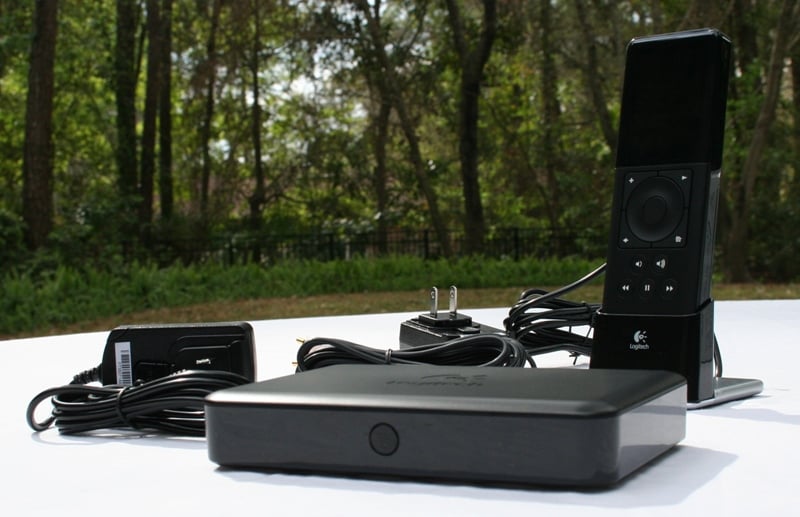
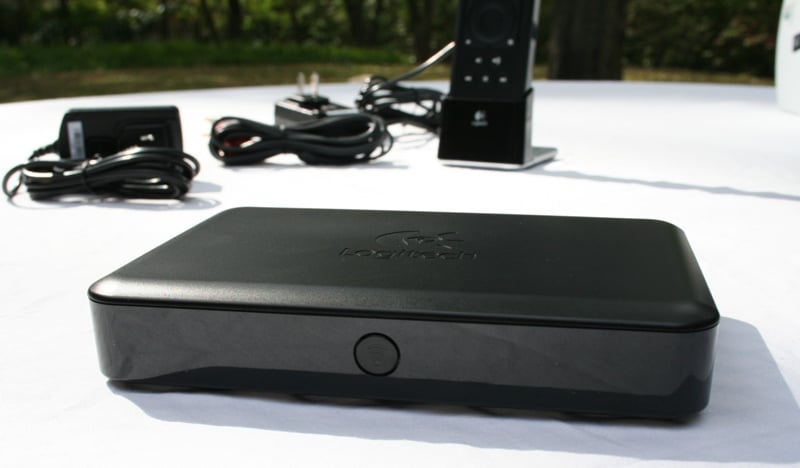
The remote is a bit thicker, less wide, and a bit taller than a normal sized iPod. The screen on the remote is nice and big and has a ton of colors. The recharging cradle is small, heavy and chrome and looks suitably high tech given the overall look of the product. The remote sits in it firmly and leans back just a bit. The Squeezebox receiver is small and black (probably about as thick as but twice as much surface area as your wallet) with a single button on the front. The back of the receiver has power and Ethernet ports plus stereo analogue, coax digital, and TOSLink audio outputs. The receiver is black and plastic and feels a bit lighter than the recharging cradle. While the cradle is heavy for it's size, the receiver definitely feels a little light and I would have worried about it sliding off the shelf with two quality (read: thick) analogue cables connected. As it was, I didn't have to worry.
Setup
 Setting up the
Squeezebox Duet is a snap… for most people. For me, I had issues. Major issues?
No. But I apparently either have bad networking karma or live in a network free
zone and am constantly struggling to keep my home network afloat. Need a
receiver hooked up? I can do it in no time flat. Tell the difference between
two speakers? I'm your man. Set up a home office network that is both stable
and lasting… well, perhaps you know someone that works in IT? According to the
instructions, this is supposed to be how it works:
Setting up the
Squeezebox Duet is a snap… for most people. For me, I had issues. Major issues?
No. But I apparently either have bad networking karma or live in a network free
zone and am constantly struggling to keep my home network afloat. Need a
receiver hooked up? I can do it in no time flat. Tell the difference between
two speakers? I'm your man. Set up a home office network that is both stable
and lasting… well, perhaps you know someone that works in IT? According to the
instructions, this is supposed to be how it works:
- Plug everything in and all that
- Charge the battery (there is usually enough of a charge on it to get through the setup process)
- Download software (see below)
- Turn on the remote and follow the onscreen instructions
- Play music
Wonder where I got stuck? Actually, it is a pretty easy process as long as everything is finding everything else. First thing to do is to make sure if you have any sort of WPA keys (passwords) on your network, you find them and get ready to enter them into the Duet remote. The basic idea is that the remote can connect to the network as can the receiver. So, once you enter the information into the remote, it configures the receiver for you. Technically, there are three ways to connect to the Internet - Wireless, Hybrid, and Bridged. Wireless is just that - both the remote and the receiver connect wirelessly. Hybrid is when the receiver is connected via Ethernet and the remote connects over your wireless network. Bridged is when the receiver is connected via Ethernet and the remote is connected to the receiver wirelessly and accesses the Internet over the Ethernet connection. Basically, you don't have to have a wireless network nor do you need to have an Ethernet run to you home theater to make the Squeezebox Duet work. You do, however, need to have a router.
My problems arose when I was trying to connect the receiver to the network. For some reason, it just wouldn't find the wireless network and even had problems connecting via Ethernet. I tried multiple placements but nothing seemed to help. Just when I was about to give up, it started working. Which was weird but I was happy that it was working. A couple of times during the beginning of the evaluation period it lost connection but eventually, it seemed to settle in and work again. Sort of strange. It definitely would have helped if there was some way of knowing what was going on with the receiver. The only feedback you get is the changing of the colors of the light on the front. It doesn't tell you why it isn't working, just that it isn't. Very frustrating.
 Eventually it went back down and I ended up on the phone
with SlimDevices for the better part of an hour before we got the Squeezebox
connected correctly - but only when connected up via Ethernet in bridged mode.
Wirelessly, I was only able to connect to the SqueezeNetwork and not any of the
computers on the network. Even that was flaky as once I disconnected from the
network, it would take anywhere from minutes to hours to reconnect. After a few
more calls, tech support decided that it must be some combination of
interference between the receiver and the router and/or conflict with my
firewall/virus protection. This didn't make a whole lot of sense to me as at
first I was also having problems connecting via Ethernet (at first).
Regardless, once I did a little reconfiguring of my firewall, the wireless
connection seemed to work as advertised. Is this a problem with the Squeezebox?
Probably not. But don't think that just because Joe Techie Review Guy gave it 100
stars on ease of setup that it will be that way for you. It is going to depend
a lot on your settings and equipment.
Eventually it went back down and I ended up on the phone
with SlimDevices for the better part of an hour before we got the Squeezebox
connected correctly - but only when connected up via Ethernet in bridged mode.
Wirelessly, I was only able to connect to the SqueezeNetwork and not any of the
computers on the network. Even that was flaky as once I disconnected from the
network, it would take anywhere from minutes to hours to reconnect. After a few
more calls, tech support decided that it must be some combination of
interference between the receiver and the router and/or conflict with my
firewall/virus protection. This didn't make a whole lot of sense to me as at
first I was also having problems connecting via Ethernet (at first).
Regardless, once I did a little reconfiguring of my firewall, the wireless
connection seemed to work as advertised. Is this a problem with the Squeezebox?
Probably not. But don't think that just because Joe Techie Review Guy gave it 100
stars on ease of setup that it will be that way for you. It is going to depend
a lot on your settings and equipment.
What was neat was that one day I noticed that the remote wasn't connected to the wireless network. I was listening to music so I knew it was working but the display showed that the wireless network was not available. It occurred to me that the Duet had switched into Bridged mode in order to keep my music flowing. After I shut down the remote and powered it back on, it found the network without a problem but it was neat to see that the different connection modes where there not only for convenience, but to keep you connected without you having to do a thing. Ultimately, I ended up with the receiver and remote connected wirelessly.
There is a link in the information to visit www.SqueezeNetwork.com and create an account and download their SqueezeCenter. Let me say, for the record, that you do NOT have to do this if you don't want to. It isn't mandatory. The Squeezebox Duet will be completely happy to stream content off the Internet (podcasts and Internet radio) through the SqueezeNetwork if that's all you want it to do. You can even set favorite stations that are unique to the SqueezeNetwork. But if you want to have access to all your content on your computer, you're going to need the SqueezeCenter. While the Wireless DJ needed to co-op your computer in order to work, the SqueezeCenter is a much more elegant and much less intrusive solution. A few fun facts from Logitech about the SqueezeCenter:
-
Web Interface—control the player and manage playlists from a web browser
-
MP3 & WMA Internet radio
-
Alarm clock
-
Automatically imports iTunes library and playlists (Windows and Mac)
-
Automatically imports metadata tags
-
Browse and search by title, artist, album or genre
-
Shuffle and repeat albums or songs
-
Create, save, and import .pls, .cue and .m3u playlist files
-
Displays current date and time when not playing
-
Open protocol and command line API—easy to control from other applications
-
Expandable through 3rd party plug-ins and skins
-
Supports multiple synchronized players
-
Cross platform Open Source software, written in Perl (GPL)
-
Listen from any computer using an MP3 software player (Winamp or iTunes)
Big deal right? Actually, it is. You can use your SqueezeCenter on your computer to give the Duet access to your content but also to your playlists and favorite stations. So, rather than keeping a global list on the Squeezebox you can access your personal one through the SqueezeCenter. The Duet can access any computer on the network that has SqueezeCenter loaded up on it so theoretically you could have different settings on your desktop, laptop, and any other computer on the network. Your kids could have their own as well as any friend that you gave access to your network. No more, "Oh, I found this great station, let me send you the link," stuff (which, incidentally, is pretty easy to add through either the SqueezeNetwork or SqueezeCenter web interfaces). They can just grab the remote, access their SqueezeCenter, and hit play (though seriously, if you ever come over and grab my remote, there's going to be a problem).
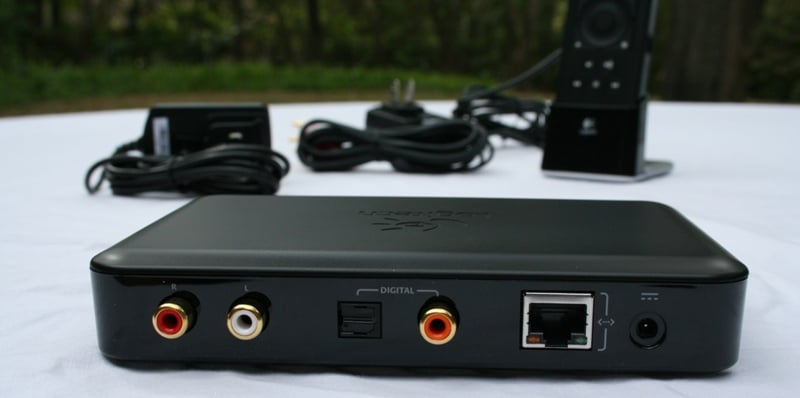 I hooked up the Squeezebox Duet via TOSLink and analogue
cables to test the difference. As I expected, with Internet radio, you'd be
hard pressed to notice one since most of the compression is so bad. The Duet
sports 24 bit Wolfson DACs so it makes a fairly good standalone audio solution
though you may find that you prefer the DACs in your equipment more depending
on their quality. As many Zone 2/3 on receivers can only access analogue
inputs, good DACs on the Duet are a much welcome addition. Digitally you have a
coax and TOSLink options. Either will sound the same (regardless of what the
esoteric audio elitists say). It is nice that they give you the option as many
receivers have more TOSLink than coax though too often users are left with only
one option at their disposal.
I hooked up the Squeezebox Duet via TOSLink and analogue
cables to test the difference. As I expected, with Internet radio, you'd be
hard pressed to notice one since most of the compression is so bad. The Duet
sports 24 bit Wolfson DACs so it makes a fairly good standalone audio solution
though you may find that you prefer the DACs in your equipment more depending
on their quality. As many Zone 2/3 on receivers can only access analogue
inputs, good DACs on the Duet are a much welcome addition. Digitally you have a
coax and TOSLink options. Either will sound the same (regardless of what the
esoteric audio elitists say). It is nice that they give you the option as many
receivers have more TOSLink than coax though too often users are left with only
one option at their disposal.
Logitech Squeezebox Duet Use and Remote
After the setup process, using the Squeezebox Duet is very intuitive. The wheel on the remote flows smoothly and the center button has just the right amount of feedback. When you hit the bottom of the menu, it takes about double the amount of turns to get it to wrap to the top (which actually makes using it easier). The menus are all pretty intuitive and you won't need much direction. I would like to point out a few of the more important menus:
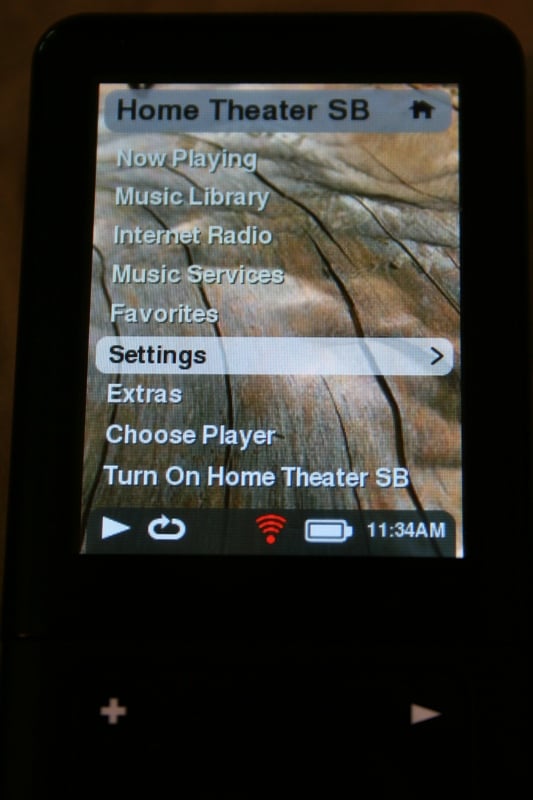
- Music Library will be listed all the time though it will only have your content if you are connected up to your SqueezeCenter on a computer on your network. Otherwise, you'll have to sign up for Rhapsody or MP3tunes Music Library.
- There are plenty of Music Services you can sign up for and many offer a free trial but in the end, it'll be a monthly charge if you want to use the service. The only free one during the time of the review was Live Music Archive.
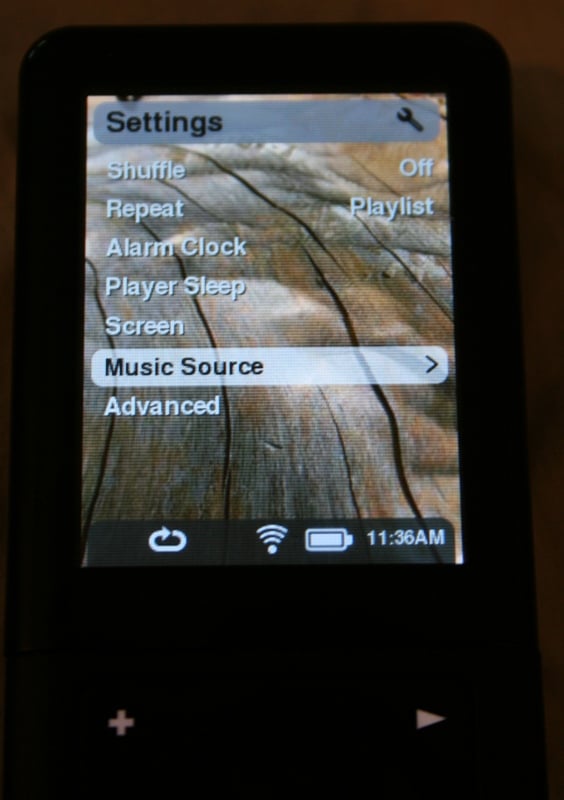
- Under Settings, the Screen menu will let adjust the brightness, dimming time, wallpaper and screensaver. Under screensaver, you can choose from a number of clock types, display what is now playing, or access your Flickr account for pictures. Very cool. It would be nice if they included a way of setting the background to a Flickr picture as well. As it is, you are forced to choose between one of the very cell-phone-ish type backgrounds.
- Under Settings, the Music Source menu lets you choose between accessing the SqueezeNetwork (essentially the Internet) or SqueezeCenter (your computer).
- ·Under Settings, the Advanced menu has a number of important functions including setting up a receiver, updating the software, and factor reset.
- Under Extras there are a number of menus that allow you to access stock sounds such as rain or traffic for those that need such things to fall asleep. You can also access Podcast Alley's top 50 Podcasts (and listen to AV Rant which is consistently in the top 50). Under this menu you can also access news from a number of different sources but only the title and synopsis of the story - not the full text or pictures.
 The Internet Radio menu is one of the places
where you'll spend most of your time on the Squeezebox Duet trying to find the
perfect stations for you. You have access to Staff Picks, Radio IO, RadioTime,
Live 365, SHOUTcast, and Sirius Internet Radio. Sirius Radio requires both a
valid SqueezeNetwork password (entered online) and a Sirius subscription. The
key thing to remember about the Internet Radio menu is that after you start
listening to a station, let the Squeezebox remote stay on the screen for a bit
until you are sure you don't want to add it to your favorites. If you start
surfing around, there is no other screen to use to add it to your favorites -
not even the "Now Playing" screen. Which is annoying.
The Internet Radio menu is one of the places
where you'll spend most of your time on the Squeezebox Duet trying to find the
perfect stations for you. You have access to Staff Picks, Radio IO, RadioTime,
Live 365, SHOUTcast, and Sirius Internet Radio. Sirius Radio requires both a
valid SqueezeNetwork password (entered online) and a Sirius subscription. The
key thing to remember about the Internet Radio menu is that after you start
listening to a station, let the Squeezebox remote stay on the screen for a bit
until you are sure you don't want to add it to your favorites. If you start
surfing around, there is no other screen to use to add it to your favorites -
not even the "Now Playing" screen. Which is annoying.
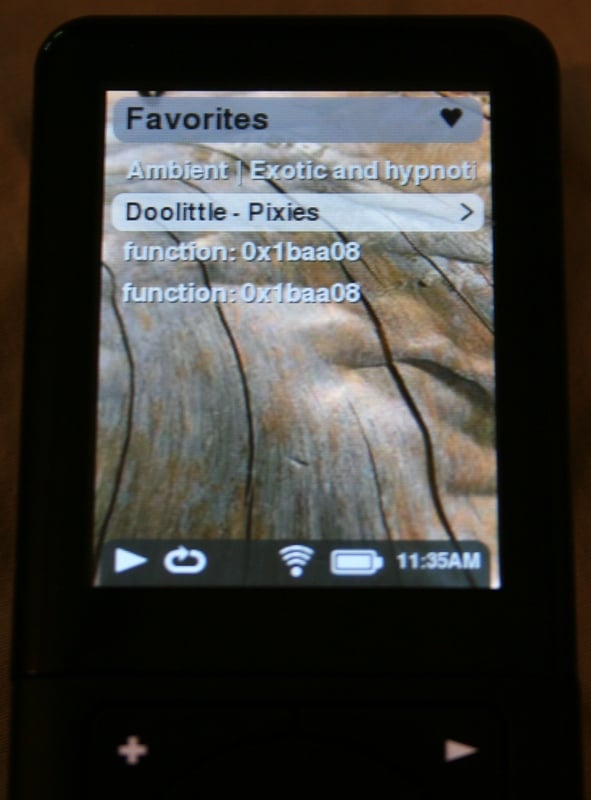
The most important thing you'll be doing with the remote is setting and changing favorites. This was a joy… at first. Because I am who I am, everything that can go wrong does go wrong. Problems connecting… Check. Once connected, problems accessing computers on the network… Check. Now that everything was up and working, the all of a sudden the Favorites list started acting up. Now, while I was partially connected at the beginning of the review process, it worked. But by the time I was nearly done with tech support, I found out that while connected to the SqueezeNetwork, any additions or subtractions to the favorite's list (of podcasts or internet radio stations) did not show up on the remote. They did show up on the SqueezeNetwork web interface however. I confirmed this issue with tech support and they promised that it was a bug in the new version of their software that would soon be fixed.
Now, when you are connected to the SqueezeCenter (and therefore your stored content), the favorites list was also buggy. Nothing that I added to the favorites list would be playable or playable for long. Occasionally I'd get something to add to it and play it but after stopping and starting a few times, it would give me a 404 or "File Not Found" error. On top of that, the Album and Artists lists were completely different from the lists on the Windows Media Center and the SqueezeCenter web interface. By "different" I mean incomplete. Lots of albums and artists were just not listed that were actually there. I could get to their music from the "Music Folders" option but that was it. I could also search for an artist and find an album that wasn't on the album list! Do I think these problems will be permanent? No. If I were a betting man I'd say that by the time this review gets published, they will be fixed. There have probably been 5-7 updates during the course of this review - but this is indicative of the sorts of things that you might experience in the future. Sure, it works now but each update brings the possibilities of breaking new things while adding new and much needed functionality.
There are some additional functionalities that I'd like to see. The skip buttons on the remote are definitely needed but there is no way to scan through a track. It seems like if you would hold down the skip buttons it should scan but it doesn't. Also, if you are listening to a podcast and switch off of it, there is no memory for where you left off. Also, there is often a delay as the remote syncs up with the receiver and/or computer. So when you go to the "Music Source" menu, computers may or may not be listed that are on the network. There is usually this moment of, "Oh my God, what happened?!" before it suddenly appears on the list. While I understand that it takes a moment to find these things, if the remote told you it was scanning for additional sources (and more importantly, when it was done), it would be helpful. Lastly, the receiver has a tendency to stop sending audio to your receiver at the slightest power fluctuation. It wasn't so bad that it did it every time the AC kicked on, but it did happen if there was a lightning strike within 50 square miles of the house. It wouldn't lose connection with the network or anything, just stop sending audio. All I had to do was reselect the source and hit "Play" and it would kick back on but it seemed a little sensitive to me.
Remote
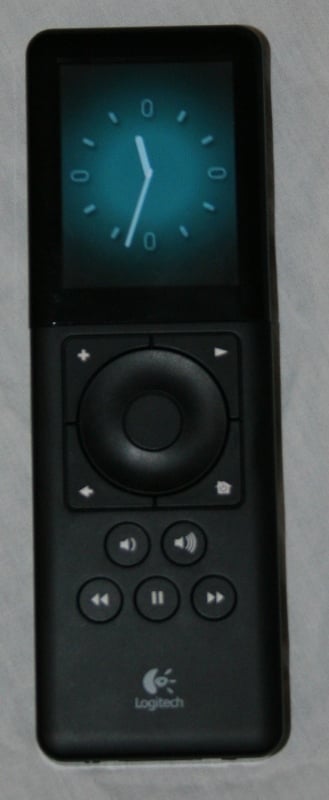 The remote is
black, rectangular, and a bit thick. The screen is gorgeous with tons of colors
and very fine resolution. All the buttons are fairly well laid out and responsive
and the control is intuitive. It has a good weight to it which conveys a sense
of quality without being too heavy. The screen takes up a third of the top face
of the remote. The control wheel moves smoothly and intuitively. There are
buttons for a number of functions including your normal Forward/Pause/Fast
Forward at the bottom and volume up and down above that. Around the control
wheel we have (starting on the top left and going clockwise) a "plus"
button for adding songs to your playlist, play button, a house to return to the
main menu, and left arrow to back up one menu screen. There is a jack on the
front side of the remote (where the IR emitter would be) that looks like a headphone jack but isn't.
It also isn't listed anywhere in the manual or the website so… maybe my remote
was female? There is a removable battery cover on the back of the remote along
with a small speaker.
The remote is
black, rectangular, and a bit thick. The screen is gorgeous with tons of colors
and very fine resolution. All the buttons are fairly well laid out and responsive
and the control is intuitive. It has a good weight to it which conveys a sense
of quality without being too heavy. The screen takes up a third of the top face
of the remote. The control wheel moves smoothly and intuitively. There are
buttons for a number of functions including your normal Forward/Pause/Fast
Forward at the bottom and volume up and down above that. Around the control
wheel we have (starting on the top left and going clockwise) a "plus"
button for adding songs to your playlist, play button, a house to return to the
main menu, and left arrow to back up one menu screen. There is a jack on the
front side of the remote (where the IR emitter would be) that looks like a headphone jack but isn't.
It also isn't listed anywhere in the manual or the website so… maybe my remote
was female? There is a removable battery cover on the back of the remote along
with a small speaker.
While the remote is heavier than it looks, it isn't overly so and feels good in the hand. The keypad has a matte finish while the rest of the remote is gloss black. This has two disadvantages in that first it picks up fingerprint marks easily and second it can make removing the battery cover an exercise in futility - especially if your hands are the least bit sweaty. Overall, I really like this remote. My only real qualm is with the layout of the menu items. The top menu items tend to be things like blank and blank while the Now Playing and Music Library. While those are important items, I tended to be most interested in Favorites and Settings. The Settings issue could have been avoided by taking out the Music Source and putting that on the front page. Favorites was consistently number four on the list which pretty much put is smack dab in the middle. While there was a Choose Player option on the front that allows you to select between multiple Squeezeboxes, the Music Source which allows you to switch between the SqueezeNetwork (Internet) and SqueezeCenter (your computer) was buried. On top of all that, the Music Library item was available on the SqueezeNetwork in the second slot with nothing in it but pay services that I didn't want nor did I sign up for the trial period! Perhaps doing a little research with the most accessed options would better inform SlimDevices and Logitech of the proper menu layout.
Logitech Squeezebox Duet Listening Tests and Conclusion
 Listening tests were not a huge issue with things like
Internet radio and podcasts, it is with quality of the streaming and how well
it streams large files. The Squeezebox Duet claims to be able to stream
uncompressed files like AIFF, WAV, and PCM. The upside of these formats is that you
could theoretically buy a surround album (or uncompressed two-channel PCM) from
someplace like itrax.com and stream it to
your home theater as long as your Squeezebox's receiver was connected
digitally. That's pretty cool. To test this out, I uploaded the seminal Pixies
album Doolittle in WAV format. Sure,
it isn't the best recorded album in the world but I could at least determine
any obvious loss of fidelity.
Listening tests were not a huge issue with things like
Internet radio and podcasts, it is with quality of the streaming and how well
it streams large files. The Squeezebox Duet claims to be able to stream
uncompressed files like AIFF, WAV, and PCM. The upside of these formats is that you
could theoretically buy a surround album (or uncompressed two-channel PCM) from
someplace like itrax.com and stream it to
your home theater as long as your Squeezebox's receiver was connected
digitally. That's pretty cool. To test this out, I uploaded the seminal Pixies
album Doolittle in WAV format. Sure,
it isn't the best recorded album in the world but I could at least determine
any obvious loss of fidelity.
In my review of the Logitech Wireless DJ, I noted that there were occasional dropouts of audio even when streaming something as easy as Internet Radio. Streaming a WAV file I figured was near impossible (an album saved in WAV format will easily pass around 10MB/minute, or over 1.3 Mbps - roughly 13% of the total bandwidth of my 10Base-T network). On top of that, I don't have a single piece of music on my computer that is saved in anything more compressed that WMA Lossless (2:1 compression makes the files about half the size of WAVs). I was sure that there would be audio dropouts galore.
I sure was wrong.
In the weeks of the review period, I experienced exactly one dropout and I'm pretty sure that was related to a power fluctuation and not a problem with the Squeezebox Duet! I was literally floored. WAV files, WMA Lossless files all streamed without so much as a hiccup. There wasn't even a huge delay before the album started to play as one might expect if the Squeezebox was trying to build up a buffer. Internet Radio and Podcasts, of course, were solid as rocks. It got to the point that I stopped even thinking of the Duet as a streaming device - it seemed just a solid to me as a DVD or CD player.
And the sound? I was streaming The Blue Man Group's limited edition Las Vegas 4 Song Sampler (something I picked up while walking through the Venetian on day) and comparing it to the CD version. The streamed version was saved in WMA Lossless and didn't so much as hiccup during the test. I connected the Squeezebox Duet up via analogue outputs for the test. You can really tell that Logitech and SlimDevices really care about audio. The inclusion of the Wolfson DACs means that the audio output is at least as good as nearly any other CD player out there. My listening tests easily bore this out as the Blue Man Group sounded fantastic. The wonderful thing is that you have the option of using one of the digital outputs if you have a high end DAC or just like having all the digital to analogue conversion done by your receiver.
Conclusion
 Logitech may
have hosed themselves on this review. Had the interface been working correctly,
this one could have easily scored 5's across the board. Unfortunately, with the
interface problems, it's hard to say, "You've just GOT to get one of
these." Still, what the Squeezebox Duet did correctly, it did amazingly.
Streaming was so solid it was beyond belief. The remote was, for the most part,
a joy to use and a real head-turner when guests were over. Once Logitech knocks
out some of the software bugs and reorganizes their menus a bit, it will be
easy to say this is a must-have for nearly anyone that is looking for a way to
get audio content from their computer (or the Internet) into their home
theater. I liken it to a great looking hotrod with a brand new high-performance
engine and a steering wheel that keeps falling off. Sure, the potential is
there but until you get that interface fixed, it just isn't going to be
realized.
Logitech may
have hosed themselves on this review. Had the interface been working correctly,
this one could have easily scored 5's across the board. Unfortunately, with the
interface problems, it's hard to say, "You've just GOT to get one of
these." Still, what the Squeezebox Duet did correctly, it did amazingly.
Streaming was so solid it was beyond belief. The remote was, for the most part,
a joy to use and a real head-turner when guests were over. Once Logitech knocks
out some of the software bugs and reorganizes their menus a bit, it will be
easy to say this is a must-have for nearly anyone that is looking for a way to
get audio content from their computer (or the Internet) into their home
theater. I liken it to a great looking hotrod with a brand new high-performance
engine and a steering wheel that keeps falling off. Sure, the potential is
there but until you get that interface fixed, it just isn't going to be
realized.
Editor's Note: As the product stands, we feel that we have no recourse but to give it the ratings we have. We plan on updating this review and the ratings as the interface issues are solved. We feel that the Squeezebox Duet has the potential to be one of the coolest products on the market, but in the current state we can't justify higher ratings. Check back here for additional updates and rating changes.
Update 1: After the review was completed but before publication, Logitech worked out the Favorites List problems on the SqueezeNetwork screen but not all the issues Tom found with the SqueezeCenter screens such as Albums and Artists not showing up and some of the problems with the Favorites List. We will continue to monitor this product and keep you informed.
Logitech Squeezebox Duet
$399.99
Logitech
6505 Kaiser Dr.
Fremont, CA 94555 USA
+1 510-795-8500
www.logitech.com
About
Logitech
Logitech is a world leader in
personal peripherals, driving innovation in PC navigation, Internet
communications, digital music, home-entertainment control, gaming and wireless
devices. Founded in 1981, Logitech International is a Swiss public company
traded on the SWX Swiss Exchange (LOGN) and on the Nasdaq Global Select Market
(LOGI).
The Score Card
The scoring below is based on each piece of equipment doing the duty it is designed for. The numbers are weighed heavily with respect to the individual cost of each unit, thus giving a rating roughly equal to:
Performance × Price Factor/Value = Rating
Audioholics.com note: The ratings indicated below are based on subjective listening and objective testing of the product in question. The rating scale is based on performance/value ratio. If you notice better performing products in future reviews that have lower numbers in certain areas, be aware that the value factor is most likely the culprit. Other Audioholics reviewers may rate products solely based on performance, and each reviewer has his/her own system for ratings.
Audioholics Rating Scale
 — Excellent
- — Very Good
- — Good
- — Fair
- — Poor
| Metric | Rating |
|---|---|
| Analogue Audio Performance | |
| Music Management | |
| Internet Radio Performance | |
| Streaming Media Performance | |
| System Stability | |
| Wireless Performance | |
| Build Quality | |
| Ergonomics & Usability | |
| Ease of Setup | |
| Features | |
| Remote Control | |
| Fit and Finish | |
| Performance | |
| Value |  |
As Associate Editor at Audioholics, Tom promises to the best of his ability to give each review the same amount of attention, consideration, and thoughtfulness as possible and keep his writings free from undue bias and preconceptions. Any indication, either internally or from another, that bias has entered into his review will be immediately investigated. Substantiation of mistakes or bias will be immediately corrected regardless of personal stake, feelings, or ego.
View full profile Subscribe to our newsletter