


Review: IOCell NetDisk 351UNE: But Will it Stream Media?
IOCell NetDisk 351UNE
- Product Name: NetDisk SOLO 351UNE
- Manufacturer: IOCell
- Performance Rating:

- Value Rating:
- Review Date: November 29, 2011 16:45
- MSRP: $ 59.99
- HDD Capacity: available in different capacities (tested up to 2TB)
- Average Read Seek: < 10ms (depending on HDD used)
- Power Requirements: 100~220 VAC, 50-60 Hz, 12V DC, 2.5A
- Operating Temperature: 5 to 50 °C
- Storage Temperature: -40 to 70 °C
- Humidity: 5 to 90%, non-condensing
- Shock: 2ms/63g (op.), 2ms/350g (non op.)
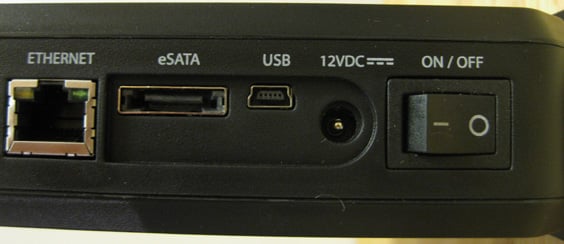
- USB 2.0: Data transfer of up to 480Mbps
- Ethernet: Data transfer of up to 1000Mbps
- eSATA: Data transfer of up to 3.0G/s
- Dimensions: 6.4 H x 8.4 L x 1.9 W (inch) 161.3 H x 213.5 L x 48 W (mm)
- Warranty: 1 Year, Limited
Pros
- Affordable
- Easy setup
- Fast
- It streams media, baby!
Cons
- Not a true NAS device
- No UPnP or standalone storage support
- Requires desktop client installation to use
IOCELL NetDISK 351UNE Introduction
My past experience with network attached storage (NAS) was years ago, we called it the toaster and it held two drives with built-in redundancy; RAID 1. Mirrored drives gave my home network nicely backed-up storage via Ethernet. After assigning it an IP and mapping a drive letter to my PC I had access to Ethernet stored files. The NAS drive was great for backing up family pictures and an MP3 library. But did it stream? Forget about it! To any audio/video enthusiast affordable NAS was a major fail. The devices were expensive, complicated and slow. But that was almost ten years ago, surely the situation has improved since then – and it has. Nowadays there are several options including NetDisk proprietary NDAS system aimed at the small, consumer-grade home network admin.
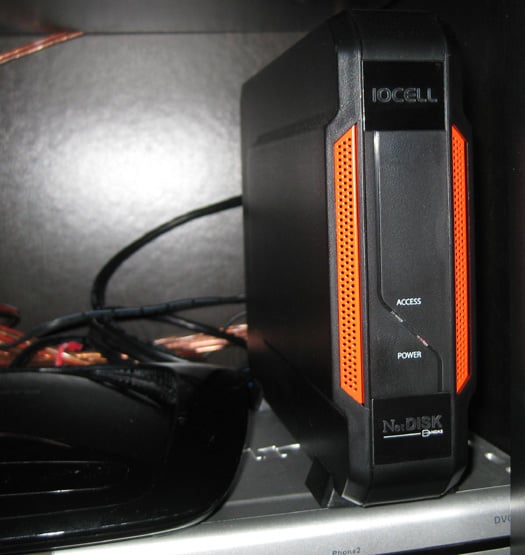
I recently got my hands on the IOCELL NetDISK 351UNE. It’s similar to the NAS storage but uses a proprietary fake NAS system called NDAS… needless to say I was skeptical. But in the back of my mind I had only one question – does it stream? It’s the only test that matters for a network-attached storage device. Who wants a drive letter on their computer just for back-up? These days, you wanna’ stream 1080p video with 5.1 audio, baby!
IOCELL NetDISK 351UNE Full Review
Before getting into whether or not it streams – let’s take an honest look at the NetDisk (Network Direct Attached Storage) NDAS system.
IOCELL Networks Corp. is the company that makes a line of storage peripherals they call NETDISK. The line starts with the entry level SOLO NEWFAST. The device is aptly named SOLO, as it only fits a single-disc, the model is 351UNE. Since it’s a single disc enclosure there is no mirroring your data but for that feature you can upgrade to the DUAL drive version.
The device I’m testing out is IOCell NetDisk SOLO NEWFAST 351UNE, which is enough names for two devices. But a clumsy naming convention is easily forgiven because as we’ll see the 351UNE makes good on the implied promise of being fast.
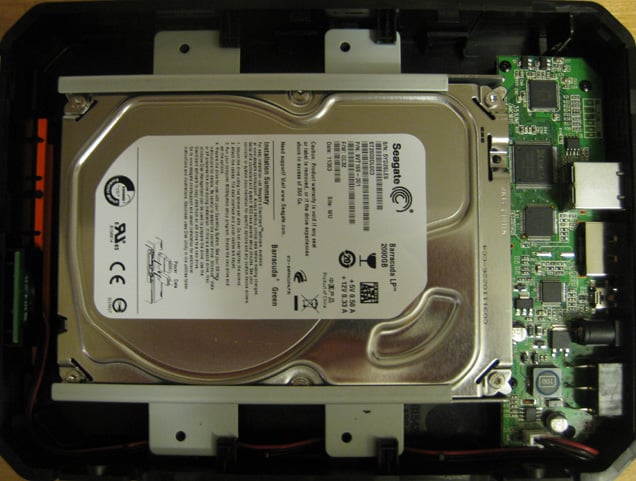
The NetDisk storage enclosure gives you portable connection options as it’s equipped to communicate directly with your computer via USB or eSATA. However, since NDAS is a proprietary formula created by Ximeta, licensed by NETDISK – it’s not a true NAS device. The drawback is your drive won’t get an IP address on the network and you’ll need to install a client app on each computer that will use the drive. That rules out having just anyone pop over to your network and read/write to your storage. Sadly, it also rules out Universal Plug-and-Play (UPnP) devices access the storage. There are no standalone media or print server features available with the device.
One of the highly touted features of the NDAS system is its security. Sure, it would seem secure if nobody can access it without a client app installed. The client application uses a unique key to handshake with the NDAS device thus preventing anyone from getting their hands on your data if they happened to download the NetDisk software. But other than that there are no extra security features like username/password logins that you might find on more sophisticated and more expensive NAS storage devices.
Setup
 Hardware setup is a snap. You’ll need to wield a small
screwdriver and four screws, plug your SATA HDD into the enclosure and put it
back together. No tricks. Once it’s back together you now have a flexible,
portable hard drive you can take anywhere and connect to a USB port or directly
to your computer via SATA for ultra-fast transfer rates.
Hardware setup is a snap. You’ll need to wield a small
screwdriver and four screws, plug your SATA HDD into the enclosure and put it
back together. No tricks. Once it’s back together you now have a flexible,
portable hard drive you can take anywhere and connect to a USB port or directly
to your computer via SATA for ultra-fast transfer rates.
Once it’s connected to your router via an Ethernet cable, you’ll need to install the client application to each computer using the device.
The client application is also quite easy to setup, it's ideal if you have a small home network. After installing the app (to a Windows computer) you’ll have to go Device Manager and add the network storage device as a volume on your computer. It’s a fairly easy task even for the non-IT person, just follow the linked instructions to add a drive letter.
The device supports both Windows and Mac environments, but you’re on your own if you’re trying to hook it up to an Apple computer.
Since there’s no messing around directly with TCP/IP to get the disc-caddy attached to your network – the client does all the work and makes IP setup a non-issue. According to the IOCell's press release its client-to-device communication makes transfer rates faster than a regular NAS device because it’s a more direct communication with your computer.
Streaming Media with IOCell NetDisk
Here's where I finally get to run the 351UNE and the NDAS system through its media streaming paces. I am thoroughly pleased to report that it was able to smoothly stream anything I threw at it. I used both the PlayStation 3 and the Patriot Box Office Media Player to playback media files directly to my home theater system. The NetDisk device has to stream to a media server, a service running on a computer that in turn communicates with your media player set-top-box. The Media Player service I use is the free PS3-Media Server software. Don’t let the name fool you – it isn't just for PS3. The free app works wonders for just about any media server including the Patriot Box.
I plugged in a 2TB Seagate HDD into the 351UNE. It’s not an ultra-fast drive but no slouch either, featuring 5900-RPM spin speed, SATA 6Gb/s interface with 64MB cache it’s pretty much average today. I was able to acquire transfer rates through that exceeded 38MB/s making it very fast for any NAS drive.
When it came to streaming media it was a dream! It was able to stream 1080p/5.1 media files, going through the media player service on the computer (of course) and it had no problem at all with lossless two-channel music files.
Conclusions
The advantages in favor of IOCell’s NetDisk storage caddy include price and serviceable speed for streaming media. You can’t go wrong at around $40 (MSRP might be $60 but you can find it for less on the street) plus the price of the SATA drive you insert into it. While it's not for an admin overseeing a large network, going station-to-station to install the client software is not necessary on a proper NAS device. But for inexpensive, easy-to-use expanded storage for the home it's an excellent solution. What makes it such a great value? Because it streams! There’s no sense in toying with any storage device that can’t stream heavy-duty media files.
If the highly affordable NetDisk Solo sounds like a good option to you, I would recommend ensuring you have a back-up of all your valuable media or going with the upgraded NetDisk DUO with RAID 1. The media you save could be your own!
The Score Card
The scoring below is based on each piece of equipment doing the duty it is designed for. The numbers are weighed heavily with respect to the individual cost of each unit, thus giving a rating roughly equal to:
Performance × Price Factor/Value = Rating
Audioholics.com note: The ratings indicated below are based on subjective listening and objective testing of the product in question. The rating scale is based on performance/value ratio. If you notice better performing products in future reviews that have lower numbers in certain areas, be aware that the value factor is most likely the culprit. Other Audioholics reviewers may rate products solely based on performance, and each reviewer has his/her own system for ratings.
Audioholics Rating Scale
 — Excellent
- — Very Good
- — Good
- — Fair
- — Poor
| Metric | Rating |
|---|---|
| High Definition Video Performance | |
| High Definition Audio Performance | |
| Streaming Media Performance | |
| System Stability | |
| Build Quality | |
| Ergonomics & Usability | |
| Ease of Setup | |
| Features | |
| Fit and Finish | |
| Performance | |
| Value | |
Wayde is a tech-writer and content marketing consultant in Canada s tech hub Waterloo, Ontario and Editorialist for Audioholics.com. He's a big hockey fan as you'd expect from a Canadian. Wayde is also US Army veteran, but his favorite title is just "Dad".
View full profile Subscribe to our newsletter