


DISH ViP 922 SlingLoaded DVR Review
DISH ViP 922 SlingLoaded DVR
- Product Name: ViP 922 SlingLoaded DVR
- Manufacturer: DISH Network
- Performance Rating:

- Value Rating:

- Review Date: October 25, 2010 05:25
- MSRP: $649 ($200 lease)
- Color: Black
- Display resolutions: 480i, 480p, 720p, 1080i (1080p for applicable Video-on-Demand)
- Dolby Digital audio
- 1 TB hard drive
- View HD and SD programming
- Record up to two shows at the same time or watch one recorded show while recording two others
- Picture-in-picture (PIP) feature so you can watch two things on one screen
- View over-the-air digital SD and HD broadcasts (requires optional over-the-air module)
- Supports External Hard Drives
- Video-on-demand (VOD) so you can choose from thousands of movies titles or TV shows
- On-screen Caller ID with history
- Dimensions: 3.5"H x 16"W x 12.5"D
- Weight: 11 lbs.
Pros
- SlingLoaded!
- Easy to navigate
- FAST Search
- RF Remote control
Cons
- No preset guide filters
- Not yet GoogleTV-compatible
DISH ViP 922 Introduction
We've been fans and clients of DISH for some time, and have been following their ViP 922 DVR with great interest for nearly two years. When it was finally released, we jumped all over it and quickly requested one to integrate into our system. Somehow, and we're almost embarrassed to say this, we missed out on the Sling phenomenon, so it was with great enthusiasm that we were determined to try out all of the great networking features included in this fully SlingLoaded High Definition Satellite DVR. After all, Echostar, sister company to DISH, acquired Sling back in 2007 - and this is their first product to integrate both technologies into one box.
Unlike AV receiver and Blu-ray player manufacturers, satellite and CableTV companies simply don't update their hardware very often. With that being the case, new models are highly sought after, offering increased processing speed and often advanced interface features. The ViP 922 doesn't spare anything - it upgrades just about everything you can imagine - and we'll outline that in great detail throughout this review.
DISH ViP922 Overview and Build Quality
For the DISH ViP 922, the attraction comes from several points. For one, the new Echostar user interface is a complete redesign from the existing DVR menu and settings system. This is unlike anything you've seen... unless you're like us and have been observing the ViP 922 in the wild for nearly two years. It's slick Search-based GUI interface is nothing short of Googletastic... sure, it's not exactly Google, but it's nearly as fast and the entire systems seems about 5x snappier than the older interface. Whereas the Program Guide was the standard way of calling up programming before, now Search is the desired method of finding shows. It's fast enough that you don't sit around waiting, so why on earth would you browse?
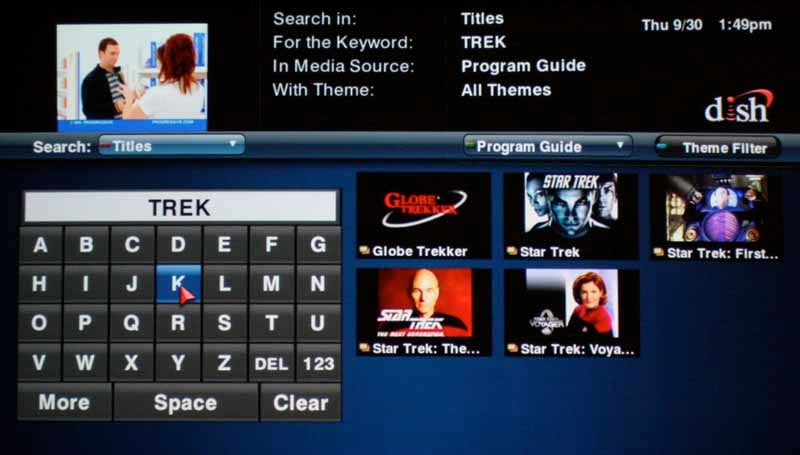
We searched "Trek" and got 5 hits, including movies and TV
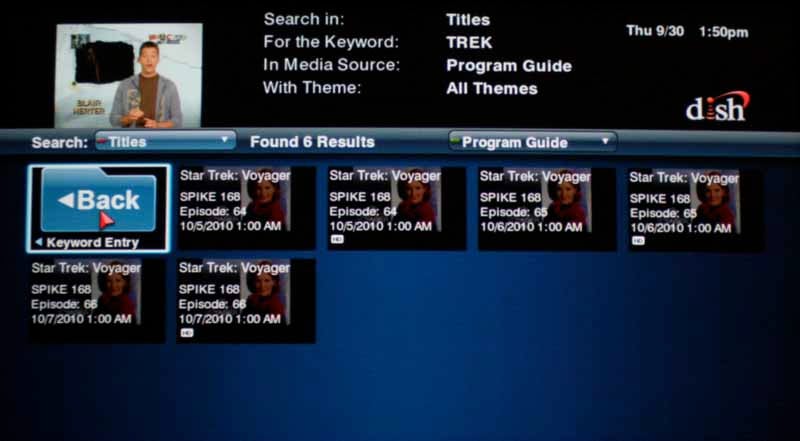
Drilling down into Star Trek Voyager, we found all the times within the 14-day window that it was playing.
Once you find a show you can then pull up info on it and get all manner of information. But it's not just now-playing shows that you can search, you are getting results for the future. Clicking on a result and bringin up the Info window then allows you to Record it, by setting a timer. Timers can be one-time only or repetitive, capturing every show ever made, or just new ones so you skip all the re-runs.
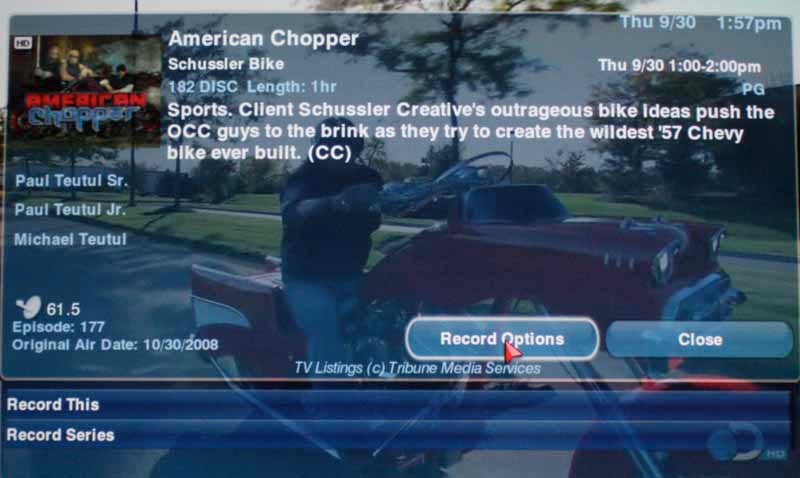
Note that you can record an entire series, or just one episode - it's very flexible.

Not only do you have all these options, you can set defaults so you don't have to repeat yourself every time
Build Quality
The ViP 922 SlingLoaded DVR is a beautiful set top box. It will fit in well whether displayed for all to see below a new flat panel TV, or hidden away within the (hopefully vented) doors of an AV cabinet. It has a mixture of the textured black finish with a gloss black front face, complete with capacitance touch controls. The front controls include a four way directional arrow pad with a Select button in the middle, Menu, Jump, System Info, and Mode buttons. There is also a power button, and status lights on the bottom indicate Solo PIP, Duo mode, and TV1 activity. At the bottom right you'll see the IR receiver window where you would put your IR emitter if you're controlling this with a whole home home control system. As usual, we were using our Universal Remote Control MX-3000 and MSC-400 and were very pleased to find that the ViP 922 used the same remote control codes as the ViP 722 which it replaced. Swapping out the box, we were literally in business within a few minutes.

DISH's ViP 922 is as attractive as it is powerful
On the left there is a panel which opens up and grants access to the smart card and a USB connection as well as a red reset button that, if all works as it should, you'll never have to use.
DISH ViP922 Remote Control, Setup and Configuration
The remote that is included with the ViP 922 is, first and foremost, a two-way RF remote. What's great about that is that you can control your DVR without any hassles, from anywhere in the room - without having to point it or mind where it's facing. For those of you with awkward positioning of your AV gear (perhaps in a closet like me) you know the advantage of this. In addition, the ViP 922 accepts standard IR controls and you should have no trouble getting the required codes into a universal remote, regardless of the manufacturer. You can also have the DVR talk to the remote - for example it can help you locate it if it's lost by causing it to make noise. You can also deliver firmware updates to the remote should the need arise. An on-screen battery level indicator even tells you when you want to replace the battery.

The remote itself seems well-organized, and we liked the way the buttons varied in shape and size. Since the remote isn't backlit, the varied buttons and sensible grouping into three sections, makes it easy to control without looking - at least the basics. The top part of the remote is dedicated to source selection and menu navigation. The middle is where you control playback of DVR material and any programmed media players. The bottom contains the numeric keypad and seldom-used PIP functions. This is a good remote that does well with the unusually large number of buttons it is forced to cram into a usable space.
Setup and Configurations
We always recommend using a certified DISH installer. It's just easier and if you have anything particularly difficult, chances are the technicians have run into it at least once or twice... that week. Installing the ViP 922 was easier than any of the other DISH installs due to the fact that we were merely swapping out the set top box and re-routing my backfeed to originate from another room. We requested and received the MT2 Dual Tuner antenna (OTA) module so that we could feed our antenna into the DISH and have those stations come up on the program guide alongside DISH's local HD channels.

The MT2 Dual Tuner OTA module is optional and slides right into the bottom left of the ViP 922
After installation of our dual tuner MT2 OTA module the rear panel of the ViP 922 possessed six F-connectors for the dual OTA and satellite inputs, the the antenna for the RF remote, and the home distribution output. One interesting trick you can do is to actually run a piece of coax between the remote antenna jack and the actual antenna - in this way you can remotely locate the ViP 922 DVR and still use the RF remote with no difficulties. Ours actually worked fine through a wall, so we left it where it was.
The connectivity to the ViP 922 is actually potentially complex if you have multiple DVRs and set top boxes in the home as we do. Suffice it to say, we were able to use diplexers to get our triple LNB DISH 1000.4 antenna fed to the two satellite inputs as well as a ViP 722 and a 211k. The DVR outputs video via composite (480i), component (1080i/720p) or HDMI (480i/480p/720p/1080i). A digital optical TOSlink output delivers up to 5.1 Dolby Digital to compatible receivers, plus there are analogue outputs for those who are using older devices. The HDMI also supports audio, so there are nearly infinite ways to connect this DVR to your home audio system in whatever configuration is needed.
On the back of the ViP 922 we also found a traditional RJ11 phone jack that perplexed us until we realized that the DVR can be made to show caller ID info when the phone rings. This feature is available for anyone and isn't tied to some overpriced phone service from DISH like you find with Time Warner and Comcast DVRs. The RJ45 ethernet connector on back is there for all of your network features like Sling, VOD and DISH Online.
Once everything as working we took a brief tour through the Menu System and found that it too was dominated by the GUI interface. Settings for most functions are in this area and we found it was easy to customize the system to our needs. It's also - and we can't express this enough - incredibly fast, much faster than we would have expected.

The settings menu is easy to navigate and includes the features you'd expect. The icons are actually a bit dated, believe it or not, but they certainly address most of the things you'd need to configure.
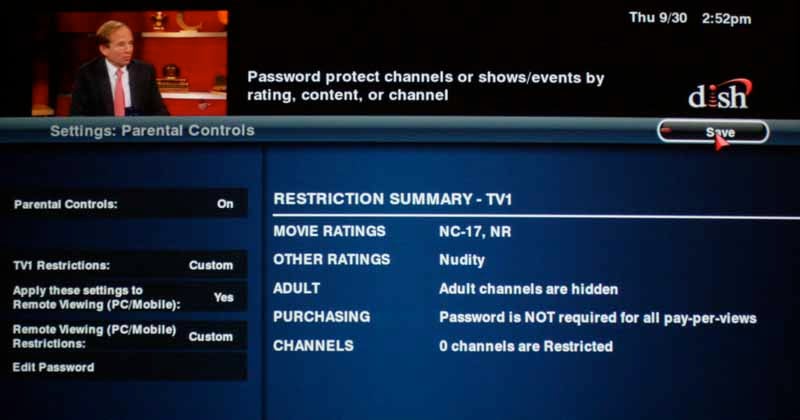
Parental controls are particularly useful and flexible. We set our system to hide adult channels, block nudity and anything rated NC-17. You can also restrict specific channels and require a password for Pay-per-View access.
The Broadband Network settings are also easy to monitor and you can immediately tell if your problems are due to connectivity issues, allowing you to quickly troubleshoot.
DISH ViP922 Use, SlingLoaded Features and Conclusion
It is extremely easy to use the ViP 922 and our biggest compliment, perhaps, is the fact that you really don't even think about using it - so excellent is the interface. You accomplish your goals - finding and watching television and movies - without unnecessary complication and interference from the DVR. While other systems force you to navigate through pages and pages of content and press button combinations to sort, the ViP 922 offers you a simple "Search" button front and center on the remote. Hit this, and you can quickly find just about anything you need. About the only thing we can imagine that would make this better would be the inclusion of a QWERTY keyboard remote. When you do check out the program menu (because sometimes we drift into old habits of aimless channel-surfing) it makes sense.

One thing we immediately noticed with respect to the Program Guide was that it didn't feature a filter for HD channels only. The ViP 722 included a filter for HD-only and Standard definition as well as some others, and so you could simply eliminate all non-HD channels, something that an HD-snob like myself is want to do frequently. What we did find, however - and this made up for it - was that the ViP 922 actually worked better. For starters, you can set the preference for showing HD or SD channels in the Settings > Guide Display menu. Additionally, we could set custom channel lists of any configuration we wanted. You simply set up a new filter and select the channels that you want included. I set to work creating an HD channel configuration, and then shortly thereafter set one up strictly for movie channels like HBO and other similar premium stations. Since it only took a few minutes to get myself configured, we really preferred this new system.
SlingLoaded Features
This is one part of the ViP 922 DVR that I was dying to check out - Sling functionality. It's no small secret that Sling has changed the way we view remote access to our media content. For most users Sling represents a way to take your TV with you when you're out of town. As we had recently left town for the 2010 CEDIA Expo, this as the perfect opportunity to test it using the hotel's wireless service. How it works is relatively simple - owed to the ergonomic design created by the people who work on the apps for DISH. If you are on a laptop you can stream media there, but we focused mostly on the iPhone app. In terms of this app, you can buy the SlingPlayer app and pay a one-time fee of $29.99, but the ViP 922 is special in that you can download the free DISH Remote Access app and get the same functionality.
Reviewer's Note: For those using the ViP 922, the DISH Remote Access app includes all of the features of the Sling app. This means that it will allow you to set and record your DVR, so there is no reason to use both.
When you launch the Sling app you are greeted to their welcome screen and the app boots up, connecting to the DVR and then starting the system. It typically takes just a few seconds, but when the network is congested it can take perhaps a minute or so to come up.

Dish Remote Access starting up
On the main screen you have a row of buttons across the bottom that are labeled: Now, Later, MyDVR, Grid, and More - which is a gateway to the preferences and setup features such as filters, search and your remote.
If you click on Now, you will likely get a message telling you that there are too many items to list and that you need to engage a filter. This ins't a big deal, just select a filter or make a new one so that you can drill down into what you are really interested in (movies, TV shows, sports, etc).


Now Playing and Later on Sling
Clicking on any of these items will give you the ability to set your DVR to record the show or jump immediately into watching it live via Sling. On the buttons at the bottom, the second one, Later, brings up an identical list of shows, but doesn't constrain the list to just what's on now. As you can imagine, you can bypass both of these and do a search. From the search results you can add additional filters to further refine your discovered programming.
Want to watch something from your DVR? Hit the DVR button and you can immediately see all of your recorded programs and view them on your iPhone (or computer if you are using DISH.com).
Reviewer's Note: Safari needs to be set to 32-bit mode to use Watch on DISH.com on a Mac running Mac OS X 10.6 (Snow Leopard). Sling provides instructions online on how to do this, but basically you just access the Get Info pane for Safari and tell it to boot in 32-bit mode.

Your DVR contents presented as an interactive iPhone app
Note that once you are in the actual Slingbox you are viewing your actual DVR. That means that you can now use the iPhone (or your laptop) as a remote control and activate the features of the box in the way you are used to. In this method, the DVR recorded material shows up in a different way:

Your ViP 922 DVR contents streamed
What's cool is that both are very obviously sufficient for web-app display, but the Sling-mode is a compressed image streamed directly from the DVR, while the (preferred, in my opinion) iPhone app is using local graphics to display merely the data available on your DVR. The iPhone app is going to come across as a clearer, more detailed solution in that it doesn't stream from the ViP 922 until you actually initiate the watching of a recorded or live show.
You can also view your DVR's Program Guide with the "Grid" button. This is pretty self-explanatory, except to add that the Preferences allow you to hide channels and content, thus making it more friendly if you want to pare down the amount of material available for remote streaming:

Grid or Program Guide display
When you stream all functions from the ViP 922 it's just like you are using the DVR locally, except for the fact that the remote is controlled by the iPhone or laptop. To aid in control, DISH has given you special overlay remote control capabilities that facilitate the more common commands you are likely to give, such as DVR and Program Guide navigation and playback control.

We used the Dish ViP 922 for several weeks, putting it through its paces and trying out just about every feature we could get our hands on. The result was a sense that this is a step into the future of television. What we mean by that is the ViP 922 shares a lot of characteristics with the upcoming GoogleTV in terms of how it allows you to search what you are looking for. Unfortunately, the ViP 922 is not compatible with GoogleTV, though the 622, 722 and 722k set top boxes are. Hopefully the ViP 922 won't be too far behind and we wouldn't be surprised if GoogleTV wasn't able to be integrated with a very minimal amount of work and adaptation. But even without Google, this box stands on its own as an impressively useful way to search and view television, both at home and while you are on the road. Bottom line: if you are a DISH subscriber, you're going to want this box. If you're not a DISH subscriber, you're going to want to become one.
DISH ViP 922 SlingLoaded DVR
$649 ($200 lease)
About DISH Network
DISH Network L.L.C., a subsidiary of DISH Network Corporation (Nasdaq: DISH), provides more than 14.3 million satellite TV customers, as of June 30, 2010, with the highest quality programming and technology at the best value, including HD Free for Life. Subscribers enjoy the most national HD channels, the most HD local coverage in the U.S., the most international channels, and award-winning HD and DVR technology including the ViP 922, the world's only DVR with built-in Sling functionality and PC Magazine's "Editor's Choice." DISH Network is first in Customer Satisfaction among all cable and satellite providers according to the 2010 American Customer Satisfaction Index survey results for the U.S. largest cable and satellite TV providers. DISH Network Corporation is included in the Nasdaq-100 Index (NDX) and is a Fortune 200 company. Visit www.dish.com.
The Score Card
The scoring below is based on each piece of equipment doing the duty it is designed for. The numbers are weighed heavily with respect to the individual cost of each unit, thus giving a rating roughly equal to:
Performance × Price Factor/Value = Rating
Audioholics.com note: The ratings indicated below are based on subjective listening and objective testing of the product in question. The rating scale is based on performance/value ratio. If you notice better performing products in future reviews that have lower numbers in certain areas, be aware that the value factor is most likely the culprit. Other Audioholics reviewers may rate products solely based on performance, and each reviewer has his/her own system for ratings.
Audioholics Rating Scale
 — Excellent
- — Very Good
- — Good
- — Fair
- — Poor
| Metric | Rating |
|---|---|
| High Definition Video Performance | |
| Standard Definition Video Performance | |
| Build Quality | |
| Ergonomics & Usability | |
| Ease of Setup | |
| Features | |
| Remote Control | |
| Fit and Finish | |
| Performance | |
| Value |  |
Clint Deboer was terminated from Audioholics for misconduct on April 4th, 2014. He no longer represents Audioholics in any fashion.
View full profile Subscribe to our newsletter