


DISH Network ViP 722 Receiver/DVR Review
DISH Network ViP 722 DVR
- Product Name: ViP 722 DVR
- Manufacturer: Dish Network
- Performance Rating:

- Value Rating:
- Review Date: March 13, 2009 06:20
- MSRP: $ 499
- Independently watch and record
- DISH Network programming on two TVs
- Record up to 350 hours of standard-definition (SD), up to 55 hours of high-definition (HD) entertainment or a combination of the two1
- View and record HD over the air digital broadcasts2 on TV1
- Supports Dolby Digital 5.1 Surround Sound
- Convenient On-Screen Caller ID3 with history
- Widescreen Electronic Program Guide with easy search features
- DishHOME Interactive TV for watching six screens at once and on demand entertainment, games, shopping, news, sports, weather and customer service
-
Free lease for NEW customers. Existing customers pay a fee of up to $200
Pros
- Dual independent tuners/TVs (HD/SD or PIP)
- Supports a backfeed for whole-home distribution
- Record up to 55 hours of HD programming
- Integrated ATSC and Dish program guide
- Includes RF remote for Zone 2
Cons
- Slow on-demand functions
DISH Network ViP 722 Introduction
While we love our DVD players and Blu-ray devices, the most used piece of AV equipment in any home theater is typically the television tuner. In the case of satellite television, like DISH Network, that's going to be your satellite receiver set-top box. When you use a device this much, it needs to be flexible enough to handle your needs, and powerful enough to give you the features you want - like digital video recording and an interactive program guide that works. For years we've used cable TV at Audioholics. This year that has changed, with some of our staff moving to Verizon's Fios service, and others, yours truly included, jumping ship to DISH Network.
We made the change to DISH for several reasons. For one, cable TV isn't very conducive to reviewing innovative new products. The latest model DVR I was using came out over 5 years ago and the utilitarian program guide and user interface hasn't changed significantly in as many years. Cable TV is rather stagnant for the money they charge. Satellite, on the other hand, is making inroads every year, with new technologies like MPEG-4 streaming and additional HD satellites popping up regularly. Even though cable TV finally started adding much-needed HD channels, it was time for a change - and that change was Dish Network.
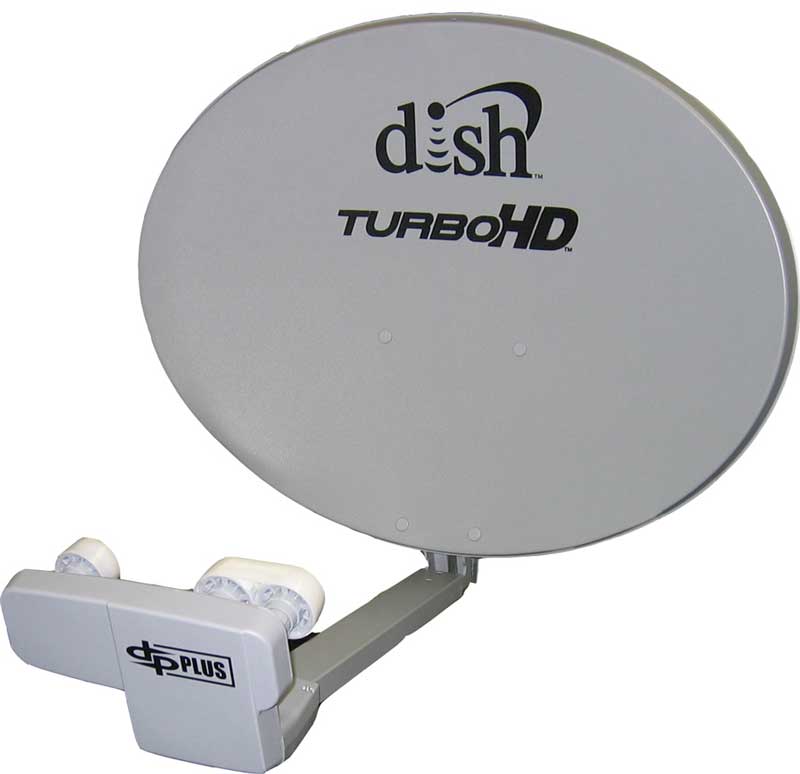 So with much anticipation I received the latest DISH technology, including their newest 1000.4 dish which had only been out in our area for a couple of months. It is a single dish solution capable of receiving signals from 61.5, 72.7, and 77 degrees West and is suitable for any Eastern US application. In the past I would have had needed to use two dishes to get the signals I am receiving from this single dish solution. Hooray for progress. This dish has three receiver output ports which support direct connection to either three single-tuner receivers or three dual tuner DISH Pro Plus receivers. We went with a dual tuner ViP 722 DVR since it would give us high definition and dual tuners which we could configure in a way that optimized our needs.
DISH Network ViP 722 Configuration & Wiring Schema
Coming from the world of cable TV, one of my primary concerns was that I'd have to install a box into every room that wanted to view satellite television programming. With cable, you can simply plug a QAM-enabled television into the wall and you're good to go with SD and HD channels. My first thought was that satellite is going to potentially cost me a lot of money in order to get at least something into the other rooms in my home.
And then I was enlightened by the DISH Network installer who handled my install. You see, with the ViP 722 and some neat RF tricks, I could send two lines into my main theater room (the dish feed and my antenna feed) and backfeed the second tuner out of the room on the same Dish line. That backfeed line could then be split and fed to all of my rooms. What this meant was that I could watch HD content in my primary theater room as expected, but I could also pick any other TV in my home to watch standard definition courtesy of the second tuner. If I wanted to upgrade down the line I could just add additional boxes with HDTV, but this was a start.
Tech Note: Backfeeding the second tuner and splitting it throughout the house means that all the other TVs will show the same thing. You don't, as with cable service, get to tune different channels on each of the televisions. Still, most families don't watch more than two TVs at a time, so this presents a nice solution for those who aren't looking to fill their homes with additional satellite receivers right away.
We proceeded to wire up the dual tuner ViP 722 such that it could be used in dual mode and we could use the RF remote to tune in stations and use the discrete programming guide throughout the rest of the house. This was done simply by running an orange twin feeder of coax (3 GHz quad shield) where one side carried the antenna and the other handled the dish signal and backfeed. We placed the hardware into my rack system and the DISH installer hung the 1000.4 dish on my roof and configured it to received signal from the Eastern Arc of MPEG-4 satellites.
Things were looking up... literally.
If you've never wired up an antenna system or DISH receiver and satellite system, it's best to let their professional installers do it for you. It's not terribly expensive and it will save your hours of hassle. Doing it yourself involves a knowledge of splitters, combiners and often RF distribution that is quite often beyond the understanding of many consumers. In our case the backfeed system entailed the use of special diplexers to make it all work properly. If you're confused, move on - there's a lot to enjoy once you get past installation and DISH will gladly (and professionally) handle that part for you.
DISH Network ViP 722 Features and Remote
As we mentioned previously, the ViP 722 has two tuners which can be used in dual mode or as a picture-in-picture configuration. We opted for the former, but in either case users can record one show while watching another. The system comes with two remote controls - one IR and the other RF - which means of course that you can control "Zone 2" of the ViP 722 from virtually anywhere in the house. What's more, a single 'Mode' button allows you to "commandeer" the second zone when it's not in use and activate the PIP functions in your primary viewing room. Flexible? Yes. Great for football season - heck, yes!
The back panel of the ViP 722 includes TV1 connections for HDMI, component and composite video connections (it also has S-video but I hope that connection dies a quick, yet painful death on most newer products). TV2 is supported via either composite video and stereo audio or the In-home distribution F connector which sends 480i via coax. You can "split" a single dish cable feed to feed both tuner inputs on the back and there is a dedicated OTA (over-the-air) antenna input. If you are using the RF remote, you'll need to connect the remote antenna which extends the range of the remote so that you can use it throughout your house (unless your name is Bill Gates and you live in a home the size of Disney World). All inputs are clearly labeled and even the remotes are decidedly marked for use in either TV1 (Green) or TV2 (Blue) zones.

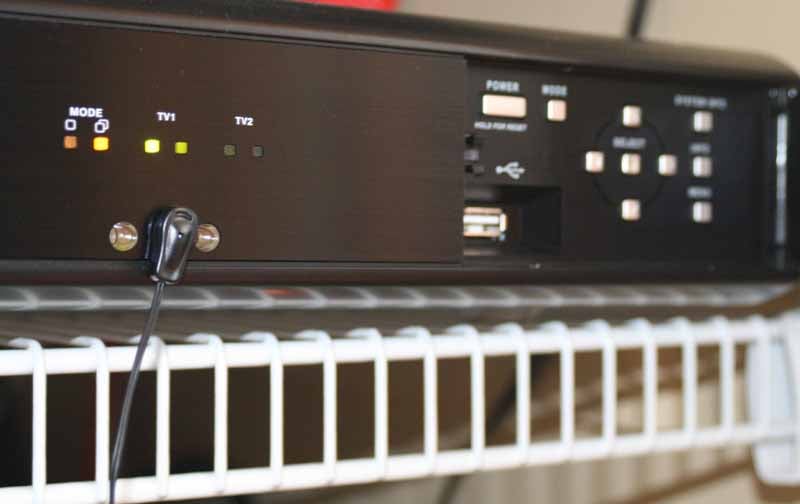 The front of the unit has two spring-loaded doors. The left reveals a smart card slot that is presently unused) and the right provides access to Power and menu controls. There is also a front-accessible USB port and System and Program Info buttons. In a pinch you could use the panel navigation to get around if you misplaced the remote - though for long-term use this would be ridiculous. In the middle of the unit are three holes for receiving IR signals. TV1 and TV2 are also represented by two lights each. The first indicates power and the second shows the record status. Dual and Single mode indicators are also present. If you can't get a signal on Channel 60 (default) in other rooms, check this mode setting.
Remote Controls
 The remote controls are identical except that one is, of course, RF and the other IR (infrared). In the hand they feel very comfortable and you can reach approximately 80% of the control surface with your thumb without moving your hand from its initial position. The remote is separated into 3 main sections, with source and navigation controls at top, DVR functions in the middle and keypad at the bottom. The layout is intuitive and what I would call a perfectly dense arrangement. The buttons are close enough together that they make the overall remote small, but far enough apart that you won't be hitting anything by accident, even if you have larger hands. While the majority of buttons are round, the arrangement and size variance of buttons helps them maintain a tactile separation so you can operate much of the remote by feel. I am also VERY pleased by included functions such as Skip Forward and Skip Back which allow you to virtually breeze through commercials on DVR content. If you come from cable and have never had a 'Skip' function, this is going to change how you watch recorded TV forever.

Compared to the remote that came with my Scientific Atlanta Explorer 8300HD, I'd say the functionality is similar, but this remote is overall far easier to navigate and use.
Of course, I pulled all of the functionality of this remote into my trusty Universal Remote MX-3000 as soon as I could. This allowed me to access the system (which is located in a closet) from my theater room.
DISH Network ViP 722 Menu, Guide, and Navigation
Compared to cable, DISH offers a very different channel and DVR browsing experience. Some things, like moving the channel guide through time, seem more difficult, while other things, such as searching for shows to record, are much more user-intuitive and friendly. Starting with the easiest and most often-accessed section, the channel guide, we can see that it resembles about every other channel guide you'll find on the market - at least at first glance:

Where it differs is where every channel guide will typically add their own style. DISH allows the user to see an hour and a half of programming at a time. It also, however, combines satellite and antenna channel guide info on the same guide. This is HUGE for those who have never quite been able to figure out how on earth to combine the use of free antenna channels with their existing cable service. With satellite it shows up right alongside the other channels, but highlighted so you can tell it's an antenna signal (and therefore uncompressed).
The biggest advantage I saw with DISH's interface over cable (Time Warner for anyone trying to keep score) was the ability to search for programs within the entire date range of the program guide's memory. This was extremely helpful as it let you find programs by name even if you didn't remember what night of the week they were being broadcast:


It doesn't end there, however. Not only can you enter in a search keyword to find your shows, you can also go back later and bring up a history of searches to re-find items you browsed for (but perhaps didn't find) earlier. Of all the back-end features this one came in most handy for me, especially with the new line-up of programs coming online this Fall.
Once you've got programs recorded you can bring up the DVR functions by hitting the DVR (DISH on Demand) button, conveniently located in the center of the remote. This brings up a menu that allows access to your recordings as well as the DISH OnDemand movie download service (requires a broadband Internet connection):

As you'd expect, the currently viewed show remains in a video window while the user interface wraps around it and allows you to access various features. The OnDemand service has potential. Most of the HD movies (comparable to what you can find on DVD or Blu-ray) cost $6.99 per rental. Do more than one per month and you might want to consider a Netflix account. Overall, prices for content vary, ranging from free to $0.99, $2.99, $3.99, etc. Most standard definition titles seem to be around $2.99. In any case OnDemand is nice for a one-off or last minute rental of some of the latest movies in the event you can't get to the movie store or didn't plan ahead.
DISH Network ViP 722 Viewing Tests and Conclusion
Viewing Tests on DISH Network were a tough assignment. I viewed a ton of material and, with the help of my DSLR camera, snapped a lot of shots to demonstrate various aspects of detail, color and black level detail that showed me Dish network's MPEG-4 streaming was actually a step above the MPEG-2 transmissions I was used to with cable TV service.
HD Movie: The Grand
This movie showed tons of detail as well as color. While not perfectly captured here, I was pleased at the level of detail I saw and the lack of artifacting present on the screen. The DISH ViP 722 seemed capable of outputting a very clean 1080i signal that lacked many of the artifacts I was used to seeing in cable:


HD Movie: Unbreakable
While a major plot disappointment, Unbreakable was a veritable black level dreamfest. Every scene was a new exploration in how deep the screen could go in terms of subtle gradations of shadow. From shadowed faces to recessed hallways, this movie is one of my new favorites for checking out shadow detail:


HD Movie: Children of Men
I had thought that I had found my black level movie of the season... and then I tuned in Children of Men. This movie took black levels and gradations to new levels and became an instant favorite of mine for upcoming display reviews. While not a very colorful film, this movie was incredibly dark and revealing with ample amounts of detail that showed what was possible when a high quality source was encoded into MPEG-4 and sent over the Dish network. It was a pleasure to watch and let me know that the ViP 722 lacks nothing in terms of capability and potential.


Conclusion
While I'm sure pages more could be written on this device, the flexibility, ease of use and capabilities of the ViP 722 make it one of the more impressive satellite receivers on the market. For DISH it represents their current pinnacle, however future products are promising some mouth watering features that will eclipse even this capable receiver. The strength of this product is definitely in its multi-TV and multi-room functionality. It's limitations include a somewhat convoluted menu system that might not be as easy to navigate as some competitor's products. For DISH users, however, you can do no better - and for new customers, this one box could conceivably get you a picture in every room in your home - at least until you want to expand your other rooms to HD resolutions as well.
DISH has outdone itself with the ViP 722 and we are happy to recommend it to both current and new DISH users. For new users it will be a free lease. For those looking to upgrade or purchase additional users it should come in around $200. Placing this in your system will be a tremendous upgrade for those just entering the realm of DVRs. For those looking to upgrade their ViP 622's, realize that the 722 merely adds more storage space, so holding out might be in your best interest. DISH is on the warpath, and if the ViP 722 and new satellites are any indication of where they are headed, the competition better stay on its toes.
The Score Card
The scoring below is based on each piece of equipment doing the duty it is designed for. The numbers are weighed heavily with respect to the individual cost of each unit, thus giving a rating roughly equal to:
Performance × Price Factor/Value = Rating
Audioholics.com note: The ratings indicated below are based on subjective listening and objective testing of the product in question. The rating scale is based on performance/value ratio. If you notice better performing products in future reviews that have lower numbers in certain areas, be aware that the value factor is most likely the culprit. Other Audioholics reviewers may rate products solely based on performance, and each reviewer has his/her own system for ratings.
Audioholics Rating Scale
 — Excellent
- — Very Good
- — Good
- — Fair
- — Poor
| Metric | Rating |
|---|---|
| High Definition Video Performance | |
| Standard Definition Video Performance | |
| High Definition Audio Performance | |
| Deinterlacing & Scaling | |
| Streaming Media Performance | |
| Build Quality | |
| Ergonomics & Usability | |
| Ease of Setup | |
| Features | |
| Remote Control | |
| Fit and Finish | |
| Performance | |
| Value | |
Clint Deboer was terminated from Audioholics for misconduct on April 4th, 2014. He no longer represents Audioholics in any fashion.
View full profile Subscribe to our newsletter