


Dymo Rhino 5200 and 6000 Labelers Reviewed
Dymo Rhino 5200 and 6000 Labelers
- Product Name: Rhino 5200 and 6000 Labelers
- Manufacturer: Dymo Industrial
- Performance Rating:

- Value Rating:
- Review Date: March 28, 2011 01:50
- MSRP: $ 169 - $249
- Backlit LED display
- Rhino Connect software (6000)
- Li-ion battery (standard on 6000, optional for 5200)
- Barcode support (6 types)
- Dimensions (5200): 6.1"H x 16.7"W x 9.5"D
- Dimensions (6000): 6.1"H x 16.7"W x 9.5"D
- Weight (5200): 14.3 lbs.
- Weight (6000): 14.3 lbs.
Pros
- Easier than ever to use
- Backlit LCD screen
- Clearer descriptive Hot Keys
- Large LCD screen
- Barcode support (6 types)
- Customizable symbol and term library
Cons
- Rhino CONNECT not Mac-compatible
- Dim backlight on 6000
Rhino 5200 and 6000 Introduction
Rhino has long been the serious user's choice in label creation for quite some time now. I say this for several reasons. One, the company has an extensive line of products that are specifically targeted for the professional and "pro-sumer" markets, and two, the Rhino brand is backed by labels that will work in a variety of applications and environments. From simple nylon tape that is available in white and yellow, to flexibly vinyl tape that is available in many colors, to permanent polyester that can handle outdoor use and rough surfaces, Dymo has paid attention to the needs of custom A/V installers, electricians and journeymen everywhere.
Rhino 5200 and 6000 Labelers Overview & Features
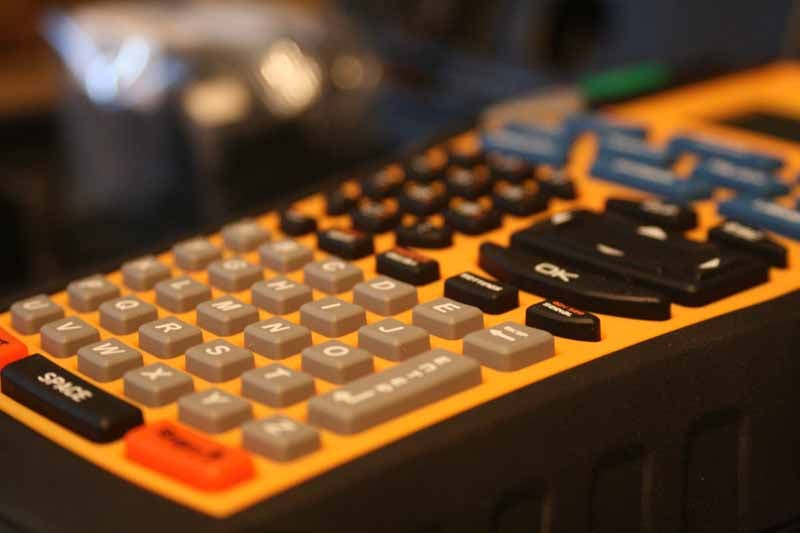 First and foremost, the Rhino line of printers has been around for quite some time. I first saw them advertised in a magazine about 5 years ago (coincidentally, that was about the time I stopped reading print magazines and switched to the Internet for most of my news and articles). What first struck me as enticing was the obvious attention to professional features that seemed to be taken for granted by manufacturers such as Brother - who seem to cater to the office crowd rather than people out in the field. Even the body of the Rhino labelers seemed a cut above what I was used to seeing. Fast forward to late last year and I was blown away when I saw the Rhino labelers at CEDIA. They had come out with their new 5200 and 6000 models (I was familiar with the 5000) and it looked like they had really stepped up the usability.
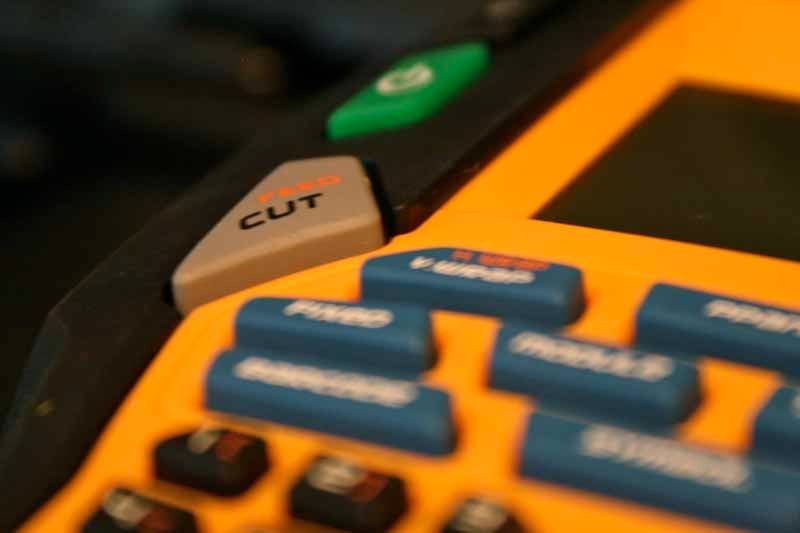 To give you an idea of the microevolution of the product, Dymo's Rhino 5000 labeler had a rubberized case that the labeler fit into like a wet suit. It was difficult to get on and off and it allowed dust and dirt to get trapped between the case and the machine. Furthermore, the case had to be removed in order to change out the batteries - for which the only option was to use the multitude of AAs (6) required to get the 5000 to work. So what did Dymo learn? For one, the rubberized overmold is now firmly attached to the tool. It's an excellent solution (not to mention elegant) and it both protects the tool, while keeping dirt away from the body of the labeler. The second big change was in the area of the button labels dealing with the label type. On the 5000 these buttons were small, in fact about 95% of all the buttons are the same size. On the 5200 and 6000 labelers, the machine separates the label types into larger buttons (called "Hot Keys") that sit in a prominent position at the top.
Rhino 6000
- H. WRAP/V. WRAP
- PPANEL
- SELF-LAM/FLAG
- FIXED
- MODULE
- TBLOCK
- VERTICAL
- BARCODE
- SYMBOL
- LIBRARY
Rhino 5200
- WIRE/CABLE
- MODULE/PANELS
- FLAG/VERTICAL
- LIBRARY/FIXED
- BLOCKS
- SYMBOL/GENERAL
Compare that to the Rhino 5000 whose small buttons simply addressed: WRAP, FIXED, PPANEL, TBLOCK and VERT (with a couple shift functions and some drill-down options as well. The new label makers make it easier (less buttons, less effort) to get where you need to go. The new label printers also ask you the label width up front, and adjust automatically to get you a consistent and workable size for each label you print. Gone are the frustrating errors that the 5000 would give you when the font size you selected wouldn't fit. The 5200 and 6000 just make it work - and THAT is the kind of intelligent functionality you want in a label printer. Both label printers also come with an inventory of over 250 industry terms and symbols which can be brought into and used on any label quickly. For customization and repeatability (we're all creatures of habit after all), you can store over 1000 custom labels for later recall and tweaking.
| RHINO 5200 SKU: S0841460 |
RHINO 6000 SKU: S0773780 |
|
| Backlit display: | Y | Y |
| Cutter: | manual | Power-assisted |
| Intuitive Graphical Interface: | Create, edit and preview multiple labels on a backlit LCD |
Create, edit and preview multiple labels on a backlit LCD. |
| Rechargeable Battery: | Li-Ion | Li-lon |
| Memory: | 99 memory locations | 1000 + labels with logos and symbols (1 MB) |
| PC / MAC connectable: | N/A | via USB |
| Font size: | XXS / XS / S / M / L / XL / XXL Big / Auto |
XXS / XS / S / M / L / XL / XXL / Big / Autom |
| Max. lines of print: | 5 | 5 |
| Printing Process: | Thermal transfer | Thermal transfer |
| Tapes | ||
| Tape width (mm): | 6 mm / 9 mm / 12 mm / 19 mm | 6 mm / 9 mm / 12 mm / 19 mm / 24 mm |
| Type: | RHINO tapes | RHINO tapes |
| 110 BLOCK: | Y | N/A |
| BARCODE Hot Key: | 2 barcodes: Code 39, code 128 | 6 Barcodes: Code 39, Code 128, UPC A, UPC E, EAN 8, EAN 13 |
| ELECTRICAL PANEL: | Y | N/A |
| FIXED Hot Key: | Y | Y |
| FLAG Hot Key: | N/A | Y |
| H. WRAP Hot Key: | Y | Y |
| HOT KEYS: | Y | N/A |
| LIBRARY Hot Key: | Customize your own library of terms | Over 250 pre-programmed terms. Customize your own library of termis. |
| MODULE Hot Key: | Y | Y |
| PPANEL Hot Key: | Y | Y |
| REVERSED PATCH PANEL: | N/A | N/A |
| SELFLAM: | N/A | N/A |
| Serialisation: | Simple / Advanced | Simple / Advanced |
| SYMBOL Hot Key: | Over 100 industry symbols. Categorized. | Over 100 industry symbols. Categorized. |
| TBLOCK Hot Key: | N/A | Y |
| V WRAP Hot Key: | Y | Y |
| VERTICAL Hot Key: | Y | Y |
With the Rhino 5200 and 6000 you get a label printer that offers excellent portability with a host of available features. It is fully certified by the organizations that matter, meeting all ANSI and TIA/EIA-606-A labeling standards. While it runs on 6 AA batteries, you can also pick up an optional, rechargeable lithium-ion battery or just pick up the hard case kit that includes it. For anyone intending on using this on the road or for extended periods of time, the lithium-ion upgrade is essentially (it recharges in roughly 30-45 minutes, so it's very convenient and we don't recommend the need for a second battery unless you are labeling all day long and desire no downtime). Both printers also have a convenient 3-bar battery-life indicator right on the LCD display and an auto-shutoff feature makes sure you don't waste the battery life, regardless of how it's powered.

If the 5200 wins the "best update of the year" award, the Rhino 6000 has to receive an even bigger honor for introducing the construction, electrical, and custom install industry to the concept of two-way communication and PC-software enhancements. The Rhino 6000 is the company's first printer to facilitate this type of connectivity. But that's not all - not only does the printer allow you to download labels from your PC with their Windows-based Rhino Connect software (sorry, no Mac version as of yet), it also empowers you to create and edit labels immediately at the job site. And the communication is two-way, so any changes you make on-site can be transmitted back to your computer to update the database of labels in your arsenal.
Dymo Rhino 5200 and 6000 Labelers: Connect and Conclusion
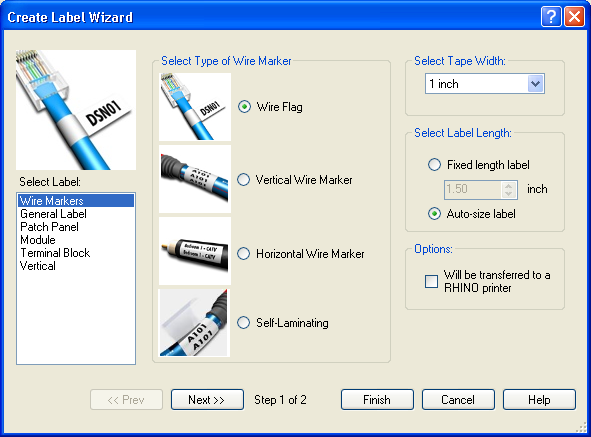 Rhino Connect allows you to create labels on your PC and then download them to the Rhino 6000. Alternatively, you can create and edit labels right on the work site and then save them to upload. The software has label wizards which make it easy for any level of user to jump right in. The system gives you all of the options, including label type, tape width, and printer options and wire gauge. You can also import data, symbols or test strings as needed. Advanced features like barcodes and serialization make sure you can control exactly what you need without any difficulties. You can change label modes with a graphic menu and the data editor means you can dynamically format your data based on label type to get it right before you print - and to match exactly what your requirements are. We also liked how the system had an error catching mechanism by which you could ensure accuracy and avoid costly mistakes.
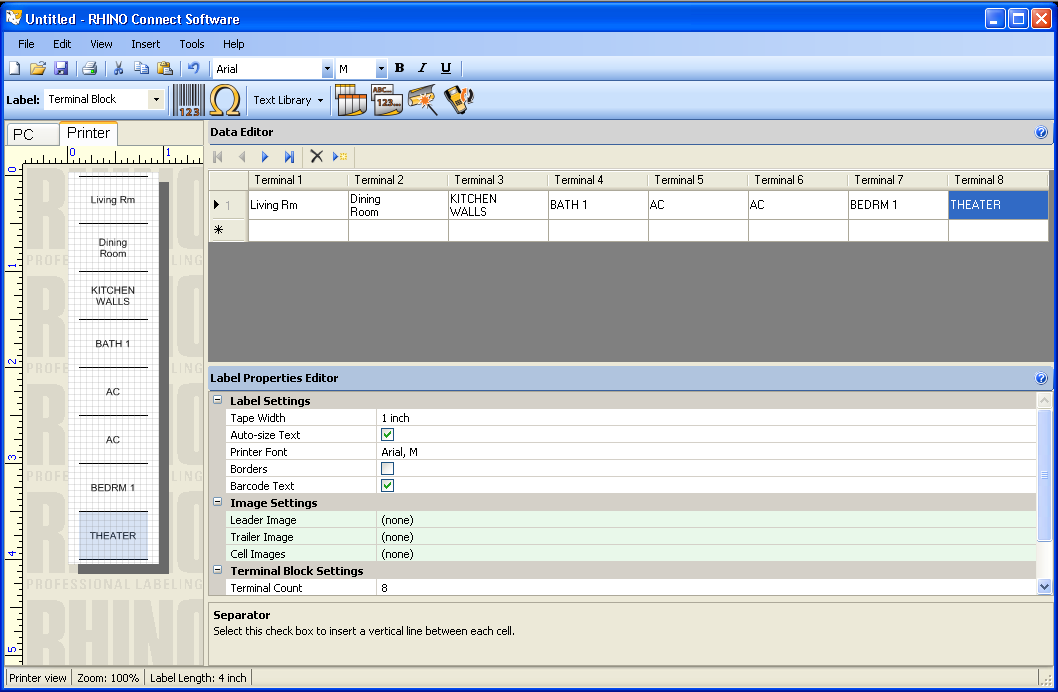

The system also automatically adjusts label properties based on what you've entered. The software allows you to print directly to any printer, and it also lets you print from any software (like Excel) with downloadable print drivers. The entire system is made to facilitate easy file transfer both ways, so any customization can be carried through in either direction.
For those that rally make use of the power of a system like this, the real win comes when an onsite label job needs to be tweaked, for whatever reason. With Rhino Connect you can make the adjustments remotely while the installer continues to work. Then, you can email the updated file to the person on-site and he or she can print out the corrected labels. Try that with any other label printer!
Using the Rhino Label Makers
Where the rubber meets the road is in the practical use of the label printers. At this point I'd have to say that the 5200 has the edge if you want portability - especially if you get the lithium-ion battery option. For starters, it's about 4 ounces lighter than the 6000. More significantly, however, it's a full 3/4-inches thinner and shorter. In defense of the 6000, however, you have to acknowledge that it includes the mechanized cutter function and has a larger LCD screen. It can also use Rhino Connect whereas the 5200 is a standalone printer only. For some, the slight markup and increased functionality will make the 6000 the obvious winner, but those looking to slim down a bit will lean towards the 5200. We also noted, and we weren't sure if it was just our sample or indicative of the model, that the backlight on the 5200 was spectacularly more bright than the 6000, which only seemed to be more visible with the backlight in the dark.
Our testing was with both, and we actually interchanged them quite a bit during our evaluation period, simply because once you learned one it was easy to use either. The systems have slightly different button layouts, but the identical terminology makes it easy to jump back and forth and adapt. We made labels for blow mold tool cases, communications cabling, home theater wiring and even redid our electrical box labels - a much appreciated function since our box was grossly mislabeled from a prior job that slipped some breakers down one space. In each case, the Rhino label printers worked flawlessly. They print fast and the labels are of excellent quality, featuring a split back design that makes it "stupid easy" to peel off the backing and get them stuck where you want them. One thing that's important to note is which labels you are using for the various jobs. Here is a simple guideline:
- FLEXIBLE NYLON – Curved or flat surfaces. This is your workhorse label for cables & wire. You can also use it on patch panels, machinery, equipment, bins, etc. Especially useful for wire and cable wraps, flexible nylon labels are memory-resistant– so they wrap easily around curved surfaces (including wire and cable).
- PERMANENT POLYESTER - If you have dirty or rough surfaces, polyester is your label. It's perfect for rugged equipment needs, bins, patch panels, etc. With a shinier finish than Flexible nylon, the Permanent Polyester tapes have a more sophisticated look as well.
- COLORED VINYL – great for nearly all surfaces. Ideal for outdoor and color-coding applications. Warning messages, wires, patch panels, equipment, machinery, etc. Vinyl labels are ideal for general identification purposes where color-coding is essential, these help improve the visual recognition of your warning and safety messages, patch panels/ face plates and more. Easy to apply with maximum durability, these can be used in direct sunlight, as well – and are ideal for outdoor surfaces.
- HEAT SHRINK TUBING for wire and cable - Specifically designed for any application requiring normal heat shrink tubing, these industrial-grade polyolefin labels help you eliminate one labeling step – by printing directly on the tubing. These advanced labels feature a 3:1 heat-shrink ratio. The label cassette fits any RHINO tool.
- NON-ADHESIVE for patch panels, distribution blocks, faceplates, etc. - Ideal for printing a quick label for a holder or sleeve – you’ll no longer need to carry books and cards. Just pull out your RHINO label printer and get to work. Constructed of non-adhesive polypropylene, each tag offers superior durability and rigidity.
In our case, we wanted to use the inexpensive Nylon labels on interior labeling projects that involved flat surfaces and which weren't in danger of much abuse. Many of your labeling activities can use these labels. For the more robust jobs, and locations where you may be exposing the labels to the environment, Permanent Vinyl labels are your ticket. We used the Vinyl labels on our tool boxes - a job that involved a lot of uneven and rough surfaces which would have allowed the Nylon labels to quickly peel off or bend up at the edges and corners. Permanent polyester would also be a good choice here. With the Permanent Vinyl labels, they stayed on, even though they were being bumped, scratched and abused quite frequently.

Going back inside, we applied some flag labels to several cables that we needed to run n a confined space. Without labels, these would quickly be confused and could potentially keep us from tying together an advanced A/V system correctly. The Flag labels are printed for readability on both sides and the center has a line that allows you to place it accurately. Most users will take quite some time to get used to applying a flag label correctly and accurately, but once you have the knack you're good to go.

Conclusion
Dymo's Rhino line of label printers is exceptional. They are clearly the market leaders and for good reason. The new Rhino 5200 and 6000 printers are a cut above all other products on the market and truly reflect a well thought out solution for the needs of the electrician, custom installer or AV professional. If you're looking to step up into the world of serious labels - and trust me it will render your work a lot cleaner, neater and professional - you can't afford not to do it with a Rhino.
About Dymo Industrial
DYMO Industrial label printers help professionals do jobs better and faster when it matters most—during a tough economy. In addition, using DYMO Industrial label printers not only saves time and money, they allow professionals to take pride in installations that look more polished.
The Score Card
The scoring below is based on each piece of equipment doing the duty it is designed for. The numbers are weighed heavily with respect to the individual cost of each unit, thus giving a rating roughly equal to:
Performance × Price Factor/Value = Rating
Audioholics.com note: The ratings indicated below are based on subjective listening and objective testing of the product in question. The rating scale is based on performance/value ratio. If you notice better performing products in future reviews that have lower numbers in certain areas, be aware that the value factor is most likely the culprit. Other Audioholics reviewers may rate products solely based on performance, and each reviewer has his/her own system for ratings.
Audioholics Rating Scale
 — Excellent
- — Very Good
- — Good
- — Fair
- — Poor
| Metric | Rating |
|---|---|
| Performance | |
| Function | |
| Versatility | |
| Build Quality | |
| Ergonomics & Usability | |
| Ease of Setup/Programming/Integration | |
| Features | |
| Performance | |
| Value | |
Clint Deboer was terminated from Audioholics for misconduct on April 4th, 2014. He no longer represents Audioholics in any fashion.
View full profile Subscribe to our newsletter