


Custom Install Tech System Review
Custom Install Tech System (C.I.T.S.)
- Product Name: Standard Custom Install Tech System (C.I.T.S)
- Manufacturer: Custom Install Supply (CIS)
- Performance Rating:

- Value Rating:
- Review Date: August 07, 2008 08:10
- MSRP: $ 3295
- CITS System includes (2) cases (16) organizers
- Barcode scanner and COA software included!
- Streamline your company's installations
- Track parts used by project, technician, and date
- Bill for all the parts you use - have the parts you need
- Automate your reordering process, eliminate data entry, eliminate ordering from multiple vendors
- Prevent impulse buying and overnight shipping
- Eliminate costly return trips and client frustration
- Fully customizable part selection, organization method and layout
- Includes Over $1500 of Resalable Parts
Pros
- Incredibly convenient
- Durable, weatherproof
- Great organization
- Infinitely customizable
- Excellent customer and product support
- New products can be added as needed
Cons
- Best practices involve using CIS for majority of inventory
- Customization needed for optimal use
- Requires disciplined re-training on inventory use procedures
- Lack of documentation online (support is mainly via phone or email)
Custom Install Tech System Introduction
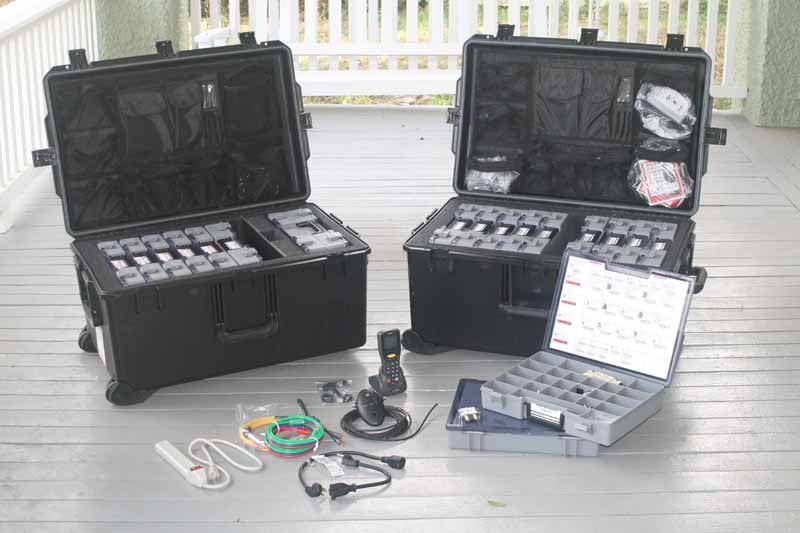 We did a first look of the Custom
Install Tech System (CITS) back in October of 2007 and found it to be an
extremely useful product with tons of potential to revolutionize the way many
custom installers handled their inventories. This time around we were fortunate
enough to be able to give the system a full test-run with a complete Standard
system which featured two weatherproof mil-spec roller cases, the Custom Order
Application (COA) software, and over $2500 in resalable parts. To say we were a bit
overwhelmed would be an understatement.
We did a first look of the Custom
Install Tech System (CITS) back in October of 2007 and found it to be an
extremely useful product with tons of potential to revolutionize the way many
custom installers handled their inventories. This time around we were fortunate
enough to be able to give the system a full test-run with a complete Standard
system which featured two weatherproof mil-spec roller cases, the Custom Order
Application (COA) software, and over $2500 in resalable parts. To say we were a bit
overwhelmed would be an understatement.
The reason the CITS system is so intriguing is due to the ease with which custom installers and system integrators lose track of inventory expended to a particular jobsite. The CITS software and barcode scanning system eliminates the problem by assigning "kits" to each installer and allowing them to bill materials to a job - tracking the parts in real time as they leave the kit. The downside is that this requires a complete retraining of how your installers handle parts and inventory replenishment, but it seems to be well worth it. As many in the business know, "the most expensive part is the one you don’t' have when you need it." No one likes to return to a jobsite simply because they didn't have what they needed.
Custom Install Tech System - What's Included
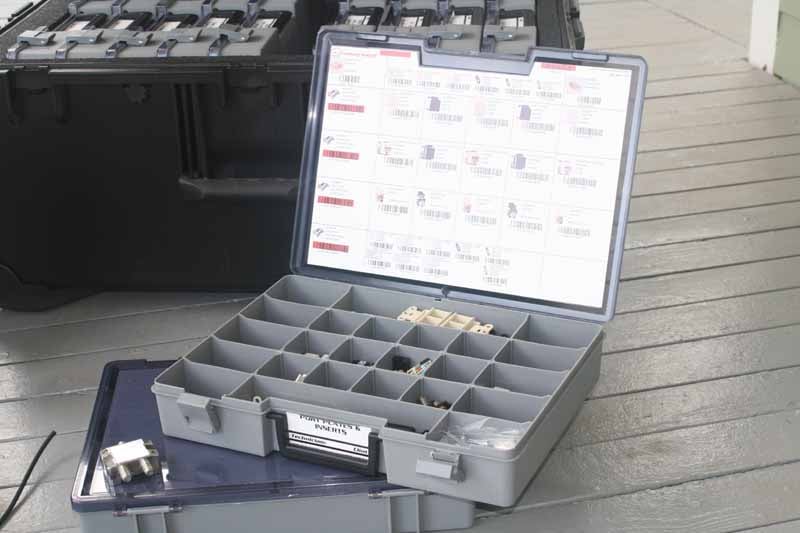 The CITS Standard system included thousands of parts
- around $1500 in terms of its retail value. Aside from the dual cases (which initially
hold 16 organizers) and barcode scanning system, the CITS comes with a whole
host of inventory-ready parts.
The CITS Standard system included thousands of parts
- around $1500 in terms of its retail value. Aside from the dual cases (which initially
hold 16 organizers) and barcode scanning system, the CITS comes with a whole
host of inventory-ready parts.
- Cables: Audio, Video, Network, Computer, & More
- Cable Adaptors: HDMI, Optical, VGA, Mod-Taps, & More
- Cable Termination: "F", BNC, RCA, Data, & More
- Connectors: Wirenuts, Crimps, Spades, Bell Caps, & More
- Electrical: Cords, Adaptors, Low Volt, Fuses, Tape, & More
- Hardware: Bolts, Nuts, Screws, Anchors, & More
- Infrared: Emitters, Power Supplies, Blocks, Receivers, & More
- Inserts: Data, CATV, RCA, Speaker, & More
- Labels: Labelers, Zip Labels, Tape, Markers, & More
- Miscellaneous: Glue, Tape, Batteries, Install Parts & More
- Retro-fit: Tools, Boxes, Enclosures, & More
- Rough-In: Conduit, Boxes, Enclosures, Hangers, & More
- Satellite Radio: Antennas, Adaptors, Amps, Tester, & More
- Signal Distribution: Satellite Parts, Splitters, Amps, & More
- Telecomm: Terminations, Blocks, Distribution, Patch Panels, & More
- Test & Repair: Meters, Wall Patch, Glue, & More
- Tools: Pre-wire, Termination, Retro-fit, & More
- TV Mounts: Fixed, Tilt, Pull-Out, & More
- VC's / Selectors: Volume Controls, Speaker Selectors
- Wallplates: Port Plates, Decora, Hole, Weather, & More
- Wire: Component, Digital, Analog, & More
- Wire Management: Velcro, Zip Ties, Cable Supports, Shrink Tube, & More
The items that aren’t included include most cables and large quantities of any types of items which take up space (wall-plates and larger inserts are limited for example). You can customize the CITS system in any way that you like, but the initial cases contain a bit of a smorgasbord, rather than a robust kit with enough parts to do a large AV installation. After seeing and using the kit, I'd recommend stocking up your utility van with the parts which you use most often and replace the supply contained within the cases as needed.
Custom Install Tech System - Build Quality Components
Solid. That was my first impression of the CITS system as it arrived at my doorstep. The cases are built like little tanks. They are easy to maneuver, thanks to the roller wheels and ample handles which surround the case, but they feel as if you could throw them off a 2-story building onto concrete and they'd survive with only a few scratches. (Oh yeah, I really wanted to try that, but I wasn't willing to risk someone else's property just to satisfy my curiosity.) You can't really get a feel for how robust the kits are until you wheel them around and open them up.
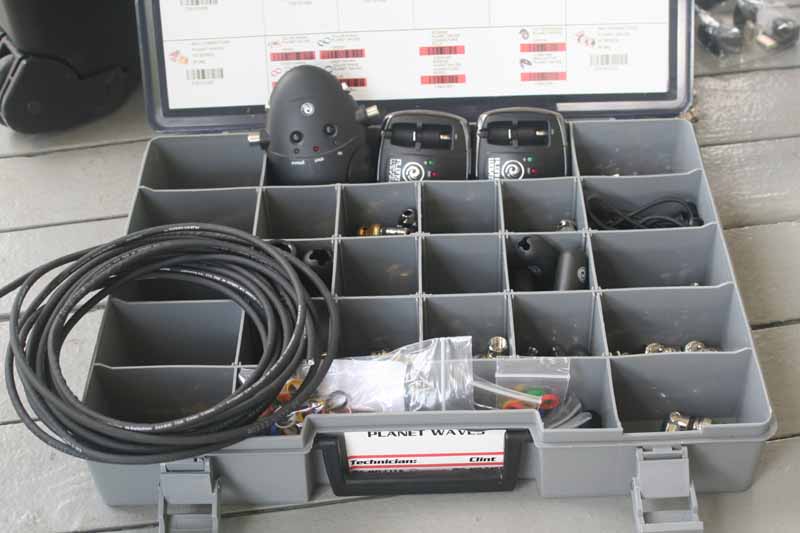 Each kit locks up tight with 5 latches which have a
center release button and flip open easily to reveal the contents of each case.
The two cases are filled with a total of 17 organizers. Ours included an extra
double-width organizer which was empty, while the typical standard system carries
a single layer empty organizer. Each organizer holds various parts, the
contents of which are summarized on the front with a custom sticker and also
internally by barcode, part number, and photo. Each organizer's label also
includes the name of the custom installer, so they won't easily get jumbled up
or switched when multiple installers are on-site.
Each kit locks up tight with 5 latches which have a
center release button and flip open easily to reveal the contents of each case.
The two cases are filled with a total of 17 organizers. Ours included an extra
double-width organizer which was empty, while the typical standard system carries
a single layer empty organizer. Each organizer holds various parts, the
contents of which are summarized on the front with a custom sticker and also
internally by barcode, part number, and photo. Each organizer's label also
includes the name of the custom installer, so they won't easily get jumbled up
or switched when multiple installers are on-site.
The first case contained 10 organizers and was broken down into: data cables, D-sub & fuses, electrical, infra-red & batteries, labeling tape & zip ties, port plates & inserts, signal distribution & splitters, test & repair, wire connectors & wall plates. The second contained: audio & phone solder terminations, bolts/lags & fasteners, screws & anchors, F/BNC/RCA ends & adapters, video cables, audio cables, and (for us) Planet Waves components. The Standard CITS typically comes with FConn compression connectors and not with the Planet Waves product. We've reviewed the Planet Waves products and found them to be incredibly easy to use.
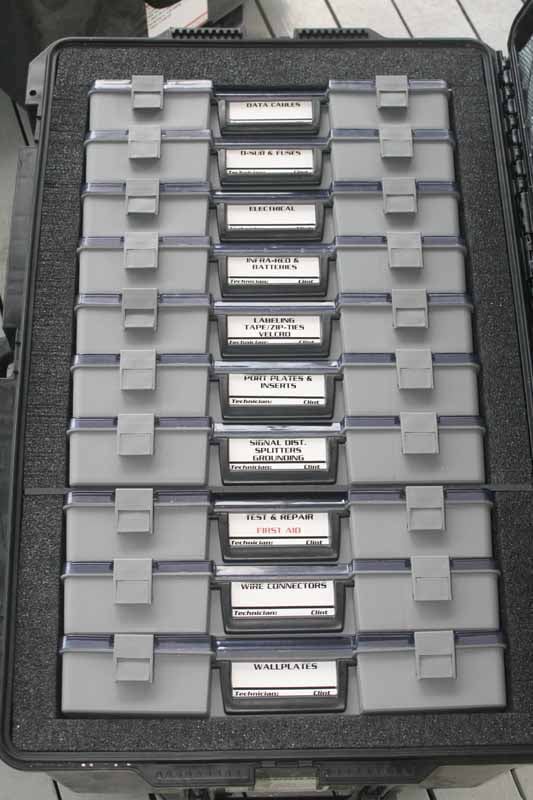
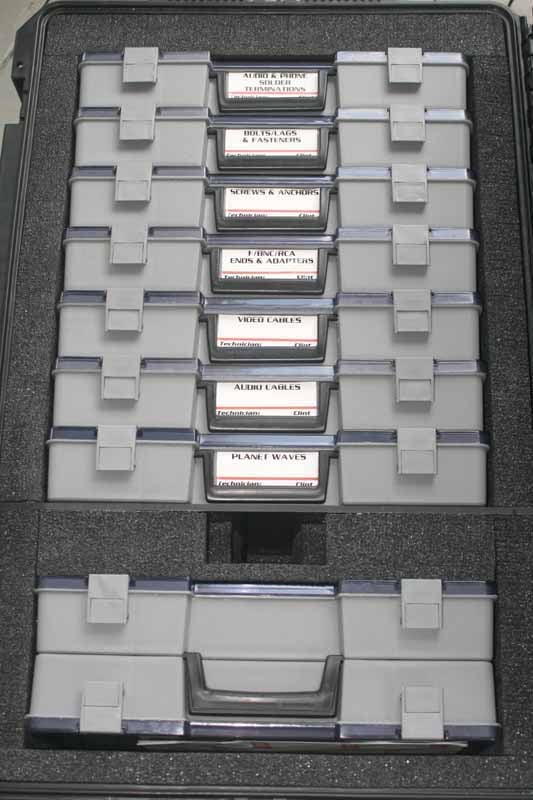
The Standard CITS kit comes with a healthy assortment of starter parts
I found the Standard kit to have an abundance of parts which spanned the entire realm of audio, video, electrical, networking, and cable installation areas. If there was an initial downside it was only that there was simply not enough of each part in some areas. Those custom installers who know their business well will simply order an abundance of necessary components and keep those on hand, in bulk, in the work van. CIS will also allow you to customize the initial contents of the CITS system, so the kits can carry adequate quantities for each installer's expected job duties. In my case I almost never touched any of the networking or power products, but spent most of the time in the audio and video connector, inserts and wall-plate organizers.
Now, if you want to scan, track and report non-Custom Install Supply (CIS) barcodes, you can do so, but with a few limitations that CIS hopes to have resolved by CEDIA. Currently, the CITS scanners will read just about any barcode out there. The limitations are that currently any CITS customers that are scanning non-Custom Install Supply parts usually enter additional information in the scanner before the part is scanned. If they don’t do this than the only information that will be passed through is the barcode number itself. What this means is that if, for example, you scan a barcode for a Xantech IR receiver, you would still enter in the Quantity and Job, but would also need to add a quick description in the comments field. Then all of this information is passed through to the site and with a couple of button clicks can be exported to a CSV file or printed to an excel spreadsheet. For most companies in our industry this replaces the guys in the field having to hand write the information, so even with the extra step of adding a quick description it is still a better solution. The scanner, of course, makes entry of data like this more of an exercise in "texting", so your mileage will vary.
Currently when the scanner data is uploaded to the CIS website it separates the parts that it recognizes as CIS parts and puts them in the Restock list for easy reordering. Then when a user goes to the Reports section they can view and report on all parts scanned. In September, at the 2008 CEDIA Expo, CIS plans to introduce a feature to their website that will allow clients to upload their entire parts list to a database that will then allow for all scanned parts to be recognized based on the information that they provide. The nice thing about this new feature is that they will also have the ability to input their sell price into that table so that it will appear with the rest of the information. If that isn't flexible then I'm not sure what is - especially considering that CIS is, after all, first and foremost a parts distributor. That's why they're so darn good at this in the first place.
Where non-CIS inventory becomes more important is with parts that you'll use often, but which may not be purchased through CIS - namely commonly-used AV manufacturer-specific parts (think Lutron,) Of course, those with local access to a cable distributor will also likely bypass shipping fees and delays for large spools of cables. Shipping bulk AV and network cables is best avoided if you have a local alternative with competitive pricing.
Custom Install Tech System - Scanning, Web Order Management System
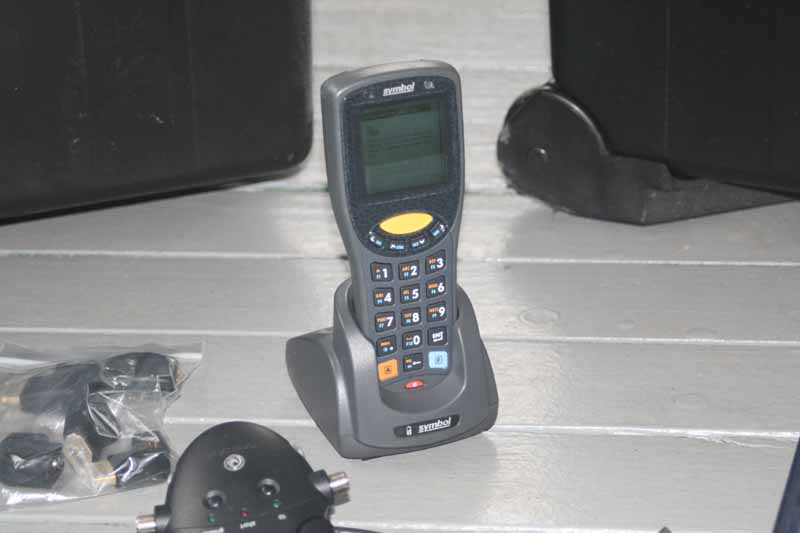 Before you can begin using the scanning system, you'll
need to run through a process to install the included barcode scanner. This was
actually not the easiest of processes and I never did get it to work on one of
my laptops due to a persistent error message that was not resolvable by any
means I found (I opted to install it on my desktop instead of utilizing CIS'
customer support since the error was clearly Windows XP-related). In order to
use the CIS Website to upload restock items the following applications must be
installed on your computer:
Before you can begin using the scanning system, you'll
need to run through a process to install the included barcode scanner. This was
actually not the easiest of processes and I never did get it to work on one of
my laptops due to a persistent error message that was not resolvable by any
means I found (I opted to install it on my desktop instead of utilizing CIS'
customer support since the error was clearly Windows XP-related). In order to
use the CIS Website to upload restock items the following applications must be
installed on your computer:
- Microsoft .NET 2.0 Framework,
- Microsoft ActiveSync 4.5 or above,
- CIS Relay
It takes about 10 steps to get everything running and cookies need to be enabled in your web browser (they are on by default) in order to utilize the software. CIS provides a phone number for support (866-4MY-CITS) which I used pretty quickly after setting up the system when my scanner took a dump on me and decided to reset. When it came back up the application I needed was nowhere to be found and I couldn't use it to scan anything. It only took a few moments to show me how to reboot it properly and get it back to where it needed to be. Overall, the company seems eager to make sure that custom installers are able to get what they need in order to be successful.
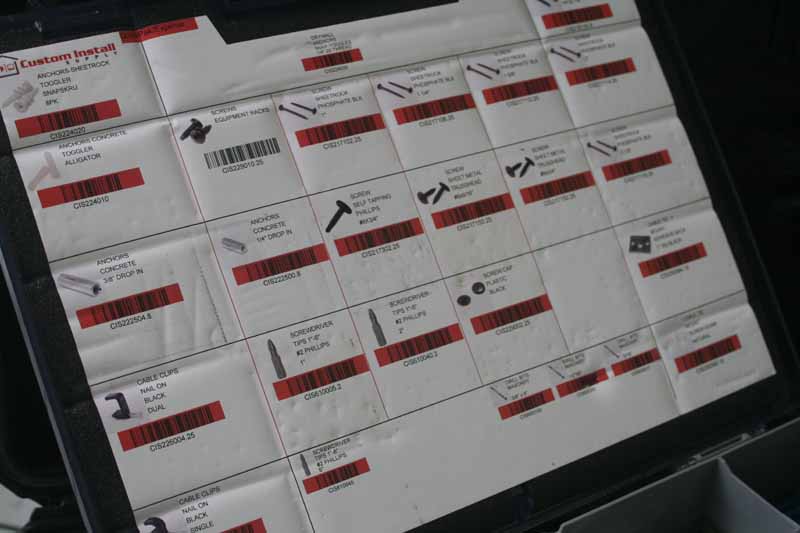 The actual scanning is simply a
matter of pressing the big yellow button and aiming the unit at the barcode
located inside each organizer. It seemed to pick up the codes very easily,
though I didn't test it in direct sunlight. The unit can be used to assign a
new jobsite - recommended before starting a new scanning session. Adding
anything in terms of text via the barcode scanner is a tad cumbersome and there
aren't dedicated keys for 'Space' or any of the commonly-used symbols (like a
hyphen). Once you learn some of the tricks (like how to delete something you
scanned) it's not so bad.
The actual scanning is simply a
matter of pressing the big yellow button and aiming the unit at the barcode
located inside each organizer. It seemed to pick up the codes very easily,
though I didn't test it in direct sunlight. The unit can be used to assign a
new jobsite - recommended before starting a new scanning session. Adding
anything in terms of text via the barcode scanner is a tad cumbersome and there
aren't dedicated keys for 'Space' or any of the commonly-used symbols (like a
hyphen). Once you learn some of the tricks (like how to delete something you
scanned) it's not so bad.
Docking and Managing
The final piece of the puzzle is what the CITS system is all about. Docking the scanner at your PC allows the system to upload all of the scanned inventory to the CIS website and automatically associate those scanned parts with the job/customer you specified before you began scanning items (you did remember to do that, right?). The CIS website has a utilitarian feel to it (mostly due to the red-on-black graphical design) but it seems to get the job done. While short on aesthetics and amenities, it shows the necessary information and allows easy export of the relevant purchase data to either QuickBooks or a standard .CSV file.
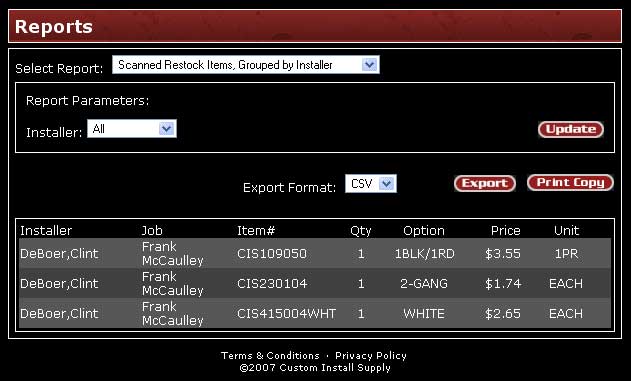
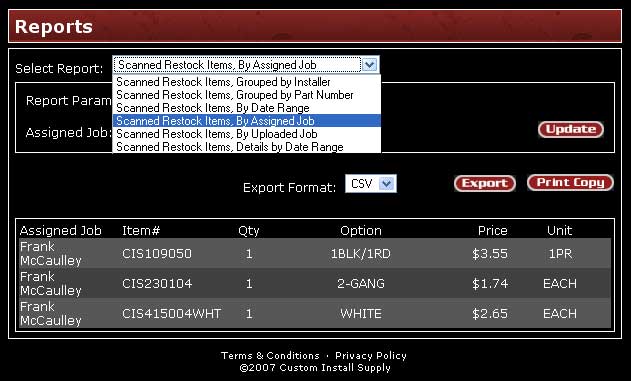
Reports can be viewed in any of several ways
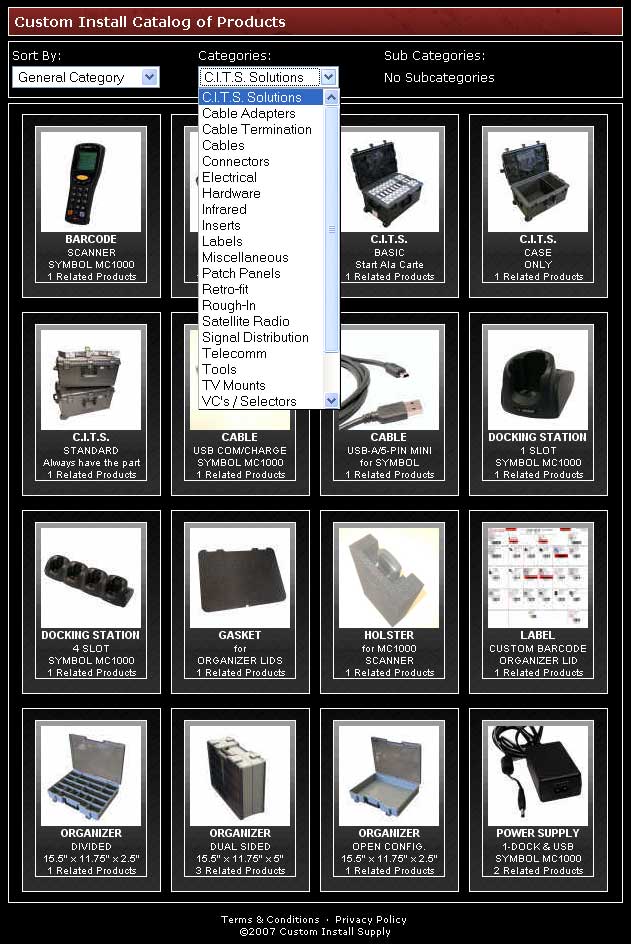
Aside from auto-replenishing parts from a submitted installer scanner docking
session, reordering parts can be done via search, part number or browsing
categories.
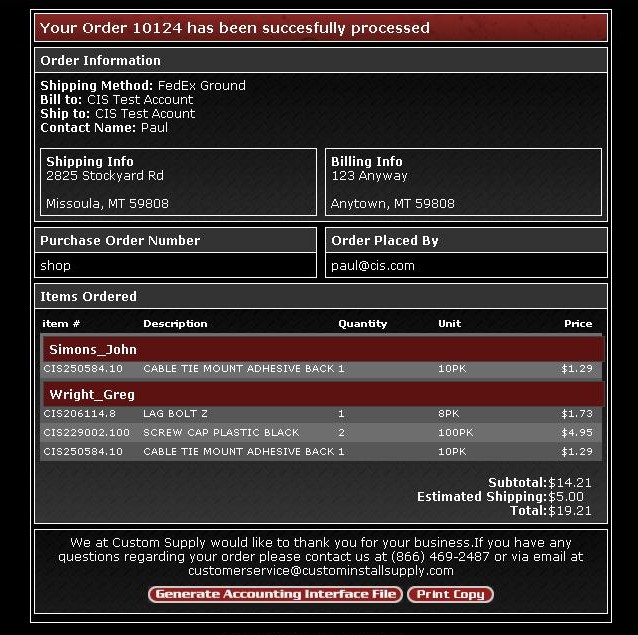
The CITS system allows you to export invoices to QuickBooks and easily print
hard copies.
Custom Install Tech System - Field Use and Conclusion
I used this system on several surround sound installations with much success. While the Standard CITS kit didn't have everything I needed, that's not something likely to happen when a custom installer places their initial order. During actual use I found the kit to be extremely handy, though a tad on the large side. I went back and forth between my desire to have everything I needed and my need for smaller, more portable cases. In the end I realized that the system is flexible enough for me to order smaller cases if it was really that important to me. The thing that makes it so usable is the whole auto-replenishing aspect of the inventory scanning process. Each install was easy to manage and I received more than a few comments about how cool it was to have a complete installation kit at my disposal. Let's face it, pull up to a house with a couple of these and a van full of bulk cables and tools and you're going to be perceived in a whole new light by your clients.
The Catch
There's not really a catch, but if you want to use the system to its fullest, you'll find you must continue ordering parts from Custom Install Supply. Based on our research this isn't so bad, as CIS seems to have some very excellent pricing in the industry. On some parts they prefer to supply name brand over generic for quality control reasons (having had experiences and feedback from customers regarding some generic brands of products.) An example would be Leviton & ICC brand keystone binding post inserts which cost $4.85/pair on the CIS website and whose generic counterparts can be found elsewhere for around $2.78/pair. When I brought this up to Custom Install Supply they let me know that if they were to carry the cheaper generic part it would come in around $2.65 - 5% less than the cheapest price I found for it online. The advantage of ordering from CIS, of course, means that you can fully use the system to track and replenish your inventory on a "per-installer" basis. When parts come in, you won't have to sort them out to figure out who needs what and you'll never run low, provided you set up rules for how and when products get re-stocked. This can all be handled by a dedicated office staffer and may be well worth it to avoid the added hassles of managing inventory separately (something that would really lower the usefulness of the kit).
Conclusion
Custom Install Supply has a compelling system that will appeal to a lot of custom installers - especially any of the many companies who already use CIS as their supplier. The physical system seems to work well and with appropriate training I feel that it could truly help many companies to eliminate several profit-killing gremlins: inadequate inventory that results in return trips, and overall efficiency. This is a system that will change the way your installers do their work, and for anyone who has lost control of their inventory - it's something that simply makes too much sense to pass up.
Custom Install Supply
Standard C.I.T.S. System
$3295
Custom
Install Supply
2825
Stockyard Rd #D4
Missoula, MT 59808
(866) 4MY-CITS (469-2487)
www.custominstallsupply.com
About Custom Install Supply
Custom Install Supply (CIS) is dedicated to
providing system parts & installation solutions to the Electronics Systems
Contractor. CIS continuously examines evolving industry trends and the
needs of the Custom Installation Industry. As a result CIS provides
unique solutions for dealers to maximize efficiency, complete system installations
and increase their bottom line.
The Score Card
The scoring below is based on each piece of equipment doing the duty it is designed for. The numbers are weighed heavily with respect to the individual cost of each unit, thus giving a rating roughly equal to:
Performance × Price Factor/Value = Rating
Audioholics.com note: The ratings indicated below are based on subjective listening and objective testing of the product in question. The rating scale is based on performance/value ratio. If you notice better performing products in future reviews that have lower numbers in certain areas, be aware that the value factor is most likely the culprit. Other Audioholics reviewers may rate products solely based on performance, and each reviewer has his/her own system for ratings.
Audioholics Rating Scale
 — Excellent
- — Very Good
- — Good
- — Fair
- — Poor
| Metric | Rating |
|---|---|
| Build Quality | |
| Ergonomics & Usability | |
| Ease of Setup/Programming/Integration | |
| Fit and Finish | |
| Performance | |
| Value | |
Clint Deboer was terminated from Audioholics for misconduct on April 4th, 2014. He no longer represents Audioholics in any fashion.
View full profile Subscribe to our newsletter