


Olevia LCD Deinterlacing Problem
Back in October we reviewed the Syntax Olevia 542i LCD. While overall we gave the display a positive review, we noticed that with certain DVDs, the top of the picture would “tear” or be skewed to the right. Over Black Friday (the day after Thanksgiving) in some markets there were heavy discounts on this and other Olevia displays. Soon after we started receiving report after report of customers having the same problem. We have contacted Olevia about this multiple times but have still received no response. A fellow audioholic, Ken Phipps, sent us a detailed report. It seems that not only did he buy the set, but so did his brother. Between the two of them, they tested a number of different movies, DVD players, and input configurations. We are reprinting part of his report with his permission:
I believe from experimenting with different connections and settings that I've come up with the particular variables that trigger the problem.
It appears that some DVDs have the problem on some players when using the component inputs, and setting the player to 'progressive' playback will *not* fix the issue on these units, where doing so on others will fix it. On the players where progressive mode doesn't fix it, then using the composite or S-Video input on the 542i will fix it.
Here is a list of the 4 DVD players I've tested:
- Sony DVP-NS575P: Progressive mode doesn't fix, have to use composite or s-video connection.
- Phillips DVDR3455H: Progressive mode doesn't fix, have to use composite connection.
- Panasonic DVD-S25: Progressive mode doesn't fix, have to use composite connection.
- JVC XV-N40: Progressive mode *does* fix with component connection.
As I stated in my earlier email, some DVDs trigger the problem while others don't. It appears from what I can see with the four players above to be mostly an issue when using the component connection. I don't have any players with HDMI connectors so I wasn't able to test that.
I've seen this happening with a fairly wide range of DVDs (movies and TV shows). I have attached an image of the screen from the "Ice Age 2" DVD that shows the 'curve' problem. I've also seen this on the 'Ghost Hunters,' 'Curb Your Enthusiam' and 'South Park' DVDs.
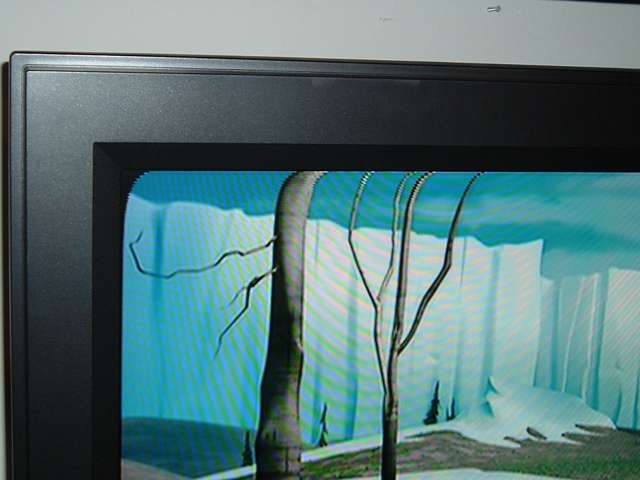
This seems to be the consensus from the reports we have received. The tear exists. Depending on which player you have and what type of input you use the problem may or may not be fixed by switching the player to “progressive”. our tests we noticed that there were many more films that were experiencing the problem but that, since they were letterboxed (black bars on the top and bottom), the “problem” was hidden in the black bars. The tear issue seems to be confined to the component inputs as all reports have stated that switching to s-video or composite fixes the problem. We’ve also had reports of the same issue on the 537h so it doesn’t seem to be confined to the just the 542i model. While we suspect that Olevia’s unresponsiveness to this issue is due to the fact that it is sporadic in nature and only affects a small subset of owners. We have subsequently pulled our recommendation of this display and hope that future models will have this problem addressed.
As Associate Editor at Audioholics, Tom promises to the best of his ability to give each review the same amount of attention, consideration, and thoughtfulness as possible and keep his writings free from undue bias and preconceptions. Any indication, either internally or from another, that bias has entered into his review will be immediately investigated. Substantiation of mistakes or bias will be immediately corrected regardless of personal stake, feelings, or ego.
View full profile Subscribe to our newsletter