


Long HDMI Cable Bench Tests - Monster Cable Shootout
Bench testing over 50 cables
Why "Just Buy ANY HDMI Cable" Advice is Wrong… Sort of
I decided to write this article the first time I saw another writer say "HDMI is digital - it either works or it doesn't." Then I saw that statement get repeated over and over. The problem is that HDMI isn't like a digital coax audio cable - it can degrade partially and produce sparkles and snow. We'll illustrate some of this below. It took nearly 6 months to research and prepare for this experiment. I intended to acquire as many HDMI cables as possible and focus on empirical testing of mostly longer lengths to show the differences that abound when you exceed 5 meters. The exercise, I believed, would save many consumers from losing lots of money and time - on a number of levels.
It’s possible that this is one of the more important articles a consumer, custom installer, or retailer who is considering or involved in the installation of longer HDMI cable runs might read this year. Why? Because HDMI is not just a digital cable carrying a fixed and limited amount of bandwidth like that of coax S/PDIF or TOSLINK. Why do I say this? Because HDMI is more complex, as we'll show you, and because we tested nearly 60 INDIVIDUAL CABLES to bring you the real data on just what happens when you ask HDMI to carry different types of data over short and long distances. In short, we hope this article will change the way you look at HDMI cables and understand when it's important to pay particular attention to quality and specifications... It sure changed our view of things, and not in the way you might expect. Read on.
What's So Special About HDMI Cables?
Before we jump into the tests and results, An HDMI cable is actually a bundle of wires - 19 counting the drain wires, and all follow a very rigorous specification in order to deliver the extremely high bitrates that deliver high definition images and audio to your electronics. Here is an example of how one particular geometry of HDMI cable would look if you sliced it open:
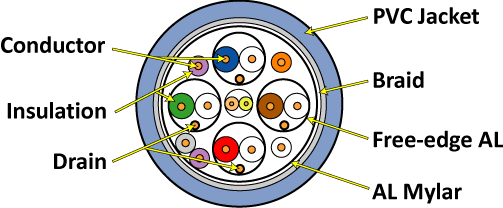
Looking at the image above you will see that there are 4 primary paired connections which represent the TDMS (Transition Minimized Differential Signaling) channels plus a drain wire. This can be thought of as the red, green, and blue color information (note that the colors are presented solely for illustrative purposes), multi-channel audio information and also the clock. The multi-channel audio is "easy" to pass along the line and is therefore interspersed among the much denser video information carried across these cables. Because of this, there are no dedicated wires for audio. While the three color/audio TDMS channels run at very high speed, the clock channel has much less demands put on it.
The central pair, in this particular cable configuration, are for DDC (Display Data Channel) clock/data which reads EDID (Extended Display IDentification) information from the display and which also handles the HDCP handshaking. EDID essentially tells the HDMI transmitter what type of signal and display it is dealing with. These wires are absolutely critical since without this information the entire signal is compromised. If HDCP isn't happy - there simply isn't going to be a signal.
The four single wires are a +5V line, a DDC ground, a hot plug detect wire (a signal that is used to monitor hot plug events so that a new HDCP negotiation can be made), and one for CEC. CEC (Consumer Electronics Control) is the two-way single wire control system which allows all the devices connected on an HDMI chain to communicate and automate settings and control functions, reducing the amount of controls and remotes needed to operate the components. In theory this is one of the coolest aspects of HDMI. In reality it is an underutilized, disappointing, buggy feature set that is mostly limited to intra-company products. The 5th solo wire is unused.
Shielding is extremely important with HDMI due to the intense data rates which are traveling through the cable. On the outside of the entire cable lies a PVC jacket. Underneath that is a braided shield which typically has around 85%-90% coverage. Underneath this is a helical-wrapped aluminum mylar material providing 100% coverage. The different shielding works well at different frequencies. For example, braid is better for blocking lower frequency interference (relatively speaking of course), and mylar foil is much better suited for blocking higher frequency interference. In addition to the master cable bundle, each of the TDMS pairs has mylar wrap as does the clock channel.
Due to the complexity of HDMI, it is never terminated in the field with a soldering iron or pin tool as you will see with other connections such as S-video, VGA and component/composite video. One of the few exceptions to this is RapidRun - a product by Impact Acoustics (Cables to Go) which utilizes proprietary interface connections to terminate HDMI and DVI-D "tails" and wall plates in the field. It's cool and, according to our tests, it actually works.
Digital Is Digital, Right?
Unlike the mumbo-jumbo surrounding TOSlink and coax optical cables, HDMI is a little more complex. When the specification is a constantly-moving target, as HDMI has proven to be - and this has been fueled by a willing consumer electronics industry - things get a little hairy. It's important to understand just why, with HDMI, you can't just say "digital is digital, it either works or it doesn't." As we referenced in detail in our article 'HDMI - It's All in the Bitrate,' HDMI has progressed (evolved) from a simple 720p/1080i 8-bit per channel signal to the current 1080p 12-bit (or more) per channel signal it is today. Just what kind of bandwidth is being sent over the cable depends on the source electronics and the capability of the display, but the potential has vastly increased since the debut of HDMI in 2003. As these signals got higher in resolution and bit depth, the amount of bits per second traveling through the HDMI cable increased. When that happened (and most recently culminating in the release of HDMI 1.3) the tolerance requirements for HDMI cables changed as well.
By way of example, with a digital audio coax cable you are dealing with a required maximum bitrate of just over 3 Mbit/s. For a S/PDIF connection, be it TOSlink or digital coax, this is chump change. The specification for that digital connection hasn't changed since ~1997 and the demands made on the cable are far less than the cable's potential capabilities. Now let's look at HDMI. A massive bundle of 15 cables (not including drain wires) - some insulated, all fairly important. In order for HDMI to remain practical, and avoid unnecessary interference, the cable has to be made, at least partially, out of stranded wire, lest 15 solid cables render the cable more of an unbendable, unwieldy stick than a cable. Additionally, the amount of information necessary to transmit the incredibly high resolution video and 8-channels of uncompressed digital audio far exceeds that of the typical DTS or Dolby Digital compressed traffic which meanders through a S/PDIF audio-only connection.
So How Do Cables Differ?
Aside from cost, HDMI cables differ in many ways. Some real obvious differences include the gauge of cable used in construction, stranded versus solid cable pairs (which greatly affects flexibility), and flat versus round. These physical differences are significant, but not nearly as important as whether or not the cables are rated to carry a particular signal a stated distance. Many cables are certified by one or more companies who provide specifications and/or speed ratings to cables. Simplay, for example is a wholly-owned division of HDMI Licensing, LLC that charges large sums of money to test cables and consumer electronics for compatibility and interoperability. Another company coming online is DPL Labs which rates cables on a 1-5 rating. It's a bit redundant since it should be pretty obvious that the Category 1 and 2 specs should be easy enough to certify and uphold. We're more concerned with manufacturer being honest than whether or not some third party certifies them or gives them a sticker. After all, nobody expects every AV receiver to be certified by a third party for exact power ratings (the FCC notwithstanding, but they hardly do more than ensure the product doesn't emit radiation).
Specific problems arise in a couple of areas. First, the equipment required to test HDMI cables is very expensive. We're talking over $200,000 for a basic setup including source generator, scope and calibrated HDMI "probes". This is obviously cost prohibitive for smaller companies to do much more than rebrand someone else's manufactured cables that have already been certified. If they choose the right manufacturer this isn't a problem, but some don't.
You can predict cable integrity and performance fairly accurately by doing the math on the cable geometry and modeling the results. This isn't easy, however (at least not for mere mortals) and we opted to use the measurement methodology instead. For a great (though very technical) article on HDMI cable modeling, please see Eugene Mayevskiy's writeup, which comes from an engineer who worked with Tektronix to deal with these very issues.
Testing Equipment and Procedure
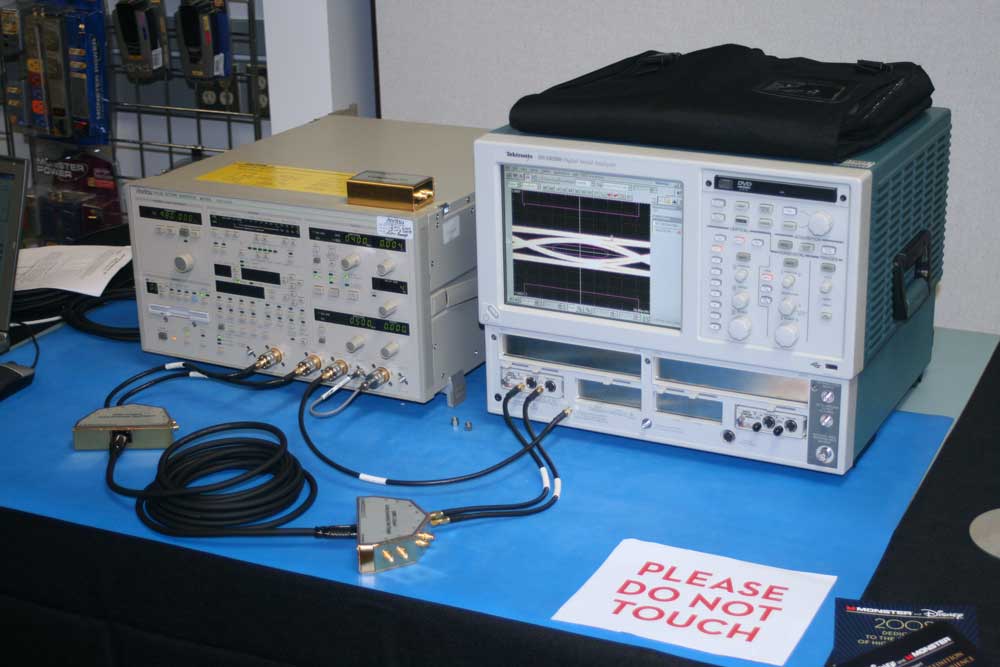 Since this isn't something just anyone
can do, we felt it only appropriate to really explain the testing equipment and
exactly how the tests are carried out. Due to the sensitivity of the
measurement system and the frequencies involved, you can't simply hook up these
cables to an LCR meter and measure resistance, capacitance and inductance.
We're dealing with rise and fall times of individual bits in a signal that is
sending (in our case) up to 5 BILLION of these bits every second - and that's
just over a one of the pairs of cables. There are four basic components to the
testing system we utilized: the signal generator, the HDMI test probes, the scope,
and the software which ran the tests and provided more detailed results.
Since this isn't something just anyone
can do, we felt it only appropriate to really explain the testing equipment and
exactly how the tests are carried out. Due to the sensitivity of the
measurement system and the frequencies involved, you can't simply hook up these
cables to an LCR meter and measure resistance, capacitance and inductance.
We're dealing with rise and fall times of individual bits in a signal that is
sending (in our case) up to 5 BILLION of these bits every second - and that's
just over a one of the pairs of cables. There are four basic components to the
testing system we utilized: the signal generator, the HDMI test probes, the scope,
and the software which ran the tests and provided more detailed results.
The signal generator was an Anritsu Pulse Pattern Generator (model MP1763C for you propeller heads). This sent a signal to an HDMI Test Fixture which we attached to one end of an HDMI cable to be tested. The other end connected to another Test Fixture which then fed into the TDT/TDR Sampling modules of a Tektronix DSA 8200 Digital Serial Analyzer. The signal generator costs around $84,900 in its stock form, the test probes are around $12,000 each and the base price of the Tektronix Analyzer/Scope is $25,000 with the TDR modules costing another $18,000 each. If anyone reading this is interested in doing these tests on your own, simply put your house up for sale and you might be able to afford the required equipment. We felt very fortunate to be able to use a system provided by Monster Cable (they actually have a spare, believe it or not). Check out the parts list and pricing of what a fully-equipped rig costs:
- Tektronix DSA 8200 Digital Serial Analyzer, $25,000
- 2 x Tektronix 80E04 TDT/TDR Sampling Modules, $36,000
- Anritsu MP1763C-1 Pulse Pattern Generator, $85,000
- Digital Serial Waveform Analysis Software, $20,000
- HDMI Test Fixture Calibration Kit, $5,000
- 2 x HDMI Test Fixture TPA-R adaptors, $24,000
- 4 x 20" RF Coaxial test cables with SMA connectors, $1,600
- 2 x 36" RF Coaxial test cables with SMA connectors, $1,000
- 18 x Precision SMA 75-ohm Terminations, $7,200
- Agilent GPIB/USB Interface, $700
Grand Total = $205,500 (not including the laptop to run the software)
Once the system is properly configured, testing is a very straightforward process. The general idea is that you are looking to see how well the cable allows for the individual bits, in the form of 1's and 0's, to be resolved by the system. Once a cable exceeds its spec (goes further than it is rated), the rise and fall times lose definition and the test fails. The way we look at this is through the use of an eye pattern. The eye pattern is a rectangular box which resides within the rise and fall time of a set of bit transitions.
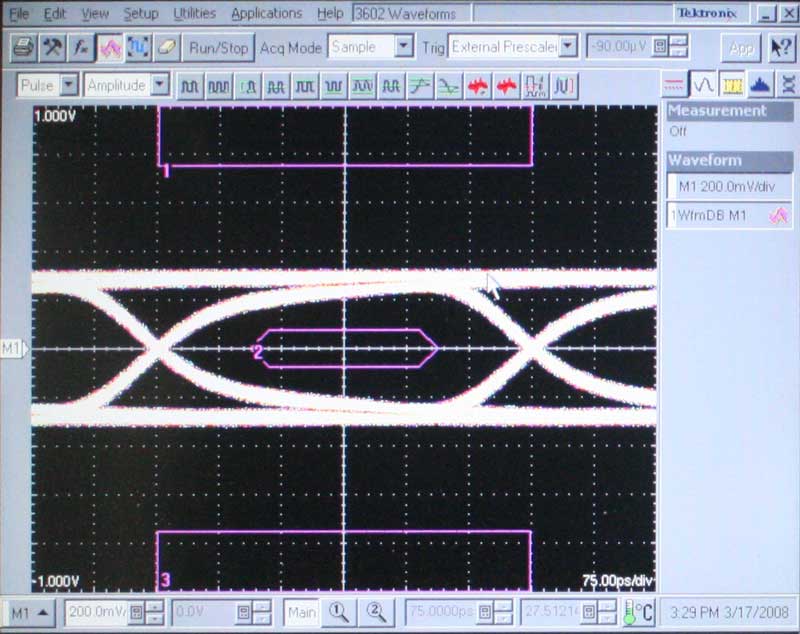
A passing signal
When the rise and fall time take on a more gradual slope, we note this as jitter - something every cable will reflect (see above). When the pattern eventually intersects the center eye, or rectangle, we say the cable has failed.
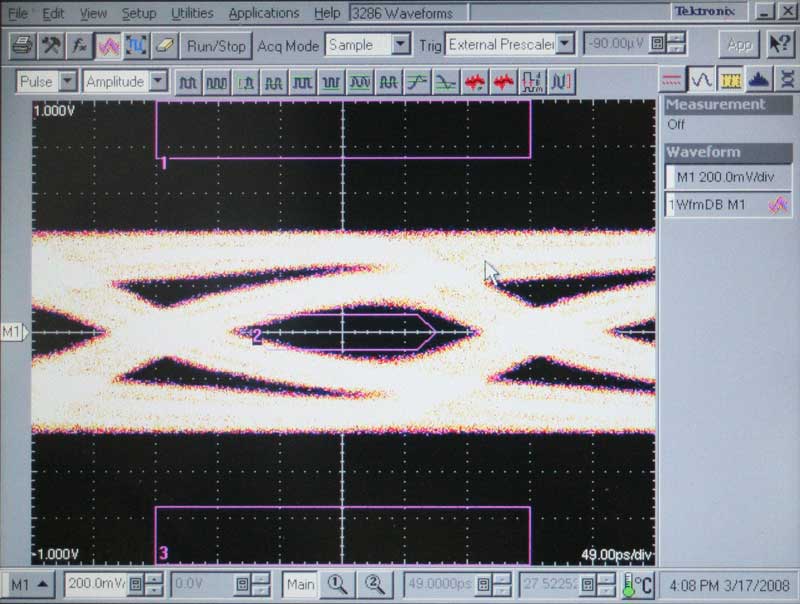
The signal goes "squish", like grape. This doesn't mean it won't pass
real-world, however.
The amount of variance in the system is shown by the thickness of the lines making up the pattern. Some cables had a medium thick line, and some had very thick lines. Many cables with higher variances were prone to failing earlier, but this wasn't an absolute indicator by any means. If you'll notice, each bit is only part of the whole signal which makes up the picture. That means that an HDMI cable can show gradual or partial degradation. That's how you get snow and 'hits' on an image instead of having it simply shut off.
We were only able to run tests on analogue cables, so we had to put aside our active HDMI cables since we didn't have the correct sampling modules for that job (We were going to spring for the extra $72,000 in active-ready modules but we left our credit card in our other pants...)
HDMI Cable Testing Results
We set up a simple grid to document our test results for the various cables submitted. Unfortunately, not every manufacturer puts out cables in identical lengths, so you'll need to interpret the results creatively, understanding that if a cable passes 4m, but fails 10m, we don't know for certain whether it would pass at 5m or 7.5m, though you can get a feel for the results after measuring a bunch of cables and seeing endless patterns and trends. This means that if one manufacturer passes at 4m, and another fails at 5m, you may be looking at identical results if the 4m cable had been extended another meter. We'll provide more analysis below.
What Do All Those Numbers Mean?
It's not as confusing as you think. We did 5 different tests, largely because the computer was already preconfigured and also because it took care of the three major tests I was interested in and added two more for good measure - one on the low end, and another on the high end. To start, we took 742.5Mbit/s per channel which tells us if a cable will pass plain old 720p or 1080i. The next step up was 1080p, which has an effective speed of 1.485Gbit/s per channel (by "per channel" we mean for each of the red, green and blue channels that carry the bulk of the information in an HDMI cable). Typically, you'll see cables and HDMI-equipped products designed to handle this type of data spec'd at 1.65 Gbps. Next up was the new 1080p at 12-bit (Deep Color). This is both significant and superfluous. Significant because HDMI 1.3-enabled products all carry HDMI chipsets that can handle data rates of 2.23Gbit/s (see this excellent article for a nice tech overview of HDMI 1.3). Superfluous because there are currently no Deep Color sources which are in any sort of practical use in home theaters today (nor are they expected in the near future, save a few HDV cams and possibly some 'as-yet-unreleased' PS3 video games). The first of the final two tests measured the ability to pass the actual maximum HDMI 1.3 spec limits (and realize the NO electronics manufacturer supports this since all current HDMI chipsets are limited to 2.23 Gbit/s speeds). This is a future-ready test.
Monster also added a fifth and final test which they described as being the equivalent (mathematically) of 1080p at 120Hz. While I seriously doubt anything except possibly a gaming system in a PC-rig will ever exceed 60Hz to a display, it's neat to see how cables collapse under a future format. Given the proclivity for HDMI Licensing to spontaneously change their spec - to the collective "Here we go again" sigh of the entire industry - this isn't entirely unreasonable for the future.
The Objective HDMI Cable Test Results
| Company |
|
720p/1080i
8-bit 742.5 Mbit/s 2.23 Gbit/s* |
1080p
8-bit 1.65 Gbit/s 4.95 Gbit/s* |
1080p
12-bit DC 2.23 Gbit/s 6.49 Gbit/s* |
Max
HDMI 3.4 Gbit/s 10.2 Gbit/s* |
1080p
8-bit 120Hz HDMI 4.98 Gbit/s |
| Acoustic Research $69.99 | 6' | Pass | Pass | Pass | Pass | Pass |
| $79.99 | 12' | Pass | Pass | Pass | Pass | Pass |
| $119.99 | 25' | Pass | Pass | Fail | Fail | Fail |
| Blue Jeans Cable Series-1 $30 | 6' | Pass | Pass | Pass | Pass | Pass |
| $51 | 15' | Pass | Pass | Pass | Pass | Fail |
| $84.75 | 30' | Pass | Pass | Pass | Fail | Fail |
| Cobalt Cable $74.95 | 2m | Pass | Pass | Pass | Pass | Pass |
| $114.95 | 5m | Pass | Pass | Pass | Pass | Fail |
| $179.95 | 10m | Pass | Fail | Fail | Fail | Fail |
| DVIGear SHR $50 | 2m | Pass | Pass | Pass | Pass | Pass |
| $90 | 5m | Pass | Pass | Pass | Pass | Fail |
| $135 | 7.5m | Pass | Pass | Pass | Fail | Fail |
| $175 | 10m | Pass | Pass | Fail | Fail | Fail |
| Gefen $49 | 2m | Pass | Pass | Pass | Pass | Fail |
| $219 | 30' | Pass | Pass | Fail | Fail | Fail |
| Infinite Cables $10.95 | 6' | Pass | Pass | Pass | Pass | Pass |
| $16.95 | 15' | Pass | Pass | Pass | Fail | Fail |
| $77.95 | 15m | Pass | Fail | Fail | Fail | Fail |
| MonoPrice $9.52 | 6' | Pass | Pass | Pass | Pass | Pass |
| $15.81 | 15' | Pass | Pass | Pass | Pass | Fail |
| $41.42 | 25' | Pass | Pass | Pass | Pass | Fail |
| NGHP $50.95 | 1m | Pass | Pass | Pass | Pass | Pass |
| $60.95 | 3m | Pass | Pass | Pass | Pass | Fail |
| RAM Electronics $27.95 | 6' | Pass | Pass | Pass | Pass | Pass |
| $49.95 | 15' | Pass | Pass | Pass | Pass | Fail |
| $129.95 | 50' | Fail | Fail | Fail | Fail | Fail |
| Tributaries $250 | 2m | Pass | Pass | Pass | Pass | Pass |
| $450 | 6m | NA | NA | NA | NA | NA |
| $900 | 15m | Fail | Fail | Fail | Fail | Fail |
| WireWorld Starlight 5 $249.95 | 2m | Pass | Pass | Pass | Pass | Pass |
| $399.95 | 5m | Pass | Pass | Pass | Pass | Fail |
| $1399.95 | 12m | Pass | Fail | Fail | Fail | Fail |
| Sewell Direct Vantora $39.95 | 2m | Pass | Pass | Pass | Pass | Pass |
| Monster 500HD $69.95 | 2m | Pass | Pass | Pass | Pass | Pass |
| $99.95 | 4m | Pass | Pass | Pass | Fail | Fail |
| Monster 700HD $79.95 | 2m | Pass | Pass | Pass | Pass | Pass |
| $119.95 | 4m | Pass | Pass | Pass | Pass | Pass |
| $249.95 | 10m | Pass | Pass | Fail | Fail | Fail |
| Monster 800HD $99.95 | 2m | Pass | Pass | Pass | Pass | Pass |
| $149.95 | 4m | Pass | Pass | Pass | Pass | Fail |
| Monster 1000HD $129.95 | 2m | Pass | Pass | Pass | Pass | Pass |
| $199.95 | 4m | Pass | Pass | Pass | Pass | Pass |
| $399.95 | 10m | Pass | Pass | Pass | Pass | Fail |
| Monster m1000 $200 | 8' | Pass | Pass | Pass | Pass | Pass |
| $250 | 16' | Pass | Pass | Pass | Pass | Pass |
*For reasons unknown to us, some manufacturers like to express the data rate as an aggregate number which combines the three primary high-speed data channels. In our opinion it's the "per channel" number that is significant. After all, we don't say that a stereo amplifier has a frequency bandwidth of 40kHz (if/when in fact each channel has a bandwidth of 20kHz.) In an attempt to be as thorough and helpful as possible, we have added the aggregate numbers to our chart as well.
What Does 'Fail' Mean?
It's important to define what we mean by "Fail'. The indicators above deal with the eye pattern on the Tektronix Digital Serial Analyzer. A 'Fail' on this chart does not necessarily mean that the cable will not pass the signal in the real world. In fact, see my Subjective summary below for some real "eye" openers (no pun intended… yes it was). The reason, quite simply, is that various electronics components have different levels of active compensation built in to help EQ incoming signals and help restructure HDMI signals into a more reliable stream. The axe swings the other way as well - we have no reason to believe the cables will reliably and consistently pass a signal to all types of components if they do not pass the eye pattern test above.
Every cable over 10 meters failed to pass 1080p, even at 8-bit, though Monster claims their m1000 Series can do just about anything (they didn't provide a cable over 10m to test and they don't sell it at lengths above 25 feet). At 10 meters the Monster Cable 700HD and 1000HD passes 8-bit, and we added Blue Jeans Cable (30 feet actually) and DVIGear. Blue Jeans, incidentally, uses a Belden-made HDMI cable. When we increased the bits to simulate 1080p at 12-bit Deep Color (similar to what's available in most HDMI 1.3a-rated products today) most manufacturers had to drop back to 5 meters to pass the signal. Blue Jeans passed it at 30 feet, but DVIGear requires their active cable solution to do a full 10 meters. Monster Cables' 1000HD cable also passed 1080p at 12-bit with no issues.
Evaluation of Results and Final Conclusions
I wanted a bird's eye view of the cable tests to see how the lengths affected overall performance. I wanted trends and general principles. Here's what the tests looked like charted out:
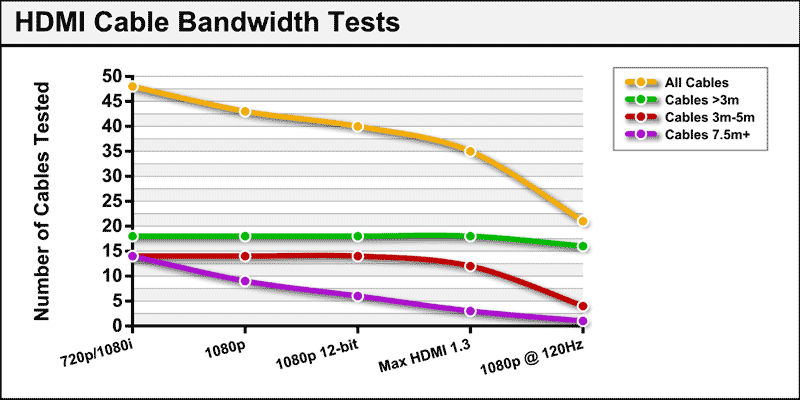
As you can see by the chart here, the drop-offs mostly occur (in bulk) at theoretical limits and that last stage. For the most part, not a lot of cables have difficulties passing real-world current bandwidth requirements of today's 1080p sets. For cables under 3 meters the results are almost flat.
Subjective Results Back Home
I wasn't content to simply check off a box and condemn massive amounts of cables to criticism unless they actually failed when brought back to a real-world environment and tested. What I found surprised me - and brought the entire thesis of this article into question. First of all, it's important to note that most projector and display manufacturers are adding cable EQ circuits into their systems. This is a way to counteract the filter effects of a longer cable and help the system to correctly read the digital data. In addition, HDMI 1.3 removed the restrictions on overshoot which prevented the use of pre-emphasis on source components. Now, sources can improve performance at higher speeds and when using longer cables. As it turns out, most manufacturers are doing exactly this.
We took two of the worst performing cables of the bunch, a RAM Electronics 50' HDMI cable ($130) and an equally challenged Tributaries (Series 9) 15 meter cable ($899). Both understandably fail eye pattern tests at even 720p resolutions. Both, unfortunately, also claim HDMI 1.3 support at up to 10.2 Gbps bandwidth and with Deep Color support. It was fairly obvious that both of these cables would fail real-world tests when connected to a 1080p source.
Except that they didn't.
I saw clean video on two separate displays. I even used two different sources - one HDMI 1.3 and the other sporting an older HDMI 1.2 chipset. Then I got real desperate and nabbed an old HDMI 1.0 source (A Helios NeuNeo player) and slapped it up to triple check the signal.
What?!? Scratching my head I searched in vain for a way to get them to fail. I couldn't. Not at 1080p or any other resolution. Finally I actually resorted to connecting the two huge cables end-to-end. That netted me sparkles at 720p/1080i and absolutely no picture at 1080p with our HDMI 1.0 player. OK, so there are some limits after all. That's good to know.
What I expected to see on failed cables was something like this, or worse:
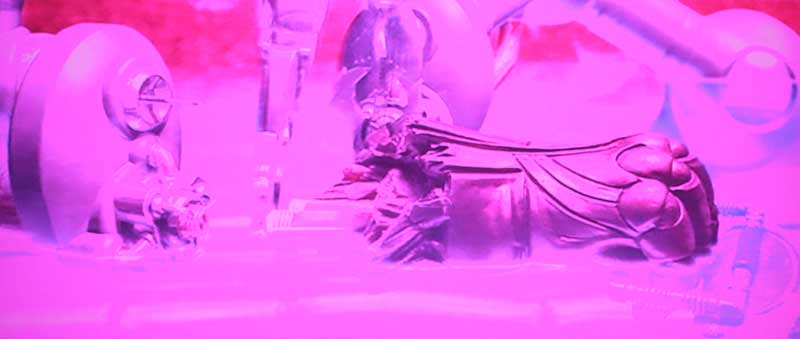
What I got was this - but only after connecting two very long cables end to end:
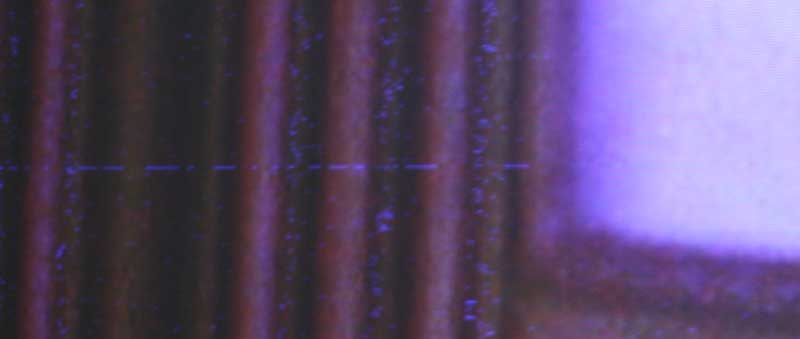
When I finally got a result, sparkles abounded on the screen, even shooting horizontal lines across parts of the picture in frequent intervals. But this was only after traversing over 65 feet of HDMI cable. So far, my theory on longer-run HDMI cables was a near-bust. Sending 1080p content through this 25 meter juggernaut from an HDMI 1.3-capable player (the Playstation 3) yielded this:
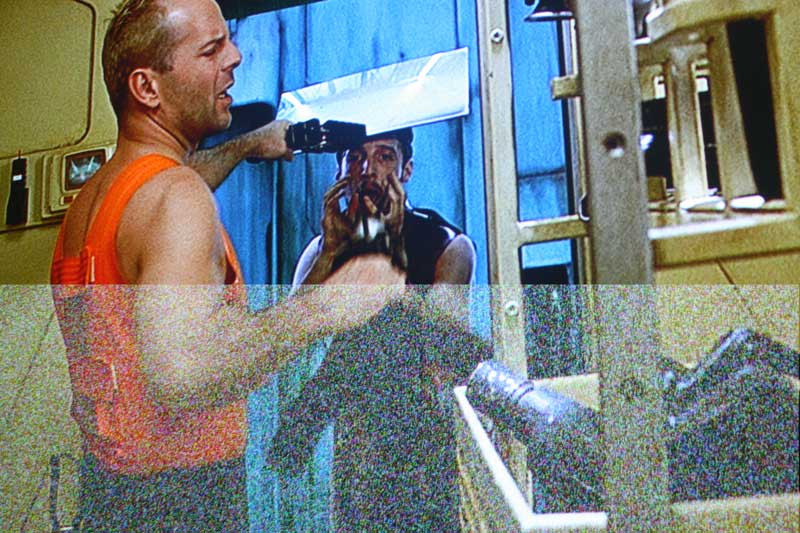
What was occurring was real-time video, but with frequent, rapid-fire areas of snow on the picture which made the movie pretty much unwatchable. Periodically, the entire picture would turn to snow or flicker off for a moment before it came back and attempted to render itself to the best of the double cable's potential. This was significant as it demonstrated to me the importance of pre-emphasis which is available via HDMI 1.3 sources and not present on older HDMI 1.0 devices (remember, with the HDMI 1.0 source we got nothing on the screen at all at 1080p).
The real test, I thought, would be to send 12-bit video through the system to the display. That would ramp up my video from 1.485 Gbps to around 2.23 Gbps. That simply wasn't in the cards, however. Despite all the hype about Deep Color - you can't get it. Not anywhere. It might as well not exist.
Statement on Deep Color 12-bit Signals
We interviewed Jeff Soo H. Park from HDMI Licensing, LLC about the lack of 12-bit ("Deep Color") sources on the market. Here was his response:
There are number of sources that support 12-bit color output (PS3, Blu-ray players) but no 12-bit content exists at this time [emphasis mine]. That doesn't mean you will not see any benefit from these 12-bit devices. Many of these 12-bit sources may have features that "upconvert" current 8-bit content to 12-bit, depending on the manufacturer. This concept is similar to how some HDTVs upconvert 60Hz source video into 120Hz video.
Like any new technologies, we will see the components (TVs usually first) start to build-in the new features and, when there is enough momentum, the content producers follow with content. We saw this with 1080p, for example. A similar trend will be likely occur for 12-bit.
With no way to cram 12-bit data into the line, I was stuck testing cables at 1.485 Gbps rates. That's practically child's play for most applications and I wasn't terribly surprised to find that even the "worst" cables passed video in real world tests. Heck, I even passed 1080p over a DVIGear 30 meter passive HDMI cable. 30 meters!!! And this coming from a company who won't sell a 10 meter cable without a cable EQ (included in the price of the cable) because it is concerned with quality.
It turns out that manufacturers aren't idiots; and I bet more than a few realize that they can spec their cables higher due to the lack of content to prove them wrong. In short, they are getting away with it... for now.
What About Future Formats?
Normally we'd say "who cares?" but with the history of HDMI, and the fact that people are putting HDMI cables behind their walls, this is a very valid question to ask. Are you really willing to put a cable in the wall that doesn't have the ability to handle any potential future bandwidth increases HDMI Licensing decides to throw into the electronics industry? To give us a fighting chance to check cables against future formats, we actually added two more empirical tests. First, we maxed out the HDMI 1.3 spec, setting up a test for 3.4 Git/s. Next we stuck on the equivalent of 1080p at 8-bit, but at double to frequency, or 120Hz. This equates to 4.98 Gbit/s. Right now only displays are performing 24/60Hz to 120Hz conversion, so this isn't necessarily anything we'll see anytime soon (hopefully never if you ask me) but it makes for an interesting scenario. As you may or may not know, the Sony PlayStation 3, being essentially a souped-up PC and graphics card, can already (theoretically) do 120Hz output over HDMI, provided this feature is activated via firmware (it's not currently).
When we added these advanced "future" formats, our eyes were opened to the real danger of using "just any old HDMI cable." They don't all work, or at least they don't look like they'll work according to our tests. Even at less than 5 meters. For example, while Gefen's 2 meter cable we tested works flawlessly with the full capabilities of HDMI 1.3, it doesn't pass our Max test at 4.98 Gbit/s (the only 2 meter cable that didn't). At 15 feet, Infinite Cables failed to pass the maximum HDMI 1.3 spec (3.4 Gbit/s). Other companies' 5 meter cables, from Blue Jeans, Cobalt Cable DVIGear, MonoPrice, RAM Electronics, WireWorld, and Next Generation Home Products (3 meters on this last one) passed the current 1.3 spec, but showed that they may not be ready for future formats at this length - failing the 4.98 Gbit/s data rate test.
Will Active Cable Solutions Save the Day?
We were unable to test active cables with the HDMI cable testing system. If we had, the insurance company for Monster Cable would have had words with us since it would have essentially fried the hundreds of thousands of dollars worth of components we were using to measure the cables. The system documented above cannot be used on active cables without special add-ons that weren't available to us. Any cables with embedded or active electronics would have had catastrophic results.
What we were able to do was test some active solutions on our failed 65+ foot run above. For example, remember that unavailable 1080p image when using the Helios player? It came back and looked just fine when we inserted an active HDMI Cable Extender from DVIGear. It also eliminated the stuttering, snowy signal from the PS3, bringing it right back to pristine picture quality. Active HDMI solutions, whether internal or external to the cable are going to be a big deal as the technology expands. What it told me is that not all is (necessarily) lost when your cable can't cut the mustard - provided you are using decent cables to begin with. I don't think any cable EQ in the world is going to help a truly bad cable, but for those who buried HDMI in a wall back in the days of 720p - there's still hope.
Conclusion
Well, what started out as a quest to prove the fact that longer HDMI cables really matter ended up schooling me in the fact that real world performance differs very much from lab results. It also demonstrated that not all manufacturers' cables are created equal - nor will all of the cables labeled as "HDMI 1.3-ready" likely pass all of the potential aspects of category 2 (3.4 Gbps) cables without help.
I have to come away saying that most cables under 4-5 meters will pass just about anything in today's arsenal of 1080p - and that's likely to include Deep Color if and when it ever makes an appearance (not likely soon due to current Blu-ray limitations). For cables over 5 meters it's a good bet that you'll want to stick with trusted manufacturers who deliver on their specs. For long cables, Blue Jeans Cable, DVIGear, MonoPrice, Monster Cable 800HD, and WireWorld seem to be the best bets of the cables we tested - however the price variance between these cables is revealing. We're sure there are also other cables we didn't test which are also likely to perform well. Some of the other manufacturers, such as NGHP, RAM Electronics, Sewell Direct, and Tributaries also showed themselves to be great performers at <7.5 meters, however they either didn't have longer length cables or they didn't supply them in ~10 meter lengths for our testing.
Your take-away from all this should be the following:
- At lengths less than 4 meters you can just about use silly string (OK, not really) and get HDMI to pass at any current resolution. At less than 3 meters you'll even extend that to 12-bit color and possibly the next crazy idea HDMI Licensing decides to throw at consumers. Don't spend a lot on these cables and if you want to save money you won't let anyone at a big box store talk you into buying from them.
- At long lengths (over 10 meters) you really need to pay attention to the manufacturer if you don't want to risk running into potential problems with 1080p and future formats such as Deep Color. With that said, just about any cable at or under 10 meters will pass 720p/1080i and nearly everyone will pass 1080p at 8-bit color as well.
- If you have an existing HDMI cable and are running into problems, we'd suggest at least attempting the insertion of an active component at the sink (display) side. This is going to be far cheaper than ripping out your walls and re-running new cables - and likely just as effective.
- HDMI has proven to be a moving target and there is no telling what crazy (likely unnecessary) format they will try to push down the cable next. Due to this, it's always good to "overbuild" your cable install, especially if it's a longer distance and going to end up behind drywall.
- If you're not prone to upgraditis and think 1080p will be your maximum resolution for the life of your install, don't sweat it...
There are going to be exceptions to all these "rules" but in the end I'd have to say that I really thought I'd see more differences in the real-world performances of longer-length cables. Since we're all basically pinned at 8-bit 1080p, I didn't. It's likely you won't either. So all those people saying "buy any cable you want, it doesn't matter" are, for the most part, correct - at least until manufacturers advance to 12-bit software and signal transmission. Where they are not accurate is in assuming HDMI (since it is digital) is either "on" or "off" (it either works or doesn’t). HDMI signals can be partially corrupted as you saw above. The other area in which they are off concerns the future. If and when 12-bit "Deep Color" video truly comes to market (as more than just a listed spec) individual cable situations can (and likely will) change. For this reason take all of the above measurements and principles into account and make sure you build your installation wisely.
Clint Deboer was terminated from Audioholics for misconduct on April 4th, 2014. He no longer represents Audioholics in any fashion.
View full profile Subscribe to our newsletter