


Digital Converter Box Comparison & Shootout
DTV Digital Tuner Shootout!
Looking for a digital TV converter box can be a daunting task as every store seems to have their own brands. And with a proliferation of boxes on the internet, which ones work with those $40 government coupons… If so, how well do they work? Features? Quality? Ease of use? Audioholics compares five popular boxes to help you make the best choice!
Test Setup
In an effort to stay true to the purpose of the low cost digital tuners which are government coupon compatible, the majority of the testing was done with a 7 year old, 20" CRT television. This RCA brand TV has coax, composite, and S-Video inputs. It isn't a particularly fantastic display, nor is it the worst available, but it did provide for a reliable visual comparison. A 20" flat-panel Dell computer monitor with composite and S-video was also used. The Dell doesn't have a great scaler, but worked nicely to expose any flaws in the picture that might have been hidden by our standard interlaced CRT. Please note that screen shots of menus, guides and info pages were also taken from the LCD monitor due to glare and moiré issues with the camera. We used two antennas to round out our signal comparison. First, we chose a basic, low-cost unit from Radio Shack that should be similar to basic rabbit ears that anyone is likely to already own. Second, we found a smart antenna at Best Buy, the Apex SM550, which works as a standalone amplified antenna or as a smart antenna. A smart antenna, as defined by the Consumer Electronics Association (CEA-909), is basically an antenna that can be controlled via the tuner to allow automatic tuning for the best possible signal. There were only a handful of smart antennas available online and this is the only one to be found at any local store. The smart antenna idea is very intriguing and we wanted to know how much of a difference it could really make. A basic set of shielded RCA and S-Video cables were used to eliminate any issues from the cheap cables included with the tuners. The following five TV converter boxes were tested: RCA DTA800B1, Insignia NS-DXA1-APT aka Zenith DTT901, Digital Stream DTX9950, Apex Digital DT250A, and Channel Master CM-7000. On to the reviews…
Editor's Note: Composite (yellow) vs. S-video (4-pin) Connections
Composite video - those yellow RCA connectors you see on the back of your TV and many video devices - are present on all of these boxes and offer a way to get the video to your television separate from the stereo audio. In this way you can feed the audio to your A/V receiver and let the TV receive the video signal. Even if you don't use an A/V receiver, composite video with separate stereo audio is often capable of delivering a better quality picture than the threaded coax F-connector which carries both audio and video on the same line. S-video is a 4-pin connector that provides even more information to better transmit the video information to your television. Whenever you are given a choice between composite (yellow) and S-video connections, we recommend using S-video.
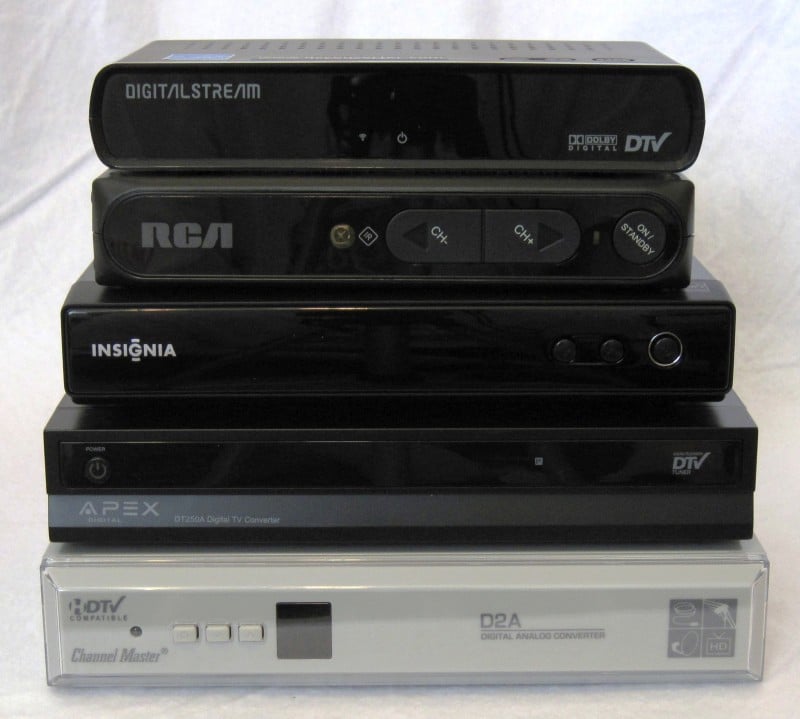
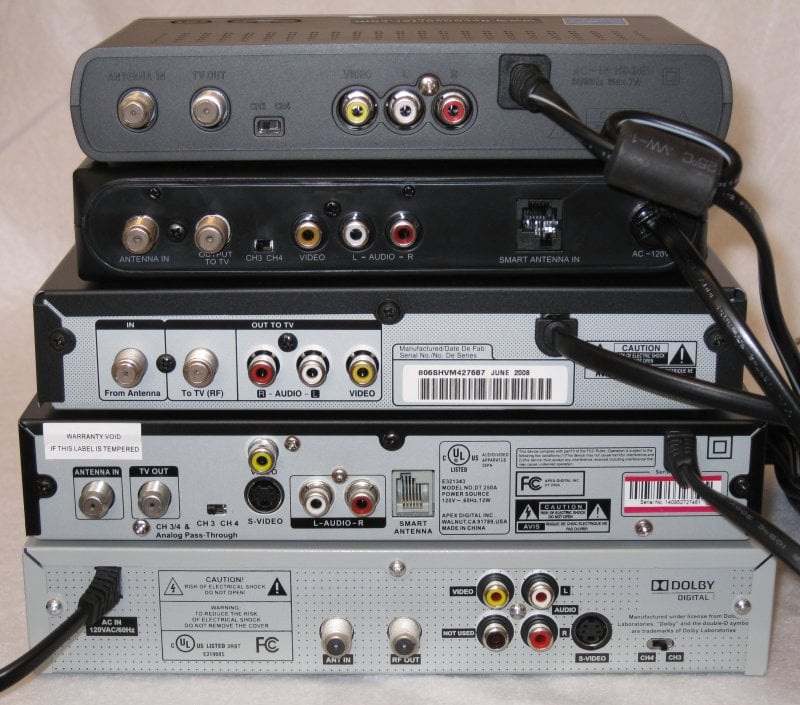
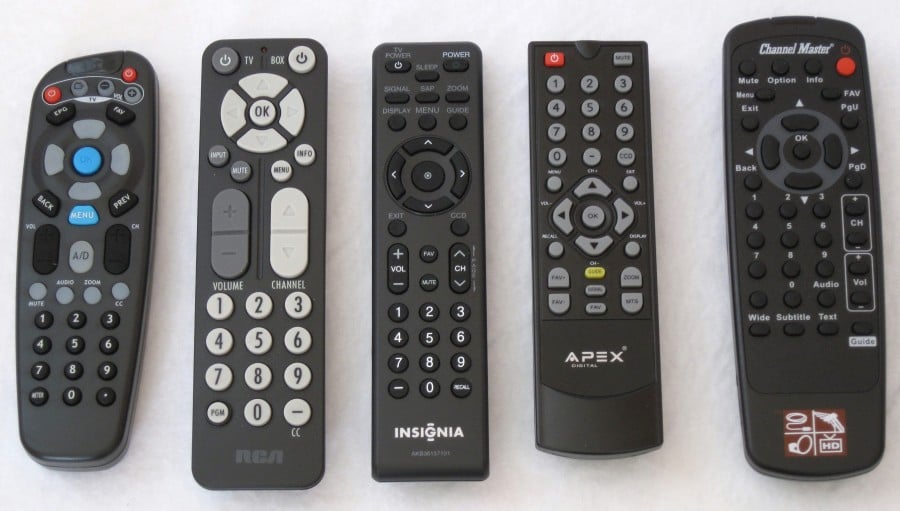
Top to Bottom and Left to Right: Digital Stream, RCA, Insignia/Zenith, Apex Digital, Channel Master
RCA DTA800B1
 MSRP: $50 at Wal-Mart
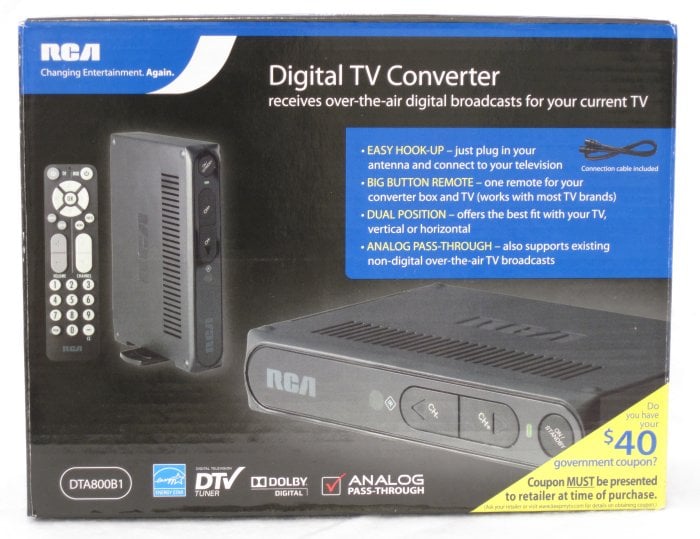
Introduction
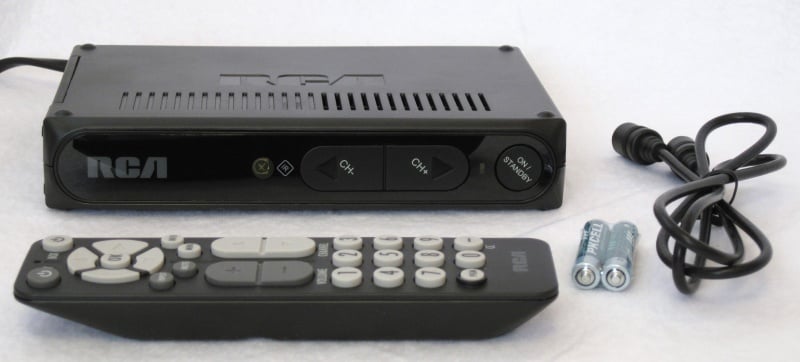 The RCA DTA800B1 is the lowest cost box in the shootout and is available at Wal-Mart. It was one of the most difficult to acquire as my local stores were sold out for over a month. I believe the cost makes this a very popular option. With a basic black appearance and simple remote control, it is easy for the electronics novice to use. The package includes the tuner, remote, batteries and coax cable. It seemed odd that a simple A/V cable wasn't included as with some of the other tuners. The picture quality seemed acceptable but it lacked some screen format options that would have been useful. Overall, my initial impressions of this box were good for its ease of use.
Appearance – 4/5
This tuner is one of the smallest in the shootout and has a side panel that rotates to allow it to stand vertically as well as the usual horizontal position. The front has power and channel plus and minus buttons and a red/green LED for the power status.
Ports – 4/5
From left to right, the rear of the box has coax antenna in, coax TV out, Ch3/Ch4 switch, composite/stereo A/V jacks, smart antenna port, and a hard wired power cable. At this price, it was good to see the addition of the smart antenna port, but my later testing showed it to be no better than using an amplified antenna.
Remote – 3/5
The RCA remote control had large and easy to use buttons and felt very comfortable in my hand. Separate TV power, volume/mute, and input buttons were included and it worked without additional programming with the RCA TV used for the tests. It can be programmed to work with other TVs, as well. The D-Pad buttons were large and shaped well and the Menu and Info buttons were well placed for quick thumb access. There were no buttons for Screen Format or Back/Exit. It seems obvious that the screen format button is critical but the RCA only allows the change inside the menu. Perhaps this was designed to be part of the perceived ease of use for the product, but it became an irritation later.
Initial Setup – 3/5
The initial setup took about 2 minutes or so including the channel scan. The system prompted for the language and then began the scan. After a short time the guide appeared and began scanning the channels for program information and allowed channel selection. The initial setup seemed to omit some steps that other tuners included.
Menu System – 4/5
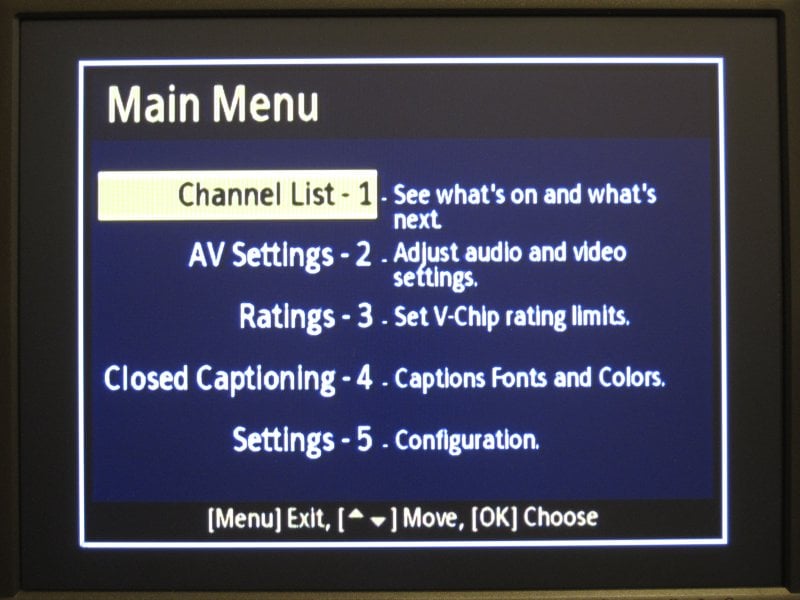 The menu reveals the more obscure settings settings including Power Saver for system inactivity, Time Zone selection, Picture format (full screen or widescreen), Audio format (Stereo or Alternate), and a System Reset. It seems that the designers assumed that this tuner will only be used with a 4:3 TV screen as no other picture formats were available. The main menu was simple and included the Channel list, AV Settings which were just mentioned, Ratings for V-Chip control, Closed Captioning, and Settings to control other system options. It was awkward to bring up the menu to get to some of these items, especially the screen format, but the menu was numbered and easy to read and the process became quicker after some repetition.
Channel Information – 5/5
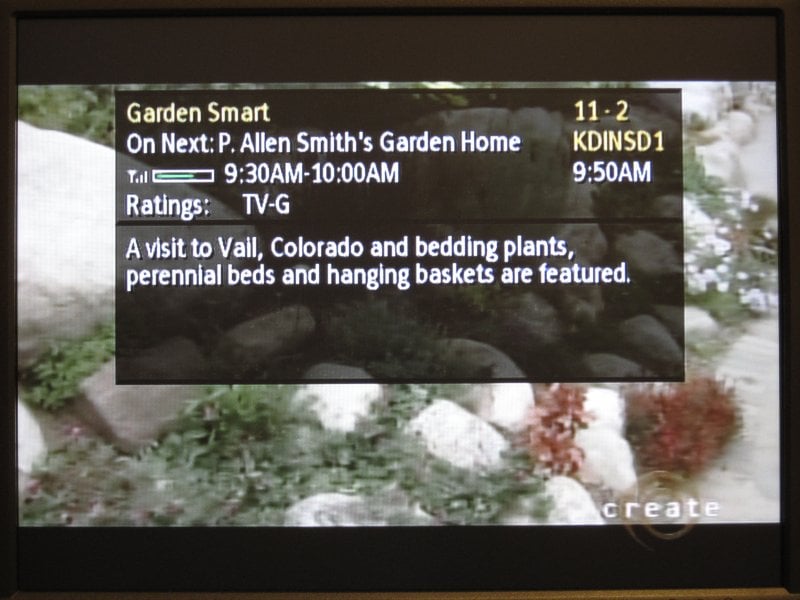 The Info button brought up a very nice, semi-translucent info screen with a lot of information. The Program Title, name of next program, signal meter, time range for current show, rating, channel number and call sign, and the current time were all included. An additional click of the Info button added a text window with the full program description. Everything was easy to read and not distracting from the actual video material behind it.
Program Guide – 3/5
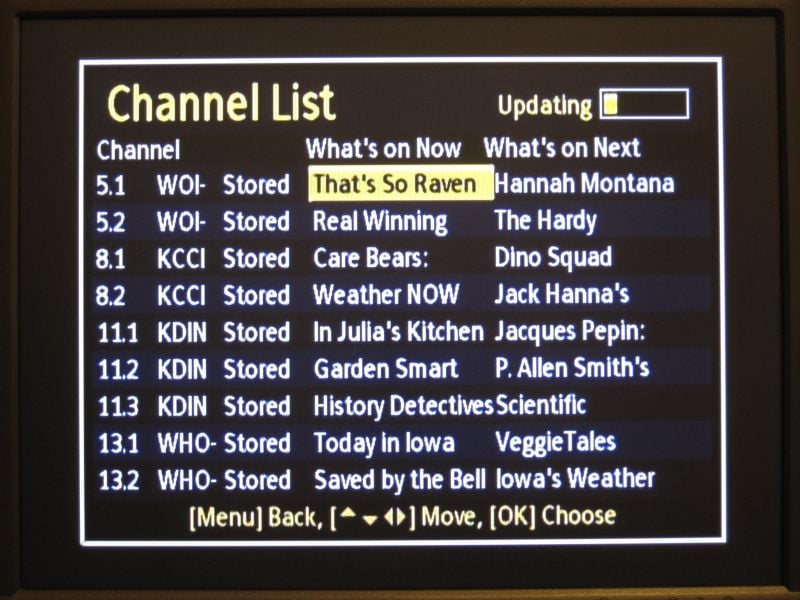 As there wasn't a Guide button, this information was only accessible through the main menu. The Channel List, as it was called, brought up a simple list of channels, the current program on each, and the next program coming up. It constantly rescanned the channels so it was always up to date. However, times for the programs were missing and you couldn't get extra info on the program unless you tuned to the channel first. The table structure was easy to read, but only provided basic information and could have been better.
Signal Strength – 3/5
On average, I was getting around 65% signal strength on most of my 11 channels with the basic antenna. If the signal dropped below about 50% I'd get some dropouts and artifacting. Once plugged into the amplified smart antenna, my signals improved by only 5%. The Apex antenna was used in two ways, both as an amplified antenna only and then plugged into the smart antenna port. I found no difference in the signal strength while using the smart port. However, the smart port is the power source for the antenna and the channel scan went from 2 minutes up to about an hour. I assumed that the RCA box was trying to change antenna parameters on each channel it scanned thus severely increasing the scan time. Again, it didn't make a difference in this case. Other than the mini-meter in the channel info, there was a full channel meter in the menu system that had sound to accompany it if you were trying to tune a distant antenna via the pitch of the audio in relation to the signal strength.
Picture Quality – 3/5
The image on the RCA TV seemed much better than anything that was available with the internal analog TV tuner. It was certainly as clear as the picture from the cheap DVD player usually hooked up to the TV. I didn't notice any dot crawl but there was a bit of artifacting along sharp, horizontal lines in the picture content. I also tried this tuner with a 20" Dell computer monitor that has a composite input, and I was a little disappointed. I could see some color problems around the edges of people or distinct objects that weren't visible on the TV. I know for sure I wouldn't use this box with my monitor or other higher resolution display.
Sound Quality – 4/5
Voices seemed clear enough and background audio was about average but I didn't use anything other than the TV for sound testing. It did seem like it could be a little better, even with cheap internal speakers. It's certainly adequate for standard TV speakers.
Conclusion
Overall, the RCA DTA800B1 is a simple solution for a low price. If the target display is a smaller set or the user doesn't feel the need for options like Screen Format, then this would be a good fit. Please note that this box will require a strong signal for good functionality. If it is used in a basement or an area with poor reception, not even an amplified local antenna will help create a stable signal, you'll need an outdoor antenna with sufficient range.
Overall – 3.5/5
Specifications
- Power supply: AC 120V/60HZ
- Power consumption: <1W (Standby) // <7W (operating, HD mode)
- Remote reception distance: >8m from front
- RF freq. range: 54MHz – 854MHz
- RF channel range: CH2 – CH69
- RF sensitivity: -83dBm to -5dBm
- RF impedance: 75 ohms
- Output channel: CH3/CH4 selectable
- Video System: NTSC
- Video output: 1V peak-to-peak
- Video output impedance: 75 ohms
- Audio output impedance: 600 ohms
- Unit Size (L x W x H): 190 x 140 x 38 mm // 7.5 x 5.5 x 1.5 in
- Net weight: 0.4 kg // .88 lbs
Insignia NS-DXA1-APT / Zenith DTT901
 MSRP: $60 at Best Buy
Introduction
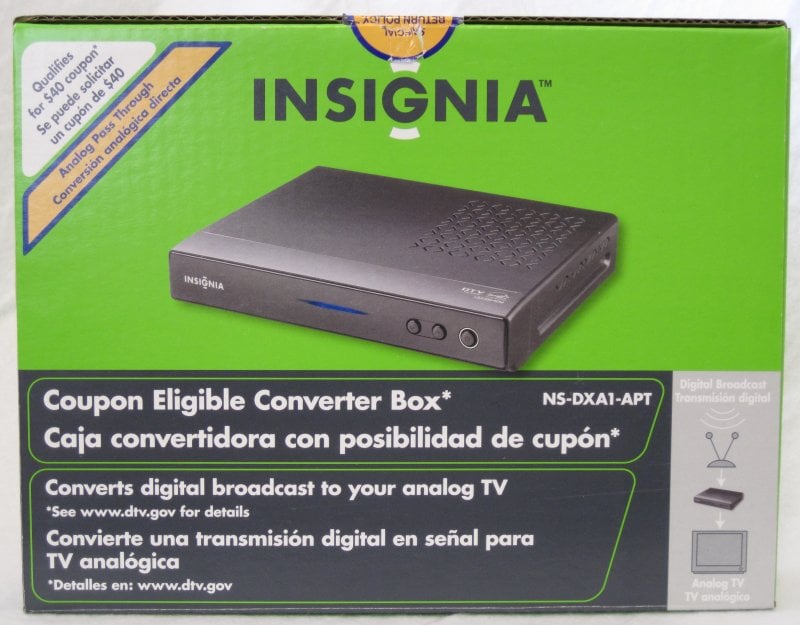
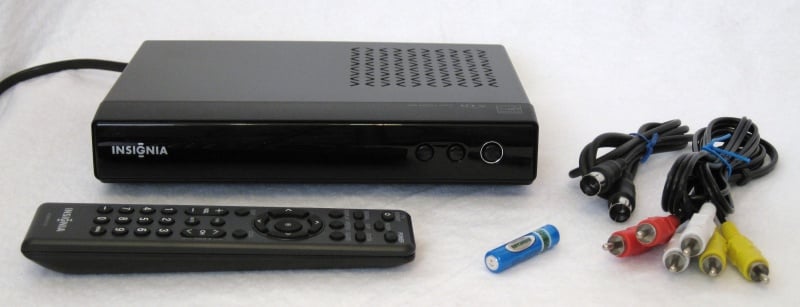 The Insignia NA-DXA1 was Best Buy's store brand digital tuner for over a year. It is now being phased out and replaced with a box from Apex Digital but can still be found at stores that still have some remaining stock or on the Internet as the Zenith DTT901. It is slightly larger than the RCA branded tuner and has a few extra options and buttons but provides a good level of usability for the average user. Other than the tuner, the remote, battery, A/V cable, and coax cable are included.
Appearance – 3/5
This tuner is medium in size compared to the other boxes in the review. It is all black with 3 small buttons on the front for channel up, down, and power. The power light is very wide across the front; it's red when off and a nice audiophile blue when on, which seemed a bit too bright in a dimly lit room. The blue light can't make up for the very simple and plain appearance, however.
Ports – 3/5
From left to right, the rear of the box has coax antenna in, coax TV out, composite/stereo A/V jacks and a hard wired power cable. It had the fewest connections and controls of all the tuners in the review.
Remote – 4/5
The remote control is a little small to hold and only uses one AAA battery so it seems very light and flimsy. However, there are a good amount of buttons on it to control everything that is needed. The volume controls work internally to adjust the signal level so the TV volume needed to be set to the loudest that would be required. Also, the TV Power button was easy to program to allow the screen to be powered on and off. Zoom is used to set the aspect ratio of the image with settings for: Set by Program, Letter Box, Cropped and Squeezed. The Set by Program worked for nearly all content but occasionally the Cropped mode was needed. There were separate buttons for Closed Caption, Second Audio Program, Signal Strength, Display, Guide, Favorite Channel, Recall / Last Channel, Sleep, and Mute.
Initial Setup – 4/5
The initial setup steps through Language, TV aspect ratio, Channel Scan, then Time Zone. The setup process took just about one minute. It wasn't perfectly straightforward as I had to read the on screen directions to actually make the channel scan work. There was one thing that needed to change after the initial setup, and that was the audio output. By default, it was set to Mono so it should be changed to Stereo in most cases.
Menu System – 4/5
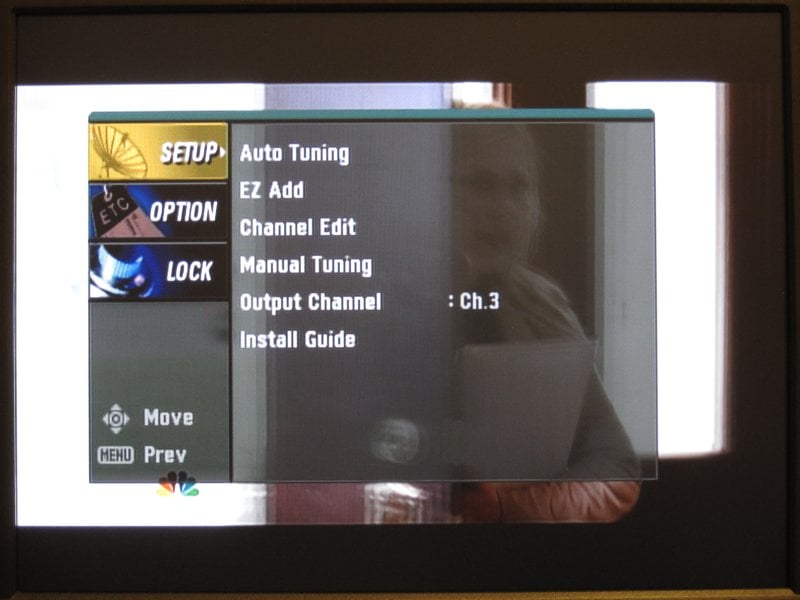 The menu has three main options, Setup, Option, and Lock. The Setup menu was mainly for programming the channels and output options. Since the back of the box doesn't have a physical switch for CH3 or 4 for the RF output, it is included here. It would be a small gotcha for the very few users using channel 4 for RF tuning and having the box default to CH3. Not only is the auto channel setup present, but master channels can be manually added if your signal strength is low or choppy and a channel isn't detected by the auto programming. The Option menu has settings for the Time Zone, Aspect Ratio, Language, CC, Auto Off, and Audio Output. Most of these can be controlled with the specific button on the remote control. Finally, the Lock menu controls functions to allow or disallow programming based on rating or content, block specific channels, and even allows for the Canadian rating system. A password can be set to protect these settings.
Channel Information – 4/5
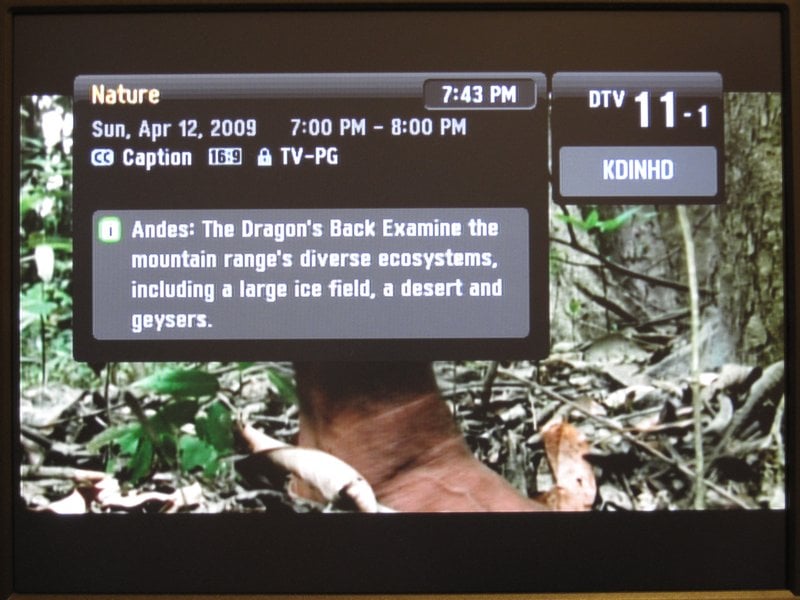 The display button on the remote control brings up the channel information. A static non-transparent display shows the program title, current time, channel designation and call sign, the time of the program, CC availability, lock status, program rating, and extended description. The info screen takes up a good portion of the picture and distracts from the current program, but is easy to read with a lot of information. The main menu has a transparent background, so it was a bit perplexing that this info screen did not.
Program Guide – 4/5
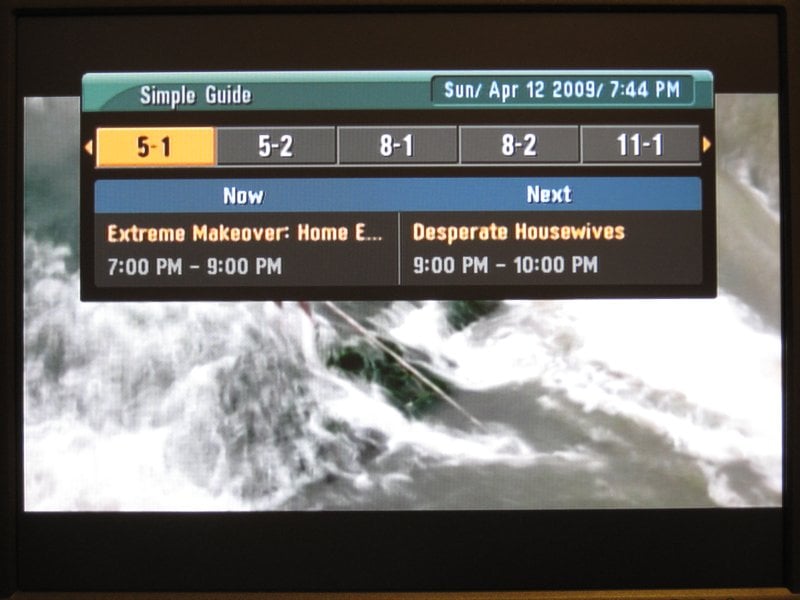 The program guide also takes a lot of screen space, but seemed easy to use and fairly complete. The current time is displayed as well as the current program title and time range as well as the next program. Five channel numbers are shown at the top and can be easily scrolled through to find what's on next or on other channels and hitting the enter button tunes to the new channel. Once again, it would have been nice to have the background be translucent, but it wasn't.
Signal Strength – 4/5
The signal strength meter didn't show a specific percentage, but seemed to be about 80% on most channels while using the cheap antenna. When the amplified antenna was used, only about a 5% increase could be seen, and in some cases, when the amplifier was turned up high, a lower signal was actually seen due to over amplifying the signal. It was preferable to not have amplification for my particular location, but your signal may still require it.
Picture Quality – 4/5
The picture quality seemed very stable with few artifacts or fringing while using the CRT. On the Dell monitor, I could see a hint of fringes but the overall image quality was better than the RCA tuner.
Sound Quality – 5/5
I didn't think I'd hear much of a difference in sound, but this tuner also seemed to have slightly more clear audio in the vocal range than with the RCA tuner.
Conclusion
With a simple look, a nice bright blue light, a fully functional remote and basic connections, this tuner did its job quite well. Even though it is being phased out, it's still a very good performer with excellent non-amplified reception and a decent menu system. Perhaps it will soon be available at lower prices on the Internet, and as such would be a smart choice.
Overall – 4/5
Specifications
- Television system: DTV standard ATSC
- Channel coverage: Terrestrial 2-69
- Dimensions (W × H × D): Approximately 8.5 × 1.8 × 6.4 inches (215 × 46 × 162 mm)
- Net weight: Approximately 1.65 lbs. (0.75 kg)
- Operating temperature: 41°F to 104°F (5°C to 40°C)
- Operating humidity: 5% to 90%
- Power requirement: 120V 60 Hz AC
- Power consumption: 7 W
- Antenna in: ATSC, 75 ohms
- Antenna out: 75 ohms, RF output / channel 3 or 4 (switchable)
- Video output: 1.0 V (p-p), 75 ohms, negative sync, RCA jack (1)
- Audio output: 2.0 Vrms (1 KHz, 0 dB), 600 ohms, RCA jack (L, R) (1)
Digital Stream DTX9950
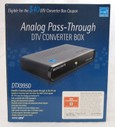 MSRP: $60 at Radio Shack
Introduction
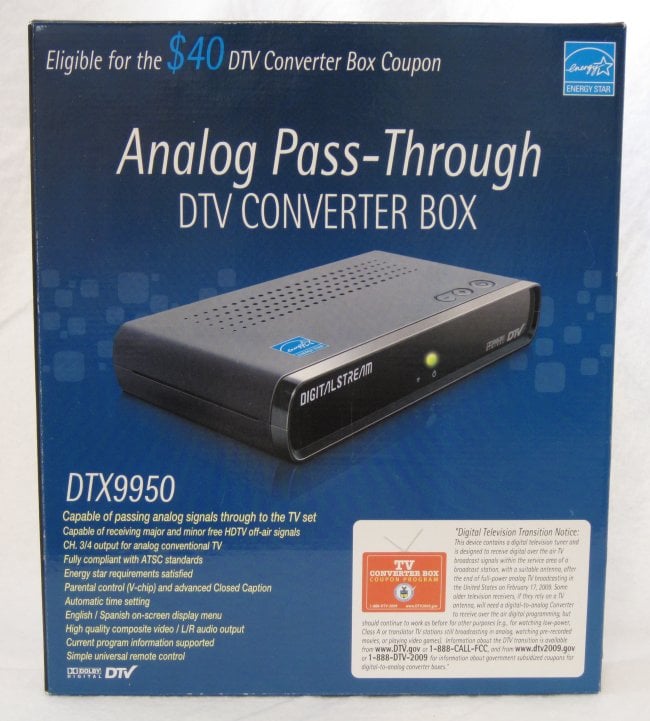
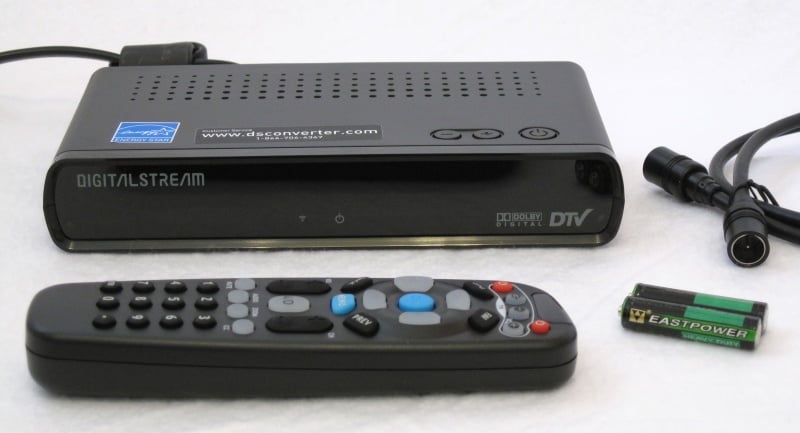 The Digital Stream DTX9950 was popular on some forums early on in the digital TV box race. This unit is available from Radio Shack but my store was out so it needed to be special ordered. It is the smallest in the shootout and has a good sized remote and comes with batteries and a coax cable in addition to the tuner itself. The manual with the box is very comprehensive and covers any questions users might have.
Appearance – 3/5
Other than its small size the actual box is black and very plain. There are no buttons on the front, only a green power LED and the IR sensor. The power and channel buttons are on the top right of the box near the front. The front is also slightly glossy.
Ports – 4/5
From left to right, the rear of the box has coax antenna in, coax TV out, CH 3/4 switch, composite/stereo A/V jacks and a hard wired power cable. This is the same configuration as most other TV converter boxes we've seen on the market.
Remote – 2/5
This remote is well balanced and easy to hold and use, for the most part. The volume and channel buttons are placed in the middle and surround an A/D button. The A/D button switched from digital mode to allow an analog pass-through for the antenna. For all intents and purposes, it just turns the box off and puts the words "Analog Pass Through" on the screen first. It's very irritating to have a big Power Off button in the middle of essential controls. There are programmable TV power, input, and volume buttons on the top. The method to program the TV into the remote seemed very frustrating as I had to hold down each button in the key code sequence for about 1 second each. After a few codes and no results I wondered if it was actually working. Finally, the fifth code for my RCA TV worked to turn the TV off, but not back on. A few codes later, the TV power button worked correctly, but the TV Input button didn't work. With two sets of volume controls, one for the TV and one for the box signal level, many users may have a bit of confusion. Our recommendation is to set the box volume and then simply use the TV volume for your volume needs. Other buttons include EPG (Electronic Program Guide), Favorite Channel, Back, Previous, Mute, Audio, Zoom, CC, and Meter. The Zoom button switched between Anamorphic, Wide 16:9, Wide 14:9, and Zoom modes. The 14:9 mode is halfway between Zoom and 16:9, the manual said, but didn't seem useful at all. It would have been nice if the A/D button had been the Zoom function since it would be used more often. Other than the feel, the redundant functions and layout put this remote at the bottom of the scale for the shootout.
Initial Setup – 3/5
The Digital Stream tuner has a setup wizard, not just an initial setup. The setup includes choosing a language, viewing a setup page with instructional setup graphic, the channel scan, and time zone selection. It took less than 2 minutes for the entire setup. Please note that after the setup is complete, the Preferred Connection setting which is buried 3 menus deep, will need to be switched to Line Out if using the A/V connections. The only thing that seemed to happen is the volume was lowered but the image quality didn't change. The manual did verify that this was the correct course of action even though the results made virtually no difference.
Menu System – 2/5
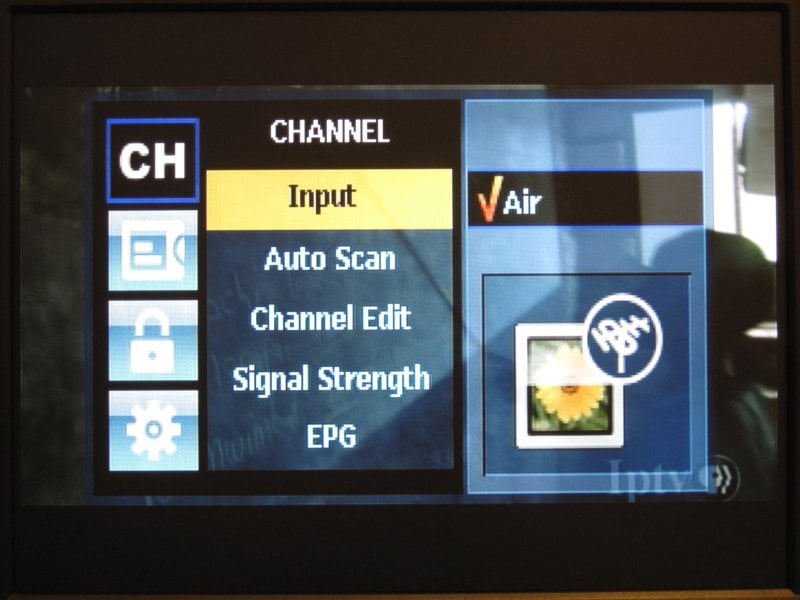 The Main Menu had four settings labeled Channel, Caption, Rating and Function. The Channel menu allows for channel rescanning as well as manual channel editing and setting up favorite channels. The Caption menu had many settings for changing the fonts, colors, sizes and transparencies. This is one of the most comprehensive setups for Closed Captioning in the shootout. A Rating menu allowed for setting ratings and permission. The Function menu included mystery functions like Emergency Alerts and separate settings for Sleep Timer and Power Down Time which would seemingly be the same thing, but aren't. There were some settings to control the transparency of all menus but it wasn't enough to make up for odd functions, bad menu layout, and poor menu response.
Channel Information – 2/5
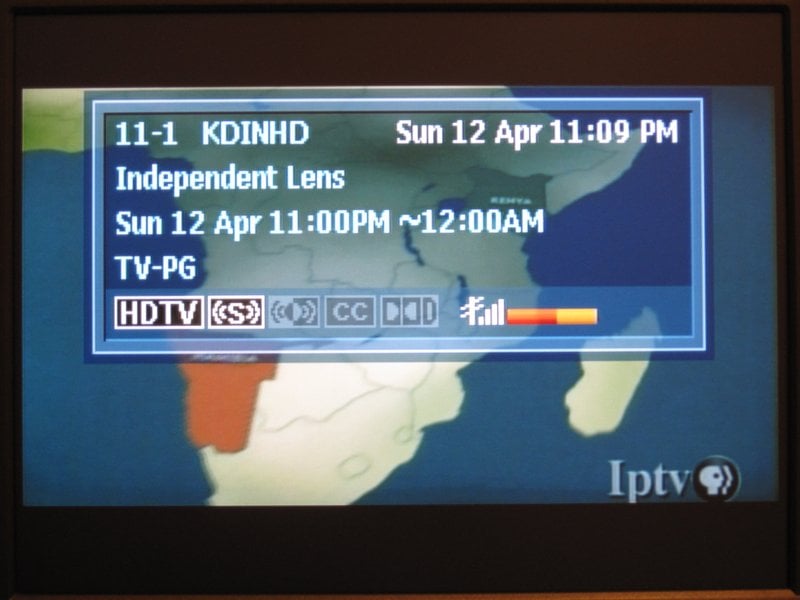 The Enter button in the middle of the D-pad control displayed the Channel Info. The graphics used reminded me of the font used on the Commodore 64. It was very blocky and large and included the channel number and call sign, the current time and date, the title of the program, the time range for the program, the rating, and several lit or dimmed icons representing HDTV, Stereo, Second Audio, CC, Dolby Digital decoding, and finally a colored signal meter. No extended program information was available.
Program Guide – 2/5
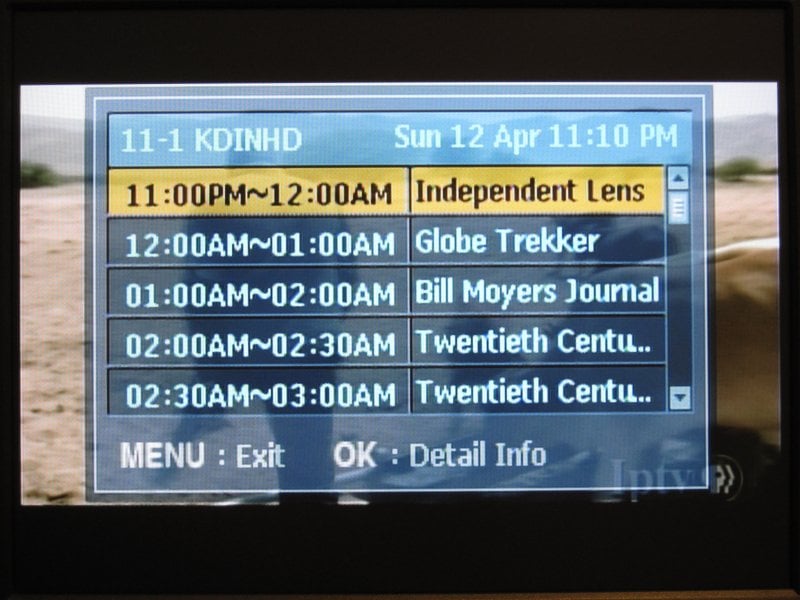 The EPG button brought up the guide. Having yet another acronym in the A/V world seems like a bad idea. The guide takes up the center of the screen and showed only what was on the current channel. It did show programs many hours in the future as well as allowing for viewing of detailed program info, but there was no way to change channels while in the guide. It was more of an informative "What's on next" button, and not a full channel guide.
Signal Strength – 3/5
The signal strength stayed around 60% on most channels with the cheap antenna. If the strength dropped below about 55% the box began to skip. Once plugged into the amplified antenna, I had huge signal improvements on most channels. It went up to about 85% on most channels, but had the bad side effect of making just one of the channels drop to 20% and completely unwatchable, no matter how low or high I set the amplifier.
Picture Quality – 3/5
The picture quality was fairly average, and nothing special. It seemed to have just a little bit of artifacting on the CRT, but the image became worse when hooked up to the computer monitor. The contrast seemed to be a bit off and there was a bit of black and white crush.
Sound Quality – 2/5
The sound was over amplified until the Line Out setting was used. The sound went from very bad to just below average. It didn't seem that any box should be significantly better or worse being that the TV speakers were used for testing, but Digital Stream proved me wrong. The vocals just weren't as clear.
Conclusion
The Digital Stream DTX9550 had a promising initial impression, but constantly underperformed. Not only was the menu system poorly laid out, but the remote had poor and redundant functions and the signal strength just wasn't as consistent as the other contenders. Honestly, the only situations where I could recommend this box was if the user needed lots of good Closed Caption features. Other than that, it is possible a worse box could exist, but not in our comparison.
Overall – 2.5/5
Specifications
- Coding Algorithm: MPEG-2 Video Decoding, MP@ML, MP@HL
- Video Format: ATSC 18 Formats
- Output Format: 480i (CVBS)
- Audio: AC-3 Audio (DD) Decoding, Digital Multi-Lingual
- Antenna Input: IEC 169-2, Female (F-Type), 75 Ohms
- Video Output: CVBS (Composite), RF Output (CH 3/4)
- Audio Output: L/R, RF output (CH 3/4)
- Band Coverage: CH 2 ~ CH 69
- Broadcasting Standard: ATSC
- Menu Language: English, Spanish
- EPG: Support
- Display Format: Anamorphic, Wide 16:9, Wide 14:9, Zoom
- Remote Control Unit: Requires DC 1.5V AAA Battery X2
- AC Power: AC ~ IN 100-240V, 50/60Hz
- Power Consumption: 7W (Max)
- Dimensions (W x D x H): 7.68"(W) x 4.13"(D) x 1.34"(H)
- Weight: 0.970 (lbs)
Apex Digital DT250A
 MSRP: $55 at Best Buy
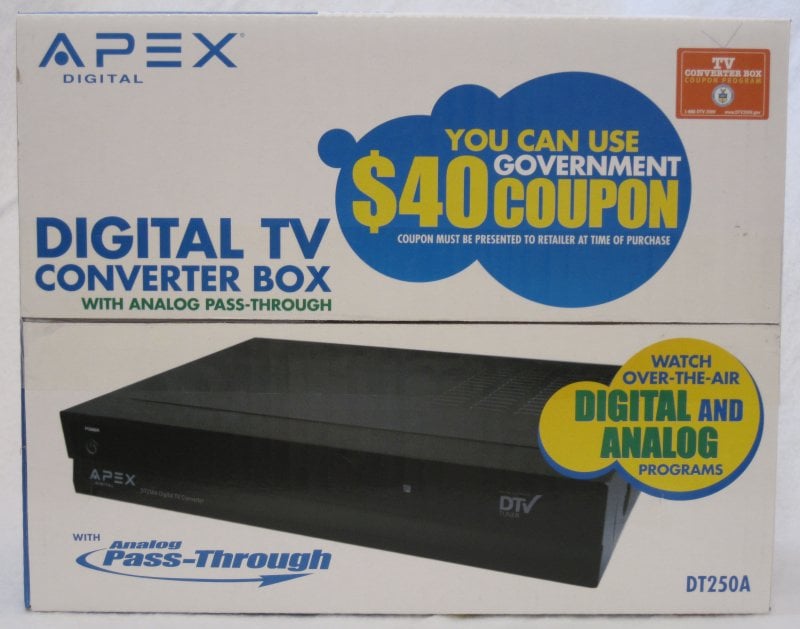
Introduction
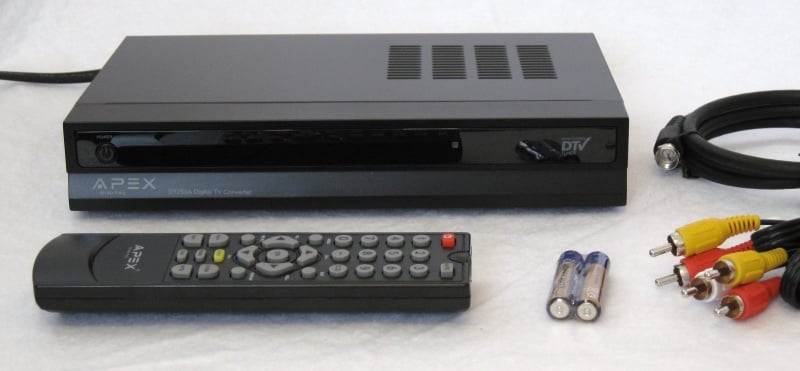 The Apex Digital DT250A is the newest model tuner available from Best Buy and it is slowly replacing the Insignia box. With new features like S-video output and a smart antenna port, this tuner should provide good video quality, but worked better on the LCD panel than the CRT display. The package includes the tuner, remote, 2 AAA batteries, a cheap coax cable and an A/V cable.
Appearance – 3/5
The box is basic black with a reflective panel on the front. It is reminiscent of a cheap DVD player, but without the tray? Other than an indistinguishable RF sensor, the front left of the box had a small power button that is very light green when on and slightly brighter red when off. No channel buttons were to be found. It's not often you change the channels from a box, but it is handy on occasion or when you misplace the remote control.
Ports – 5/5
From left to right, the rear of the box has coax antenna in, coax TV out, CH3/4 switch, S-video, composite/stereo jacks, smart antenna port, and a hard-wired power cable. The addition of the S-video port was a nice feature. In fact, it isn't allowable to have higher output quality than 480i on a converter box that is eligible for the government coupons.
Remote – 2/5
This is by far the worst remote control in the shootout. It is very small and flimsy. There is no button for TV power, the buttons are very small, and there are no distinct channel and volume up and down buttons as they are part of the D-pad configuration. It felt very unnatural to use and was hard to find the functions I was looking for. The Mute button was placed in the upper right where power buttons are usually found. It is the only remote that has the number pad in the prime thumb position and they were located above the D-pad. However, there are distinct buttons for the Menu, Exit, Recall, Display, Guide, Signal Meter, Favorite channel add/delete, Favorite Channel plus and minus, Zoom, and MTS. The Zoom button cycled through three aspect ratios: Normal, Zoom, and Fill. These 3 settings only work if the TV shape is specifically set to 4:3 or 16:9. There is an Auto TV shape in the menu, but it disables all zoom functions.
Initial Setup – 4/5
The initial setup had all options on one screen, which was very nice. It felt more like a menu rather than being directed one step at a time through a wizard-like system. Perhaps this is nicer for more advanced users. Language, Time Zone, TV Aspect Ratio, and Channel Scan were easily accessible.
Menu System – 3/5
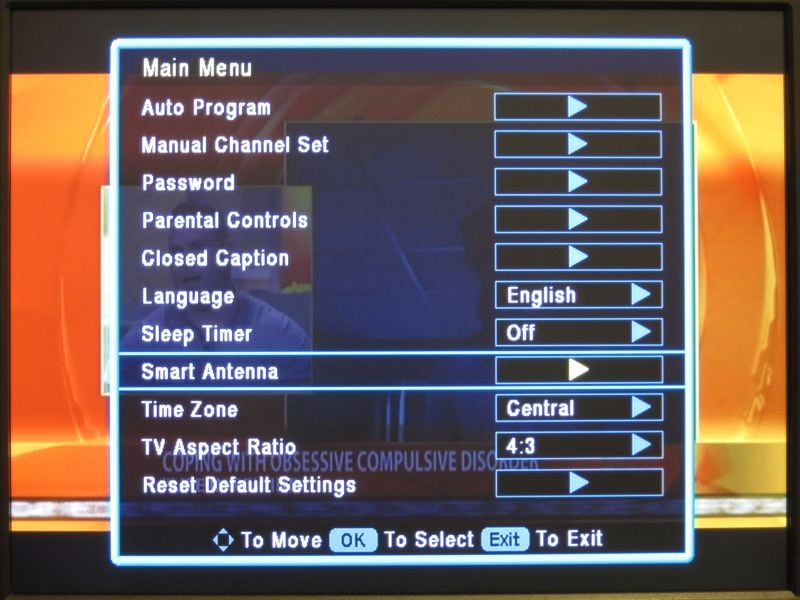 The main menu contained a large list of functions. There were sub menus for Manual Channel Setup, Parental Controls and Closed Captioning. Because there were so many items in the menu, the fonts and lines were narrow and flickered badly on the CRT. It was really a bad choice of visual interface for a box designed for interlace output. It was as if the whole screen was flashing when the menu was up. This tuner also had some extensive CC options but I couldn't get a good readable combo because of the small flicker-prone fonts.
Channel Information – 2/5
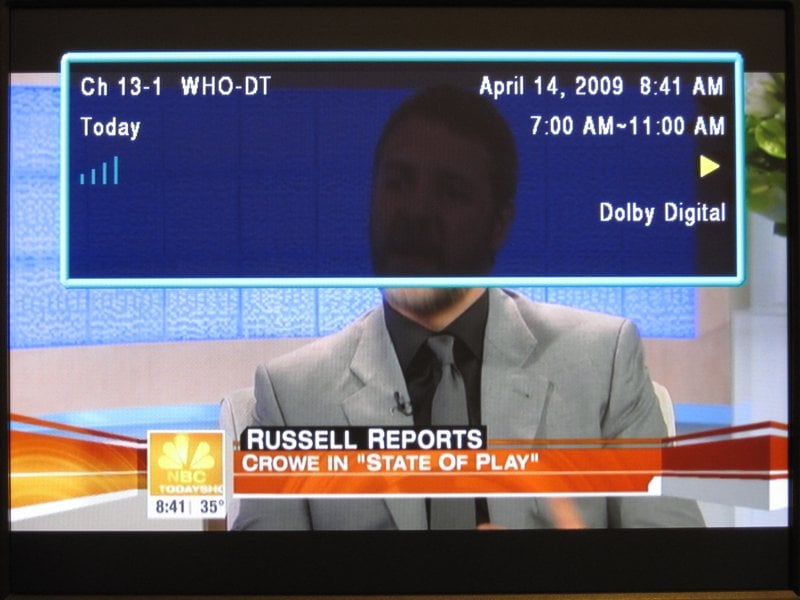 After the ugly Commodore 64 like interface on the Digital Stream box, I didn't think a channel info screen could be that bad. Well, Apex Digital managed to tie for the low score. With a small flickering font, and a semi-transparent box, the following could be seen: Channel number and call sign, the program title, the date and time of the current program, the program rating and whether it is decoding Dolby Digital to the stereo outputs. There was also an option to arrow to the right to see future programs for the channel currently selected.
Program Guide – 1/5
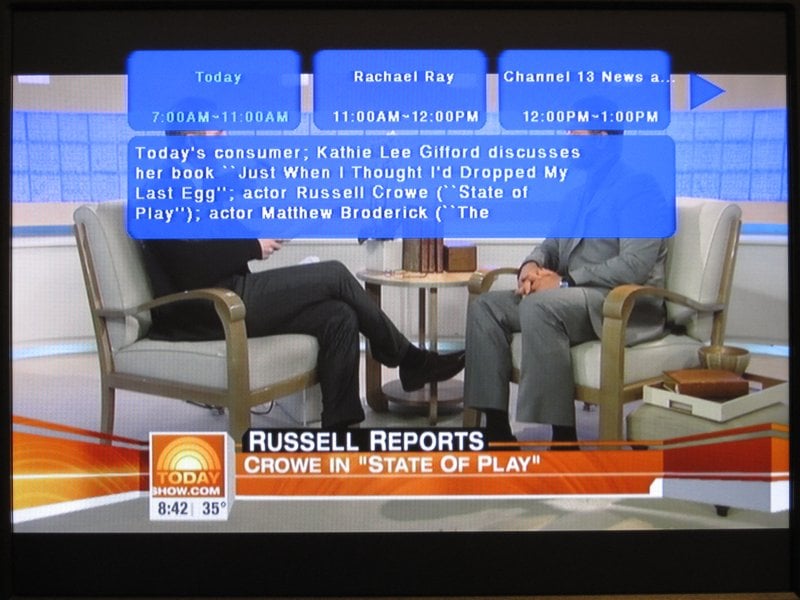 The program guide didn't even look like it was from the same manufacturer. Three bright blue boxes with small flickering white letters appeared at the top and a larger blue box in the middle contained the full program description. It was only a little more info than when arrowing right and left from the Channel Info screen, but with horrible readability. It wasn't possible to see what was on other channels from the guide. I hope someone got fired for this. At least the guide button is small on the remote and it's not likely to be used since it's so bad.
Signal Strength – 3/5
With the normal antenna, the Apex tuner was getting 65 to 70% across my 11 channels. However, the signal would occasionally drop down to 50 or less for just a second causing a skip, then return back to normal. With the amplified antenna it was 5 to 10% higher in several channels, but inexplicably had the same signal drop problem. Rescanning the channels with the smart antenna didn't take an hour like it did with the RCA, but only 5 minutes or so. There were manual settings in the menu for smart antenna calibration also. It was possible to have an antenna position for each channel individually and it could be set by hand or auto scanned. The overall signal strength went back down 5% or so, but the signal stability was a little better and there were far less drop outs.
Picture Quality – 5/5
The picture quality while using composite video was as good as the Insignia box, but it just got better when the S-video port was used on the CRT. It was an excellent quality video image on the LCD monitor as well. Also, there was no flicker while using the LCD, and that made the box bearable for menu setup and reading the fonts.
Sound Quality – 3/5
The sound seemed very average, and the volume was only controlled internally since there were no TV volume controls on the remote. The vocal range was clear enough, but not as good as others in the shootout.
Conclusion
With the worst interface of all the boxes, it was difficult to use the DT250A, but the picture quality was excellent once the smart antenna was in place and preventing drops. The S-video connection really did step the image quality up, but the sound wasn't as good as it could have been. If this tuner had a better menu and guide system, it would have been rated higher, but I would still prefer the Insignia tuner over this one due to the better interface, guide and menu system. Keep trying Best Buy, maybe your third box will be a charm.
Overall – 3/5
Specifications
- Unit Dimensions: 9" x 6.1" x 1.6"
- Net Weight: 2 lbs.
- Aspect Ratio: 16:9 / 4:3
- Tuner Type/ Range: ATSC/ RF CH 2-69
- Resolution: Down converts to 480i
- Video Outputs: Composite (1); S Video (1), RF Out with Audio
- Video Inputs: RF (1); Smart Antenna (optional)
- Audio Outputs: L/R Audio
- Energy Standards: <1 Watt While in Sleep Mode
Channel Master CM-7000
 MSRP: $60 at Amazon.com
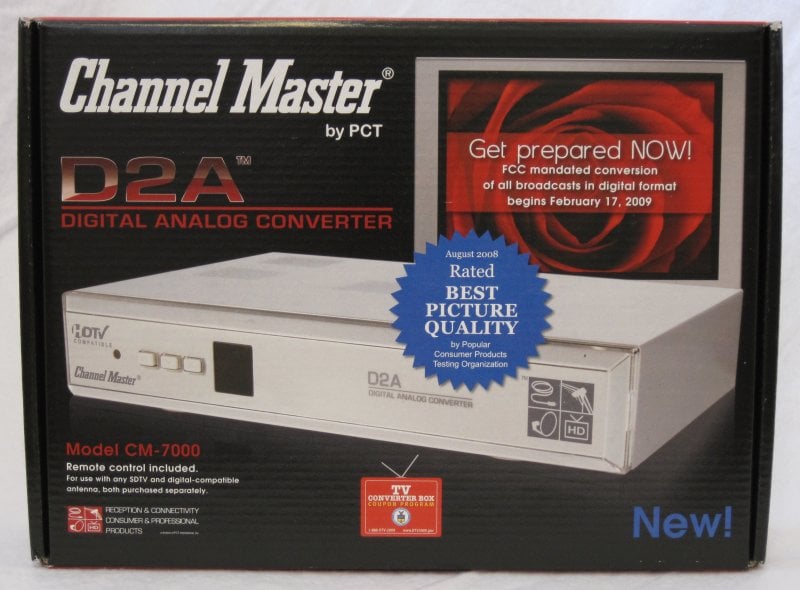
Introduction
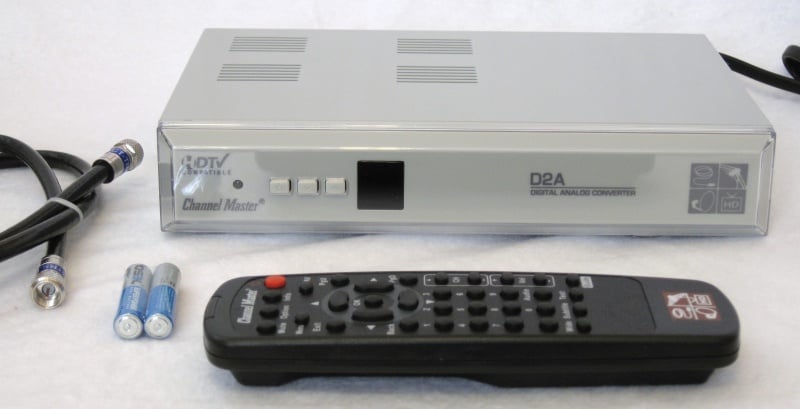 With high hopes, the Channel Master CM-7000 was set up in the test station. An initial glance at the remote looked promising as did the back of the box with its S-video output. The package included the TV converter box, the remote with 2 batteries, and a high quality RG6 coax cable. It would have been great to see an A/V cable but my assumption is that Channel Master was going for the lowest common denominator and trying to keep the price as low as possible. The back of the box used for packaging had a great setup graphic and the manual was easy to understand. Oddly, the online user manual was more comprehensive than the included manual, indicating that it had probably been updated following the printing of the packaged product.
Appearance – 4/5
This is the only silver tuner in the shootout and it was also the largest physical box, but only slightly larger than the Apex Digital tuner. The front of the box features a small Power LED that is Amber when off and Green when on. To the right of that, there was a power button and channel up and down buttons. Lastly, there was a large black square which I had hoped to be a channel designation, but it was only the IR sensor. It was either the most sensitive IR receiver, or the best remote emitter of the group. I could aim the remote almost anywhere in the room and have the tuner do my bidding.
Ports – 4/5
The Channel Master was the only box with the power cord on the left side. So, from left to right, there was the hard-wired power cable, coax antenna in, coax TV out, composite/stereo A/V jacks with an unused black RCA jack, S-video, then the CH3/4 switch. We actually tested the black RCA jack to see if was really a digital audio output, but to no avail. A quick search on google revealed that this was its original intent by Channel Master but was disabled to comply with the governement coupon comaptibility rules.
Remote – 3/5
The Channel Master remote has a good layout for the most part, but there were a few problems. One thing was that there are unused (but labeled) buttons that seem like they may be useful. They aren't. If you try the PageUp, PageDown, Text, or Option buttons they don't do anything. We know you'll still go ahead and try them, but trust us -they don't do anything. As for useful functions, the D-pad is well placed and there is a Wide button for the aspect ratio, a Subtitle button for closed caption selection and Guide, Audio, Mute, Info and Audio buttons that do what they actually say. I was disappointed that there wasn't a TV power button on the remote, as well.
Initial Setup – 3/5
Upon the first boot up of the CM-7000 the user is greeted with a Channel Master info page that quickly disappears and a black screen appears. There was no walk-through at all for initial setup on the device itself. The manual was very descriptive of each function, but it didn't specify exactly what to do and in what order for new users. It's clear that more advanced users with find this device a bit easier to use than others.
Menu System – 5/5
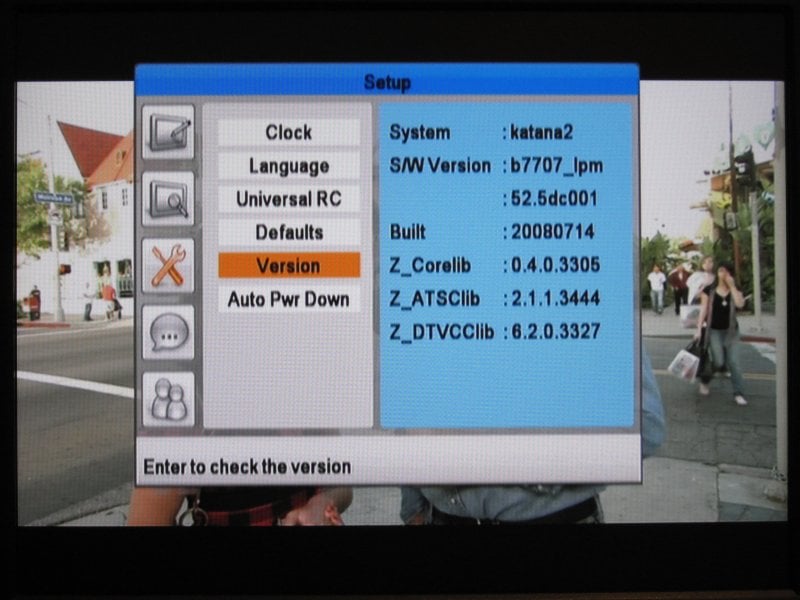 This is where the Channel Master really starts to shine. The main menu system has some nice icons and an easy to use layout. There are a lot of options, so it may be intimidating for beginners, but the seasoned channel surfer will be right at home. There are options for manually setting channels, favorite channels, rescanning channels, clock with auto & manual settings (and time zone), auto power down with optional warnings, an extensive CC setup, and rating controls for parents. The menu is easy to read. In fact, even though it has a smaller font there was no flickering of the text at all.
Channel Information – 5/5
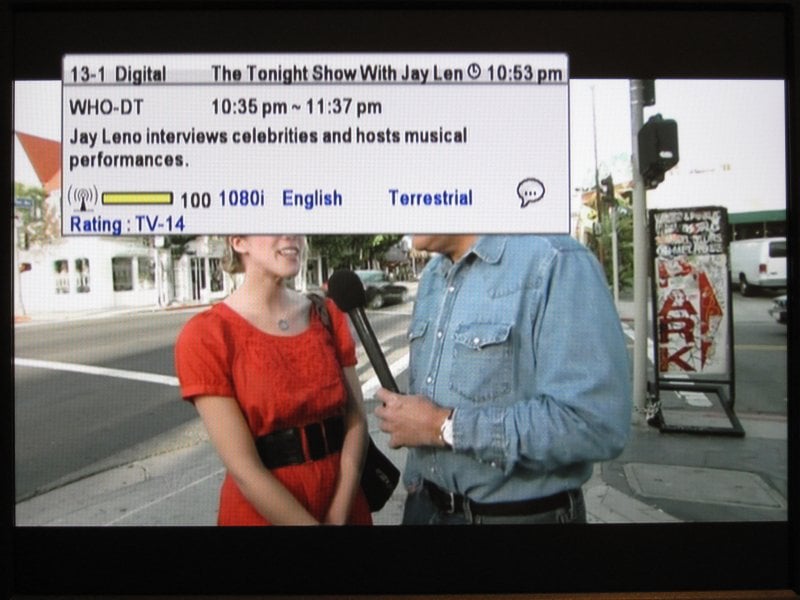 The info page for the current program is fantastic! It showed the Channel number and call sign, the program title with time range and the current time, the full extended program description which could be scrolled through, the signal strength, the source signal of 480i/p, 720p, or 1080i, the language, the ratings, and finally if there is CC text available. I was super impressed with the readability even though the font was a bit small. This info page would be excellent on larger CRT televisions.
Program Guide – 5/5
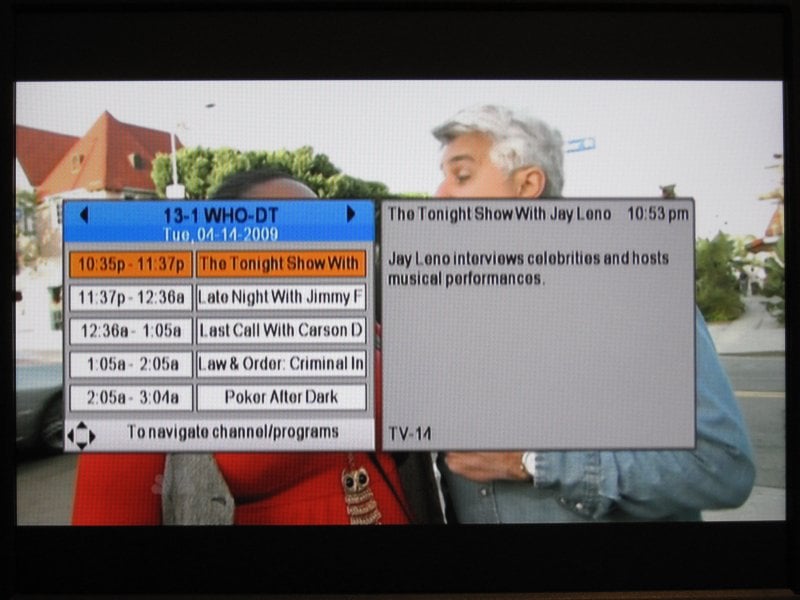 It just kept getting better and better as I pulled up the guide. This was the most extensive program guide of any box in the shootout. Times and titles for the current channel were paired with a tab showing the full extended description. The system allowed scrolling up and down to see about 12 hours in the future. Left and right on the D-pad changed the channel to show all the upcoming programming on each. I was very happy with this system and it would only have been better if it hadn't changed the channel until the enter button was pressed when scrolling through channels. That seemed to be a very minor issue when compared to the amount of information that was easily displayed.
Signal Strength – 5/5
The low cost antenna revealed nearly 100% channel strength on all my channels. The update was fast and occasionally it would drop down to 80% or so, but there was no skipping to be seen. Only after switching to the amplified antenna did some skipping issues take place. It seemed that the CM-7000 was very good at elimination of problems on its own and over-amplifying the signal actually made the signal strength drop and skip. Turning the amp strength down once again restored the near 100% signal.
Picture Quality – 5/5
This box has the best picture quality of all the boxes in the shootout. It seemed even just slightly sharper than the Apex Digital even though the S-video port was used on both. The composite video output was also very good but S-video, as expected, showed enough improvement for me to insist users make that their default connection where possible. On the CRT, both the color and resolution was good with no fringing problems or washout. The LCD monitor also displayed exceptional video quality and all text in menus and the CC became perfectly crisp and clear. This would certainly be the right tuner to use if a coupon certified box is needed for older digital HDTVs that lack built in tuners.
Sound Quality – 5/5
Sound output was also very good, and was at least the same, if not better, than the Insignia tuner. Perhaps it was just that so many other things were working so well, but in either case we awarded it a 5/5.
Conclusion
The Channel Master truly lives up to its name. Of course, the remote could use some work and the initial setup might be a little more than expected for new users, but it's worth it. The CM-7000 is certainly worth waiting for when ordering on line. S-video output with a rock solid picture and great tuning stability, an awesome guide and great onscreen info, and Channel Master hits the mark!
Overall – 4.5/5
Specifications
- Frequency Range: 54 to 864 MHz
- Input Impedance: 75 Ohm
- Input Connector: F-Type, Female
- Channel Bandwidth: 6 MHz
- Input Dynamic Range: -83 to -5 dBM / SNR - 15 dB
- Type: 8VSB / ATSC A/53 compliant
- Performance: ATSC A/74 compliant
- Input Video Formats: 1080i, 720p, 480i, 480p
- Output Format: 480i
- Aspect Ratio: 4:3 / 16:9 with letter box pan and scan
- Composite Video: RCA
- Component Video: S-Video
- Audio - Left / Right: RCA, Stereo
- Output RF Connector: F-Type, Female
- Channel: 3 / 4, Selectable, Mono Audio
- Supply: 120 VAC / 60 Hz
- Consumption "ON" : 8 W
- Consumption "STANDBY": 2 W
- Auto-Sleep Mode: 4 hours after last remote control entry
- Dimensions (W x L x H): 22 x 16 x 4 cm / 8.7 x 6.3 x 1.6 in
- Weight: 0.9 kg / 2.0 lbs
- Operating Temperature: 0 to 60° C / 32 to 140° F
- Relative Humidity: 10 to 90% non-condensing
Final Scores
|
RCA |
Insignia |
Digital |
Apex |
Channel |
|
|---|---|---|---|---|---|
|
Appearance |
4 |
3 |
3 |
3 |
4 |
|
Ports |
4 |
3 |
4 |
5 |
4 |
|
Remote |
3 |
4 |
2 |
2 |
3 |
|
Initial Setup |
3 |
4 |
3 |
4 |
3 |
|
Menu System |
4 |
4 |
2 |
3 |
5 |
|
Channel Info |
5 |
4 |
2 |
2 |
5 |
|
Program Guide |
3 |
4 |
2 |
1 |
5 |
|
Signal Strength |
3 |
4 |
3 |
3 |
5 |
|
Picture Quality |
3 |
4 |
3 |
5 |
5 |
|
Sound Quality |
4 |
5 |
2 |
3 |
5 |
|
Over All Score |
3.5 |
4 |
2.5 |
3 |
4.5 |
|
MSRP |
$50 |
$60 |
$60 |
$55 |
$60 |
Summary
The clear winner in the shootout is the Channel Master CM-7000. Only really lacking with the remote control, the picture and system quality was outstanding. Of course, the best image was available with the S-video output but the composite video output still provided an excellent picture. As the runner up, the Insignia NS-DXA1-APT is disappearing from the shelves of local Best Buy stores, but still provides an excellent system for local buyers. Please don't forget that the Zenith DTT901 is identical to the Insignia and can still be found from various internet sources. Even though the low cost RCA tuner from Wal-Mart fell in third place, it was still a decent choice for new users or for smaller and secondary CRT sets. The remote was easy to use with large buttons, as well. Sorry, I can't really give any honorable mentions to the other two TV converter boxes, as they just had too many issues to overcome.
Be sure to apply for your government issued TV converter box coupons as they will reduce the price of any of these boxes by $40 for up to 2 boxes per household. To apply and for more information, see https://www.dtv2009.gov
 Subscribe to our newsletter